
AudioGrabber is a free and versatile audio extraction tool designed for Windows operating systems. Its primary function is to rip audio from various sources, including CDs, cassette tapes, vinyl LPs, and even audio playing directly from your computer. This comprehensive guide delves into the capabilities, features, and usability of AudioGrabber, providing a detailed overview for both novice and experienced users.
What is AudioGrabber and What Can It Do?
AudioGrabber, as its name suggests, is a software application that allows users to extract audio from multiple sources and save them as digital files on their computer’s hard drive. This process involves capturing audio signals, converting them into digital formats, and saving the resulting files. The software’s ability to handle diverse input methods sets it apart from simpler audio recording programs.
One of its key features is CD ripping. AudioGrabber can directly rip audio tracks from audio CDs, bypassing the need for intermediate steps often found in other software. This digital copying ensures high-fidelity reproduction of the original audio. The software also provides the option to utilize either Analog or ASPI modes for CD ripping, offering users flexibility based on their system’s capabilities and the desired ripping speed. The ASPI mode, in particular, allows for significantly faster ripping (up to 20x speed) compared to the Analog mode’s 1x speed.
Beyond CDs, AudioGrabber expands its capabilities to encompass various other audio sources. It can record audio input from your computer’s microphone, capturing live sounds or recordings from external devices such as cassette players or turntables. Additionally, AudioGrabber can capture audio playing directly from applications on your computer, providing a convenient way to create digital copies of your favorite music or podcasts. However, it’s important to note that it does not record audio streaming from online sources.
The software’s functionality isn’t limited to simple capture; it also incorporates robust audio editing and conversion features. Users can adjust volume levels, normalize audio tracks to ensure consistent loudness, and trim silence from the beginning and end of recordings, improving the overall quality and listening experience. AudioGrabber also supports multiple output formats, including widely used formats like MP3, WAV, WMA, and OGG, allowing users to tailor their audio files to their specific needs and devices. Furthermore, the software provides the capability to schedule recordings, enabling automated capture of audio at predetermined times.
AudioGrabber’s User Interface and Ease of Use
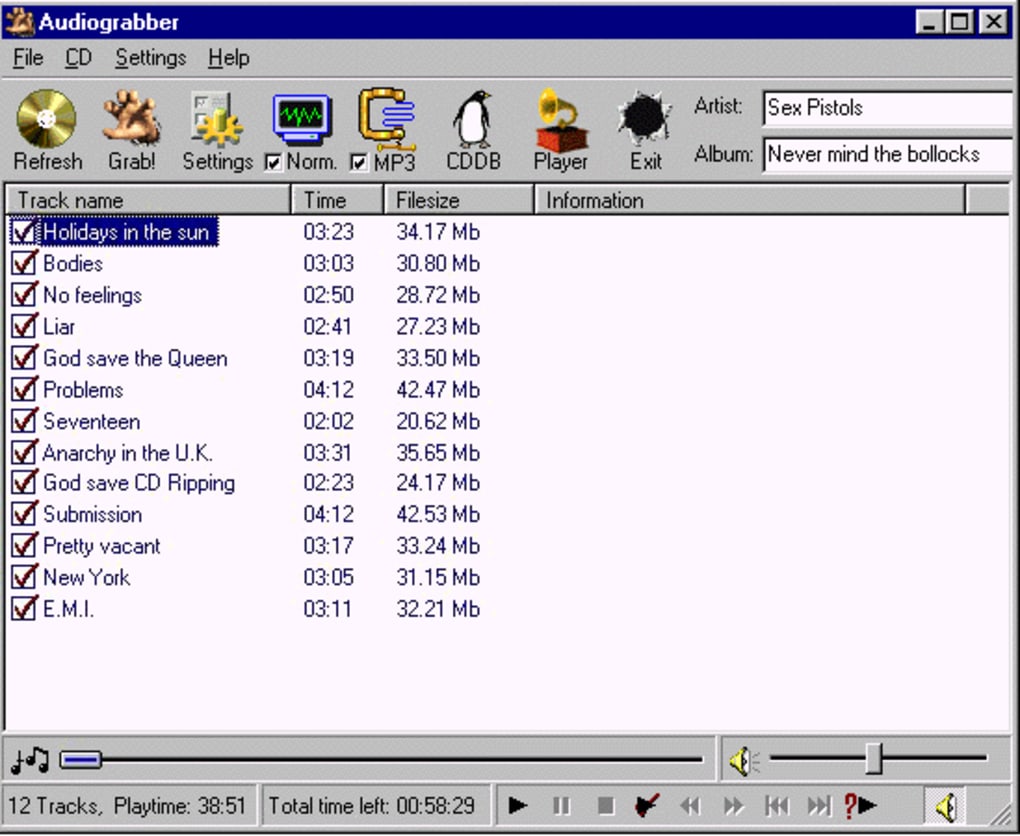
AudioGrabber boasts a user-friendly interface designed for accessibility, even for users with limited technical experience. The layout is straightforward and clearly displays all the essential functions, making it intuitive to navigate and operate. Although the design may appear somewhat dated compared to modern software applications, its simplicity is a considerable advantage, particularly for beginners who may find overly complex interfaces intimidating.
The software’s functions are logically organized and easily accessible, minimizing the learning curve and allowing users to quickly begin extracting and converting their audio files. Even advanced users will find the straightforward interface allows them to efficiently manage complex operations without navigating convoluted menus or settings. The focus on simplicity promotes efficient workflow, allowing users to spend less time interacting with the software and more time enjoying their digital audio.
Key Features and Functionalities
AudioGrabber’s extensive feature set significantly enhances its usefulness and appeal. The software provides more than just basic audio extraction capabilities; it offers a comprehensive suite of tools designed to improve the quality and management of digital audio files.
-
CD Ripping: As mentioned earlier, CD ripping is a core function. The software excels at creating accurate digital copies of audio CDs, supporting both standard audio CDs and those with copy protection. The inclusion of FreeDB support allows the program to automatically retrieve and add track information (titles, artist, album details) directly from an online database, streamlining the organization of your music library.
-
Multiple Input Sources: The capacity to capture audio from various sources significantly broadens AudioGrabber’s utility, surpassing the limitations of many other audio extraction tools. This allows users to digitize their existing audio collections from sources like vinyl LPs and cassette tapes, preserving precious memories and collections in a convenient digital format.
-
Multiple Output Formats: The software’s support for multiple output formats (MP3, WAV, WMA, OGG) allows users to save their audio in the format most suitable for their devices and applications. This adaptability makes it compatible with a broad range of players and software, enhancing its overall usability.
-
Audio Editing and Enhancement: AudioGrabber’s editing features enable further refinement of captured audio. The ability to adjust volume levels, normalize audio, and trim silence eliminates unnecessary elements and improves the overall audio quality. This feature set helps users to create polished and professional-sounding digital audio recordings.
-
External Encoder Support: For users seeking enhanced control over the encoding process, AudioGrabber provides the option to utilize external MP3 encoders, such as Fraunhofer’s L3enc. This feature grants users the freedom to leverage specialized encoders to optimize their audio quality based on personal preferences.
-
Scheduling: The scheduling feature allows for automated recordings, ideal for capturing audio from specific sources at pre-defined times. This simplifies the process of acquiring recordings without the need for continuous user intervention.
-
OCC Support: Support for the Open Compact Disc (OCC) standard allows users to extract audio specifically designed for karaoke or CDG (CD Graphics) discs. This adds a unique functionality appreciated by users involved in karaoke or similar applications.
-
FreeDB Integration: The software’s integration with FreeDB, a comprehensive online database of CD information, streamlines the process of accurately labeling and organizing ripped audio tracks. This automates the task of metadata entry, greatly simplifying the organization and management of large audio collections.
Is AudioGrabber Free, and Should You Download It?
AudioGrabber is completely free to download and use. This makes it an exceptionally valuable tool for users looking for a cost-effective solution for audio extraction and conversion. It’s available for both 32-bit and 64-bit versions of Windows, ensuring wide compatibility with most Windows operating systems. A Pro version with additional features also exists, but the free version provides a substantial amount of functionality for most users.
The decision of whether to download AudioGrabber depends on your individual needs and requirements. If you require a simple yet powerful tool for ripping CDs, recording audio from various sources (including older analog formats), and capturing audio playing on your computer, AudioGrabber is an excellent choice. Its user-friendly interface, multiple format support, and advanced editing features make it a valuable asset for both beginners and seasoned users. However, if your primary need is capturing online streaming audio, then you will need to look at alternative solutions, as this functionality is not included in AudioGrabber.
Alternatives to AudioGrabber
While AudioGrabber is a robust and capable audio extraction tool, it’s always beneficial to explore alternative options to find the best fit for your specific workflow. Some alternative applications include:
-
Any Audio Grabber: This program focuses on broader audio capture capabilities.
-
Music Grabber: This software often specializes in downloading music from online sources. The capabilities can vary between these programs, so reviewing the detailed features before downloading is advisable.
-
Radio Downloader: A program designed for recording podcasts and internet radio streams. (Again, this type of solution would be necessary if you need online streaming capability).
In conclusion, AudioGrabber presents a compelling combination of ease of use, comprehensive features, and free accessibility. Its ability to handle a diverse range of audio input sources and its robust set of processing tools make it a worthy addition to the digital audio toolbox for any Windows user. While alternative options exist, AudioGrabber’s strong feature set and user-friendly interface makes it a highly recommended program for efficient and effective audio extraction.
File Information
- License: “Free”
- Latest update: “July 10, 2023”
- Platform: “Windows”
- OS: “Windows 98”
- Language: “English”
- Downloads: “59.3K”


