
AudioLab is a versatile Android application designed for audio editing, recording, and ringtone creation. Developed by HitroLab - Mp3 Audio Editor & Voice Recorder Dev, this free program offers a surprisingly extensive feature set, making it a powerful tool for both casual users and more experienced audio enthusiasts. This review will delve into its capabilities, user experience, and overall effectiveness.
Core Features: Editing, Recording, and Ringtone Creation
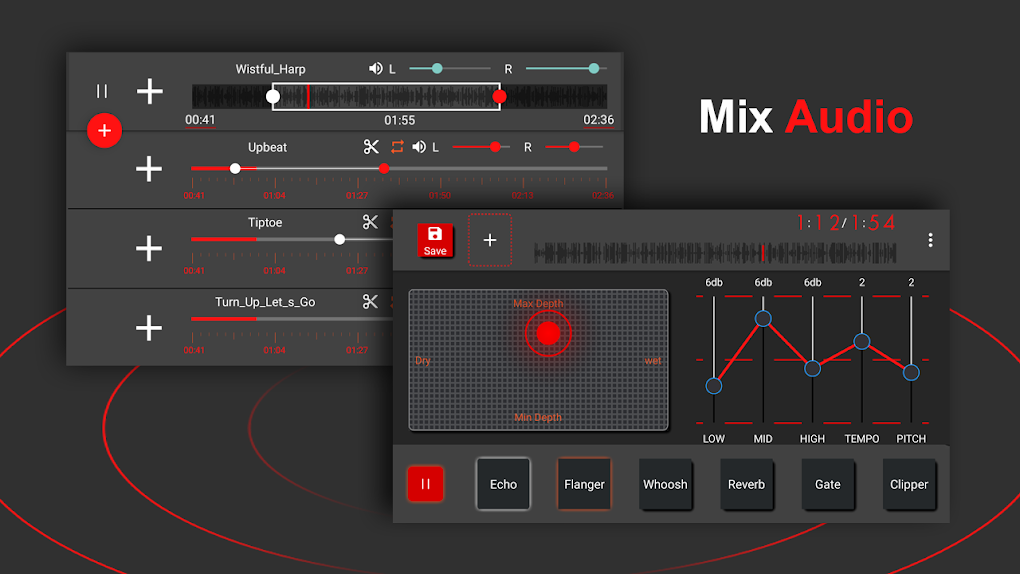
At its heart, AudioLab functions as a robust audio editor. Its capabilities extend beyond simple trimming and cutting; it allows for the merging of multiple audio files into a single track, a crucial feature for creating mixes, podcasts, or even personalized soundtracks. This multi-track editing capability is often absent in simpler audio editors, setting AudioLab apart. The app supports a wide range of audio formats, including popular choices such as MP3, AAC, OGG, AC3, FLAC, and WAV, ensuring broad compatibility with various audio sources. This diverse format support minimizes the need for pre-conversion, streamlining the workflow for users with files in different formats.
The editing tools themselves are intuitive and well-designed. Precise trimming allows for the removal of unwanted sections with pinpoint accuracy, while cutting enables users to segment longer audio files into smaller, manageable pieces. The mixing capabilities, though not as advanced as professional DAWs (Digital Audio Workstations), are sufficient for basic mixing and blending of audio tracks. Users can adjust volume levels and potentially apply basic effects to create a balanced and coherent final product.
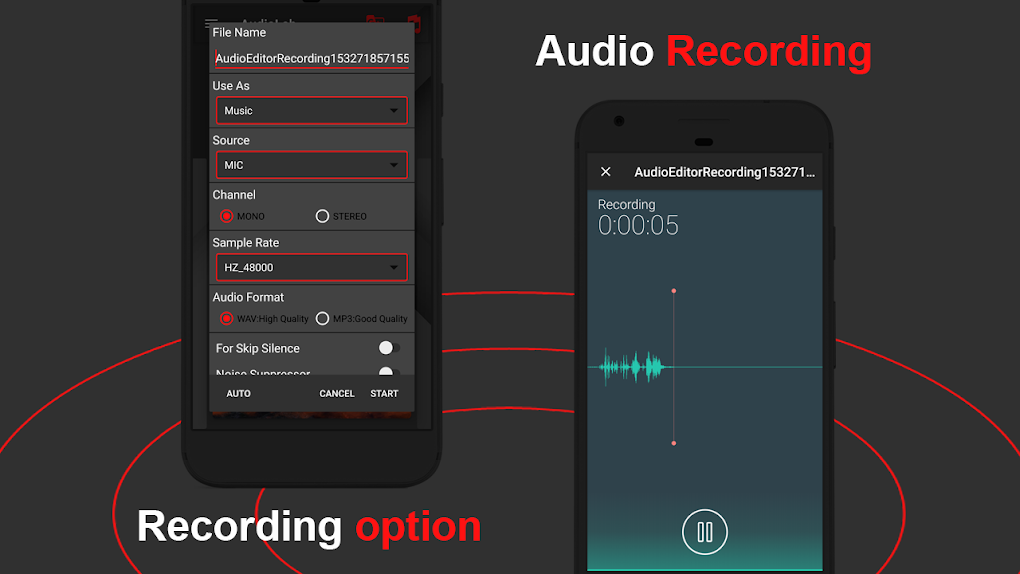
Beyond editing, AudioLab functions as a capable audio recorder. This integrated recording feature simplifies the creation of new audio content, eliminating the need for a separate recording application. The quality of recordings will naturally depend on the device’s microphone, but the app itself provides a straightforward interface for starting and stopping recordings and managing recorded files. This integration is a practical advantage for users who need both editing and recording functionality within a single, streamlined application.
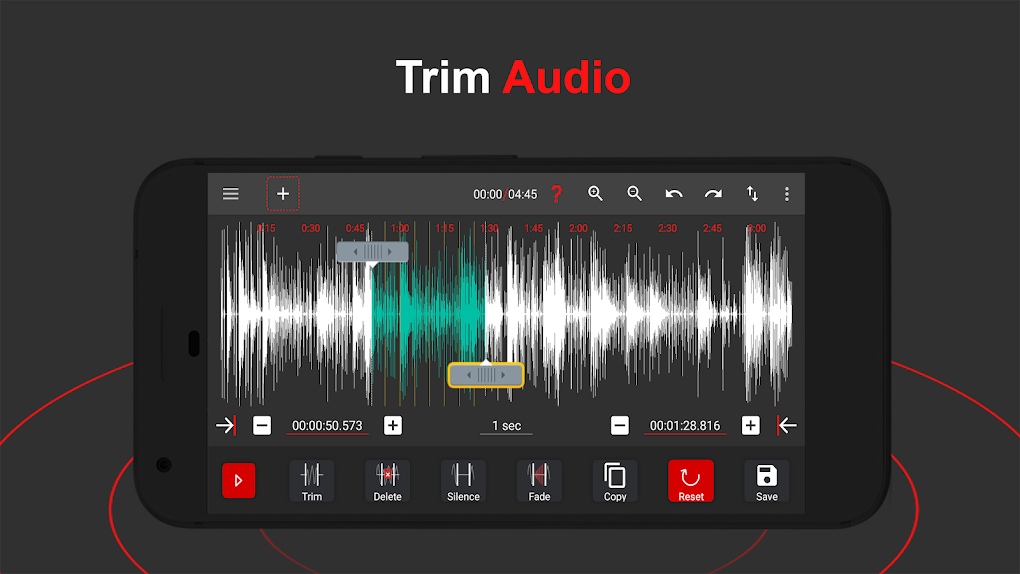
Finally, its name highlights its ringtone creation capabilities. Once users have edited or recorded audio, they can easily convert the resulting file into a custom ringtone. This process is simplified within the app’s interface, requiring minimal steps to transform an audio clip into a personalized notification sound. This feature provides an easy-to-use path to creating unique and customized ringtones without the need for additional software or complex procedures.
Advanced Features and Effects
While its core features are already impressive, AudioLab extends its functionality with several advanced features. The ability to edit multiple songs simultaneously significantly speeds up the workflow, especially beneficial for users working on album-length projects or longer audio compilations. This feature significantly reduces the time required to process large amounts of audio data, making it a time-saving advantage for efficient users.
The app also provides a suite of audio effects. Although not as extensive as professional-grade software, the inclusion of effects like reverb and echo allows for basic audio enhancement and creative manipulation. These effects can be used to add depth, ambience, or other stylistic elements to audio recordings or edited tracks. While the specific range of effects may not be as diverse as dedicated audio effect plugins, their inclusion significantly enhances the capabilities beyond simple editing and mixing.
Further enriching the user experience is the inclusion of music tag editing. Users can easily modify metadata such as song titles, artist names, album art, and other relevant information. This feature maintains organization and enhances the searchability of music libraries. Accurate tagging ensures proper identification and display across various music players and devices.
User Interface and Experience
AudioLab’s design prioritizes user-friendliness. The interface is clean, intuitive, and easy to navigate, even for users with limited experience in audio editing software. The controls are clearly labeled and arranged logically, minimizing the learning curve associated with mastering its capabilities. This intuitive design allows both beginners and advanced users to quickly access and utilize the app’s features effectively. The streamlined interface prevents overwhelming the user with unnecessary complexity, making it accessible to a broader audience.
The app’s responsiveness is another significant plus point. Loading times are generally short, and the editing process is smooth and efficient, even when working with larger audio files. This responsiveness ensures a pleasant user experience without noticeable delays or lags during critical operations like trimming or merging audio tracks. This efficiency is a testament to the app’s optimized performance and smooth execution.
Comparison with Alternatives
While AudioLab stands out as a capable all-in-one solution, it’s important to consider its position in relation to other audio editing and recording applications. Compared to professional-grade DAWs, AudioLab lacks the extensive mixing capabilities, advanced effects plugins, and MIDI support found in those more specialized and often paid applications. However, its ease of use and integrated features significantly outweigh this limitation for users who don’t require the advanced functionalities of professional software.
When compared to simpler audio editing apps, AudioLab’s multi-track capabilities, diverse format support, and integrated recording feature set it apart from basic trimming and cutting applications. Its advanced features offer a significant advantage for users who need more than just basic editing, placing it above many simpler alternatives in terms of functionality and versatility.
The app’s free availability is another crucial aspect of its competitive advantage. Many comparable applications with similar functionality are paid software, making AudioLab’s free access a significant draw for users on a budget. This free access opens up possibilities for a wider user base to access and utilize its features without financial barriers.
Conclusion: A Versatile and User-Friendly Tool
AudioLab Audio Editor, Recorder, and Ringtone Maker presents a compelling solution for Android users seeking a versatile and user-friendly audio editing application. Its comprehensive feature set, including multi-track editing, diverse format support, integrated recording, and ringtone creation capabilities, makes it a powerful tool for a range of tasks. The intuitive interface and smooth performance further enhance its appeal, making it accessible to users of all skill levels. While it might not match the sophistication of professional-grade software, AudioLab’s free availability and user-friendly design make it a strong contender among audio editing apps available on the Google Play Store. Its ease of use and comprehensive feature set make it an excellent choice for anyone looking to edit audio, create ringtones, or record audio on their Android device. The strong emphasis on user experience combined with its robust features solidifies its position as a valuable tool in the Android audio editing landscape.
File Information
- License: “Free”
- Version: “1.3.8”
- Latest update: “June 6, 2025”
- Platform: “Android”
- OS: “Android 13.0”
- Language: “English”
- Downloads: “11.3K”
- Download Options: “Google Play”


