
Aurora is a powerful visual designer application that leverages the Microsoft Windows Presentation Foundation (WPF) Object Model and WinFX to generate XAML documents. Unlike simple drawing or painting programs, Aurora offers a sophisticated approach to UI creation and manipulation, directly interacting with the WPF object model and its visual tree. This allows for a level of control and precision not typically found in traditional graphic design software. This in-depth analysis will explore Aurora’s capabilities, its significance in the context of WPF development, and its place within the broader landscape of graphic design and UI development tools.
Understanding Aurora’s Core Functionality
At its heart, Aurora acts as a bridge between visual design and the underlying code structure of WPF applications. Its visual interface allows developers to create and manipulate WPF elements intuitively, dramatically reducing the need for manual XAML coding. This simplifies the process of building complex user interfaces, allowing designers to focus on the visual aspects while the underlying XAML is automatically generated. This streamlined workflow significantly accelerates the development cycle and enhances productivity.
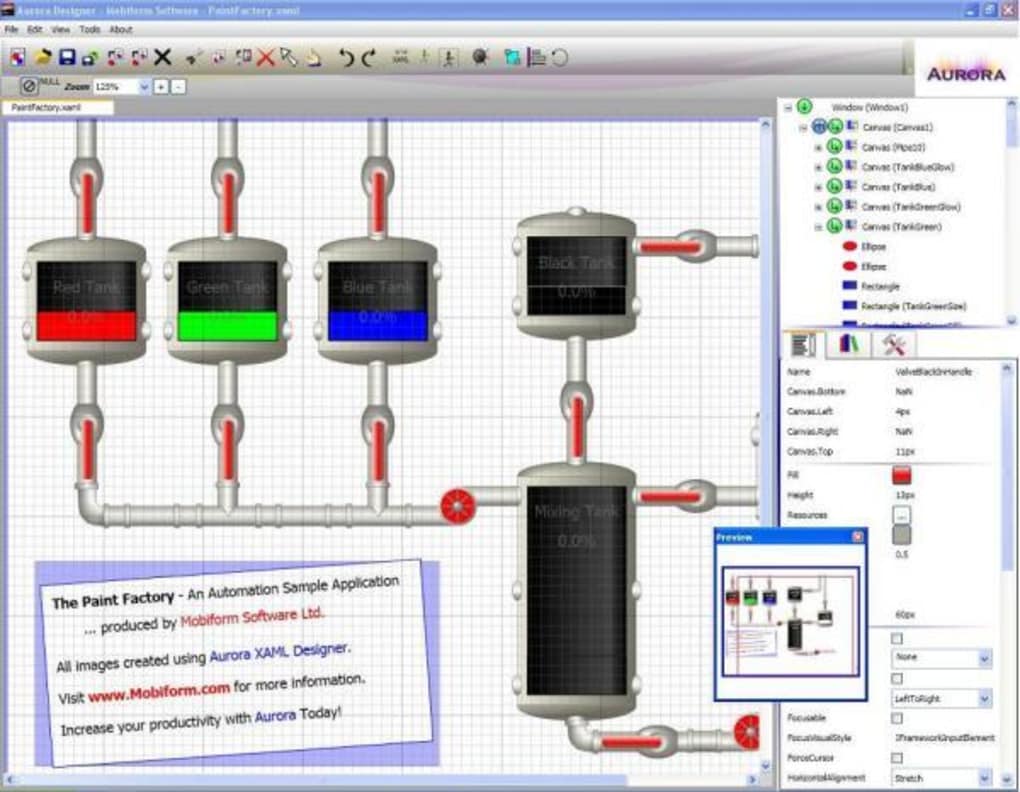
The program’s ability to interact directly with the WPF object model and visual tree is a key differentiator. This allows for granular control over individual elements and their properties, enabling the creation of highly customized and visually rich user interfaces. Users can easily adjust properties like size, position, color, and various other attributes directly within the visual editor. This real-time feedback loop ensures that design changes are immediately reflected, fostering a more iterative and responsive design process.
Beyond Basic UI Design: Advanced Features
Aurora extends beyond basic UI design, offering features that cater to more advanced development needs. One noteworthy capability is its support for attached dependency properties. These properties allow developers to extend the functionality of existing WPF controls without modifying their core structure. Aurora simplifies the application of these properties, providing a user-friendly interface for manipulating them within the visual design environment.
Another powerful feature is the ability to define custom content for content controls. This enables developers to integrate custom components and functionalities seamlessly into their applications. By allowing the creation and manipulation of custom content directly within the visual editor, Aurora eliminates the complexities associated with manually integrating such components through XAML code. This simplifies the process of building modular and extensible applications.
Libraries and Reusability: Streamlining Development
A significant advantage of Aurora lies in its support for object libraries. Developers can create and store collections of pre-designed UI elements, allowing for the reuse of components across multiple projects. This promotes consistency in design and significantly reduces development time. The ability to effortlessly incorporate these pre-built libraries into new projects accelerates the development process, especially when working on large-scale applications with consistent visual themes or design patterns. This reusable asset management feature is a valuable addition for improving efficiency and streamlining workflows.
Aurora in the Context of WPF Development
Aurora’s significance within the context of WPF development is considerable. WPF, with its declarative XAML markup and powerful object model, offers a robust framework for building visually appealing and interactive applications. However, manual XAML coding can be time-consuming and error-prone, particularly for complex interfaces. Aurora mitigates these challenges by providing a visual alternative to manual coding, significantly enhancing developer productivity and reducing the likelihood of errors.
The visual approach that Aurora employs simplifies the process of understanding and manipulating the WPF object model. Instead of wrestling with cryptic XAML code, developers can interact directly with the visual representations of the UI elements. This makes the development process more intuitive and accessible, especially for developers who are less familiar with the intricacies of XAML.
Comparison to Traditional Design Tools
Aurora distinguishes itself from traditional graphic design software by its deep integration with the WPF framework. While tools like Adobe Illustrator or Inkscape excel at creating high-quality vector graphics, they do not offer the direct interaction with the WPF object model that Aurora provides. This means that designs created in those tools may require significant manual translation into XAML before they can be integrated into WPF applications. Aurora eliminates this translation step, resulting in a smoother and more efficient workflow.
Aurora’s Cross-Platform Availability and Future Potential
Aurora’s availability across multiple platforms – including Windows, Android, and Web Apps – expands its accessibility and reach. This multi-platform support ensures that developers can utilize the program’s capabilities regardless of their preferred operating system or development environment. The web app version, in particular, further increases accessibility by eliminating the need for local installation.
The future potential of Aurora is promising. As WPF continues to evolve, future versions of Aurora could incorporate support for the latest advancements in the framework. Integration with other development tools and technologies could further enhance its capabilities and streamline the overall development process. The addition of features like advanced animation capabilities, support for newer WPF controls, and enhanced collaboration tools would likely make Aurora even more attractive to WPF developers.
Community and Support: Fostering Collaboration
The success of any software tool depends partly on the community and support it cultivates. A vibrant community can contribute to the continuous improvement of the software through feedback, bug reports, and feature requests. Strong support channels, including comprehensive documentation and readily available assistance, can greatly enhance the user experience and encourage broader adoption.
Conclusion: Aurora’s Impact on WPF Development
Aurora represents a significant advancement in the tools available for WPF development. Its visual approach to XAML creation and manipulation drastically simplifies the process of building complex user interfaces, improving developer productivity and reducing errors. By directly interacting with the WPF object model, Aurora bridges the gap between visual design and code, fostering a more intuitive and efficient workflow. Its cross-platform availability and potential for future enhancements suggest that Aurora will continue to play a crucial role in the development of modern WPF applications. The program’s focus on reusability and streamlined workflows positions it as a powerful tool for both individual developers and larger teams working on substantial projects. The potential for future integration with other tools and technologies only strengthens its position as a valuable asset in the world of WPF development.
File Information
- License: “Trial version”
- Version: “8.1”
- Latest update: “August 12, 2019”
- Platform: “Windows”
- OS: “Windows 2000”
- Language: “English”
- Downloads: “6.3K”
- Size: “11.28 MB”


