
Aurora HDR is a professional-grade High Dynamic Range (HDR) photo editing software developed by Skylum (formerly Macphun) in collaboration with renowned HDR photographer Trey Ratcliff and other acclaimed photographers. Unlike general-purpose image editors, Aurora HDR focuses specifically on the unique needs and workflows of HDR photography, providing a suite of advanced tools and features designed to enhance and refine HDR images. This detailed review explores its capabilities, strengths, and limitations, providing a comprehensive assessment of its value for both amateur and professional photographers.
Core Functionality: HDR Imaging and Processing
At its core, Aurora HDR excels at merging multiple exposures of the same scene to create a single HDR image. This process, crucial for HDR photography, effectively handles challenging lighting situations with extreme highlights and deep shadows, often found in landscape or architectural photography. The software leverages its proprietary AI-powered Quantum HDR Engine™ to automate the merging process, ensuring precise alignment and optimal tone mapping. The result is a single image with an expanded dynamic range, revealing details previously lost in the highlights or shadows. This foundational capability is complemented by a robust set of tools for further enhancement and refinement.
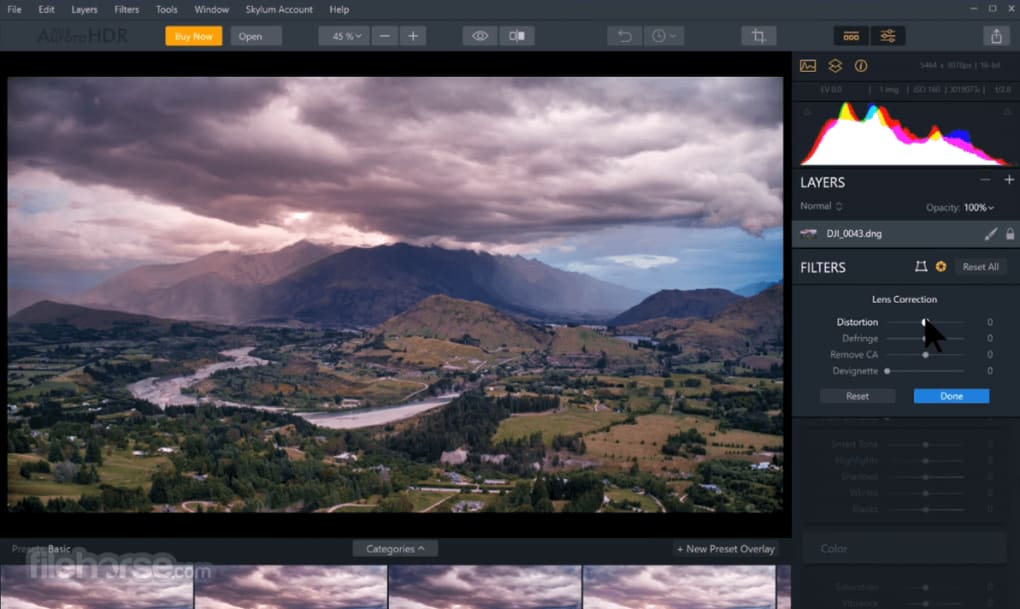
Advanced Tools and Features: Beyond Basic HDR Merging
Beyond the core HDR merging functionality, Aurora HDR boasts a comprehensive arsenal of advanced editing tools. These tools are not merely basic adjustments but rather sophisticated algorithms designed to address the specific challenges of HDR imagery. Key features include:
- HDR Denoise: This AI-powered tool intelligently identifies and reduces noise in the HDR image, a common issue stemming from the merging of multiple exposures, particularly in low-light conditions. This noise reduction significantly improves image quality, leading to cleaner and more refined final results.
-
HDR Smart Structure: This innovative feature enhances the depth and detail within the image, providing a more three-dimensional and visually appealing result. It cleverly identifies and preserves fine details while simultaneously increasing contrast and definition without introducing unwanted artifacts.
-
HDR Clarity: This tool selectively boosts contrast only where it’s needed, adding localized sharpness and definition without affecting other parts of the image. This precise approach prevents over-sharpening and maintains the natural look and feel of the scene.
-
Layers & Masking: For advanced users, Aurora HDR offers robust layer support and masking capabilities, allowing for precise non-destructive editing. This feature provides the flexibility to isolate specific areas of the image for targeted adjustments, enabling complex and detailed edits without altering the original image data.
-
Batch Processing: For photographers with large volumes of images to process, the batch processing function provides an efficient workflow, allowing for automated adjustments and consistent processing of multiple files. This feature saves significant time and effort, enhancing productivity.
-
RAW Support: Aurora HDR provides comprehensive support for RAW files from a wide range of cameras, allowing for direct processing of the uncompressed image data. This ensures the highest possible quality and allows for maximum control during the editing process.
-
Over 80 Unique Looks: The software includes a vast library of over 80 unique presets, called “Looks,” meticulously crafted in collaboration with prominent HDR photographers. These presets range widely in style and tone, offering photographers a starting point for their editing process or inspiration for unique creative effects. They cover diverse aesthetics and moods, from subtle enhancements to dramatic and stylized looks. Applying a Look is as simple as a single click, instantly transforming the image.
Integration and Workflow: Seamless Compatibility
Aurora HDR is designed to integrate seamlessly into existing photographic workflows. It functions both as a standalone application and as a plug-in for popular software such as Adobe Photoshop and Lightroom, as well as an extension for Apple Photos. This flexibility allows photographers to incorporate Aurora HDR into their preferred editing environment, maximizing efficiency and minimizing disruptions to established workflows.
Strengths and Weaknesses: A Balanced Perspective
Aurora HDR stands out for its user-friendly interface, which simplifies the complex process of HDR image editing. The intuitive layout makes the software accessible even to less experienced users, while its advanced features cater to the needs of professional photographers. The AI-powered tools significantly streamline the workflow, automating time-consuming tasks and minimizing the need for manual adjustments. The extensive library of “Looks” provides a wealth of creative possibilities, inspiring experimentation and stylistic exploration.
However, Aurora HDR’s specialization in HDR photography also implies certain limitations. While its tools are highly effective for HDR images, it lacks the extensive range of general-purpose editing features found in comprehensive photo editing suites such as Adobe Photoshop. Features such as advanced retouching tools, detailed brush controls, or extensive layer manipulation options might be less comprehensive than in other full-fledged editors. This specialization is a trade-off; users gain focused power in HDR editing but sacrifice the broader versatility of a general-purpose photo editor.
Comparison with Alternative Software: Finding the Right Tool
Aurora HDR competes with several other HDR editing programs, each with its own strengths and weaknesses. Luminance HDR, for example, is a free and open-source alternative, but it may lack the advanced AI-powered features and user-friendly interface of Aurora HDR. Other commercial options, like Photomatix, often come with a steeper learning curve and may require more technical expertise. The choice of software ultimately depends on individual needs and preferences, considering factors like budget, required features, and desired level of user-friendliness.
Conclusion: Is Aurora HDR Worth the Investment?
Aurora HDR presents a compelling proposition for photographers who prioritize efficient and high-quality HDR image editing. Its AI-powered tools, user-friendly interface, and extensive “Looks” library significantly enhance the workflow and creative possibilities. The seamless integration with other popular photo editing software further enhances its practicality and adaptability. While it may not replace a full-featured image editor for all tasks, it excels as a specialized tool for HDR photography. For photographers who frequently work with HDR images, the investment in Aurora HDR is likely to be well-justified, offering substantial gains in efficiency, quality, and creative potential. The balance between specialized power and user-friendliness makes it a strong contender in the HDR editing software market. The decision to purchase hinges on the individual photographer’s needs and priorities, but for dedicated HDR enthusiasts, Aurora HDR deserves serious consideration.
File Information
- License: “Full”
- Latest update: “May 24, 2023”
- Platform: “Windows”
- OS: “Windows 10”
- Language: “English”
- Downloads: “5.5K”


