
Aurora Photo Editor is a user-friendly photo optimization and sharing software designed to enhance the quality of your images. While the name might cause confusion due to the existence of other applications also bearing the name “Aurora,” this particular software focuses solely on photo retouching, organization, and sharing capabilities. Its intuitive interface makes it accessible to both novice and experienced users, offering a range of features to improve even the dullest or most color-imbalanced photographs.
Key Features and Functionality
Aurora Photo Editor’s strength lies in its ability to bring out the best in your photos through a simple yet powerful set of tools. The program utilizes a pop-up image selector, allowing for real-time previews and adjustments until the desired outcome is achieved. This feature significantly streamlines the editing process, allowing users to experiment with different effects without the need for multiple steps or complex workflows.
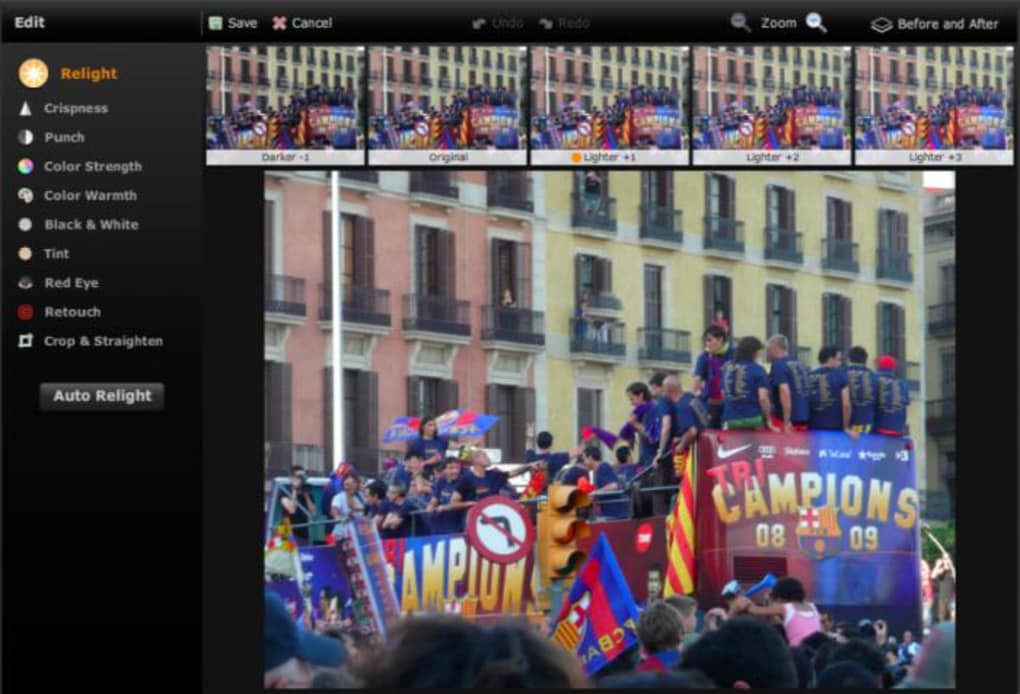
Among the many functions available, users can perform basic and advanced edits, including:
-
Retouching: This feature allows for the removal of blemishes, unwanted objects, or other imperfections within an image. The retouching tool effectively replaces selected areas with a seamless blend of surrounding pixels, creating a natural and unnoticeable correction.
-
Straightening: Correcting tilted or skewed photos is made simple with Aurora Photo Editor’s straightening tool. This ensures your images are properly aligned, adding to their overall aesthetic appeal.
-
Color Adjustment: Users can fine-tune the color balance, saturation, brightness, and warmth of their images to achieve a more vibrant and visually appealing outcome. The intuitive controls allow for precise adjustments, giving users complete creative control over their photos.
-
Crispness Adjustment: This feature allows users to enhance the sharpness and clarity of their images, bringing out fine details that might otherwise be lost or obscured.
-
Cropping and Zooming: These basic yet essential functions allow for precise adjustments to the composition of an image, highlighting key elements and removing unwanted portions.
-
Red-Eye Reduction: Aurora Photo Editor includes a dedicated tool to effortlessly correct red-eye effects, a common issue in photographs taken with flash.
-
Relighting: Arguably one of the most impressive features, the relighting tool revitalizes dull or poorly lit photographs. It magically enhances colors and reveals details previously hidden in shadow or low-light conditions, breathing new life into otherwise lackluster images. This function is a significant asset, capable of transforming an average photo into a visually stunning one.
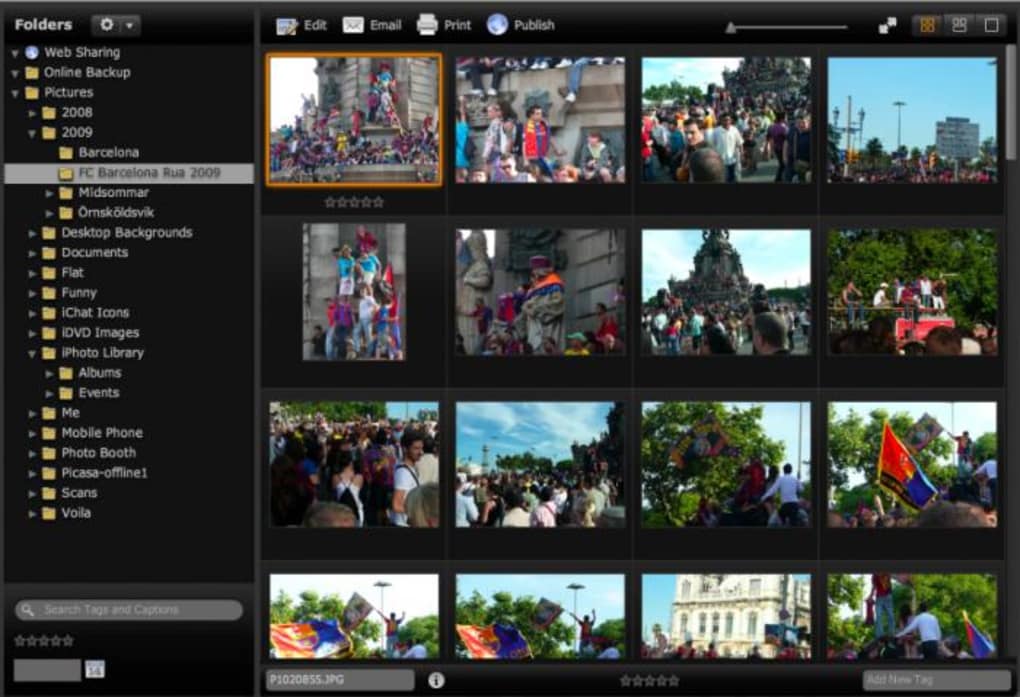
The user interface is elegantly designed for ease of use. A left-hand panel displays all photo folders on your computer, while a photo grid conveniently showcases the images within each selected folder. While the loading time for the photo grid might be slightly slower compared to competitors like iPhoto or Picasa, it does not significantly detract from the overall user experience. The program also offers a generous free backup option to Amazon’s cloud storage for users with less than 2GB of photos, encouraging organized storage and safeguarding images from potential loss.
The primary editing options are clearly displayed across the top of the photo grid, including “Publish,” “Edit,” “Email,” and “Print.” The “Edit” function is central, opening the main editing panel where users can access all the aforementioned retouching and enhancement tools. Applying effects is intuitive, with a preview displayed across the grid’s top to visualize the impact before finalizing changes. The “Auto Relight” function is particularly noteworthy; it automatically analyzes the photo and applies the necessary adjustments for optimal lighting and color balance, eliminating the need for extensive manual fine-tuning. The “Retouch” tool, as previously mentioned, is exceptional for effortlessly removing unwanted elements or objects from images.
Seamless Integration and Sharing Capabilities
Aurora Photo Editor boasts seamless integration with popular online platforms, simplifying the sharing process. Publishing is readily integrated with both Flickr and Facebook, making it straightforward to share edited images with friends, family, or a wider audience. Emailing options are also integrated with popular online webmail services such as Windows Live Mail and Gmail, allowing for convenient direct sharing via email. This multifaceted integration underscores Aurora Photo Editor’s commitment to streamlining the entire photo workflow, from editing to sharing.
Pros and Cons: A Balanced Perspective
As with any software, Aurora Photo Editor presents both advantages and disadvantages. A balanced perspective considers the strengths and limitations to provide a clear understanding of its capabilities.
Pros:
-
Significant Photo Enhancement: The software effectively improves the quality and visual appeal of photos, particularly those with poor lighting or color balance.
-
User-Friendly Interface: The elegantly designed interface makes the software intuitive and easy to navigate, even for users with minimal photo editing experience.
-
Comprehensive Retouching Options: The range of retouching tools allows for precise and effective correction of various imperfections, ensuring high-quality results.
-
Streamlined Sharing: Seamless integration with popular platforms simplifies the process of sharing edited photos, saving time and effort.
-
Generous Free Cloud Backup: The generous free Amazon backup allowance for users with under 2GB of photos is a valuable added benefit.
Cons:
-
Subtle Retouch Results: In some cases, the retouching might produce subtle changes, making it hard to detect a significant difference, especially for minor imperfections.
-
Slower Photo Loading: The loading time of photos into the grid can be slower compared to some competitor software.
- Lengthy Installation: The initial installation process might be somewhat lengthy, although this is a one-time inconvenience.
Alternative Applications and Comparisons
While Aurora Photo Editor offers a robust set of features, it’s helpful to consider alternative options available in the market. Comparing Aurora Photo Editor to established players like Adobe Photoshop reveals clear distinctions in terms of functionality and complexity. Adobe Photoshop, while offering significantly more advanced features and extensive control, demands a steeper learning curve and comes at a higher cost. Aurora Photo Editor, in contrast, offers a more streamlined and accessible approach, ideal for users seeking basic to intermediate photo enhancement without the need for advanced technical expertise.
Other alternatives include programs like PhotoScape, which provides a free, versatile option for various editing tasks. However, Aurora Photo Editor may stand out due to its ease of use and integration with popular social media platforms. Ultimately, the choice between these applications depends on individual needs and technical proficiency.
Conclusion: A Valuable Tool for Photo Enthusiasts
Aurora Photo Editor proves to be a valuable addition to the toolkit of any photo enthusiast. Its user-friendly interface, comprehensive editing options, and seamless integration with online platforms make it a strong contender in the photo editing software market. Although some minor drawbacks exist, like slightly slower photo loading and subtle results in some retouching instances, these are outweighed by the overall positive aspects. The generous free cloud backup feature adds further value, encouraging responsible photo management. For users seeking a simple yet effective way to enhance their photos and share them effortlessly, Aurora Photo Editor is a compelling choice. Its balance of usability and power makes it an accessible and effective tool for photo editing and sharing, offering a satisfying experience for users of all skill levels.
File Information
- License: “Trial version”
- Version: “1.1”
- Latest update: “July 15, 2022”
- Platform: “Windows”
- OS: “Windows Vista”
- Language: “English”
- Downloads: “115.8K”
- Size: “56.96 MB”


