Auto-clickers are software applications designed to automate mouse clicks, significantly boosting efficiency in various tasks and game scenarios. This comprehensive guide delves into the functionality, usage, security, and applications of auto-clicker software, particularly focusing on its Windows and Android compatibility. We’ll examine its benefits and drawbacks, exploring alternative solutions and addressing common user concerns.
Auto-Clicker Functionality and Applications
Auto-clicker software simulates the action of a user clicking the left mouse button at pre-defined points on a screen. This seemingly simple function unlocks a world of possibilities for automating repetitive tasks, thereby saving significant time and effort. Its primary applications span across two major areas: productivity and gaming.
Productivity: In professional and personal settings, countless tasks involve repetitive clicking. Data entry, filling online forms, web scraping, and even some aspects of software testing can be streamlined with an auto-clicker. Imagine the time saved by automating the process of clicking through hundreds of web pages for research or quickly completing a series of identical form entries. The efficiency gains become increasingly pronounced as the volume of repetitive clicks rises.
Gaming: Auto-clickers find particularly widespread use in “clicker” games, a genre where players repeatedly click on screen elements to progress. These games rely on constant clicking to generate resources, upgrade characters, or overcome challenges. Auto-clickers automate this process, allowing players to leave the game running without needing to manually click continuously. While this can enhance the gaming experience by eliminating tedium, it’s crucial to be aware of the terms of service of the respective games, as using auto-clickers might violate certain rules and lead to penalties.
Beyond clicker games, auto-clickers can indirectly improve gameplay in other genres. For instance, in MMORPGs (Massively Multiplayer Online Role-Playing Games), auto-clickers could be used for farming resources or performing other repetitive tasks, freeing up the player’s time to focus on more engaging aspects of the game. However, it’s essential to check the game’s terms of service before using any automation tool.
System Compatibility and Usage Instructions
Auto-clicker software offers broad compatibility, typically supporting both Windows and Android operating systems. This cross-platform accessibility extends its usability to a wide range of devices, from desktop computers and laptops to smartphones and tablets.
The installation process is usually straightforward. After downloading the software (from a reputable source, emphasizing security), users typically run an executable file (.EXE for Windows). The installer will guide the user through the necessary steps, requesting permissions to access accessibility features and potentially run above other applications. These permissions are essential for the software to accurately simulate mouse clicks and remain visible on the screen, even when other applications are in focus.
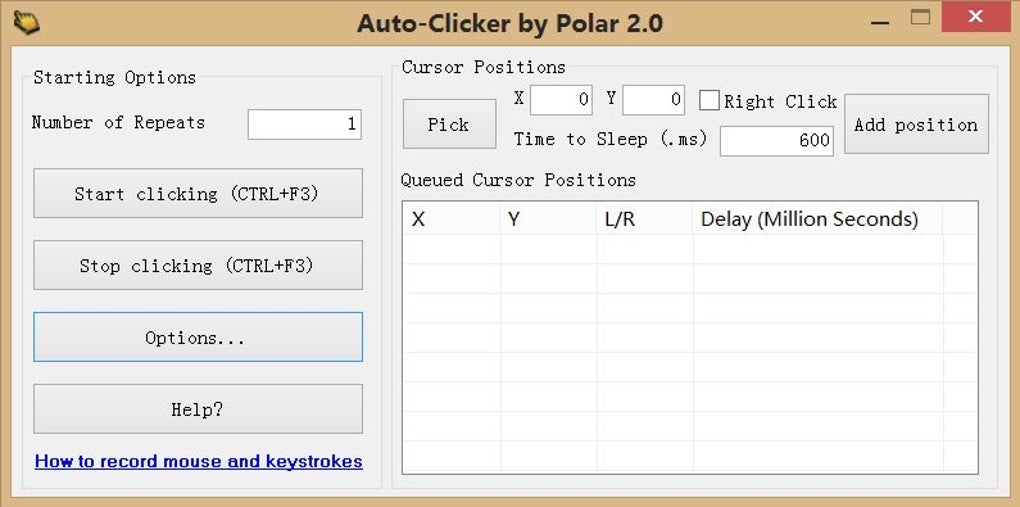
Once installed, launching the auto-clicker software presents a user interface that facilitates the configuration of click sequences. The interface may vary depending on the specific software, but common features usually include:
- Adding Click Points: Users typically add click points by clicking the “+” button (or a similar command) and positioning the cursor at the desired location on the screen. Each click point is often assigned a number to determine the order in which clicks are executed.
- Interval Setting: Auto-clickers usually allow users to specify the time interval between consecutive clicks. This setting can range from milliseconds for rapid clicking to several seconds or minutes for slower, more controlled automation.
- Repetition Control: The user can configure the number of times a click sequence should be repeated. Options include a fixed number of repetitions or an infinite loop, which continues until manually stopped.
- Advanced Settings: Some auto-clickers provide advanced settings to fine-tune the automation, such as randomizing click intervals to mimic human behavior or adding delays between click sequences.
The user initiates the automated clicking by pressing a “Start” button. The auto-clicker then begins simulating mouse clicks at the pre-defined points, following the specified intervals and repetitions.
Security and Permissions
A critical aspect of using any auto-clicker software is understanding its security implications and the permissions it requests. Reputable auto-clickers are generally safe, free from malware or adware. However, downloading from untrusted sources significantly increases the risk of installing malicious software. Always download from reputable websites and carefully review user reviews and security assessments before installing.
The permissions requested during installation are key to the software’s functionality. These typically include:
- Accessibility Permissions: This permission grants the software the ability to interact with the screen and simulate mouse clicks. Without this permission, the auto-clicker cannot perform its primary function.
- Priority Permissions: This allows the auto-clicker’s interface to remain visible above other applications, providing clear feedback and control over the automated process.
Granting these permissions is necessary for the software’s proper operation, but it’s crucial to ensure you are granting permissions only to trusted software. Be cautious when granting extensive system-level permissions to unknown or untrusted applications.
Auto-Clicker Pros and Cons
Like any software, auto-clickers come with both advantages and disadvantages. A balanced perspective is essential for informed decision-making.
Pros:
- Increased Efficiency: Auto-clickers dramatically improve efficiency for repetitive tasks, saving significant time and effort.
- Automation of Tedious Tasks: They eliminate the monotony of repetitive clicking, making tasks more bearable.
- Enhanced Gaming Experience: In appropriate games, they enhance the gameplay by automating repetitive actions, allowing players to focus on other aspects of the game.
- Wide Compatibility: Most auto-clickers support multiple operating systems, broadening their applicability.
- Free and Open-Source Options: Numerous free and open-source auto-clickers are available, eliminating software costs.
Cons:
- Security Risks: Downloading from untrusted sources poses risks of malware or adware infection.
- Permission Requirements: Granting extensive permissions might raise security concerns for some users.
- Potential for Game Ban: Using auto-clickers in online games may violate the terms of service, leading to account bans.
- Ethical Considerations: Using auto-clickers for activities such as automated botting on social media platforms or manipulating online systems may have ethical implications.
- Steeper Learning Curve for Advanced Features: Some auto-clickers have advanced features that require a learning curve to fully utilize.
Alternatives and Further Considerations
While auto-clickers are a powerful tool, alternative solutions exist depending on the specific task. Macro recorders, for example, can automate more complex sequences of actions beyond simple mouse clicks, including keyboard inputs. However, macro recorders often require a deeper understanding of scripting languages.
Scripting languages like Python can provide highly customized automation solutions, offering unparalleled flexibility but requiring programming knowledge. For simpler tasks, browser extensions might suffice, providing automated functionality specifically within the context of web browsers.
The choice of automation solution depends on the complexity of the task, the user’s technical skills, and the potential risks associated with automation. Always prioritize security and adhere to the terms of service of any online platforms or games where you use automation tools. The ethical implications of using automation should also be carefully considered.