Auto Clicker by Shocker is a free Windows utility designed for automating repetitive mouse clicks. While boasting a somewhat dated interface, its ease of use and powerful features make it a compelling choice for users seeking to streamline tasks involving frequent mouse interactions. This review delves into the software’s functionalities, customization options, pros and cons, and compares it to alternative auto-clicker solutions.
Functionality and Ease of Use
Auto Clicker by Shocker’s core function is straightforward: to automate mouse clicks at specified locations and intervals. The software excels in its simplicity. Users can easily define the type of click (left, right, or middle), the number of clicks, and the time interval between clicks. This allows for precise control over the automation process, making it adaptable to a wide range of tasks. Whether you need to perform a single click repeatedly, execute a series of clicks with pauses, or generate an infinite stream of clicks, Auto Clicker by Shocker provides the necessary tools.
Beyond basic click automation, the software offers several advanced features. The “Group Interval” feature, for instance, allows users to configure time-based pauses within the click sequence, offering significant flexibility in managing complex automation scenarios. The inclusion of random auto-stop delays adds another layer of customization, enhancing the software’s adaptability to unpredictable situations.
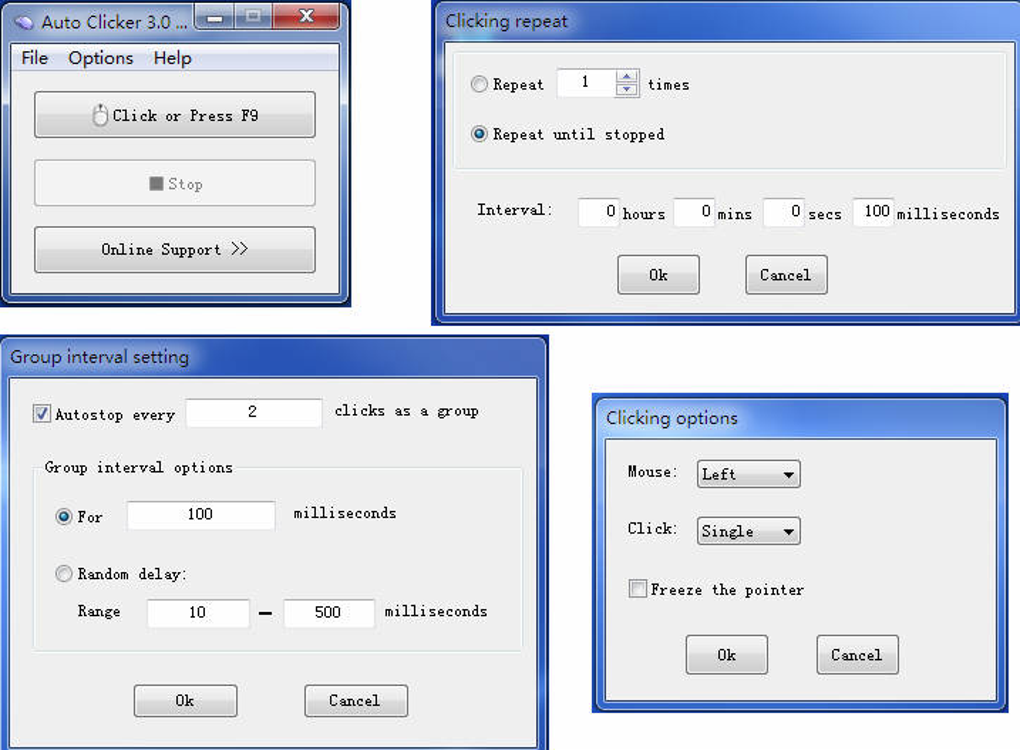
Perhaps one of the most user-friendly aspects is the hotkey functionality. Users can assign a custom hotkey (by default, F9) to start and stop the auto-clicking process. This allows for seamless integration into workflows, enabling users to initiate and halt the automation with minimal disruption to other tasks. The option to run the application in either visible or hidden mode further enhances its practicality, allowing users to discreetly automate clicks in the background while working on other applications.
Customization Options: Tailoring the Auto-Clicker to Your Needs
Auto Clicker by Shocker’s strength lies not just in its core functionality but also in its extensive customization options. Users have a high degree of control over the parameters of the auto-clicking process. Beyond specifying the number of clicks and the delay between them, the software allows users to fine-tune the automation based on mouse movement. A unique feature lets the software only trigger clicks when the mouse cursor has remained stationary for a predetermined duration, effectively preventing accidental activations during active mouse use.
Furthermore, users can choose between two methods for specifying click locations: selecting a point directly on the screen or inputting precise coordinates. The former method is intuitive and user-friendly, while the latter provides more accuracy for complex automation needs. The ability to manually enter coordinates ensures precise targeting of specific elements within applications or websites, a feature crucial for advanced automation scripts.
Performance and System Impact
One notable advantage of Auto Clicker by Shocker is its lightweight design. As a compact application, it consumes minimal system resources, ensuring smooth operation even on less powerful machines. This low impact on system performance minimizes interference with other applications, a critical aspect for users performing demanding tasks concurrently with the auto-clicking process. The software has proven reliable, with regular updates addressing bugs and enhancing stability. This commitment to continuous improvement ensures users benefit from a robust and optimized application experience.
User Interface and Design
While the software functions flawlessly, its user interface is arguably its weakest point. The single-window design, intended to simplify navigation, might appear cluttered to some users. The visual design shows its age, lacking the modern aesthetics found in many contemporary applications. However, this is largely a superficial concern, as the software’s intuitive layout becomes easy to navigate with minimal learning curve. Once accustomed to the interface, users will quickly appreciate the efficiency of having all functionalities readily accessible within a single window. The somewhat dated appearance might be a drawback for those who value visual appeal, but it doesn’t compromise the functionality or efficiency of the program.
Comparison with Alternative Auto-Clickers
Auto Clicker by Shocker stands alongside several other auto-clicker applications available for Windows. While many offer similar basic functionalities, Auto Clicker by Shocker distinguishes itself through its unique blend of ease of use and advanced customization options. Compared to applications like GS Auto Clicker and TinyTask, it might lack the sleek visual appeal of its competitors but compensates with a more straightforward user experience. Its features offer a solid middle ground between simplicity and advanced capabilities, making it suitable for both casual and demanding users. While other applications might offer more specialized functionalities or a more polished interface, Auto Clicker by Shocker excels in its balance of user-friendliness and powerful customization options, making it a versatile choice for a broad range of users. The absence of a notification upon process completion is a minor drawback, however, it is easily offset by the convenient hotkey system allowing for quick start and stop control.
Is Auto Clicker by Shocker the Right Choice for You?
Auto Clicker by Shocker presents a compelling case for users seeking a free, lightweight, and effective auto-clicker solution. Its intuitive interface, despite its outdated appearance, makes it accessible to both novice and experienced users. The range of customization options caters to a wide spectrum of automation needs, from simple repetitive clicks to complex, multi-stage sequences. The software’s minimal system impact ensures smooth operation without compromising overall system performance. While alternative solutions might offer superior visual aesthetics or highly specialized functionalities, Auto Clicker by Shocker shines in its overall versatility and user-friendliness. If you’re looking for a reliable, easy-to-use auto-clicker that gets the job done without demanding significant system resources, Auto Clicker by Shocker deserves serious consideration.
Pros and Cons
Pros:
- Free and readily available: The software is free to download and use, eliminating any cost barrier for potential users.
- Lightweight and efficient: Minimal system resource consumption ensures smooth operation and compatibility with other applications.
- Extensive customization: Offers a wide range of settings for precise control over the auto-clicking process. This includes the ability to control click type, number of clicks, interval timing, mouse movement sensitivity, and hotkey assignments.
- Intuitive interface (despite outdated design): While the visual design is dated, the program’s functionality is easy to understand and use, reducing the learning curve for new users.
- Reliable and stable: Regular updates ensure bug fixes and performance improvements, leading to a stable and reliable user experience.
- Supports multiple click types: Left, right, and middle clicks can be automated.
- Supports infinite clicks: Enables continuous automation without manual intervention.
Cons:
- Outdated interface: The visual design is dated compared to more modern applications.
- No process completion notification: The software does not automatically notify the user when the automation process is complete. However, the hotkey controls allow for easy manual checks.
In conclusion, Auto Clicker by Shocker provides a robust and user-friendly solution for automating repetitive mouse clicks. While its visual design could benefit from a modernization, its ease of use, powerful features, and minimal system impact make it a highly competitive and effective auto-clicker for Windows users. The application’s simplicity and effectiveness outweigh the cosmetic aspects for many users who prioritize functionality and efficiency over visual aesthetics.
File Information
- License: “Free”
- Version: “3.0”
- Latest update: “July 20, 2021”
- Platform: “Windows”
- OS: “Windows XP”
- Language: “English”
- Downloads: “79.9K”
- Size: “880.99 KB”