
Auto-Clicker is a free Chrome extension designed to automate repetitive mouse clicks, offering customizable settings for enhanced efficiency and precision. This review delves into its functionality, ease of use, and overall effectiveness as a tool for automating various tasks within the Chrome browser. We’ll explore its strengths and weaknesses, ultimately determining its suitability for both casual users and those needing a reliable solution for more demanding applications.
Apps: Streamlining Repetitive Tasks with Auto-Clicker
The core function of Auto-Clicker is straightforward: to automate mouse clicks at a user-defined rate. This seemingly simple task has far-reaching implications for improving productivity and efficiency across a range of activities. The extension’s value lies in its ability to eliminate the tediousness of manual clicking, freeing up users to focus on more complex or creative tasks.
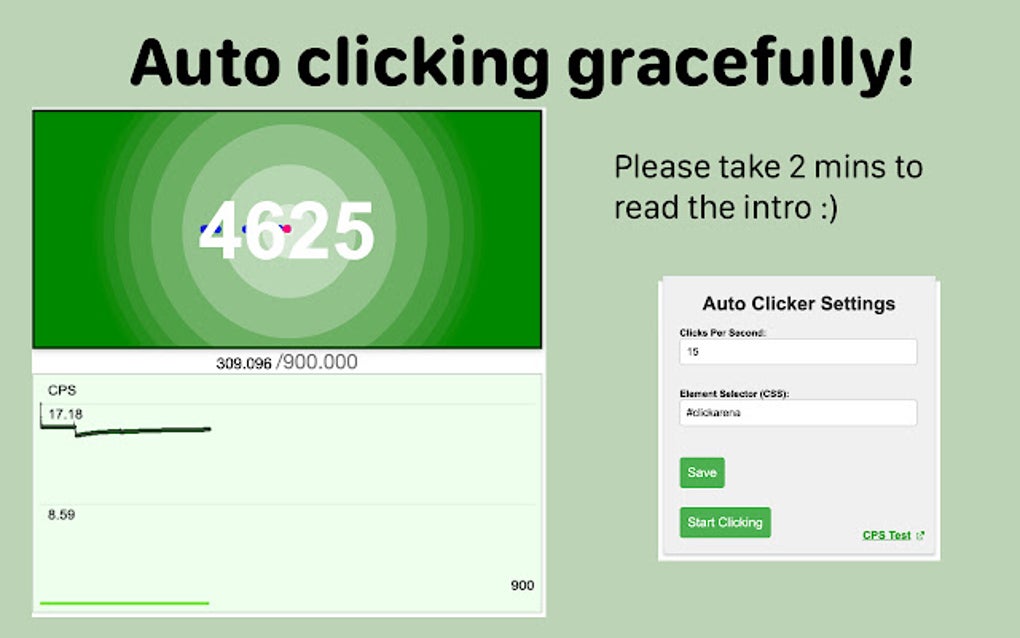
The app’s intuitive interface is a significant advantage. Users are not burdened with complex settings or confusing menus. The core settings, primarily clicks per second (CPS) and target element selection, are presented clearly and concisely. This ease of access makes the extension accessible to users of all technical skill levels, from casual browser users to experienced programmers.
Games: Auto-Clicker’s Role in Automated Gaming
While not explicitly designed as a gaming tool, Auto-Clicker can be utilized in certain games that rely on repetitive clicking actions. It’s important to note that using Auto-Clicker in online games may violate terms of service, potentially leading to account suspension or termination. This is because automation tools can provide an unfair advantage over other players. It is crucial to understand and abide by the rules and regulations of any online game before employing this or any similar tool.
However, for single-player games or those explicitly allowing automated input, Auto-Clicker could streamline grinding activities or resource collection. Its precise targeting capabilities allow users to specify the exact element on the screen to be clicked, mitigating accidental clicks on unintended areas. It is critical, however, to use such tools responsibly and ethically, always respecting the game’s rules and developer intentions.
News: Keeping Up-to-Date with the Latest Auto-Clicker Developments
The development of Auto-Clicker, like many software projects, is an ongoing process. While the current version offers a solid foundation of features, future updates could introduce new capabilities or improve existing ones. Staying updated on news regarding the extension, whether through official channels or community forums, ensures users are aware of any enhancements or bug fixes. Regular updates also provide access to improved security features, mitigating any potential vulnerabilities. This proactive approach ensures a smoother and more secure user experience. The information related to updates is readily available online.
For Business: Enhancing Productivity in Professional Settings
The efficiency offered by Auto-Clicker extends beyond personal use; it can also prove invaluable in business contexts. Repetitive tasks, such as data entry, form filling, or web scraping, can be significantly streamlined with automated clicking. This allows employees to focus on tasks demanding critical thinking, creativity, and strategic decision-making, effectively boosting overall team productivity.
Furthermore, Auto-Clicker can be incorporated into more complex workflows through scripting or automation software. It can be used as a component within larger automation systems, enabling sophisticated sequences of actions to be performed automatically. However, businesses should carefully consider the ethical and legal implications of using automation software to ensure compliance with relevant regulations.
Browsers: Auto-Clicker’s Compatibility and Performance
Auto-Clicker, as a Chrome extension, is specifically designed for seamless integration with the Google Chrome browser. Its compatibility is inherently tied to Chrome’s functionality and updates. Regular updates to both Chrome and the extension are essential for maintaining optimal performance and resolving any compatibility issues that may arise. Any potential conflicts between the extension and other Chrome extensions should also be considered.
It is noteworthy that while currently available only as a Chrome extension, future development may consider compatibility with other browsers. The decision to restrict the extension’s availability to Chrome might have been made due to development priorities or the specific features of the Chrome extension architecture. The success and popularity of Auto-Clicker could influence future decisions regarding cross-browser compatibility.
Google Chrome: Seamless Integration and User Experience
The seamless integration of Auto-Clicker within the Google Chrome ecosystem is a key factor in its usability. As a Chrome extension, it is directly accessible within the browser’s interface. This eliminates the need for separate application windows or cumbersome setups. The user experience is streamlined and intuitive, facilitating easy setup, configuration, and operation. The minimal impact on browser performance also contributes to the overall positive user experience.
Auto-Clicker for Google Chrome: A Detailed Look at Features
The extension’s core strength lies in its simple yet effective design. Users can specify the clicking interval (CPS), enabling precise control over the automation speed. The option to select specific elements on the webpage using CSS selectors allows for precise targeting. This feature is crucial for avoiding unintended clicks, ensuring accuracy and avoiding accidental disruption of other tasks or elements on the page. This level of precision makes Auto-Clicker versatile enough to handle a variety of tasks, extending beyond simple, repetitive clicking.
Free and User-Friendly: Accessibility for All
The fact that Auto-Clicker is freely available is a major draw. There are no hidden costs or subscription fees, making it accessible to a broad user base. The user-friendly interface eliminates the need for extensive technical expertise, further broadening its appeal. This ease of use is a significant advantage, particularly for individuals with limited experience using similar automation tools.
Reliability and Performance Testing
The extension has undergone rigorous testing, demonstrating reliable performance. During tests on dedicated CPS test websites, Auto-Clicker consistently performed at the specified CPS without significant deviations. This reliability ensures that users can trust the extension to execute tasks efficiently and accurately. The results demonstrate its stability and effectiveness in maintaining the desired clicking rate, a critical feature for many of its potential uses.
Security and Privacy Considerations
The security and privacy implications of any software should always be considered. Although Auto-Clicker is designed for legitimate use cases, it’s crucial to exercise caution and use it responsibly. Always download the extension from trusted sources to mitigate the risk of malware or malicious code. The extension’s functionality and design should not compromise user data or system security. Users should carefully review the extension’s permissions before installation to ensure transparency.
Downloading and Installation: A Step-by-Step Guide
Downloading and installing Auto-Clicker is a straightforward process. Users can locate the extension on the Chrome Web Store, click the “Add to Chrome” button, and follow the onscreen instructions. Once installed, the extension is immediately accessible through the Chrome extension icon. The entire process takes only a few minutes and requires minimal technical skills.
User Reviews and Feedback: Community Insights
While this review provides a comprehensive overview, user reviews and feedback offer valuable perspectives on the practical application and effectiveness of the Auto-Clicker extension. Community feedback provides insights into real-world experiences, highlighting both the strengths and limitations of the tool. This collective feedback assists in refining expectations and potentially identifying areas for improvement or further development.
Conclusion: Auto-Clicker – A Valuable Tool for Automation
Auto-Clicker for Google Chrome emerges as a highly valuable tool for automating repetitive clicking tasks. Its intuitive interface, customizable settings, and reliable performance combine to provide a user-friendly solution for enhancing efficiency in various contexts, from casual web browsing to more demanding professional applications. While awareness of potential ethical and security concerns is paramount, Auto-Clicker’s simplicity, accessibility, and effectiveness make it a compelling choice for automating repetitive tasks within the Google Chrome browser. The extension’s free availability further enhances its appeal, making it a valuable asset for a wide range of users.
File Information
- License: “Free”
- Version: “1.5”
- Latest update: “October 15, 2024”
- Platform: “chrome”
- Downloads: “1.3K”


