
Auto Shutdown Free is a versatile and user-friendly Windows utility designed to automate your computer’s shutdown process. This comprehensive guide explores its features, benefits, and how it can significantly improve your computer’s lifespan while saving energy costs. We’ll delve into its functionality, examine its pros and cons, and compare it to alternative solutions.
Extending Computer Lifespan and Saving Energy
Auto Shutdown Free’s primary function is to manage your computer’s power states, including shutdown, restart, sleep, hibernation, and log-off. By automating these processes based on customizable criteria, the software helps prolong your computer’s life and reduce your electricity consumption. Leaving your computer running unnecessarily consumes significant energy, leading to higher electricity bills and potentially shortening the life of your hardware components due to constant heat generation. Auto Shutdown Free addresses this by intelligently managing power usage, ensuring your system powers down when it’s not actively being utilized. The cumulative energy savings over time can be substantial, far exceeding the initial cost of the software. In essence, it’s a simple yet effective investment in both your computer’s longevity and your wallet.
Flexible Scheduling and Trigger Options
Auto Shutdown Free offers a robust scheduling system that goes beyond simple timed shutdowns. It allows you to define events based on several different triggers, providing a level of customization that surpasses many competing programs. These triggers include:
-
Timed Events: Schedule shutdowns to occur daily, weekly, monthly, annually, or even just once. This allows you to automate power-down processes according to your personal routines and usage patterns. Whether you want your computer to automatically shut down each night, only on weekends, or at specific times during the week, Auto Shutdown Free provides the flexibility to achieve this.
-
Countdown from Startup: Set a shutdown to occur after a specified duration following the computer’s startup. This is beneficial for tasks that only require a short period of usage, enabling a programmed automatic power-down at the task’s conclusion.
-
Idle Detection: Automatically shut down your computer after a period of inactivity. This is particularly useful if you frequently leave your computer running without actively using it. The software detects when your system is idle and powers it down after a customizable time frame, preventing unnecessary energy consumption.
-
Low Battery: For laptops and tablets, the software can trigger a shutdown when the battery reaches a user-defined low level. This prevents unexpected shutdowns from occurring during important tasks and ensures your data is saved before the battery depletes completely.
This layered approach to event triggering enables you to fine-tune your computer’s power management to match your specific workflow. You aren’t limited to simple time-based schedules; instead, you have multiple options to adapt to your usage patterns.
Advanced Features and Exception Handling
Beyond the core scheduling features, Auto Shutdown Free offers several advanced features that enhance its functionality and versatility. These features are often absent or limited in freeware counterparts, solidifying its position as a powerful and comprehensive power management tool.
-
Multiple Event Scheduling: The software supports an unlimited number of scheduled tasks, allowing you to create intricate power management profiles based on your usage patterns. This granular control makes it ideal for those with complex needs or users who switch between different tasks requiring varying levels of computer uptime.
-
Event Logging: A detailed event log tracks all scheduled and completed tasks, providing a history of your computer’s power management actions. This functionality is crucial for troubleshooting issues or monitoring the program’s effectiveness. Understanding the usage patterns revealed by the log can help in refining your scheduling and optimization strategies.
-
Exception Handling: The ability to set exceptions for scheduled events ensures your work isn’t disrupted. If a critical program is running or a large file download is in progress, Auto Shutdown Free can delay the shutdown, restart, or hibernation until the task is completed, preserving your workflow. This functionality avoids data loss or incomplete processes that could result from unplanned power-downs.
-
Multilingual Support: Auto Shutdown Free boasts support for a wide range of languages, making it accessible to a global audience. This broad linguistic coverage reflects the developer’s commitment to inclusivity and user experience.
These advanced features contribute to a more refined and tailored approach to power management, going beyond the basic functionality found in many similar applications.
User Interface and Overall Experience
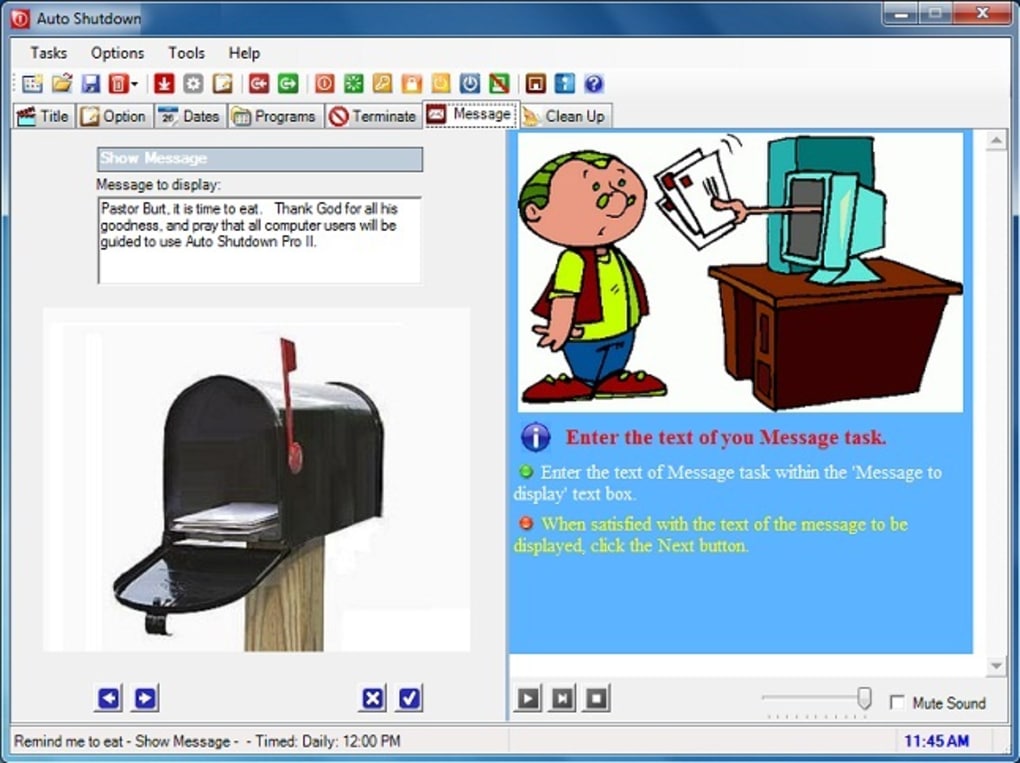
While the software excels in its functionality, the user interface has received some criticisms. Some users have described the interface as cluttered, lacking a polished and intuitive design. However, this aesthetic shortcoming shouldn’t overshadow the powerful and comprehensive features that underly the program’s functionality. The core functionality remains impressive, enabling users to achieve significant energy savings and enhance the longevity of their computers.
Despite the criticism, the program’s ease of use remains a major advantage. Navigating the scheduling options and setting up various triggers is generally straightforward, even for users with limited technical expertise. The intuitive nature of the settings makes it easily manageable for diverse users with varying levels of computer literacy.
Comparison with Alternative Applications
Several alternative applications offer similar automated shutdown capabilities. However, Auto Shutdown Free distinguishes itself through its combination of features, particularly the extensive event scheduling options, exception handling, and multilingual support. Many competitors offer a more streamlined interface, but often at the expense of the advanced capabilities available in Auto Shutdown Free.
Consideration of alternatives should always be accompanied by a comparison of features and functionality to ascertain the best fit for individual needs. While some alternatives may boast sleeker user interfaces, the comprehensive feature set of Auto Shutdown Free often outweighs this aesthetic consideration for many users.
Conclusion: A Powerful Tool for Energy Savings and System Health
Auto Shutdown Free, despite its somewhat cluttered interface, proves a highly effective and versatile tool for managing your computer’s power consumption. Its extensive features, including flexible scheduling, multiple trigger options, and robust exception handling, provide a comprehensive solution for enhancing both the lifespan and efficiency of your system. The significant energy savings and potential reduction in hardware wear and tear should outweigh the minor aesthetic concerns for the majority of users. While alternatives exist, the extensive functionalities offered by Auto Shutdown Free make it a strong contender in the field of automated PC power management software. Its ability to intelligently manage energy consumption while protecting your workflow makes it a valuable tool for any Windows user looking to optimize their system’s performance and longevity.
File Information
- License: “Free”
- Latest update: “December 21, 2023”
- Platform: “Windows”
- OS: “Windows 8”
- Language: “English”
- Downloads: “60K”
- Size: “619.09 KB”


