
AutoClick Robot is a free Windows utility designed to automate repetitive mouse and keyboard actions. This powerful tool offers a programmable interface, allowing users to automate a wide range of tasks, from simple clicks to complex multi-step sequences. Whether you need to perform hundreds of clicks, fill out online forms repeatedly, or interact with web applications in a predetermined manner, AutoClick Robot can significantly increase your efficiency and save valuable time.
Key Features and Functionality
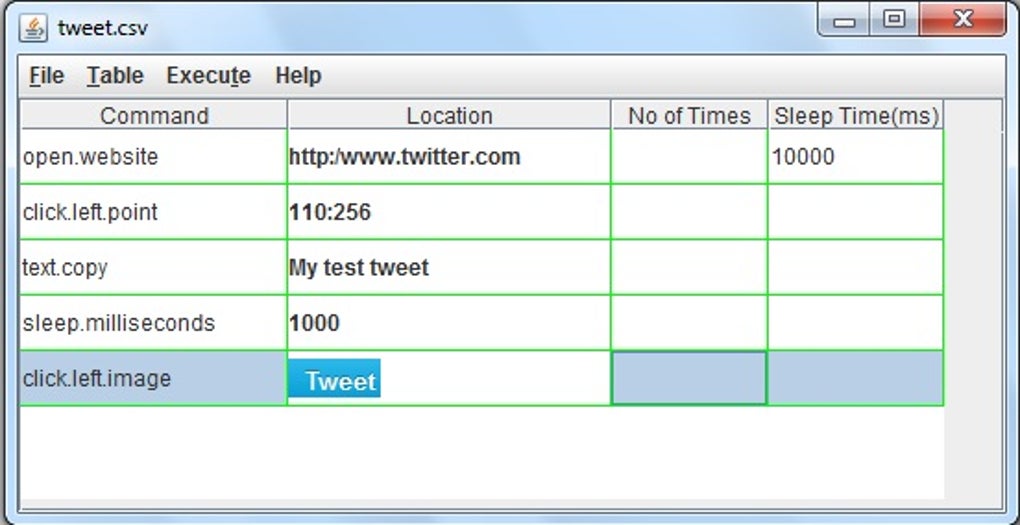
AutoClick Robot’s primary function is to record and replay user actions. This means it can meticulously replicate any sequence of mouse clicks, keyboard inputs, and other actions performed on your computer. This recording capability simplifies the automation process, eliminating the need for complex scripting or programming knowledge for simpler tasks. More advanced users can leverage its programmable interface for intricate automation scenarios.
Here’s a detailed breakdown of its key features:
-
Mouse and Keyboard Event Recording and Playback: The software’s core functionality lies in its ability to capture a user’s mouse and keyboard interactions and replay them seamlessly. This is particularly useful for tasks involving repetitive clicking on specific website buttons, navigating through menus, or filling out online forms with consistent data. The recorded actions are stored as a script, enabling users to reuse them repeatedly without manual intervention.
-
Image Recognition and Clicks: AutoClick Robot extends its capabilities beyond simple coordinate-based clicks. It can identify and click on specific images on the screen. This feature is invaluable when dealing with dynamic interfaces where element positions may change, allowing the software to locate and interact with the correct elements regardless of their precise location on the screen. This image-based interaction adds a layer of robustness to automation, making it more adaptable to varying screen resolutions and website layouts.
-
Data Input from External Sources: For tasks requiring input of variable data, AutoClick Robot supports importing data from external sources like Excel spreadsheets. This feature enables users to automate processes such as bulk data entry, where data needs to be copied from a spreadsheet and pasted into multiple fields of a website or application. This integration significantly streamlines repetitive data entry tasks, reducing errors and accelerating workflow.
-
Looping and Conditional Logic: The software allows users to execute actions repeatedly in a loop, defining the number of iterations required. Furthermore, AutoClick Robot, through its programmable interface, can support conditional logic. This allows for the creation of more complex automation sequences where the next action is dependent on specific conditions. This enhanced control ensures more adaptable and robust automation flows.
-
Programmable Interface for Complex Tasks: While the recording function suits simpler automation needs, the programmable interface empowers users to tackle complex scenarios. Using its scripting capabilities, experienced users can create intricate automation sequences involving conditional logic, loops, and other advanced programming constructs. This flexibility allows for highly customized solutions tailored to specific application requirements.
-
Applications across Various Platforms: While the current version primarily supports Windows, the software’s versatile nature suggests potential future expansions to encompass various operating systems and platforms. The core concepts of mouse and keyboard event automation are platform-independent, making this a possible avenue for future development.
Automating Real-World Scenarios
The applications of AutoClick Robot are diverse and extensive. Its capabilities prove highly beneficial across a wide spectrum of applications and user needs. Consider these examples:
-
Social Media Management: Automating tasks like liking posts, following users, or scheduling tweets can save significant time and effort for individuals or businesses managing multiple social media accounts. The software can be programmed to perform these actions repeatedly, ensuring consistent engagement across platforms.
-
Data Entry and Form Filling: Filling out repetitive online forms becomes incredibly efficient with AutoClick Robot. Users can record the process once and replay it multiple times, feeding data from an Excel spreadsheet to automate the process. This eliminates manual data entry, saving time and reducing errors.
-
Online Gaming: While ethical considerations must be paramount, certain game tasks that involve repetitive actions, such as clicking or keyboard inputs, could be potentially automated, though the developers do not condone such use. Remember that many online games have strict policies against automation.
-
Stock Trading and Financial Applications: Automating trades based on predefined conditions or regularly adding stocks to a trading platform are examples of how AutoClick Robot can be utilized within the financial domain. However, extreme caution is warranted in this context due to the high stakes involved in financial transactions.
- Website Testing and Monitoring: AutoClick Robot could be used in a controlled testing environment to simulate user interaction, performing repetitive tasks to test the stability and functionality of websites. This would be helpful to developers in identifying and resolving potential bugs or performance issues.
Comparison with Alternative Automation Tools
The market offers various automation tools, each with its strengths and weaknesses. AutoClick Robot distinguishes itself through its balance of ease of use and powerful functionality.
Compared to some simpler auto-clickers, AutoClick Robot offers advanced features such as image recognition and data import from external sources. These features are crucial for handling complex automation scenarios that simpler tools might struggle with. On the other hand, more sophisticated automation tools might require more technical expertise, particularly those requiring extensive scripting or programming. AutoClick Robot attempts to strike a balance, providing a straightforward interface for basic tasks alongside the power and flexibility of a programmable interface for more advanced needs.
The choice of automation software depends heavily on the user’s technical skills and the complexity of the tasks to be automated. For users who need simple, straightforward automation, a basic auto-clicker might suffice. However, for more complex and versatile automation needs, AutoClick Robot’s blend of usability and sophisticated features provides a compelling solution.
Security and Ethical Considerations
While AutoClick Robot offers powerful automation capabilities, it’s essential to use it responsibly and ethically. Misuse of the software could lead to several consequences:
-
Violation of Website Terms of Service: Many websites prohibit automation, and using AutoClick Robot to circumvent these rules could lead to account suspension or permanent bans.
-
Legal Ramifications: Depending on the context and the specific tasks automated, there might be legal implications associated with the use of the software. Users should always adhere to relevant local and international laws regarding automated activities.
-
Security Risks: Improperly configured or used automation scripts could inadvertently expose personal information or compromise system security.
Therefore, users should always exercise caution and ensure they understand the ethical and legal implications of using the software before applying it to any task.
Conclusion
AutoClick Robot provides a robust and versatile solution for automating repetitive tasks on a Windows computer. Its intuitive interface makes it accessible to users with varying levels of technical expertise, while its powerful programmable features empower advanced users to create highly customized automation solutions. The software’s versatility extends to various applications, from social media management to data entry and potentially even website testing. However, ethical and legal considerations should always guide its use, ensuring that the software’s capabilities are utilized responsibly and within the boundaries of legal compliance and website terms of service. Responsible usage will allow users to leverage this tool’s potential while mitigating potential risks and negative consequences.
File Information
- License: “Free”
- Version: “2”
- Latest update: “March 12, 2019”
- Platform: “Windows”
- OS: “Windows 2000”
- Language: “English”
- Downloads: “25.4K”
- Size: “50.16 KB”


