
Autodesk AutoCAD Civil 3D is a powerful, industry-standard software application designed for civil engineering professionals. This comprehensive review focuses on version 2014, examining its features, capabilities, and overall usability. While newer versions exist, understanding the functionalities of version 2014 provides valuable insight into the core strengths of the software and its evolution. This review will delve into the program’s strengths and limitations, comparing it to alternatives and considering its place within the broader landscape of project management and CAD software.
Core Features and Functionality
Autodesk AutoCAD Civil 3D 2014 is a Windows-based application offering a comprehensive suite of tools for designing, analyzing, and documenting civil engineering projects. Its core functionality centers around the creation and manipulation of 3D models, incorporating various data sources and enabling users to visualize complex projects with precision. This allows for accurate representation of terrain, infrastructure, and other crucial elements within a civil engineering project.
The software’s strength lies in its ability to handle large datasets efficiently. This is crucial for managing the extensive amounts of data often associated with large-scale civil engineering endeavors. The efficient processing of this data allows for rapid design iterations and analyses, saving time and resources throughout the project lifecycle.
Key features in version 2014 include:
-
Surface Modeling: Creating and manipulating digital terrain models (DTMs) is a cornerstone of Civil 3D. Version 2014 allows users to import various data formats, including point clouds, contours, and breaklines, to generate accurate and detailed surface representations. This enables detailed analysis of topography and facilitates the design of earthworks and other site-related features. The software’s ability to seamlessly integrate different data sources is crucial for ensuring accuracy and consistency throughout the design process.
-
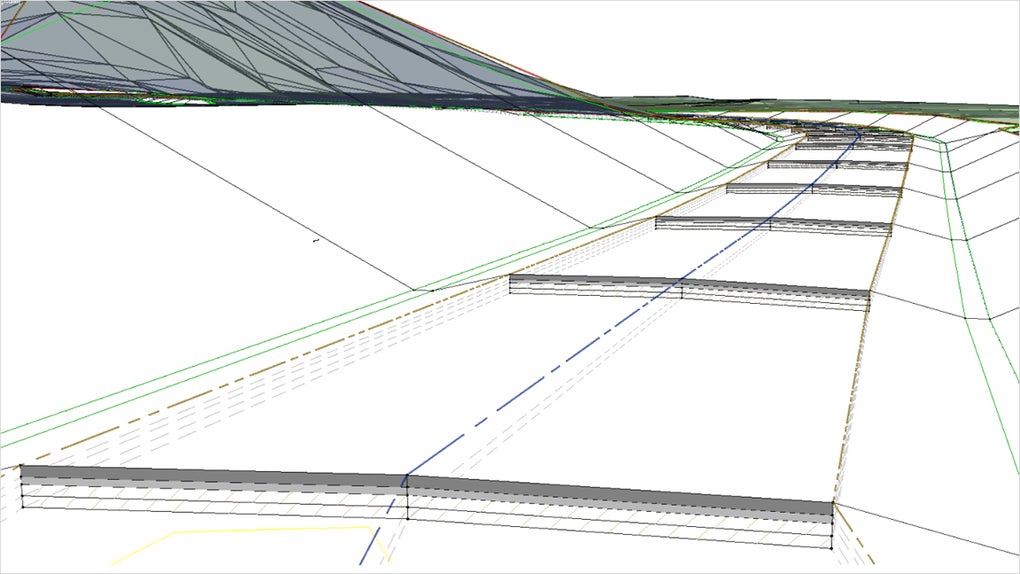
Corridor Modeling: This feature is invaluable for designing transportation infrastructure such as roads and railways. Users can define corridor alignments and then design cross-sections, incorporating elements such as roadways, shoulders, ditches, and utilities. This facilitates the efficient design and analysis of complex transportation networks. The ability to automatically generate quantities and other data from the corridor model simplifies cost estimation and project planning.
-
Drainage Design: AutoCAD Civil 3D 2014 provides tools for designing drainage systems, including pipes, channels, and other related infrastructure. Users can model hydraulic flow, analyze drainage basin characteristics, and generate reports detailing design parameters. The integration of hydraulic modeling capabilities ensures that drainage systems are designed to meet relevant standards and regulations.
-
Grading Design: The grading design capabilities allow for the efficient modeling and analysis of earthworks. Users can create grading plans, optimize earthmoving volumes, and generate reports detailing cut and fill quantities. This feature is critical for managing costs and optimizing the overall site development process.
-
Annotation and Documentation: Creating accurate and detailed drawings is crucial for communication and regulatory compliance. AutoCAD Civil 3D 2014 provides a robust set of annotation tools, enabling the generation of professional-quality drawings and plans. The software’s ability to generate automated reports and schedules further enhances efficiency and reduces the potential for errors.
Comparison with Alternative Software
Autodesk AutoCAD Civil 3D is not the only software application available for civil engineering design. Several alternative programs offer similar functionalities, each with its strengths and weaknesses. A comparison is essential for understanding the unique advantages of Civil 3D.
Some prominent alternatives include:
-
Bentley MicroStation/OpenRoads: This is a strong competitor, known for its powerful modeling capabilities and robust data management features. However, it may have a steeper learning curve compared to AutoCAD Civil 3D.
-
FreeCAD: As an open-source alternative, FreeCAD offers a cost-effective solution. However, its functionality may be less comprehensive than Civil 3D, particularly regarding specialized civil engineering tools.
-
Civil 3D’s integration with other Autodesk software: One significant advantage of Civil 3D is its seamless integration with other Autodesk products, such as AutoCAD, Revit, and InfraWorks. This integration streamlines workflows and facilitates collaboration among different disciplines.
System Requirements and Usability
Autodesk AutoCAD Civil 3D 2014, like many CAD programs, has specific system requirements to ensure optimal performance. These generally include a reasonably powerful computer with sufficient RAM and a dedicated graphics card to handle the processing of complex 3D models. Users should refer to Autodesk’s official documentation for the precise specifications required for their operating system.
Usability is a key factor in any software application. While AutoCAD Civil 3D is a powerful tool, its interface might initially seem complex, particularly for users without prior experience with CAD software. The learning curve can be steep, requiring time and practice to master the software’s full capabilities. However, numerous online tutorials and training resources are available to assist users in mastering the software’s features.
Limitations and Future Developments
While AutoCAD Civil 3D 2014 offers extensive features, it also has certain limitations. Some users may find the software’s interface complex and require significant training to fully utilize its potential. Additionally, the software’s licensing costs can be a significant barrier for some users.
Since 2014, Autodesk has released several updated versions of AutoCAD Civil 3D, incorporating enhancements and addressing previous limitations. These updates often include improved performance, enhanced user interfaces, and new features. Therefore, while this review focuses on version 2014, it’s important to consider the advancements made in subsequent releases. Staying updated with the latest versions is crucial for accessing the most efficient and comprehensive functionalities.
Conclusion
Autodesk AutoCAD Civil 3D 2014 remains a significant tool within the civil engineering industry. Its powerful modeling capabilities, integrated analysis tools, and efficient documentation features make it a valuable asset for professionals working on various projects. While the initial learning curve can be challenging, the comprehensive functionality and integration with other Autodesk software offer significant advantages. However, potential users should carefully consider the system requirements and licensing costs before adopting the software. The availability of alternative software options should also be taken into account when making a decision. Ultimately, the suitability of AutoCAD Civil 3D depends on the specific needs and resources of each individual user.
File Information
- License: “Trial version”
- Version: “2014”
- Latest update: “June 6, 2024”
- Platform: “Windows”
- OS: “Windows 7”
- Downloads: “5.8K”
- Size: “16.03 MB”


