
Autodesk Maya stands as a titan in the world of 3D computer graphics, animation, and modeling. This comprehensive software package has earned its reputation through decades of innovation, powering countless award-winning films, television shows, video games, and other visual projects. Its robust feature set, extensive capabilities, and industry-standard workflows have solidified its position as a go-to tool for professionals worldwide. However, its complexity also means it comes with a steep learning curve, making it a more suitable choice for experienced users or those committed to dedicated learning.
What Makes Autodesk Maya Unique?
Maya’s power stems from its flexible and extensible architecture. Unlike some simpler 3D applications, Maya isn’t just a collection of tools; it’s a platform built upon a powerful scripting foundation. This architecture allows for extensive customization and automation through its robust Application Programming Interface (API) and support for two embedded scripting languages: Maya Embedded Language (MEL) and Python. This empowers advanced users to create custom tools, automate repetitive tasks, and tailor the software to their specific workflows, pushing the boundaries of what’s possible within the application.
The openness of Maya’s architecture contributes to its broad appeal. It allows for integration with other software and hardware, fostering collaboration and streamlining production pipelines. This integration extends beyond simple file exchange; it allows for seamless workflows between different stages of the 3D pipeline, from modeling and animation to rendering and compositing. This interconnectedness is a key element of Maya’s effectiveness in professional environments.
Beyond its underlying architecture, Maya boasts a rich arsenal of industry-leading features. These include sophisticated modeling tools for creating both organic and hard-surface models, advanced animation tools for bringing characters and objects to life, a comprehensive dynamics system for simulating realistic physical interactions, and powerful rendering capabilities for creating stunning visuals. These tools, along with Maya’s extensive libraries of presets, shaders, and other resources, allow artists to focus on creativity rather than getting bogged down in technical details.
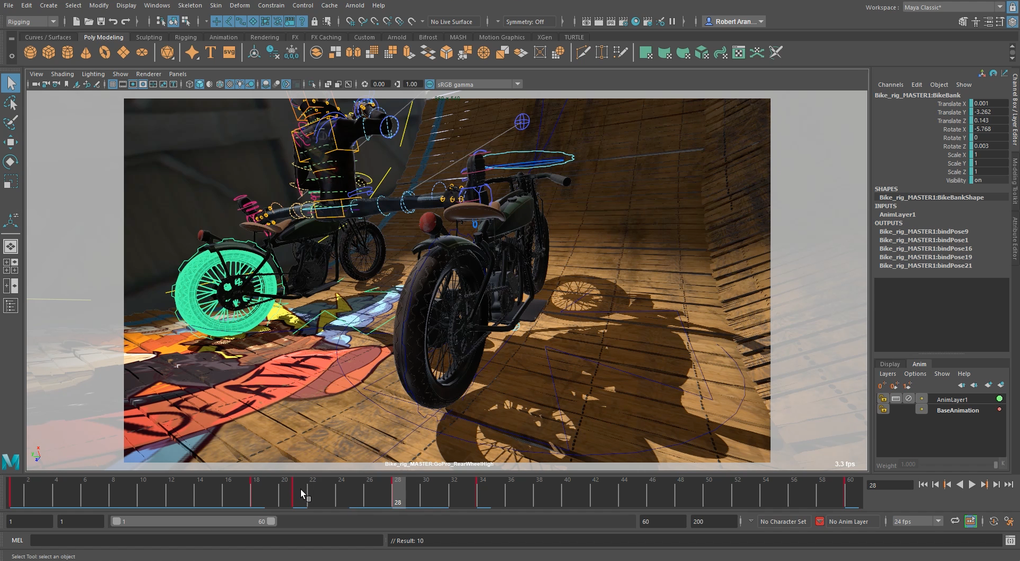
Maya’s impact on the entertainment industry is undeniable. Its use in major film studios like Blue Sky Studios, Framestore, and Moving Picture Company is testament to its capabilities. Blockbuster animated films such as Frozen and Wreck-It Ralph are just two examples of the impressive visuals created using Maya. This demonstrates its ability to handle complex projects and produce high-quality results, suitable for the demands of large-scale productions. The versatility of Maya extends beyond film; it’s also extensively used in video game development, visual effects for television, and architectural visualization.
Autodesk Maya’s Feature Set: A Closer Look
The versatility of Autodesk Maya is best appreciated by examining its key features in detail:
-
Modeling: Maya’s modeling tools are renowned for their precision and flexibility. Whether creating intricate character models, detailed environments, or complex mechanical designs, Maya provides the tools to achieve a high level of detail and realism. Users can leverage polygon modeling, NURBS modeling, and subdivision surface modeling techniques, allowing them to choose the best approach for each specific task. The software also supports various sculpting tools, enabling artists to work with digital clay in a natural and intuitive way.
-
Animation: Maya’s animation tools are equally impressive, providing animators with a complete set of capabilities for creating realistic and expressive character animations. The software offers traditional keyframing techniques, as well as more advanced methods such as motion capture integration and procedural animation. Its robust character rigging system allows for creating complex and flexible rigs, facilitating the creation of nuanced and believable character movements.
-
Dynamics: Maya’s dynamics system enables the simulation of real-world physical phenomena such as gravity, collisions, and fluid flow. This is crucial for creating realistic effects such as cloth simulation, particle effects, and rigid body dynamics. These tools are essential for crafting believable and immersive environments, enhancing the overall realism of visual projects.
-
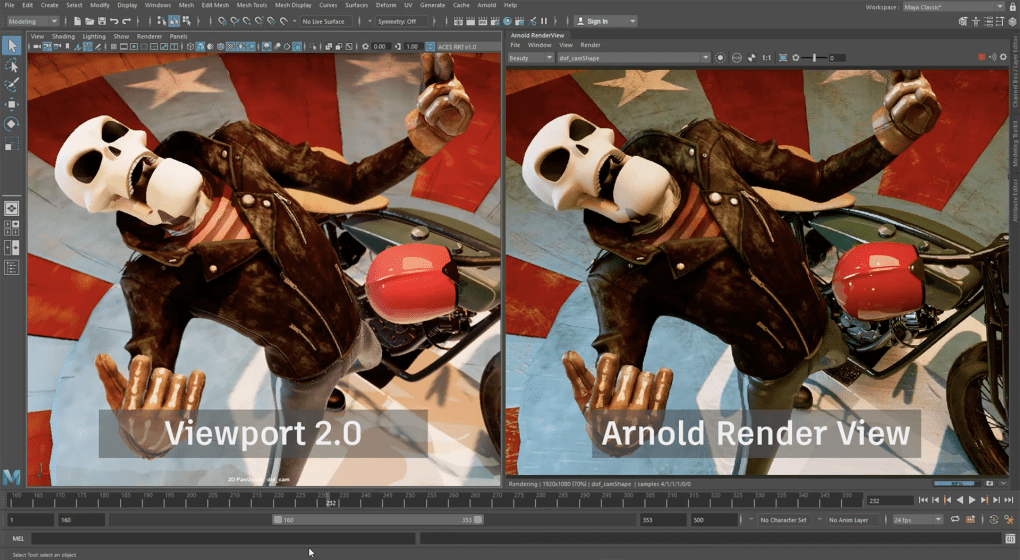
Rendering: Maya’s rendering engine allows for the creation of high-quality images and animations. The software supports a range of renderers, including its own built-in renderer, as well as integrations with third-party renderers like Arnold and RenderMan. This flexibility allows artists to choose the renderer that best suits their project’s needs and desired level of realism.
- Scripting and Customization: As mentioned earlier, Maya’s ability to be customized and extended through scripting is a defining feature. This empowers advanced users to create tailored workflows, automate tasks, and integrate with other software applications. This level of control is unparalleled in many other 3D applications and allows for significant productivity gains and specialized functionalities.
Is Autodesk Maya Right for You?
Autodesk Maya’s powerful feature set and widespread adoption make it a tempting choice for aspiring and professional 3D artists. However, its complexity should not be overlooked. The software boasts a steep learning curve, requiring significant time and effort to master its capabilities. Beginner users might find themselves overwhelmed by the sheer number of tools and features available. Therefore, a clear understanding of your needs and skill level is critical before investing in Maya.
While a free trial is available, allowing users to explore the software’s capabilities, it’s essential to realistically assess whether the investment in time and resources needed to learn Maya aligns with your goals. If you are a beginner exploring 3D modeling and animation, consider starting with simpler software options to develop a fundamental understanding before tackling Maya’s complexities.
The cost of Autodesk Maya is another crucial factor. It’s a subscription-based software, with monthly, annual, and multi-year plans available. These subscription costs should be factored into your decision-making process. However, for students and educational institutions, Autodesk offers free access to Maya, providing an excellent opportunity for learning and skill development.
Alternatives to Autodesk Maya
If Autodesk Maya’s complexity or cost proves prohibitive, several compelling alternatives are worth exploring. These range from free and open-source options like Blender, which provides a powerful and versatile suite of 3D tools, to more professional alternatives such as Cinema 4D and Autodesk 3ds Max. Each alternative has its own strengths and weaknesses, so it’s essential to research and evaluate the features and capabilities that best suit your specific needs and budget.
Conclusion
Autodesk Maya remains a dominant force in the world of 3D modeling and animation, consistently setting industry standards for quality and performance. Its powerful feature set, flexible architecture, and widespread adoption make it the preferred choice for many professionals. However, its complexity and cost make it essential to carefully consider your skills, budget, and project requirements before committing to this industry-standard software. The decision of whether or not to use Autodesk Maya hinges on a balance between its exceptional capabilities and the considerable effort required to master its intricacies.
File Information
- License: “Trial version”
- Latest update: “May 23, 2023”
- Platform: “Windows”
- OS: “Windows 7”
- Language: “English”
- Downloads: “435.2K”


