
AutoSizer is a free, lightweight Windows utility designed to streamline your window management experience. This simple yet powerful program addresses a common frustration: applications opening at non-optimal sizes, requiring manual maximization or resizing. AutoSizer eliminates this extra step, automatically resizing specified windows to your preferred dimensions upon launch. Its unobtrusive design ensures it operates in the background without cluttering your desktop.
Streamlining Window Management
Many users find themselves constantly adjusting window sizes. Web browsers often default to smaller-than-screen dimensions, documents might open minimized, and other applications may lack intuitive resizing options. Manually adjusting each window can be tedious, particularly if repeated frequently. AutoSizer solves this problem by allowing users to define specific applications and their desired window states (maximized, specific dimensions, etc.). Once configured, AutoSizer silently takes over, ensuring each application starts precisely as intended.
This is particularly beneficial for users who work with multiple applications simultaneously. Maintaining consistent window sizes across applications enhances productivity and reduces visual clutter, promoting a more organized and efficient workflow. No more juggling between multiple windows, adjusting sizes, and struggling to find the information you need. AutoSizer ensures all your windows are precisely where and how you want them, from the moment you launch them.
How AutoSizer Works
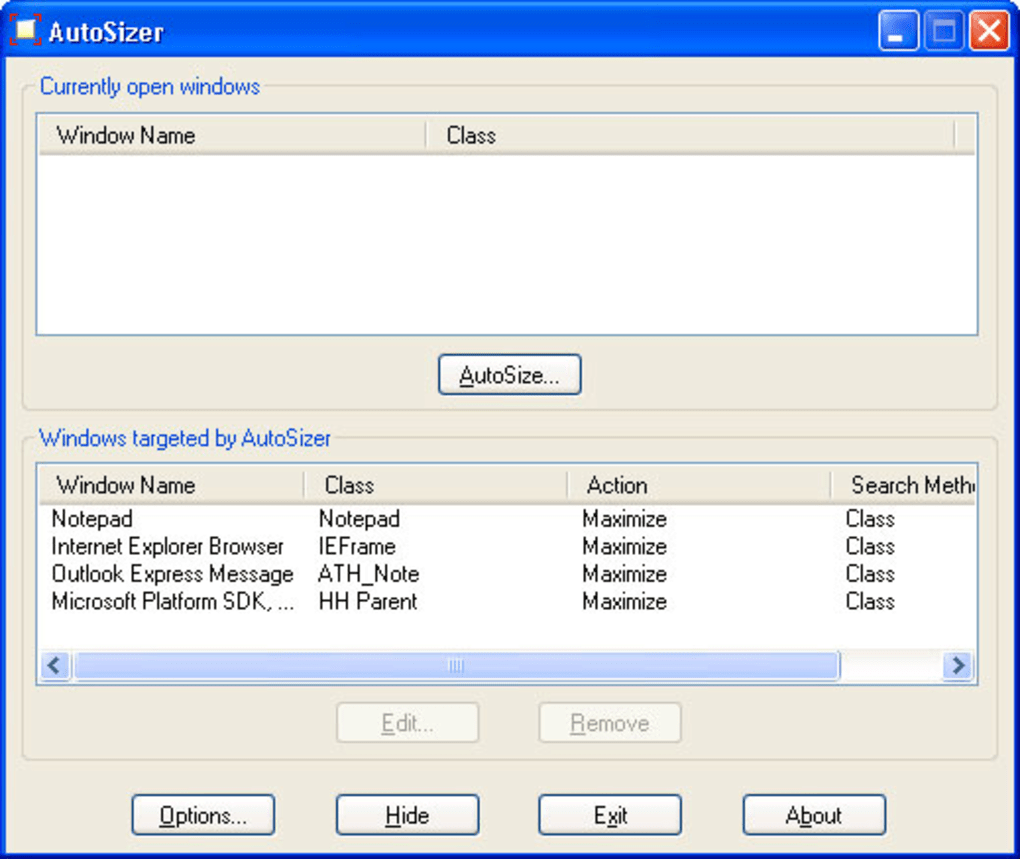
AutoSizer operates discreetly in the system tray, remaining invisible until needed. This unobtrusive presence allows for seamless integration into your daily workflow without visual distraction. The program’s lightweight nature ensures minimal impact on system resources, preventing performance slowdown or conflicts with other applications.
The core functionality revolves around user-defined profiles. Users select target applications and specify their desired size and window state. AutoSizer then monitors for the launch of these applications, instantly adjusting their dimensions according to the pre-configured settings. This automated process removes the manual intervention needed for resizing, saving considerable time and effort over time.
The simplicity of the configuration process contributes significantly to AutoSizer’s ease of use. The interface is designed to be intuitive and accessible to users of all technical levels. This minimal configuration requirement ensures that even those unfamiliar with system utilities can quickly set up and utilize AutoSizer effectively. The learning curve is practically non-existent, maximizing the benefit for a wide range of users.
Key Features and Benefits
AutoSizer offers a concise yet effective set of features, each designed to enhance the window management experience:
-
Automatic Window Resizing: The core function of AutoSizer is the automatic adjustment of application window sizes based on user-defined settings. This simple yet impactful feature eliminates the repetitive manual resizing required for many applications.
-
System Tray Integration: AutoSizer resides in the system tray, ensuring a non-intrusive presence. It operates quietly in the background, ready to act whenever a configured application launches. This design minimizes desktop clutter and prevents interference with other active programs.
-
Lightweight and Efficient: AutoSizer is designed for minimal resource consumption, ensuring it won’t impact system performance. Its compact size ensures a fast download and installation process.
-
User-Friendly Interface: The configuration process is intuitive and accessible to all users. A simple interface makes setting up and managing profiles effortless, requiring minimal technical expertise.
-
Compatibility: AutoSizer works with a wide range of applications, including web browsers, text editors, and other common software, providing versatile window management capabilities.
-
Customizable Profiles: Users can create multiple profiles to tailor window sizes to different workflows or application groups. This level of customization ensures AutoSizer can accommodate various needs and preferences.
- Background Operation: AutoSizer runs silently in the background, automatically resizing windows without requiring user interaction. This automated functionality enhances efficiency and productivity.
User Reviews and Feedback
User reviews consistently highlight AutoSizer’s effectiveness in solving the common annoyance of improperly sized application windows. Many users praise its speed, small download size, and ease of use. One user commented, “For months my windows open minimized, not full-screened…I was amazed at the speed and small size of the download; it worked straight away…A must-have for anyone.” Another user simply stated, “It works - what more can I say?” These testimonials reflect the program’s straightforward functionality and its significant impact on user experience.
While negative feedback is scarce, some users have encountered issues with compatibility in specific scenarios. Such instances may stem from unusual application behaviors or system configurations. However, the overwhelmingly positive reception suggests that AutoSizer effectively addresses a frequent user frustration for most.
The consistent positive feedback underscores AutoSizer’s success in providing a simple, efficient solution to a common problem. The small size and speed of download, combined with the immediate impact on window management, contribute to its widespread appeal among users.
Alternatives to AutoSizer
While AutoSizer provides a streamlined solution, several alternative applications offer similar or complementary window management capabilities. These alternatives often provide more advanced features but may also have a steeper learning curve or higher resource consumption. Some noteworthy alternatives include:
-
Sizer: A similar utility focused on resizing windows, often praised for its highly customizable options and more advanced features than AutoSizer, but possibly with a steeper learning curve.
-
WinSplit Revolution: Offers more extensive window management tools beyond simple resizing, including the ability to divide the screen into customizable zones for efficient multi-tasking. Its feature set is more comprehensive than AutoSizer, but with a corresponding increase in complexity.
-
GridMove: Provides a grid-based system for arranging windows, enhancing organization, particularly beneficial for users with multiple monitors or many simultaneously open applications.
These alternatives may better suit users requiring advanced functionality, but AutoSizer remains a compelling option for those prioritizing simplicity and ease of use. The choice depends heavily on individual needs and preferences. AutoSizer excels in its simplicity, focusing exclusively on automated window resizing with minimal user intervention.
Conclusion
AutoSizer offers a straightforward yet effective solution to a common productivity hurdle: inconsistent application window sizes. Its ease of use, lightweight design, and immediate impact make it a valuable tool for anyone who wants to streamline their window management. While more complex alternatives exist, AutoSizer shines in its simplicity and efficiency, making it an excellent choice for users seeking a hassle-free approach to optimizing their workspace. Its consistent positive user reviews and sustained popularity affirm its value as a practical and beneficial utility for the Windows operating system.
File Information
- License: “Free”
- Version: “1.7”
- Latest update: “November 20, 2008”
- Platform: “Windows”
- OS: “Windows ME”
- Language: “English”
- Downloads: “19.7K”
- Size: “270.34 KB”


