
AV Cast is a free, user-friendly application designed to seamlessly stream compatible media from your Windows PC to various Google Cast-enabled devices, including Google TV and Chromecast. This versatile tool bridges the gap between your computer and your television, offering a convenient way to enjoy your personal media collection on a larger screen without the hassle of complex setups or expensive hardware. This comprehensive guide will delve into the functionalities, advantages, and usage of AV Cast, highlighting its capabilities and addressing common queries.
Effortless Streaming: Connecting Your PC to Your TV
The core function of AV Cast revolves around its ability to cast media from your Windows PC to your Chromecast or other compatible smart TVs. This eliminates the need for cumbersome cable connections, enabling you to effortlessly share photos, videos, presentations, or even your entire desktop screen with others. The process is straightforward, designed for users of all technical skill levels. Once AV Cast is installed, simply select your casting device from the application’s interface and begin streaming your chosen content. This ease of use makes AV Cast an attractive option for both casual users and those seeking a hassle-free solution for screen mirroring and media sharing.
AV Cast’s compatibility extends beyond Chromecast, encompassing a range of devices that support the Google Cast functionality. This broad compatibility significantly enhances its utility, making it a versatile solution for a variety of home entertainment setups. You can cast content to Google TV, Chromecast devices (including the Chromecast Mini), Android TV boxes, Chromebooks, and even Apple TV devices (with appropriate compatibility considerations). This expansive reach ensures that AV Cast caters to a large audience with diverse entertainment preferences and technological landscapes.
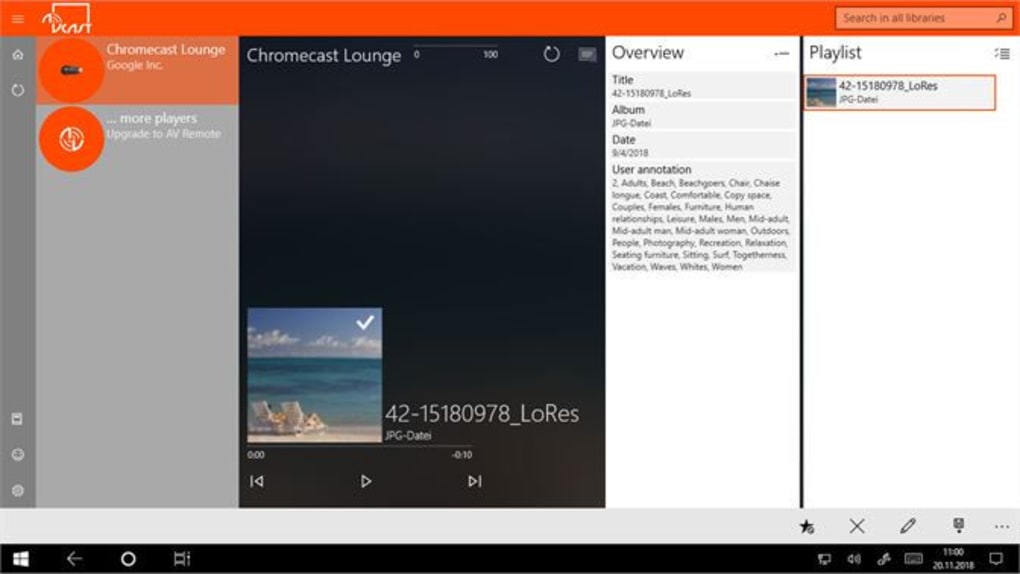
The application is designed to be intuitive and user-friendly, removing any unnecessary complexities involved in screen mirroring and media casting. No specialized technical knowledge is required to use AV Cast effectively. The simple interface allows you to quickly select your casting device and begin streaming your chosen content in minutes. This user-centric approach is one of the key factors contributing to its popularity among users seeking a straightforward and efficient solution for casting media from their Windows PCs.
Beyond Basic Streaming: Advanced Features and Capabilities
AV Cast’s capabilities extend beyond basic media streaming. It offers several features designed to enhance the user experience and provide added flexibility. For instance, the ability to connect multiple laptops to a single Chromecast device without any need for cable rearrangements offers significant convenience, especially in situations where multiple users might want to share their content on a larger screen. This eliminates the hassle of constantly unplugging and replugging cables, streamlining the casting process.
Furthermore, the application facilitates the effortless transfer of files between multiple computers. This functionality proves extremely useful for users who often need to share files or documents among different PCs within a network. This feature significantly improves workflow efficiency and reduces the time spent on manual file transfers. Instead of using external storage devices or cloud services, you can directly transfer files between your connected computers through AV Cast.
Compatibility extends to smart TVs and DLNA (Digital Living Network Alliance) devices, broadening its potential use cases. This ensures that AV Cast can be used in a range of home entertainment setups, regardless of the specific brand or model of your smart TV or media streamer. The application’s versatility is a significant advantage, ensuring broad compatibility across diverse home entertainment systems.
AV Cast also works with various Bluetooth-enabled devices, allowing for a comprehensive audio experience. This integration allows you to seamlessly switch between audio outputs, using either your TV’s speakers or connected Bluetooth speakers or headphones for enhanced audio quality and flexibility. This added layer of functionality caters to a wider range of user needs and preferences, offering a more customizable audio experience.
AV Cast: A Comparison with Alternative Solutions
Several alternative applications offer screen mirroring and media casting capabilities. However, AV Cast stands out due to its combination of simplicity, broad device compatibility, and ease of use. Compared to some paid alternatives, AV Cast’s free availability makes it a particularly attractive option for users seeking a cost-effective solution.
While some alternative apps might offer more advanced features (such as specialized encoding options or higher resolution support), AV Cast excels in its user-friendly interface and broad compatibility. For users who prioritize a simple, hassle-free experience, AV Cast’s streamlined design and wide device support are significant advantages. The ease of setup and use compensates for any lack of advanced features for a large percentage of users.
Consider other screen mirroring applications such as EasyCast, Screen Share, or AirServer. While they might offer similar functionalities, they often come with a price tag or more complex interfaces. AV Cast’s free and straightforward approach sets it apart, making it an ideal choice for users who value simplicity and cost-effectiveness. Direct comparison of performance benchmarks against competing applications would require rigorous testing and analysis beyond the scope of this overview. However, user reviews frequently cite AV Cast’s reliability and ease of use as significant strengths.
Installing and Using AV Cast: A Step-by-Step Guide
Installing AV Cast is a straightforward process. Visit the official website to download the installer package specifically designed for your Windows operating system (Windows 11 compatibility is confirmed). Once downloaded, run the installer and follow the on-screen instructions. The installation process is typically quick and intuitive. No special technical expertise is required to successfully install and run AV Cast.
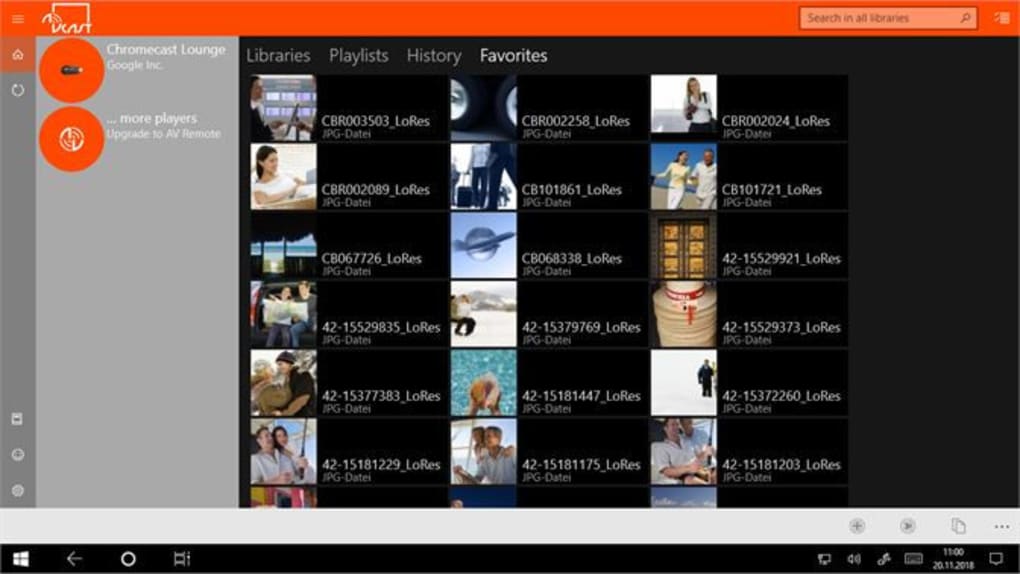
After successful installation, launch AV Cast from your Start Menu or desktop shortcut. The application will display a list of available casting devices on your network. Select your Chromecast or other compatible device from this list. Once connected, you can begin streaming media by selecting the content you wish to share. The application’s intuitive interface makes the streaming process remarkably simple.
AV Cast’s user interface is designed with simplicity in mind. The main screen clearly displays the connected devices and allows for easy selection of the content to be streamed. There are minimal settings or configurations to adjust, making it accessible to even novice users.
Troubleshooting any issues is typically straightforward. If a connection problem arises, check your network connection and ensure that both your PC and casting device are on the same network. The application’s help section or online documentation can provide further assistance if needed. The developers’ website may also offer additional support resources or a community forum for users to seek help and share experiences.
In conclusion, AV Cast offers a simple yet effective solution for streaming content from your Windows PC to a wide range of devices. Its free availability, user-friendly interface, and broad compatibility make it a strong contender in the world of screen mirroring and media casting applications. Whether you’re a casual user or a tech-savvy individual, AV Cast provides a reliable and convenient way to enjoy your PC’s content on a bigger screen.
File Information
- License: “Free”
- Version: “1.0”
- Latest update: “July 15, 2022”
- Platform: “Windows”
- OS: “Windows 11”
- Language: “English”
- Downloads: “1.7K”


