
AV Voice Changer Software is a versatile tool that allows users to modify and create a wide range of voices for various applications. From adding a humorous twist to online chats to producing professional-sounding voice-overs, this software offers a robust set of features aimed at both casual users and those seeking more advanced capabilities. This review delves into the software’s functionalities, strengths, weaknesses, and overall user experience.
Transforming Your Voice: Core Features and Capabilities
At its core, AV Voice Changer Software excels at real-time voice alteration. Users can instantly modify their voice to sound like a variety of characters, including elderly women, teenage boys, girls, and even animals. This real-time transformation makes it ideal for online interactions, instantly injecting humor or intrigue into conversations on platforms like Skype, TeamSpeak, Discord, and many others. The software’s compatibility extends beyond VoIP services; it works seamlessly with online games like World of Warcraft and Second Life, allowing players to add another layer of playful interaction to their gaming experiences.
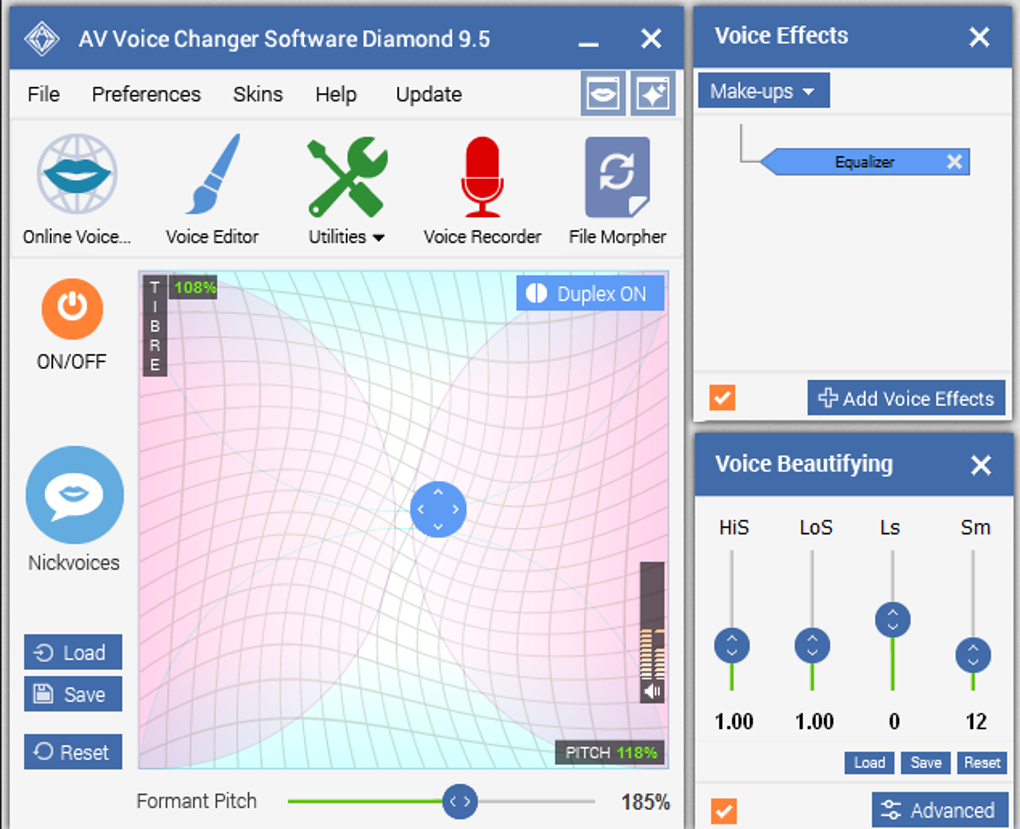
Beyond simple voice alteration, the software offers a sophisticated suite of tools for more fine-grained control over audio. Users can adjust various parameters to fine-tune their transformed voices, ensuring the desired effect is achieved. This level of customization caters to users who want precise control over pitch, tone, and other vocal characteristics. The software doesn’t just limit users to real-time transformations. It also provides the ability to record audio directly through the computer, enabling offline editing and voice modification of pre-recorded files. This opens up a wider range of applications, making it useful for creating voice-overs, dubbing audio, and generating unique sound effects.
The Diamond Edition, the version reviewed here, boasts an improved voice morphing algorithm, delivering faster and smoother transitions between different voices. This enhanced performance ensures a more natural-sounding outcome, enhancing the overall user experience and allowing for smoother and more believable voice transformations. The software includes over 30 pre-set voices ready for immediate use, offering a diverse starting point for users of all skill levels. For users seeking even more variety, an extensive online add-on store offers additional voice packs and expansion options, giving them virtually endless potential to explore and experiment. The community-driven aspect further enhances the software’s appeal, fostering a vibrant network of users who share their custom creations, encouraging creativity and collaboration.
Beyond Voice Changing: Advanced Features and Functionality
AV Voice Changer Software isn’t just a voice changer; it functions as a comprehensive audio editing suite. The included Voice-Overs Editor and Voice Recorder provide a full-fledged recording and editing environment, enabling users to record, edit, and refine their audio projects within the software. This eliminates the need for separate audio editing tools, streamlining the workflow and simplifying the entire process of audio production. Users can easily record narrations, create voice-overs for videos, and adjust pre-recorded files with precision, fine-tuning every aspect of their audio work.
The File Morpher module further expands the software’s versatility. This feature allows users to convert audio files between various formats, facilitating easy integration with different platforms and devices. It also handles batch processing, enabling users to efficiently convert multiple files simultaneously, saving considerable time and effort. The ability to apply voice morphing settings from the Voice Morpher directly to these files enhances workflow, especially for those working on large projects with numerous audio segments.
The software offers a vast library of effects and audio enhancements, adding another layer of creativity and personalization. Users can incorporate various sound effects to further enhance the realism or humor of their creations. Whether it’s adding background noise to simulate a particular environment or creating unique sound designs, the software empowers users to craft precisely the auditory experience they desire.
Parody Voices and Celebrity Imitations: Fun and Entertainment
One of the more entertaining features of AV Voice Changer Software Diamond is its Parody Maker. This function aims to morph a user’s voice to sound like that of a celebrity or other famous individuals. While the results aren’t always perfect imitations, they often provide amusing and entertaining outcomes, perfect for casual use and playful interactions. The default selection of voices offers a good starting point, but the add-on store significantly expands the possibilities. Users can download free packages containing voices from a wider range of celebrities and other well-known personas, continually expanding the software’s potential for generating fun and creative audio.
User Experience and Interface: Strengths and Challenges
While the software packs a wealth of features, the interface might present a slight learning curve for new users. Unlike some simpler voice changers, the interface may require some time to navigate and master effectively. The abundance of options and parameters, while offering great flexibility, can initially feel overwhelming. However, once users become acquainted with the layout and the organization of the tools, the software’s intuitive design becomes apparent. The extensive tutorial resources available significantly ease the initial learning process.
The software’s trial version has a time-limited recording functionality, restricting the length of audio users can create. This limitation might restrict extensive projects during the trial period. Furthermore, achieving truly professional-sounding results may require some practice and experimentation, demanding users develop a skillset to fully utilize the software’s potential.
Community and Support: A Collaborative Ecosystem
AV Voice Changer Software benefits from a large and active online community. This community-driven aspect contributes significantly to the software’s appeal. Users share their creations, exchange tips and tricks, and provide support to each other, creating a thriving ecosystem of creativity and collaboration. This community readily offers assistance to new users, helping them overcome any initial challenges and get the most out of the software’s capabilities. The abundance of shared samples and pre-made files also serves as a valuable resource for users seeking inspiration or ready-to-use audio. This collective knowledge further enhances the software’s user experience, enriching it beyond a single user’s expertise.
In conclusion, AV Voice Changer Software Diamond is a powerful and versatile tool that goes beyond basic voice alteration. Its comprehensive features, ranging from real-time voice transformation to advanced audio editing and batch file processing, cater to a wide range of users and applications. While the interface may present a learning curve, the abundant resources, active online community, and the fun factor make it a valuable and entertaining tool for anyone interested in exploring the world of audio modification and creation.
File Information
- License: “Trial version”
- Latest update: “February 4, 2025”
- Platform: “Windows”
- OS: “Windows Vista”
- Language: “English”
- Downloads: “318.3K”
- Size: “57.61 MB”


