
AVG AntiVirus Free is a popular free antivirus program available for both Windows and Mac operating systems. This review delves into its features, performance, user interface, and compares it to alternative options to help you determine if it’s the right antivirus solution for your needs.
Protection Capabilities: What Does AVG AntiVirus Free Defend Against?
AVG AntiVirus Free provides robust protection against a wide range of online threats. Its core function is the detection and removal of viruses, malware, spyware, ransomware, and Trojan horses. These malicious programs can infiltrate your system through various means, including email attachments, malicious websites, and infected downloads. AVG actively scans for these threats, identifying and quarantining suspicious files before they can cause damage.
The program’s real-time protection monitors your system continuously, alerting you to potentially harmful websites and downloads. This proactive approach prevents many threats from ever reaching your computer. AVG also incorporates advanced technologies to identify and block zero-day exploits – vulnerabilities that are unknown to traditional antivirus signatures. This is particularly important in today’s dynamic threat landscape, where new malware is constantly emerging.
Beyond its malware protection capabilities, AVG AntiVirus Free helps protect your personal data and online privacy. It actively monitors for phishing attempts, which are designed to steal your sensitive information, such as usernames, passwords, and credit card details. By identifying these malicious websites and blocking access, AVG significantly reduces the risk of identity theft and financial loss. While not explicitly a firewall, the software’s threat detection mechanisms indirectly contribute to system security by preventing many intrusion attempts.
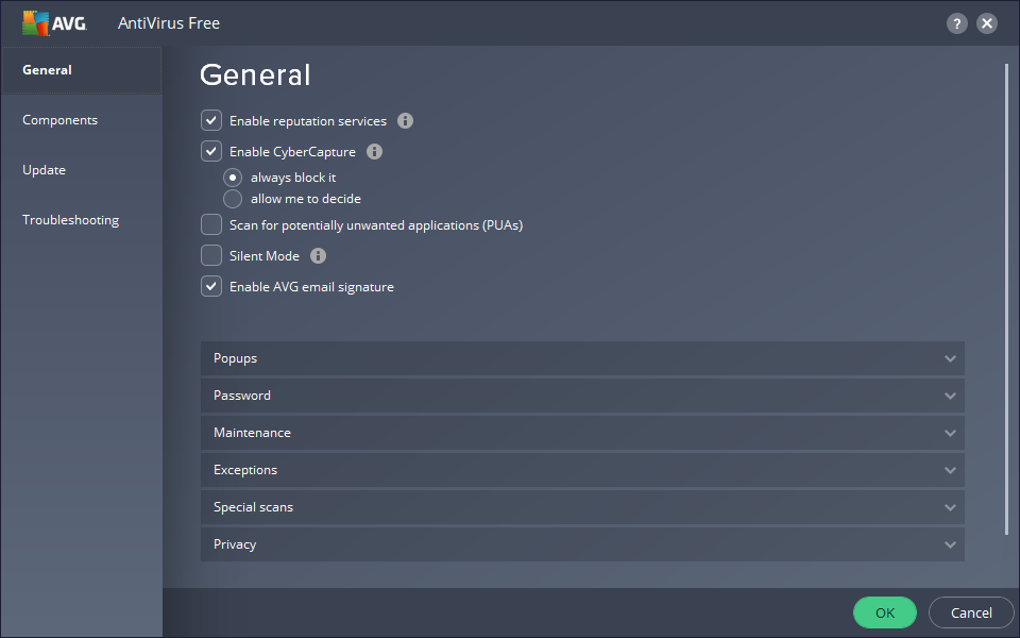
The software actively scans your system for potentially unwanted programs (PUPs). These are programs that, while not strictly malicious, may install unwanted toolbars, change your browser settings, or track your online activity. By identifying and alerting you to these programs, AVG empowers you to make informed decisions about what software you allow on your system, maintaining greater control over your digital environment. The quarantine feature allows you to review flagged files before deciding whether to remove or restore them, offering a level of user control that is essential for preventing false positives.
AVG AntiVirus Free performs comprehensive system scans, allowing you to assess the overall health of your computer. These scans can detect existing infections, identify vulnerabilities, and remove any threats found. The software also provides options for quick scans, targeting specific areas of your system, making it more efficient for checking only critical files and folders.
Features Offered in the Free Version: A Generous Package
Despite being a free antivirus program, AVG AntiVirus Free offers a comprehensive suite of features. These include:
- Real-time protection: Constant monitoring of your system for any malicious activity.
- Automated updates: Regular updates ensure that your antivirus definitions are always current, protecting against the latest threats.
- On-demand scans: The ability to perform full system scans, quick scans, or customized scans at your convenience.
- Website protection: Blocking access to malicious and potentially harmful websites.
- Download protection: Scanning downloaded files for malware before they can be executed.
- Basic malware detection: Protection against viruses, spyware, Trojans, and other forms of malware.
While the free version lacks some advanced features found in paid versions (such as a firewall, ransomware protection, and advanced privacy tools), it provides a solid foundation for protecting against the most common cyber threats. The level of protection offered is more than sufficient for many users, especially those without extremely sensitive data or specialized security needs.
User Interface and Ease of Use: Intuitive and Accessible
AVG AntiVirus Free boasts a clean and user-friendly interface. The dashboard provides clear visual cues about your system’s security status, making it easy to understand at a glance whether your system is protected or if there are any issues needing attention. The dark theme, accented with green highlights, is aesthetically pleasing and reduces eye strain during extended use.
Navigation is intuitive, allowing even novice users to easily access all the program’s features. Scheduling scans, running quick checks, or accessing more advanced settings is straightforward. AVG’s design prioritizes simplicity, avoiding complex configurations or technical jargon, making it accessible to a wide range of users, from tech-savvy individuals to those with limited computer experience.
The program mostly operates in the background, requiring minimal user intervention beyond occasional updates and scan requests. These interactions are simple, often involving a single button click. This seamless integration into the user’s workflow minimizes disruptions and allows users to focus on their tasks without constant reminders or prompts from the antivirus software.
Alternatives to AVG AntiVirus Free: A Comparative Look
AVG AntiVirus Free competes with many other free antivirus programs, each with its own strengths and weaknesses. Some popular alternatives include:
- Avast Free Antivirus: A strong competitor from the same parent company as AVG, Avast often boasts a slightly more comprehensive feature set in its free version.
- Windows Defender: A built-in antivirus solution for Windows operating systems, Defender offers decent basic protection and is often praised for its speed and low system resource consumption.
- Bitdefender Antivirus Free Edition: Known for its efficient scanning and reliable malware detection, Bitdefender’s free version offers a good level of protection.
- Kaspersky Security Cloud Free: A reputable antivirus with a strong reputation for malware detection, offering a robust free option.
- 360 Total Security: A free antivirus that includes additional system optimization tools.
While these alternatives offer similar basic protection, AVG stands out with its user-friendly interface and intuitive design. However, some users might find AVG’s full system scan speed slower than alternatives like Windows Defender. The choice of the best antivirus depends largely on individual priorities, with some users prioritizing speed, others malware detection rates, and others interface simplicity.
Pros and Cons of AVG AntiVirus Free
Pros:
- Excellent user interface: Simple, intuitive, and easy to navigate.
- Effective malware protection: Provides reliable protection against various types of malware.
- Regular updates: Keeps your antivirus definitions current to protect against the latest threats.
- Comprehensive scans: Offers various scan options to meet different user needs.
- Free to use: A cost-effective solution for basic antivirus protection.
Cons:
- Slower scan speeds compared to some competitors: Full system scans can take longer than those in other free antivirus programs.
- Limited features in the free version: Lacks some advanced features found in paid versions.
- Not 100% detection rate: Like all antivirus software, it may not detect every single threat.
Should You Use AVG AntiVirus Free?
AVG AntiVirus Free is a solid choice for users seeking basic antivirus protection for their personal computers. Its intuitive interface and effective malware detection make it easy to use and reliable for daily protection. While it might not offer the same speed or extensive feature set as some paid alternatives, its free price point and ease of use make it an excellent option for many users. Its real-time protection and regular updates provide a considerable layer of security against common threats, making it a worthwhile download for those needing essential antivirus functionality without a subscription fee. If you’re primarily concerned about simple and effective virus protection with minimal system impact, AVG AntiVirus Free is a perfectly viable option. However, if you require more advanced features like firewall protection, identity theft protection, or enhanced ransomware protection, a paid antivirus solution may be more appropriate.
File Information
- License: “Free”
- Latest update: “October 11, 2024”
- Platform: “Windows”
- OS: “Windows 7”
- Language: “English”
- Downloads: “15.3M”


