
AVS Audio Converter is a versatile audio conversion tool designed for Windows users. Its intuitive interface and comprehensive feature set make it a popular choice for both casual users and audio enthusiasts. This review delves into the software’s strengths and weaknesses, exploring its usability, features, and overall performance.
User-Friendly Interface and Ease of Use
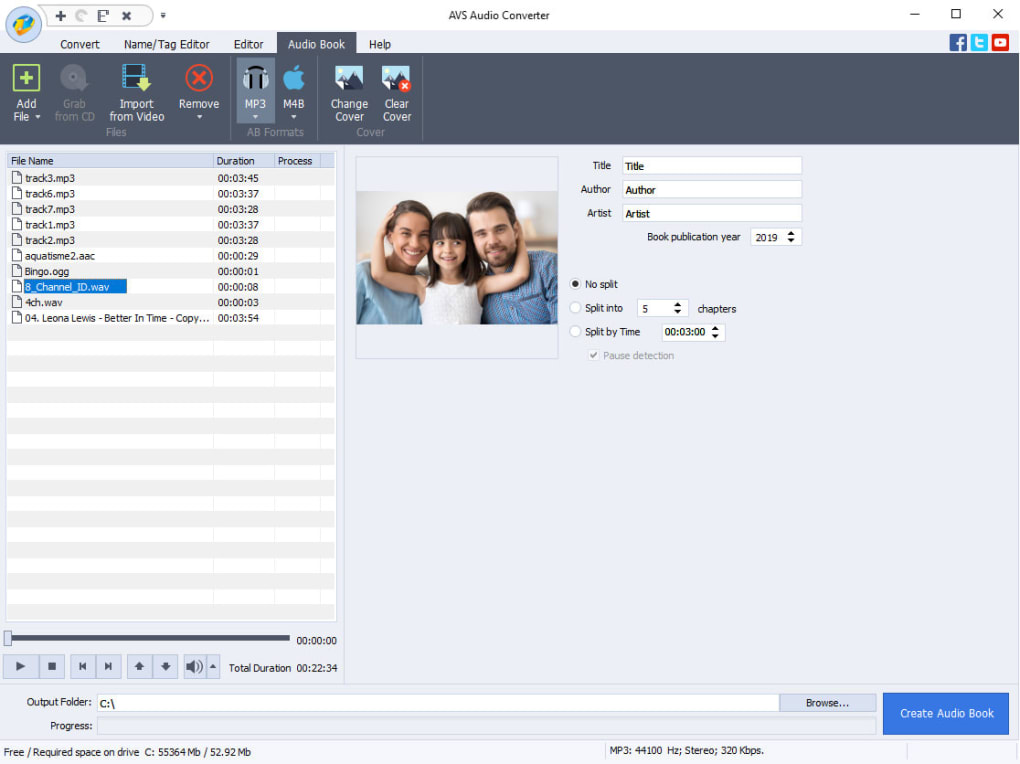
One of AVS Audio Converter’s most significant strengths is its user-friendly interface. The program boasts a clean and uncluttered layout, making it easily navigable even for users with limited technical expertise. The conversion process is remarkably straightforward. Users simply add the audio files they wish to convert, select the desired output format from a readily available list, and click “Convert Now!”. This simplicity makes it ideal for quick and efficient conversions.
However, the simplicity doesn’t preclude advanced features. For users seeking more control over the conversion process, AVS Audio Converter provides extensive customization options. Users can manually adjust codec settings, sample rate, and bitrate, allowing for fine-tuning of the output audio quality. These custom settings can be saved as profiles for future use, streamlining the workflow for repetitive tasks. This flexibility caters to both users who prefer a quick conversion and those who demand precise control over the audio characteristics.
The program’s intuitive design extends beyond the conversion process itself. Features like the embedded tag editor allow users to easily modify metadata associated with their audio files, such as artist, title, album, and year. This is a valuable feature for users who manage large music libraries and want to ensure accurate and consistent metadata. Similarly, the integrated basic audio editor offers tools for simple audio manipulation, enabling minor edits before or after conversion. This all-in-one approach streamlines the audio editing workflow, eliminating the need for multiple applications.
Comprehensive Format Support and Conversion Capabilities
AVS Audio Converter supports a wide array of popular audio formats, ensuring compatibility with a broad range of audio files. This extensive format support minimizes the need for format conversions before using the software. The program’s ability to handle various formats, including but not limited to MP3, WAV, FLAC, WMA, OGG, and AAC, is a considerable advantage for users working with diverse audio collections. It readily handles both common and less frequently encountered formats, significantly broadening its appeal and utility.
Beyond basic conversion, the software excels in its ability to extract audio tracks from video files. This feature is particularly beneficial for users who wish to isolate the soundtrack from their movie or video clips for various purposes such as creating ringtones or importing audio into other projects. The extraction process is seamless, retaining the audio quality to the highest degree possible, depending on the original video’s audio encoding. The software’s efficient handling of this task enhances its overall versatility and usefulness.
Additional Features Enhancing Functionality
AVS Audio Converter goes beyond simple audio conversion by offering additional tools that enhance its functionality and user experience. The integrated music player allows users to preview audio files before conversion, ensuring the desired file is selected and the conversion parameters are appropriate. While the player is limited to audio files, this capability helps prevent unintended conversions of the wrong files.
The inclusion of an audio CD ripping functionality further expands the software’s capabilities. Users can directly rip audio tracks from audio CDs and convert them to various formats. This feature eliminates the need for separate ripping software, making AVS Audio Converter a more comprehensive audio management solution.
However, the software has a limitation. The embedded player only supports audio playback; it cannot play video files. While this might be seen as a minor drawback for some users, it is balanced out by the comprehensive nature of the software’s other features.
Performance and System Requirements
AVS Audio Converter generally delivers solid performance, converting audio files quickly and efficiently. The conversion speed varies depending on the file size, format, and system specifications. However, users generally report satisfactory conversion speeds, minimizing wait times for the completed conversion.
The system requirements for AVS Audio Converter are relatively modest, making it accessible to a wide range of users with different computer specifications. The software is compatible with various versions of the Windows operating system. This broad compatibility ensures that it can be used on a majority of Windows systems without any compatibility issues.
Conclusion: A Powerful and Versatile Audio Conversion Tool
AVS Audio Converter presents itself as a powerful and versatile tool for audio conversion and manipulation. Its intuitive interface, comprehensive format support, and additional features, such as audio CD ripping and tag editing, make it a highly competitive option in the market. While the limited video playback capability of the embedded player is a slight drawback, its overall performance and extensive features far outweigh this minor limitation. The software’s ease of use makes it accessible to both novice and experienced users, while its advanced features allow for meticulous control over the conversion process. Overall, AVS Audio Converter stands as a strong contender amongst audio conversion software, offering a compelling blend of simplicity and power.
File Information
- License: “Trial version”
- Latest update: “July 12, 2023”
- Platform: “Windows”
- OS: “Windows XP”
- Language: “English”
- Downloads: “30.8K”
- Size: “51.92 MB”


