
In today’s digital landscape, images are everywhere. From personal photos capturing cherished memories to professional graphics fueling business endeavors, the need to manage, convert, and enhance these visual assets is paramount. While countless tools promise to streamline this process, few strike the balance between robust functionality and user-friendliness as effectively as AVS Image Converter. Designed for anyone seeking a straightforward yet powerful way to handle multiple image files, this application stands out as a reliable choice for both casual users and those with more demanding batch processing needs.
At its core, AVS Image Converter is an indispensable utility for anyone looking to convert and edit a large volume of images efficiently. It addresses the common pain points associated with image manipulation: incompatible formats, inconsistent sizes, the desire for quick visual enhancements, and the crucial need to protect intellectual property. This article delves deep into the capabilities of AVS Image Converter, exploring its intuitive design, versatile conversion options, array of editing features, and its overall value proposition in the crowded market of image processing software.
The Intuitive Interface: A Gateway to Seamless Image Processing
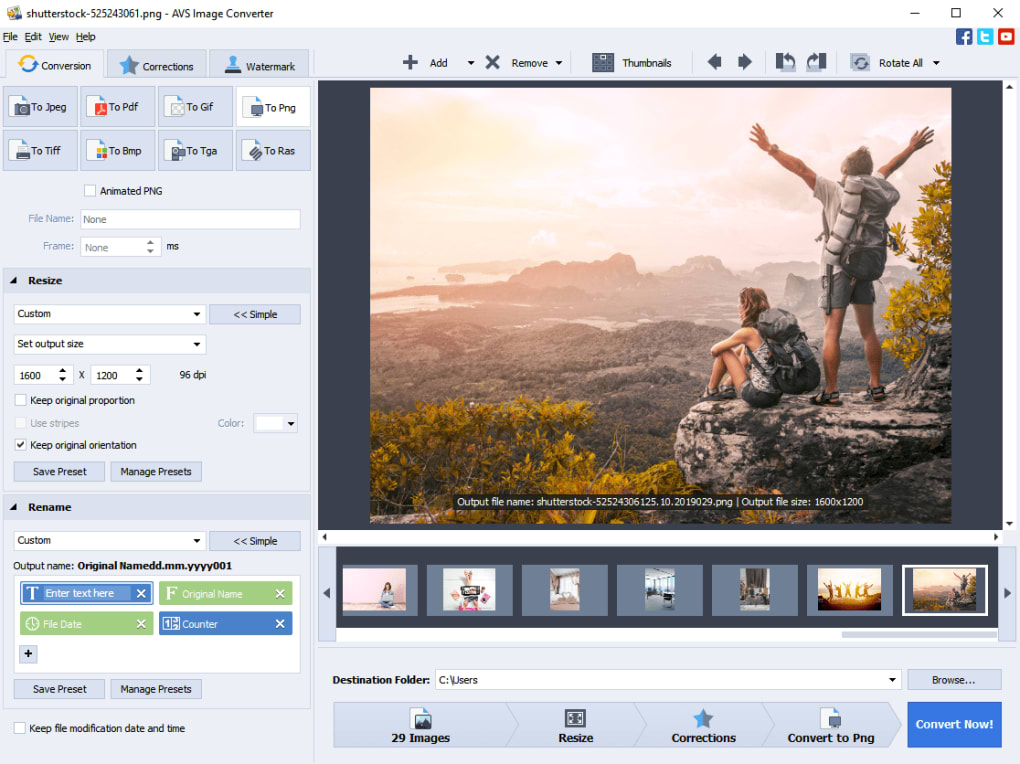
One of the most striking aspects of AVS Image Converter is its meticulously crafted interface. In an era where software often prioritizes complexity over clarity, AVS Image Converter offers a refreshing experience characterized by its smooth design and logical layout. The developers have clearly invested in creating a user experience that is not only visually appealing but also highly functional and easy to navigate, even for first-time users.
Upon launching the application, users are greeted by a clean, modern window that immediately conveys a sense of purpose and order. The features are intelligently organized into distinct tabs, each clearly labeled and dedicated to a specific stage of the image processing workflow. This tabbed approach minimizes clutter and ensures that all necessary tools are accessible without overwhelming the user. Underneath these tabs, you’ll find clear, easily comprehensible buttons, often accompanied by intuitive icons, guiding you through each action. This design philosophy removes much of the guesswork typically associated with feature-rich software, allowing users to quickly grasp the application’s capabilities and confidently execute tasks.
A standout feature of the interface is the import window, which ingeniously doubles as a real-time viewer. This integrated preview pane is invaluable, allowing users to see their images and immediately visualize the impact of any edits or conversions before committing to them. This iterative feedback loop is crucial for ensuring desired outcomes and preventing time-consuming re-dos. Whether you’re adding effects, resizing, or applying watermarks, the ability to preview changes instantly is a significant advantage, promoting precision and user satisfaction.
The conversion process itself is a testament to the application’s thoughtful design. Instead of presenting a single, monolithic “Convert” button that might leave users unsure of the steps involved, AVS Image Converter segments the operation into logical, manageable stages. This staged approach, often initiated by a “neat” convert button, systematically walks the user through the entire process:
- Selection: Specifying how many images you wish to process.
- Resizing: Defining new dimensions for your images.
- Effects: Applying various visual enhancements.
- Watermark: Adding protective text or image overlays.
- Final Conversion: Executing the batch operation to the target format.
This step-by-step guidance is particularly beneficial for users who might be less familiar with image editing concepts, as it demystifies the workflow and ensures that no crucial step is overlooked. The clarity and sequential nature of these stages transform what could be a complex task into a straightforward, almost intuitive, operation.
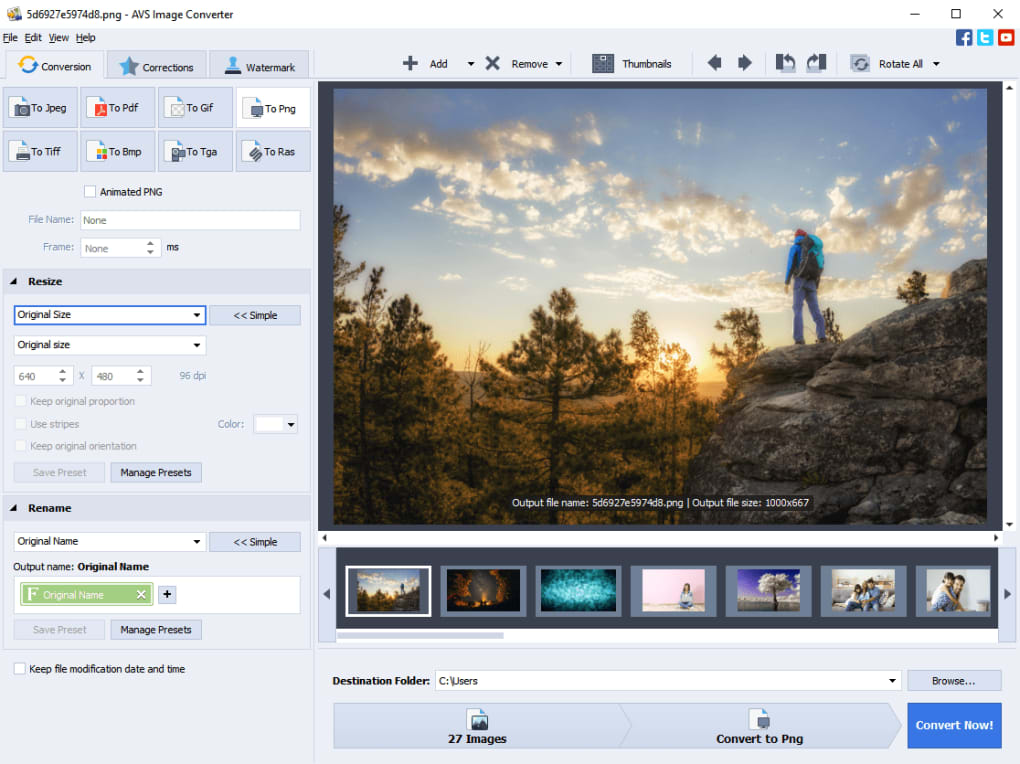
In summary, the interface of AVS Image Converter is more than just aesthetically pleasing; it is a masterclass in user-centric design. Its smooth appearance, well-organized tabs, comprehensible buttons, integrated preview viewer, and staged conversion process collectively create an environment where image processing feels less like a chore and more like an effortless, guided experience. This commitment to usability is a cornerstone of the application’s appeal, making it accessible to a wide audience while maintaining a high level of functional sophistication.
Unlocking Versatility: Core Conversion and Resizing Capabilities
The primary function of any image converter is, predictably, conversion. AVS Image Converter excels in this regard, offering robust support for a range of widely used image formats, ensuring that users can transform their visuals to meet almost any requirement. Beyond mere format conversion, the application provides powerful resizing and renaming capabilities, critical for managing image collections efficiently and optimizing them for various platforms and purposes.
Supported Formats
The conversion tab within AVS Image Converter is the heart of its format-switching prowess. It provides users with a selection of eight major image formats, covering the vast majority of common needs. These include:
- JPEG (Joint Photographic Experts Group): The undisputed king for photographs, offering excellent compression for web and digital display with minimal perceived quality loss. AVS Image Converter allows fine-tuning of JPEG compression levels.
- PNG (Portable Network Graphics): Ideal for web graphics, logos, and images requiring transparency (alpha channels). It’s lossless, ensuring no quality degradation during conversion.
- BMP (Bitmap): An uncompressed format, often used for high-quality, non-lossy images. While larger in file size, it’s suitable when absolute pixel fidelity is crucial.
- GIF (Graphics Interchange Format): Best known for simple animations and images with limited color palettes, often used for icons and small web graphics.
- TIFF (Tagged Image File Format): A highly versatile and widely supported format for high-quality images, particularly in publishing, printing, and archival applications. It supports various compression schemes and multiple image layers.
- PCX (Paintbrush Exchange): An older but still occasionally encountered raster image format, historically popular in DOS applications. AVS Image Converter’s support ensures backward compatibility.
- RAS (Sun Raster Image): Another legacy format, primarily associated with Sun Microsystems’ operating systems, highlighting the converter’s broad compatibility with diverse image sources.
- TGA (Truevision Targa): A widely used format in the video and animation industry, supporting transparency and high color depths, making it valuable for game development and visual effects.
This comprehensive array of formats ensures that whether you’re preparing images for a website, archiving high-resolution photos, creating graphics for a presentation, or working with specialized industry formats, AVS Image Converter has you covered. The selection process is straightforward, allowing users to easily pick their desired output format with a click.
Flexible Resizing and Renaming Options
Beyond format conversion, AVS Image Converter shines with its flexible resizing and renaming functionalities, which are often bundled with the conversion process for maximum efficiency.
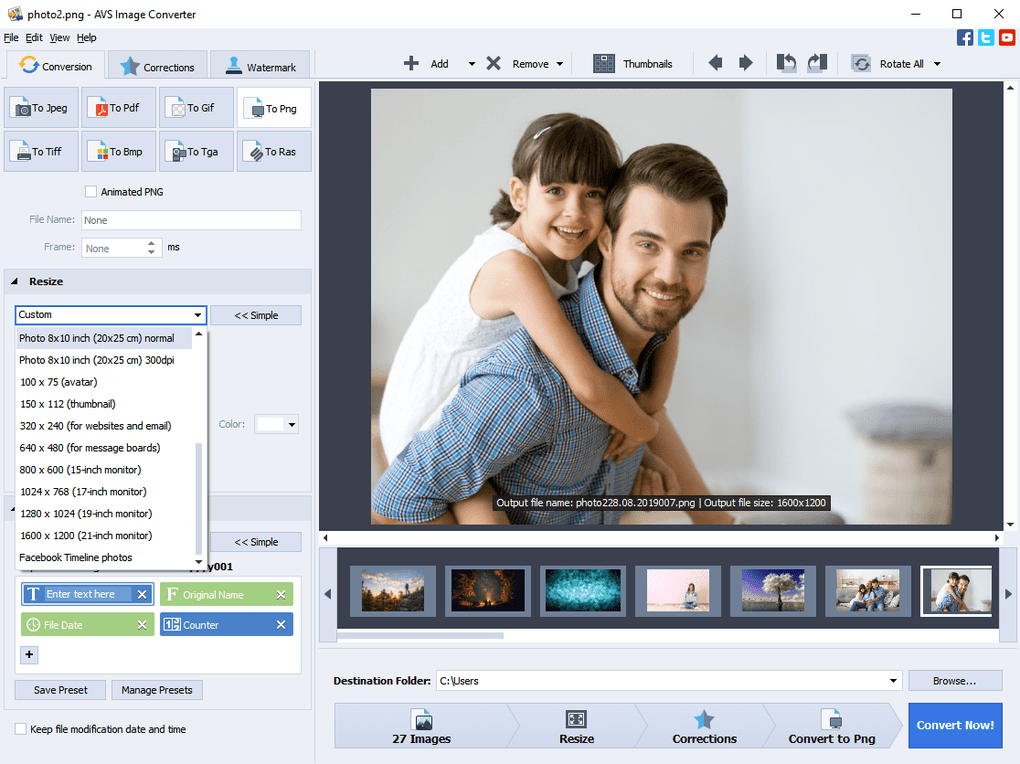
Resizing: Image dimensions are crucial for various applications. An image that’s too large can slow down website loading times or exceed email attachment limits, while one that’s too small might appear pixelated when printed or displayed on a high-resolution screen. AVS Image Converter offers robust resizing capabilities:
- Manual Dimension Setting: Users have full control to define precise width and height dimensions in pixels, percentages, or other units, ensuring that images conform exactly to specific requirements. This is invaluable for designers, developers, or anyone adhering to strict specifications.
- Popular Image Size Presets: For convenience, the application provides a list of commonly used image sizes. These presets cater to typical scenarios like web optimization (e.g., standard banner sizes), social media uploads (e.g., profile pictures, cover photos), or common print sizes. This feature drastically speeds up the resizing process for frequently encountered tasks.
- Aspect Ratio Lock: Crucially, AVS Image Converter allows users to maintain the original aspect ratio of their images during resizing, preventing distortion and preserving the visual integrity of the content. This intelligent handling ensures that images look natural regardless of their new dimensions.
- Batch Resizing: The true power of AVS Image Converter lies in its ability to apply these resizing rules to entire batches of images simultaneously. This is a massive time-saver for photographers, content creators, or anyone dealing with large collections of photos that need uniform dimensions.
Renaming: After conversion and resizing, organizing your newly processed images is often the next logical step. AVS Image Converter simplifies this with its intelligent renaming feature. Instead of manually renaming each file, which can be tedious and error-prone for dozens or hundreds of images, the application allows for batch renaming as part of the conversion workflow.
Users can define custom naming conventions, incorporating elements like:
- Original file names (with prefixes/suffixes)
- Sequential numbering
- Date and time stamps
- Custom text
This functionality is incredibly useful for maintaining consistency and order within large image libraries. For instance, a photographer might want to rename all converted images with a project name followed by sequential numbers (e.g., “Wedding_Album_001.jpg”, “Wedding_Album_002.jpg”). This feature streamlines post-processing organization, making it easier to locate and manage files.
In essence, AVS Image Converter’s core conversion and resizing capabilities are designed for both power and simplicity. Its broad format support ensures compatibility across diverse platforms, while its flexible resizing and intelligent batch renaming tools empower users to manage and optimize their image collections with unprecedented ease and efficiency. These features alone make the application a valuable asset for anyone working with digital images.
Enhancing Visuals: A Suite of Editing Effects
While AVS Image Converter primarily focuses on conversion and resizing, it also integrates a practical suite of editing effects designed to quickly improve the aesthetic quality of your images. These tools cater to users who need to make swift, impactful adjustments without the complexity of professional-grade photo editors. The “Effect” tab houses a collection of features, ranging from essential auto-corrections to more artistic filters, all aimed at giving your photos a better look.
Basic Adjustments
For common photographic issues like dullness, poor lighting, or lack of visual punch, AVS Image Converter offers three fundamental auto-settings that can significantly enhance an image with minimal effort:
- Brightness: This setting adjusts the overall lightness or darkness of an image. A photo taken in low light might appear underexposed and dark, while one in harsh sunlight could be overexposed. The brightness tool allows users to correct these issues, making dark areas more visible or toning down overly bright spots, thereby improving overall visibility and appeal.
- Contrast: Contrast refers to the difference between the light and dark areas in an image. A photo with low contrast can appear flat and lifeless, while one with high contrast tends to be more dynamic and vibrant. AVS Image Converter’s contrast adjustment helps to define edges and bring out details, giving images more depth and “pop.” This is particularly effective for photos that look washed out or lack definition.
- Levels: This is a more nuanced adjustment that allows users to redistribute the tonal range of an image. By manipulating the input and output levels of shadows, mid-tones, and highlights, users can correct exposure problems, improve contrast, and enhance detail in both the brightest and darkest areas without over-saturating or clipping information. While “auto-levels” offers a quick fix, understanding this tool slightly can lead to more refined improvements.
The beauty of these auto-settings lies in their simplicity and effectiveness. They provide quick solutions for “dull or poorly lit photos,” transforming them into more presentable and engaging visuals. For users who don’t have the time or expertise for intricate manual adjustments, these features offer an invaluable shortcut to better-looking images. They are perfect for preparing a batch of photos for a family album, a social media post, or a quick presentation where speed and general quality improvement are prioritized.
Artistic Filters
Beyond basic corrections, AVS Image Converter also includes a selection of “deeper effects” that allow users to infuse their images with a distinct mood or artistic style. These filters go beyond mere technical corrections, offering creative transformations:
- Temperature: This effect adjusts the color temperature of an image, making it appear warmer (more orange/red tones) or cooler (more blue tones). This is incredibly useful for correcting color casts from different lighting conditions (e.g., yellowish indoor lighting, bluish outdoor shade) or for intentionally creating a specific emotional tone. A warmer image might evoke feelings of comfort or nostalgia, while a cooler one could convey calm or a sense of detachment.
- Soft Focus: Applying a soft focus effect blurs the edges and reduces the sharpness of an image, often creating a dreamy, ethereal, or romantic aesthetic. This can be used to soften harsh lines, minimize minor imperfections in a portrait, or simply add a touch of artistic blur to a scene.
- Sepia: The sepia tone is a classic photographic effect that gives images an antique, brownish-yellow hue, reminiscent of old photographs. This filter is perfect for adding a vintage feel to modern pictures, evoking a sense of history or nostalgia.
What makes these artistic filters particularly useful in AVS Image Converter is their adjustability. Unlike some tools that apply a fixed filter, AVS Image Converter allows users to fine-tune the intensity and characteristics of each effect. This means you’re not stuck with a predefined look; you can “get them just how you want,” customizing the effect to perfectly match your creative vision. This level of control, even within a simple interface, empowers users to achieve more personalized and professional-looking results.
In conclusion, AVS Image Converter’s suite of editing effects transforms it from a mere converter into a basic photo enhancer. The inclusion of easy-to-use auto-adjustments for brightness, contrast, and levels provides quick fixes for common photo flaws, while the adjustable artistic filters like temperature, soft focus, and sepia offer creative avenues for stylistic expression. These features collectively make the application an excellent choice for anyone who needs to quickly improve and stylize their images in a batch process, without diving into the complexities of advanced photo manipulation software.
Protecting Your Work: The Watermarking Feature
In an age where digital content is easily shared and replicated, protecting intellectual property is a growing concern for creators. Whether you’re a photographer showcasing your portfolio, a blogger publishing original images, or a business owner branding your product shots, the ability to add a watermark is a vital tool for asserting ownership and deterring unauthorized use. AVS Image Converter recognizes this need and includes a watermarking feature, allowing users to embed either text or image watermarks onto their pictures.
The primary purpose of a watermark is to make it difficult for others to use an image without permission or proper attribution. By subtly overlaying your name, logo, copyright notice, or website URL, you’re essentially stamping your ownership onto the digital asset. This acts as a visual deterrent and provides clear evidence of origin, which can be invaluable in cases of copyright infringement.
AVS Image Converter offers two main types of watermarks:
-
Text Watermarks: This allows users to type in custom text, such as their name, company name, website address, or a copyright notice (e.g., “© 2024 YourName”). Users can typically control various aspects of the text, including:
- Font: Choosing a suitable typeface.
- Size: Adjusting the prominence of the text.
- Color: Selecting a color that contrasts sufficiently with the image but isn’t overly distracting.
- Opacity/Transparency: Making the watermark subtle or more pronounced. A lower opacity often allows the watermark to blend into the image without obscuring the main content.
- Position: Placing the watermark in a strategic location (e.g., corner, center, tiled across the image) to maximize its effectiveness without detracting from the image’s aesthetic.
-
Image Watermarks: For those who prefer to use a logo or a custom graphic as their watermark, AVS Image Converter supports image-based watermarks. This is particularly useful for businesses or brands that have established visual identities. Users can import their logo (often a PNG with transparent background for seamless integration) and apply it to their images. Similar controls for size, opacity, and position are usually available for image watermarks, allowing for precise placement and visibility.
The inclusion of a watermarking tool is a thoughtful addition to AVS Image Converter’s feature set, aligning with the needs of individuals and small businesses who distribute their visual content online. For batch processing, this means you can apply your brand or copyright notice to hundreds of images in a single operation, saving significant time and effort compared to manually watermarking each photo.
However, the provided reference material notes that this is “the least developed part of AVS Image Converter, and is a disappointment in an otherwise well-made image conversion tool.” This honest assessment is important. While the feature exists and fulfills its basic function, it suggests that the watermarking capabilities might be somewhat rudimentary compared to dedicated watermarking software or more advanced photo editors.
Potential areas where it might be “less developed” could include:
- Limited Customization Options: Perhaps fewer font choices, color options, or special effects for text.
- Less Sophisticated Placement: Maybe lacking advanced tiling patterns, rotational options, or automatic adjustment for image content.
- No Batch Previews: Users might not get a real-time, comprehensive preview of how watermarks will look across an entire batch, requiring more trial and error.
- Performance Issues: Potentially slower application of watermarks compared to other operations.
- Lack of Templates/Presets: Dedicated tools often allow saving watermark settings as templates for future use, which might be absent here.
Despite these potential limitations, the presence of a watermarking tool, even in its basic form, is a significant advantage. For users who need a quick and simple way to add a protective layer to their images during a batch conversion process, it serves its purpose. It’s a foundational feature that ensures original content creators have a means to assert their rights, even if its implementation doesn’t reach the sophisticated levels of specialized solutions. For many, the convenience of having this capability integrated into their primary image conversion tool outweighs any minor drawbacks in its development.
Why Choose AVS Image Converter? Pros, Cons, and Verdict
When evaluating any software, a balanced perspective considering its strengths and weaknesses is essential. AVS Image Converter, while highly effective for its intended purpose, is no exception. Understanding its advantages and disadvantages will help potential users determine if it’s the right tool for their specific needs.
Pros: What Makes AVS Image Converter Stand Out
- Easy to Understand Interface: As highlighted earlier, the user interface is a major strong point. It’s clean, intuitive, and logically structured with tabbed features and clear buttons. This design philosophy minimizes the learning curve, making the software accessible to users of all skill levels, from beginners to more experienced individuals. The integrated preview window further enhances usability by providing immediate visual feedback.
- Simple Process: The application breaks down complex tasks like batch conversion and editing into simple, guided stages. This step-by-step approach—from selecting images and setting formats to applying effects and watermarks—makes the entire workflow straightforward and efficient. There’s no convoluted menu diving or obscure settings to decipher, ensuring a smooth user experience.
- Flexible Functionality: AVS Image Converter offers a good degree of flexibility for a tool in its category. It supports a wide array of major image formats for conversion, provides granular control over resizing (manual or presets), and includes various editing effects from basic auto-corrections to artistic filters, all of which are adjustable. This flexibility allows users to tailor the output to a broad range of requirements, whether for web, print, or personal use.
- Batch Processing Efficiency: One of the core strengths, though not explicitly listed as a “pro” in the provided text, is its inherent ability to process multiple images simultaneously. For anyone dealing with large volumes of photos, this batch conversion, resizing, and effects application saves an immense amount of time and effort compared to performing these tasks individually. This makes it an invaluable tool for photographers, content managers, and digital artists.
- Quick Enhancements: The inclusion of basic auto-correction tools (brightness, contrast, levels) and adjustable artistic filters allows for rapid visual improvements. Users can quickly fix common photographic issues and add stylistic touches without needing to switch to a dedicated, more complex photo editor.
Cons: Areas for Improvement
- Poor Watermark Tool: This is the most significant drawback explicitly mentioned in the reference. While the presence of a watermarking feature is welcome for intellectual property protection, its implementation is described as “the least developed part” and a “disappointment.” This suggests that it might lack advanced customization options, sophisticated placement controls, or the overall polish found in other parts of the application or in dedicated watermarking software. Users requiring highly professional or intricate watermarking might find this feature insufficient.
Overall Verdict
AVS Image Converter emerges as a highly capable and user-friendly application perfectly suited for a specific niche of users. It is an excellent choice for individuals and small businesses who need a quick and simple way to resize, convert, and add basic effects to their photos and images in batches.
It’s not designed to be a replacement for professional image editing suites like Adobe Photoshop or GIMP, nor does it aim to provide the granular control over every pixel that advanced graphic designers might demand. Instead, its strength lies in its ability to streamline common image processing tasks with remarkable ease and efficiency. For everyday users, digital marketers, photographers preparing web galleries, or anyone managing large collections of personal photos, AVS Image Converter offers a compelling solution.
The smooth interface, simple workflow, and flexible options for conversion and basic enhancement make it a pleasure to use. While the watermarking feature might not meet the expectations of every user, its inclusion, even in a basic form, adds value for those concerned with copyright.
In conclusion, if your primary needs involve batch image conversion, resizing for various platforms, and applying quick visual improvements without extensive technical expertise, AVS Image Converter stands out as a highly recommended tool. It delivers on its promise of making image processing accessible and efficient, making it a valuable addition to any digital toolkit. You can download a trial version to experience its capabilities firsthand and see how it can simplify your image management workflow.
Availability and Support
AVS Image Converter is available for Windows platforms, supporting various versions including Windows 10. The application is developed by AVS4YOU Software, a company known for its suite of multimedia tools. Users can often find trial versions to test the software before making a purchase. The product is also typically available in multiple languages, reflecting its global user base and commitment to accessibility. For further information and downloads, you can often visit the developer’s official website or trusted software repositories like PhanMemFree.org.
PhanMemFree performs rigorous security checks on all files hosted on its platform, ensuring that AVS Image Converter, like other applications, is thoroughly scanned for potential threats. This commitment to user safety means you can download and use the software with confidence, knowing it has been assessed for security. If you have tried AVS Image Converter, consider leaving your review on platforms like PhanMemFree to help other users make informed decisions. PhanMemFree encourages user feedback to continuously improve its catalog and address any concerns promptly.
File Information
- License: “Trial version”
- Latest update: “May 24, 2023”
- Platform: “Windows”
- OS: “Windows 10”
- Language: “English”
- Downloads: “25.1K”
- Size: “36.87 MB”


