
AVS Video ReMaker is a specialized video editing tool designed for a singular purpose: efficiently removing unwanted segments from video files. Unlike comprehensive video editors that offer a vast array of features, AVS Video ReMaker focuses on providing a straightforward and user-friendly experience for trimming clips and seamlessly joining the remaining portions. Its simplicity makes it ideal for beginners while still offering enough functionality to satisfy experienced users needing a quick and efficient solution for video editing.
Intuitive Interface and Ease of Use
The program’s ease of use is a significant advantage. The user interface is clean and uncluttered, presenting a straightforward workflow that minimizes the learning curve. After opening the desired video file(s), the program automatically loads the footage onto the timeline. From there, users can quickly split the video into multiple segments using intuitive controls. Unwanted sections can be easily deleted, and the remaining parts reordered as necessary. This streamlined approach simplifies the editing process, allowing users to focus on the task at hand without being overwhelmed by complex settings and options. The intuitive design makes AVS Video ReMaker accessible even to users with limited video editing experience.
Core Features and Functionality
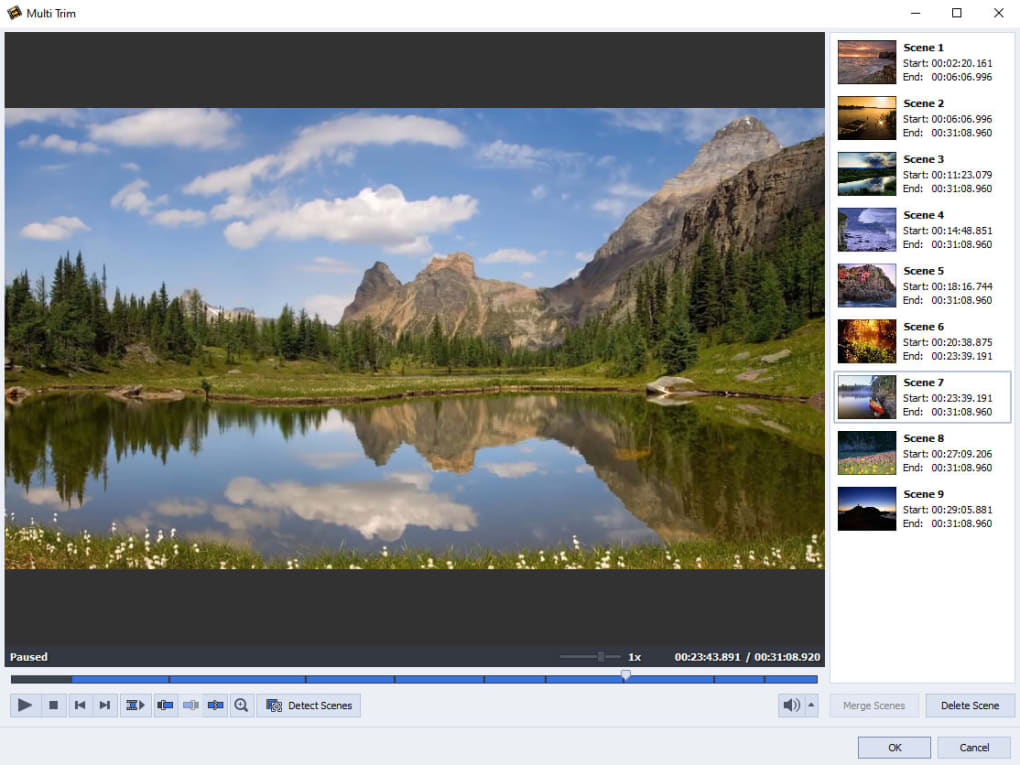
The core functionality revolves around precisely cutting out unwanted parts of a video. The software excels at this specific task, providing a simple yet effective method for creating a refined, polished final product. This focus allows for a faster editing workflow compared to more feature-rich editors that require navigating numerous menus and settings.
Here’s a breakdown of the key features:
- Scene Detection: AVS Video ReMaker incorporates automatic scene and keyframe detection. This feature automatically identifies scene changes within the video, making it easier to pinpoint the start and end points of segments for deletion or rearrangement. This is particularly helpful when dealing with longer video clips, where manually locating transition points can be time-consuming.
-
Splitting and Joining: The program’s primary function is splitting video files into smaller segments, which allows for precise removal of unwanted scenes or moments. Once the unwanted parts are removed, the remaining segments are effortlessly combined to create a new, continuous video file. This process is incredibly simple and efficient, leading to fast turnaround times.
-
Snapshot Tool: AVS Video ReMaker also includes a snapshot tool, allowing users to capture still images (frames) from the video. This feature is useful for extracting specific moments or creating promotional stills from the edited video. It adds a touch of extra utility beyond the core trimming functionality.
-
Format Support: AVS Video ReMaker supports a wide range of common video formats, ensuring compatibility with various source materials. This broad support simplifies the process, as users are not limited to specific file types.
-
Output Options: Once the edits are finalized, users can choose the desired output format for the remade video. The options available provide flexibility to tailor the final output to different platforms or devices.
-
Batch Processing: While the detailed documentation doesn’t explicitly state this capability, the description of opening multiple files implies batch processing could be supported. This potential would further improve efficiency.
Limitations and Areas for Improvement
Despite its strengths, AVS Video ReMaker does have some limitations:
-
Limited Editing Capabilities: The program’s focus on scene removal means it lacks the broader editing features found in professional video editing software. Options for transitions, effects, color correction, and audio editing are absent. This is intentional, given the program’s specific goal, but it limits its versatility.
-
Timeline Navigation: The user interface, while simple, could benefit from improved timeline navigation. The timeline’s size and zoom capabilities could be enhanced to provide a more comfortable and precise editing experience, especially when working with lengthy videos. This would allow for finer control during the selection and deletion of scenes.
-
Lack of Advanced Features: Users looking for advanced features like color grading, keyframing, or sophisticated audio manipulation will find themselves limited by the software’s scope. These omissions are intentional but might restrict more experienced editors from using it for complex projects.
Comparison with Other Video Editors
Compared to full-featured video editing suites like Adobe Premiere Pro or Final Cut Pro, AVS Video ReMaker occupies a distinct niche. While those programs offer comprehensive tools for every aspect of video production, AVS Video ReMaker provides a streamlined, focused solution for the specific problem of removing unwanted scenes. It’s less powerful but far more efficient for its targeted task.
Simpler video editors like Windows Movie Maker (now discontinued) or iMovie offer basic editing capabilities, but often lack the precision and ease of use found in AVS Video ReMaker for the task of removing specific segments from a video. AVS Video ReMaker bridges the gap between basic video editing tools and full-fledged professional applications, providing a dedicated and effective solution for a frequently encountered video editing need.
User Reviews and Feedback
User reviews reveal a mixed bag of experiences. While many praise its simplicity and ease of use, particularly for beginners, others express frustration with perceived limitations and occasional unexpected trimming results. Some users report issues with the software cutting more than they intended, requiring additional adjustments. This highlights the importance of careful review of the editing process before completing it. The absence of more precise, frame-by-frame control may contribute to such experiences.
Conclusion
AVS Video ReMaker is a niche video editing tool that excels in its intended purpose. Its strength lies in its ease of use and efficiency in removing unwanted scenes from videos. The intuitive interface and straightforward workflow make it accessible to beginners, while the automatic scene detection speeds up the editing process. While it lacks the versatility of full-featured video editors, its streamlined approach is a major advantage for those needing a quick and efficient way to trim and refine their video footage. Users seeking advanced editing capabilities should consider more comprehensive software, but for those focused on precise scene removal, AVS Video ReMaker offers a compelling and effective solution. Its targeted approach makes it a powerful tool for a specific task, despite its limitations. The reported instances of unintentional cuts highlight a need for careful attention to detail during usage, but overall, the software remains a valuable asset for its intended purpose.
File Information
- License: “Trial version”
- Latest update: “July 12, 2023”
- Platform: “Windows”
- OS: “Windows 8”
- Language: “English”
- Downloads: “46.2K”
- Size: “62.98 MB”


