
AVS Audio Editor is a versatile audio editing software designed for users of all skill levels. This review will delve into its features, strengths, weaknesses, and overall usability, providing a comprehensive assessment of its capabilities for both casual and professional audio editing needs. The software offers a wide range of functionalities, from basic audio cleanup to more advanced effects and video integration, making it a potentially valuable tool for various applications.
User Interface and Ease of Use
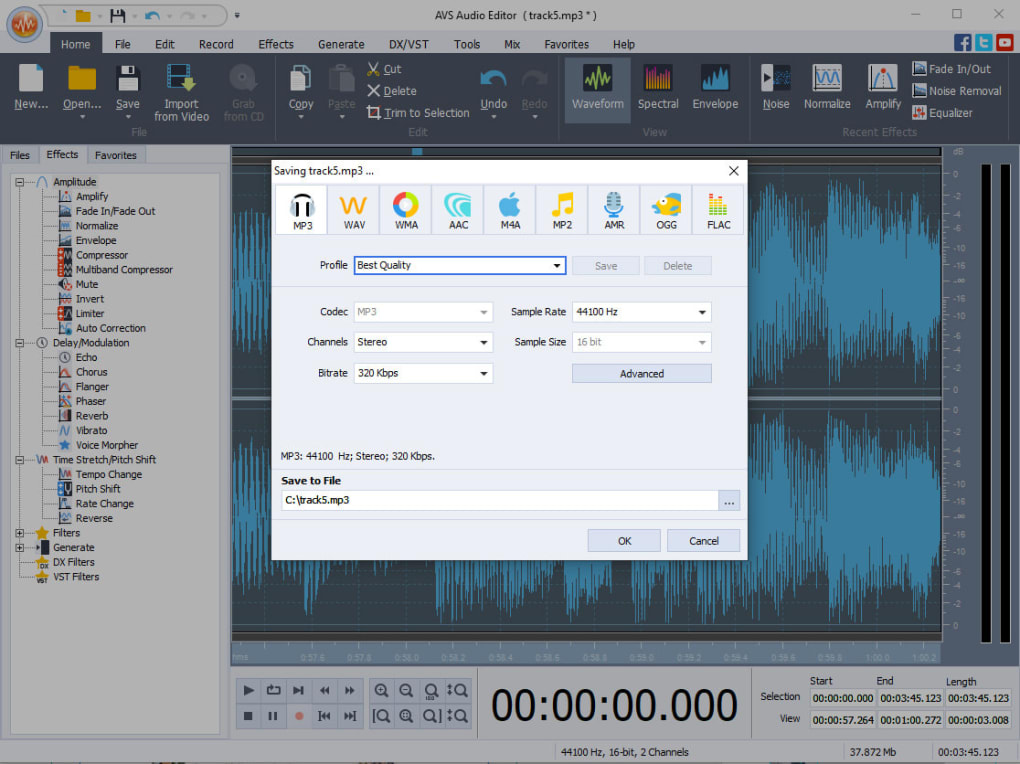
AVS Audio Editor boasts a user-friendly interface, making it relatively easy to learn, even for beginners. The layout is intuitive, with clearly labeled tools and options. The software provides numerous guides and tutorials, further assisting users in navigating its features. This accessibility is a significant advantage, particularly for those new to audio editing software. The streamlined workflow allows users to quickly grasp fundamental editing processes, including cutting, pasting, and basic effects application. However, while the core functions are accessible, mastering more advanced features may require a steeper learning curve and dedicated time investment. The abundance of features, while beneficial, could overwhelm inexperienced users initially.
Navigating the interface is generally straightforward. Tools are logically grouped, and contextual menus appear as needed, reducing the need for extensive searching. The visual representation of waveforms allows for precise editing, although the level of detail might be insufficient for highly demanding professional projects. The software’s responsiveness is generally good, even when handling relatively large audio files. However, it can sometimes experience lags, particularly when dealing with multiple tracks or complex effects simultaneously, suggesting that system resources are a factor in overall performance. The software’s memory footprint is another area where improvements could be beneficial; it can consume significant system RAM, especially during prolonged editing sessions.
Features and Functionality
AVS Audio Editor offers a rich set of features catering to a wide spectrum of audio editing needs. It supports a broad range of audio formats, ensuring compatibility with various file types. The core editing functions, such as cutting, pasting, copying, and deleting audio segments, are implemented smoothly and efficiently. The software also excels in basic audio cleanup, effectively removing unwanted noise, hiss, and clicks. This is particularly useful for improving the quality of recordings with background noise interference or imperfections. The inclusion of advanced features like normalization and compression further enhances the audio’s clarity and dynamic range.
Beyond the basic functionalities, AVS Audio Editor incorporates a range of special effects, allowing users to creatively enhance their audio projects. These effects range from reverb and echo to more specialized options. The ability to add these effects non-destructively is beneficial, allowing users to experiment and adjust parameters without permanently altering the original audio. The software also supports batch processing, which speeds up the workflow when handling numerous files requiring similar edits or effects. While the range of effects is extensive, some users might desire even more sophisticated and specialized options that are available in professional-grade audio workstations.
A notable feature is the integration of video support. Users can import video files, edit the audio track, and re-export the modified video. While a valuable feature, the support for only one video track at a time limits its versatility compared to more advanced video editing software. This limitation might prove restrictive for users working with projects requiring multiple video and audio tracks synchronized. The video editing capabilities are primarily focused on audio manipulation within the video context, rather than providing comprehensive video editing tools.
Strengths and Weaknesses
Strengths:
- Ease of Use: The intuitive interface and comprehensive tutorials make AVS Audio Editor accessible to beginners.
- Wide Format Support: The software supports a wide array of audio formats, ensuring compatibility with various sources.
- Effective Noise Reduction: The software effectively removes unwanted background noise, improving audio clarity.
- Special Effects: A generous selection of special effects allows for creative audio enhancement.
- Batch Processing: The batch processing capability significantly speeds up workflows involving multiple files.
- Video Support: The ability to edit audio within video files is a useful feature.
Weaknesses:
- Limited High-End Features: The software lacks some advanced features found in professional audio workstations. Users seeking highly specialized tools may need to explore other options.
- Memory Intensive: The software can consume substantial system RAM, potentially affecting performance on lower-end systems.
- Single Video Track: The video editing functionality is limited to a single video track, which restricts its versatility.
- Learning Curve for Advanced Features: While the basic interface is easy to understand, mastering advanced features may require significant time investment.
Comparison with Alternative Software
AVS Audio Editor sits in a mid-range position compared to other audio editing software. Free and open-source options like Audacity offer comparable basic features but often lack the user-friendly interface and some advanced features provided by AVS Audio Editor. On the other hand, professional-grade Digital Audio Workstations (DAWs) like Pro Tools or Logic Pro X provide significantly more advanced features and capabilities but come with a substantially higher price tag and steeper learning curve. The choice depends on individual needs and budgets. For casual users and those seeking an easy-to-use program with a good range of features, AVS Audio Editor presents a solid alternative. However, professionals needing high-end features and advanced workflows might find more suitable choices in professional-grade DAWs.
Overall Conclusion
AVS Audio Editor is a functional and accessible audio editing software suitable for a wide range of users. Its user-friendly interface, combined with its comprehensive feature set, makes it a good option for both beginners and intermediate users. The inclusion of video editing capabilities further adds to its versatility. While the software lacks some high-end features found in professional-grade alternatives and can be memory-intensive, its strengths in ease of use, noise reduction, and a wide array of effects compensate for these shortcomings. The software provides a good balance of usability and functionality for those who don’t require the extreme capabilities of professional-level DAWs. Users looking for a user-friendly and capable solution for their audio editing needs will find AVS Audio Editor to be a valuable tool. Ultimately, the decision to use AVS Audio Editor depends on the user’s specific needs, skill level, and budget.
File Information
- License: “Trial version”
- Latest update: “February 4, 2025”
- Platform: “Windows”
- OS: “Windows 8.1”
- Language: “English”
- Downloads: “44.6K”
- Size: “49.85 MB”


