
Finding and removing duplicate photos from your computer can feel like an overwhelming task, especially as your digital photo collection grows. But what if there was a tool that could streamline this process, saving you time and valuable hard drive space? This in-depth review of Awesome Duplicate Photo Finder for Windows explores its capabilities, ease of use, and limitations, helping you decide if it’s the right solution for your photo management needs.
Ease of Use and Initial Impressions
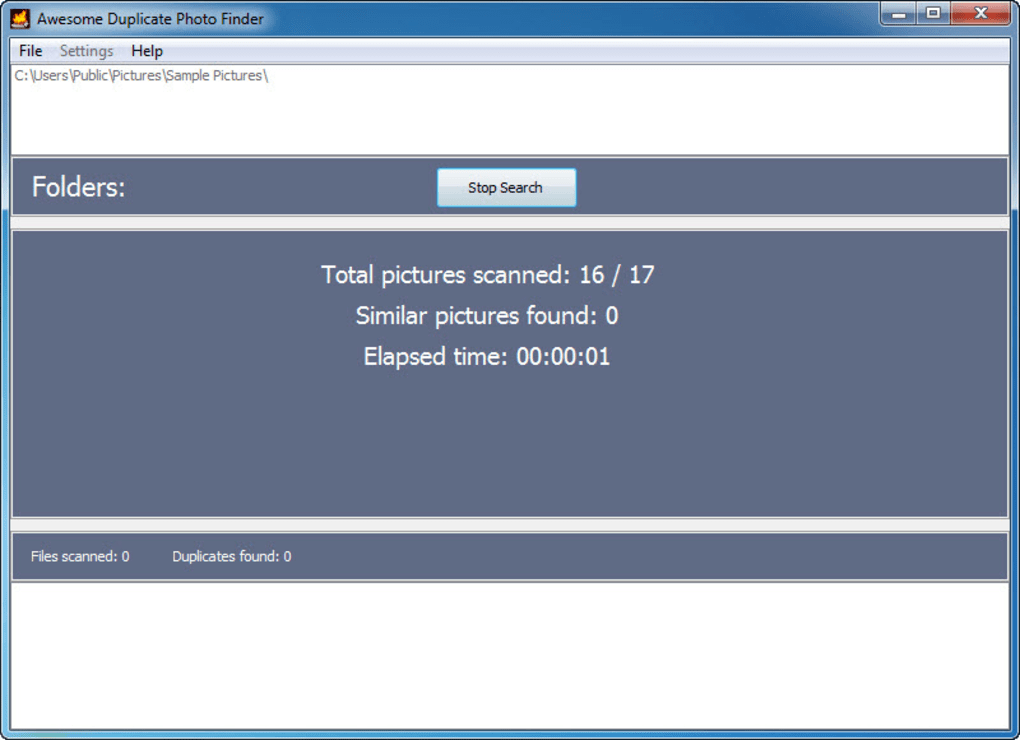
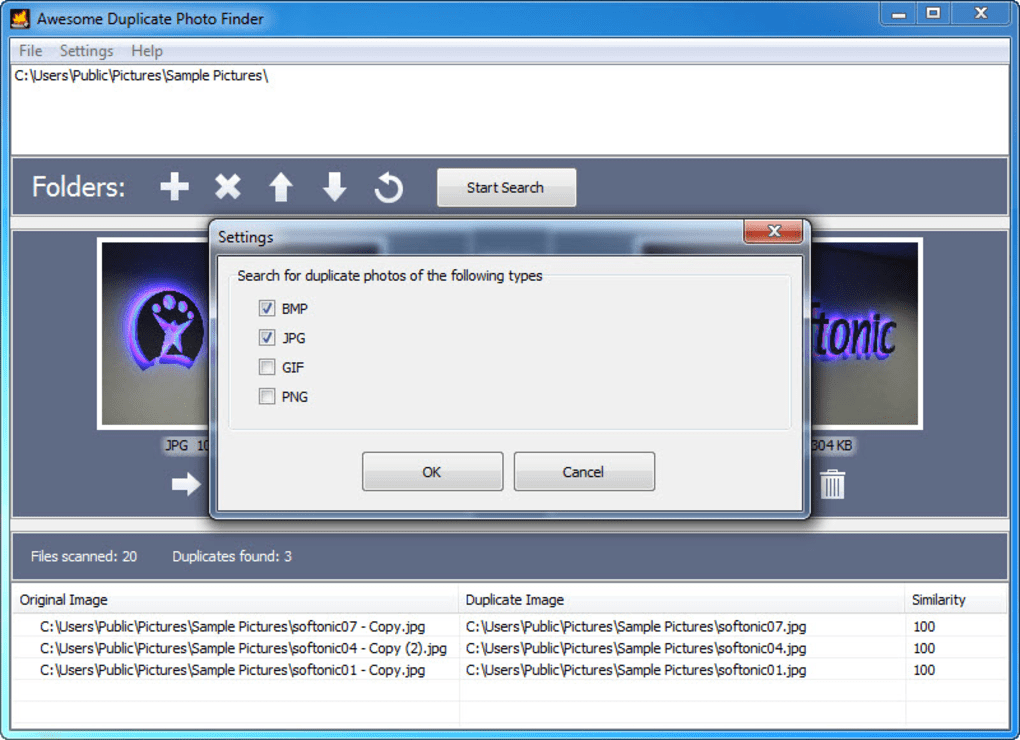
Awesome Duplicate Photo Finder boasts a user-friendly interface, making it accessible even to those without extensive technical expertise. The program’s straightforward design eliminates the need for a steep learning curve. To begin, you simply select the folder containing the images you want to scan. This can be a single folder or multiple folders, allowing you to target specific areas of your hard drive. A “Start Search” button initiates the scan, and the program promptly displays the results, listing duplicate images at the bottom of the interface. This intuitive workflow makes the initial experience highly positive. The process of selecting folders and initiating the scan is quick and efficient, making it easy to dive into your image cleanup project.
The results display provides a clear overview of potential duplicates, showcasing each image alongside a similarity percentage. This visual representation helps users quickly assess the level of similarity between images and make informed decisions about which image to retain and which to delete or move. This is crucial for avoiding accidental deletion of unique images that may have slightly different characteristics. The inclusion of a preview function allows for further visual comparison before committing to any action, enhancing the precision of the process.
Speed and Efficiency of the Scan Process
One of the program’s standout features is its fast folder scan speed. Even when dealing with a large number of images, Awesome Duplicate Photo Finder efficiently processes the data. This rapid scan time significantly reduces the wait time between initiating the scan and receiving results, making it a time-efficient solution for managing large photo libraries. This speed is a significant advantage, especially for users with extensive photo collections spread across multiple folders and subfolders.
The speed, however, doesn’t come at the cost of accuracy. The software accurately identifies and flags similar images, helping users avoid time-consuming manual checks. The program uses sophisticated algorithms to compare images, taking into account factors such as file size, resolution, and pixel data. This robust comparison method ensures that only truly similar or identical images are flagged, minimizing the risk of accidental removal of unique photos.
Reliability and Accuracy: A Balancing Act
While the speed of Awesome Duplicate Photo Finder is impressive, its reliability is subject to some limitations. The software’s accuracy is most reliable when the similarity percentage between images is high (above 50%). Below this threshold, the identification of duplicates may become less reliable, potentially leading to false positives or missed duplicates. This suggests that the user may need to review the results manually, particularly when dealing with images that display a lower similarity percentage.
This limitation stems from the inherent challenges in comparing images with subtle differences. Minor adjustments in brightness, contrast, or cropping can significantly alter the numerical representation of an image. While the algorithm is designed to account for minor variations, significant differences in image processing can lead to lower similarity percentages and potentially impact the accuracy of the program’s detection capabilities.
Feature Limitations and Areas for Improvement
Despite its ease of use and speed, Awesome Duplicate Photo Finder lacks several features that would significantly enhance its functionality. The most noticeable absence is the capability to select multiple files simultaneously for deletion or movement. This limitation necessitates individual actions for each image, a significant drawback when dealing with large numbers of duplicates. The lack of bulk selection hinders efficiency, forcing users to perform repetitive actions, which can be time-consuming and inconvenient.
Furthermore, the absence of advanced configuration options restricts the level of customization. The program lacks options to adjust similarity thresholds, specify file formats, or exclude specific folders from the scan. The lack of these options limits user control over the scan parameters. This limits the precision of the process and potentially reduces the efficiency when dealing with specific file types or folders.
Another significant drawback is the lack of a “save results” function. This means that if you interrupt the process or need to restart the scan, all previous work is lost. This feature limitation adds to the inconvenience of using the software, especially when dealing with extensive photo libraries. The program could greatly benefit from an option to save the results of a scan, allowing users to resume the process at a later time or review the results offline.
Comparison with Alternative Solutions
Several alternative duplicate photo finder applications exist in the market, each offering a unique set of features and capabilities. Some offer bulk selection capabilities, allowing users to manage multiple files simultaneously. Others provide more advanced configuration options, enabling users to fine-tune the scan process for increased accuracy and efficiency. Still others may offer cloud integration, enabling users to seamlessly manage their photo libraries across multiple devices and platforms.
Comparing Awesome Duplicate Photo Finder to these alternatives reveals both its strengths and weaknesses. Its speed and ease of use are undeniable advantages, but the limitations in bulk selection, advanced configuration, and result saving significantly detract from its overall functionality. Users who require these additional features may find more comprehensive solutions better suited to their needs. Choosing the right software requires carefully considering your individual needs and priorities, weighing the advantages and disadvantages of each program.
User Reviews and Feedback
User reviews highlight both the positive and negative aspects of Awesome Duplicate Photo Finder. Many users praise its speed and ease of use, emphasizing its simplicity and intuitive interface. However, the criticism frequently centers on the lack of bulk selection, the need for individual deletion or movement of each file, and the absence of advanced configuration options. These recurring concerns underline the need for improvements in these specific areas to enhance user experience and overall program functionality. The mixed reviews underscore the importance of considering individual needs and preferences when choosing a duplicate photo finder application.
Conclusion: A Quick and Easy, But Limited Solution
Awesome Duplicate Photo Finder offers a simple and quick way to identify and remove duplicate images. Its intuitive interface and rapid scanning speed make it an attractive option for users seeking a straightforward solution. However, its limitations in bulk file selection, advanced configuration, and the inability to save results significantly limit its overall functionality and efficiency. While it serves as a suitable tool for users with smaller photo libraries and a preference for simple interfaces, those requiring more advanced features and improved efficiency may find alternative solutions more beneficial. The program represents a viable option for casual users, but professionals or users with extensive photo libraries might find its limitations frustrating. Ultimately, the decision of whether or not to use Awesome Duplicate Photo Finder depends on your individual needs and expectations.
File Information
- License: “Free”
- Latest update: “July 11, 2023”
- Platform: “Windows”
- OS: “Windows XP”
- Language: “English”
- Downloads: “43K”
- Size: “1.27 MB”


