
AxCrypt is a free and open-source file encryption software primarily designed for Windows operating systems. Its ease of use and strong encryption capabilities have made it a popular choice for users seeking to protect their sensitive data. This review delves into the features, functionality, security aspects, and overall user experience of AxCrypt, providing a comprehensive assessment of its strengths and weaknesses.
Core Functionality: Encryption, Decryption, and Beyond
AxCrypt’s core function is the encryption and decryption of files. It integrates seamlessly with Windows Explorer, allowing users to encrypt and decrypt files with just a few mouse clicks. This intuitive interface makes it accessible even to users with limited technical expertise. The encryption process is straightforward: right-click on a file or folder, select the AxCrypt option, and choose to encrypt. Decryption is equally simple, requiring only the user’s password.
The software uses robust cryptographic primitives, employing AES-128 encryption for data protection and SHA-1 for hashing. While AES-128 remains a strong encryption algorithm, newer versions of AxCrypt might incorporate more modern and potentially stronger algorithms like AES-256, though this wasn’t explicitly stated in the provided text. The use of SHA-1 for hashing, however, is noteworthy. SHA-1 is considered cryptographically broken and is no longer recommended for security-sensitive applications. This is a potential area of concern and warrants attention from both users and developers.
Beyond basic file encryption and decryption, AxCrypt offers additional features. These features can enhance the user experience and provide added functionality, including:
- Compression: AxCrypt can compress files during the encryption process, reducing file size and improving storage efficiency. This is a useful feature for managing large files or when storage space is limited.
- File wiping: This is a crucial security feature. It allows users to securely delete files, preventing data recovery through standard methods. This is especially important when dealing with sensitive information that should not be recovered, even if the drive is overwritten or recovered using data recovery tools.
- Viewing and editing: Users can view and edit encrypted files directly within AxCrypt, without the need to decrypt them first, potentially increasing convenience and workflow efficiency. However, this depends on the file type and any associated applications.
- Command-line interface: For programmers and system administrators, AxCrypt provides a command-line interface. This allows integration with batch files, scripts, and other programming languages, offering increased automation and control over encryption processes for larger systems and networks.
These additional capabilities contribute to AxCrypt’s overall utility, catering to both individual users and those requiring more advanced functionalities for managing and securing data in more complex scenarios.
Security Considerations: Strengths and Potential Weaknesses
AxCrypt’s security relies heavily on the strength of its encryption algorithms and the security of the user’s password. As previously mentioned, while AES-128 encryption remains relatively secure, the use of SHA-1 for hashing is a significant drawback. SHA-1’s vulnerability to collision attacks raises concerns about the integrity of the encryption process. Users should be aware of this limitation and consider the implications for their data security.
The security of AxCrypt also depends entirely on the user’s password. A weak or easily guessable password renders the entire encryption system vulnerable. Strong passwords, incorporating a mix of uppercase and lowercase letters, numbers, and symbols, are crucial for maintaining strong security. Implementing a robust password management system is highly recommended to further secure access to encrypted files.
Furthermore, it’s essential to understand that the security of any encryption software depends on the overall security practices of the user. Maintaining up-to-date software, avoiding phishing scams, and practicing safe browsing habits are crucial in preventing unauthorized access to encrypted data. Even with strong encryption, vulnerabilities elsewhere in a system can compromise overall data security.
The open-source nature of AxCrypt allows for community scrutiny of its code, which is generally positive for security. However, it also means that any vulnerabilities discovered are potentially exploitable. It’s crucial to stay informed about any security updates or patches released by the developers and to install them promptly to mitigate any known risks.
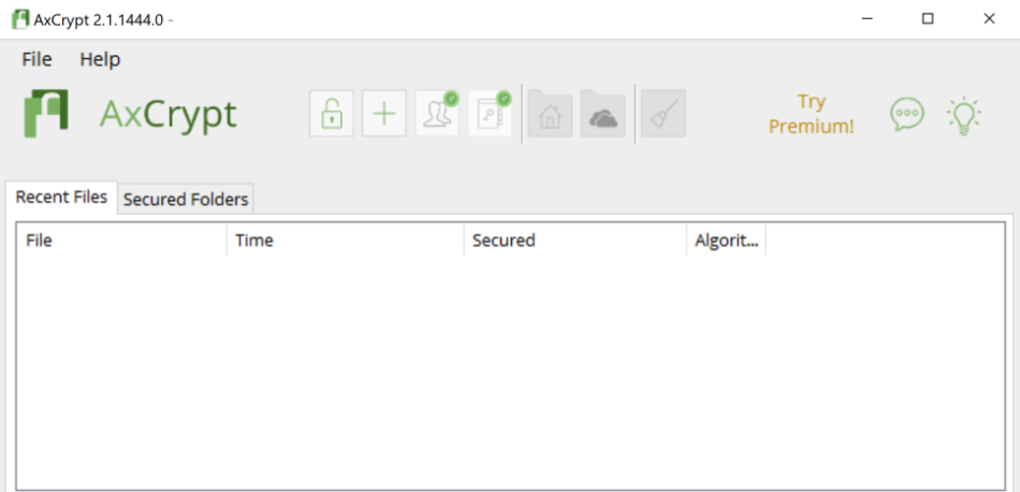
User Interface and Experience: Simplicity and Accessibility
AxCrypt’s primary strength is its user-friendly interface. The integration with Windows Explorer makes encryption and decryption intuitive and easily accessible. Even users unfamiliar with encryption software can quickly grasp the basics and start protecting their files.
The simplicity of the interface, however, might be a double-edged sword. While it makes the software accessible to a broad audience, it also means it lacks some of the advanced features and control options found in more complex encryption tools.
This simplicity may be perfectly suited for individual users who simply need a reliable and straightforward way to encrypt their files. However, users requiring more granular control over encryption parameters or advanced security features might find AxCrypt’s capabilities limited. They might need to explore more advanced software with a wider range of options and customization capabilities.
Platform Compatibility and Availability
While primarily designed for Windows, AxCrypt also offers versions for macOS, iOS, and Android. This cross-platform availability allows users to access and manage their encrypted files across various devices. However, it’s crucial to verify that the features and functionality remain consistent across different platforms, as limitations might exist depending on the specific operating system.
The availability of AxCrypt on multiple platforms greatly enhances its utility, providing a consistent experience for users who utilize a variety of devices for managing and accessing their data. The consistency of functionality across platforms is a critical factor in ensuring a seamless and dependable user experience regardless of the devices employed.
Conclusion: AxCrypt’s Place in the File Encryption Landscape
AxCrypt provides a straightforward and accessible way to encrypt files for both individual users and those requiring more basic functionalities for managing and securing data. Its integration with Windows Explorer significantly enhances ease of use. However, the use of the now-deprecated SHA-1 hashing algorithm raises security concerns. While AES-128 encryption provides a reasonable level of protection, users should be mindful of this weakness and consider the implications for their data security. Users concerned about long-term security should ensure they are using the most up-to-date version of the software and should actively monitor security advisories released by the development team.
Ultimately, AxCrypt’s suitability depends on the specific needs and technical proficiency of the user. For users prioritizing simplicity and ease of use above all else, it provides a valuable tool. However, users seeking more advanced features, granular control, or absolute confidence in the most modern cryptographic standards should explore alternative encryption solutions offering stronger algorithms and more comprehensive security features. The software’s open-source nature is a positive aspect, allowing for community review and improvement of the codebase, though users must remain diligent in keeping the software updated and informed of any identified vulnerabilities.
File Information
- License: “Free”
- Latest update: “July 12, 2023”
- Platform: “Windows”
- OS: “Windows Vista”
- Language: “English”
- Downloads: “17.5K”
- Size: “9.67 MB”


