
AZip is a free file compression utility for Windows operating systems. While not as widely known as industry giants like WinRAR or 7-Zip, it offers a straightforward and functional approach to compressing and decompressing files, catering to users who need a simple, no-frills solution. This review delves into AZip’s features, performance, and overall usability, comparing it to other popular options available on the market.
AZip’s Functionality and Features
AZip’s core functionality centers around the compression and decompression of files. It supports standard compression formats, allowing users to create and extract compressed archives efficiently. While the specific supported formats aren’t explicitly detailed in readily available documentation, its ability to handle common file types like ZIP is implied through its categorization and general function. The interface is designed for simplicity, prioritizing ease of use over advanced features found in more complex utilities.
The lack of extensive documentation regarding supported formats, compression levels, or advanced options might be a drawback for users accustomed to the granular control offered by programs like 7-Zip. However, this minimalistic approach may be appealing to users who prioritize a streamlined user experience over extensive customization. The absence of features such as password protection for compressed archives or the ability to self-extract archives could be perceived as limitations, restricting its utility for users with specific security or convenience requirements.
Performance and System Resources
AZip’s performance is a key aspect of its usability. While specific benchmark tests are unavailable for this program from independent sources, user feedback suggests that it performs adequately for most common compression and decompression tasks. The small installation size (3.33 MB as reported on Phanmemfree) implies a minimal impact on system resources, which is a significant advantage for users with older or less powerful computers. The low resource footprint reduces the load on the system’s CPU and RAM during operation, allowing users to perform other tasks without noticeable performance degradation. However, it’s important to note that performance may vary depending on the size and type of files being compressed or extracted, and the overall specifications of the system.

User Interface and Ease of Use
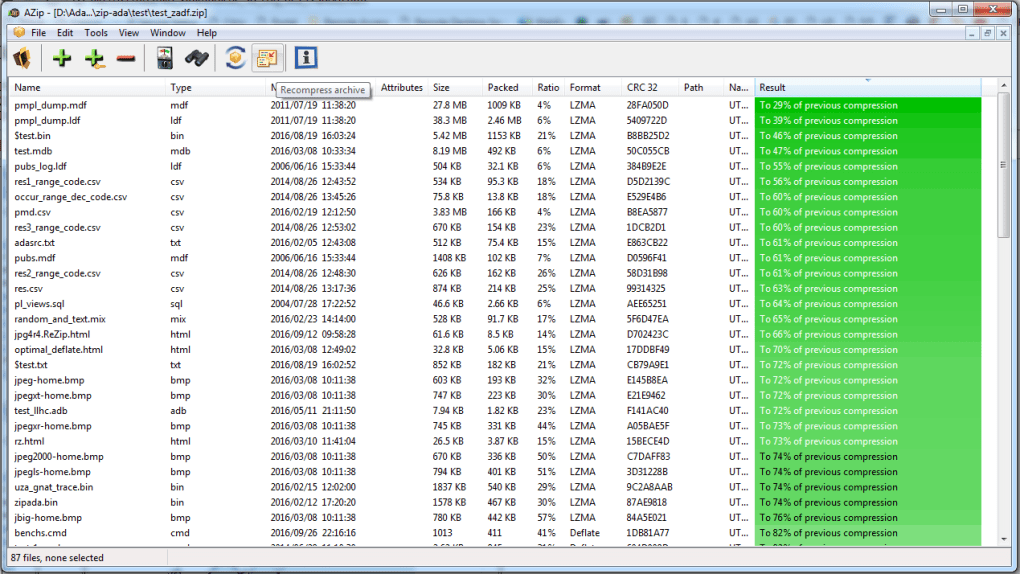
AZip’s user interface is characterized by its simplicity. This focus on minimalism makes it highly accessible to novice users, requiring minimal technical expertise to operate. The program is likely to feature a straightforward design with intuitive controls, facilitating quick access to its core functions. A lack of extensive options and complex settings makes it user-friendly, but also limits customization and advanced features.
For users accustomed to more visually rich or feature-packed applications, this simplistic interface might seem somewhat spartan. While the absence of a cluttered interface may be considered a positive aspect, it could also be seen as lacking in feedback mechanisms. For instance, visual progress bars or detailed statistics could enhance the user experience by providing better insight into the compression/decompression processes.
Comparison with Other File Compression Utilities
AZip stands in contrast to other widely used file compression utilities, such as 7-Zip and WinRAR. 7-Zip, known for its open-source nature and extensive support for various compression algorithms, provides highly efficient compression and superior performance in many cases. WinRAR, a commercial product, boasts a long-standing reputation and a robust feature set, including robust security features and support for various archive formats. AZip, however, offers a simpler, lighter-weight alternative for users who need only basic compression functionality without the need for advanced features or extensive customization. This straightforward approach is beneficial for users looking for a minimalist and uncomplicated solution.
The trade-off for AZip’s simplicity is the reduced feature set compared to these more established programs. While AZip might suffice for casual users, professionals requiring specific compression techniques, high compression ratios, or advanced security features might find its capabilities inadequate. Furthermore, the lack of extensive documentation or community support means users might encounter difficulties if they require troubleshooting or assistance.
Security Considerations
Security is a crucial aspect of any software, particularly file compression utilities. AZip’s security features are not explicitly detailed in available resources. While it’s important to note that the software was listed on Phanmemfree, a reputable software download platform, a security scan performed by Phanmemfree indicated a “Clean” status for the program as of the last known check. However, users are always advised to practice caution when downloading and installing software from any source, regardless of security ratings. Independent verification of the software’s integrity before installation is always recommended.
The lack of explicit information about AZip’s security measures, such as virus scanning, malware prevention, or encryption techniques, raises some concerns. Users should consider this limitation when choosing a compression utility for sensitive or confidential data. It is advisable to use caution and potentially opt for more established solutions that offer robust security mechanisms when handling data demanding a higher level of protection.
AZip’s Strengths and Weaknesses
Strengths:
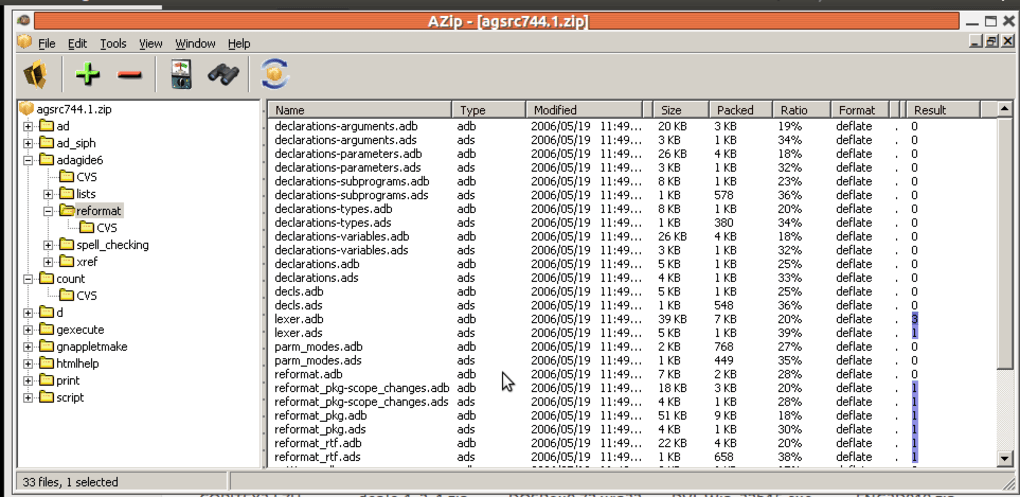
- Simplicity and ease of use: AZip’s minimal interface is intuitive and user-friendly, making it ideal for novice users.
- Small size: Its small installation size minimizes resource consumption, ensuring compatibility with older or less powerful systems.
- Free of charge: AZip is a free utility, making it an attractive option for users who don’t want to pay for a commercial program.
Weaknesses:
- Limited features: AZip lacks many advanced features found in competitors such as 7-Zip and WinRAR.
- Lack of documentation: The lack of detailed documentation limits users’ ability to fully understand and utilize the program’s capabilities.
- Uncertainty regarding security: The lack of explicit information regarding AZip’s security features raises potential concerns for users handling sensitive data.
- Limited support: The absence of widespread community support or readily available troubleshooting resources could hinder users who need assistance.
Conclusion
AZip serves as a functional, lightweight file compression tool, particularly well-suited for users requiring basic compression and decompression capabilities without the need for advanced features or extensive customization. Its simple interface and minimal resource consumption make it an attractive option for novice users or those working with older systems. However, users needing advanced features, robust security, or comprehensive documentation should consider alternative solutions like 7-Zip or WinRAR, which provide more comprehensive functionality and broader support. Ultimately, the choice between AZip and other available options depends on the individual user’s needs and priorities. For simple tasks, AZip might be sufficient; for more demanding requirements, more robust solutions are recommended.
File Information
- License: “Free”
- Latest update: “June 23, 2025”
- Platform: “Windows”
- OS: “Windows 8.1”
- Language: “English”
- Downloads: “200”
- Size: “3.33 MB”


