
Baidu Antivirus, developed by the prominent Chinese tech company Baidu, stands as a noteworthy contender in the realm of free antivirus software. While perhaps less well-known in Western markets compared to established names like Avast or McAfee, Baidu Antivirus offers a robust suite of security features packaged within a user-friendly interface. This review delves into its capabilities, performance, and overall effectiveness, providing a comprehensive assessment for potential users.
Interface and Usability: Simplicity Meets Functionality
One of Baidu Antivirus’s strengths lies in its straightforward and intuitive design. The interface, characterized by large, clearly labeled icons and a predominantly blue and white color scheme, promotes ease of navigation. Users will immediately find the core functionalities: Quick Scan, Full Scan, and Custom Scan. A discreet arrow tab reveals the real-time protection settings, allowing users to toggle various protection modules on or off based on their needs. The settings menu provides extensive customization options, enabling users to schedule scans, define actions for infected files (quarantine, delete, trust), and specify scan depth. This level of control caters to both novice and experienced users, allowing for a tailored security experience. The lack of overwhelming options keeps the interface clean and avoids the cluttered look often seen in more feature-rich antivirus programs.
Scanning Capabilities: Speed and Thoroughness
Baidu Antivirus offers three primary scan types: Quick, Full, and Custom. The Quick Scan focuses on critical areas, including startup items, browser add-ons, temporary files, and system services, offering a rapid assessment for immediate threats. This is ideal for users who need a quick check without extensive system analysis. The Full Scan, conversely, is a comprehensive examination of the entire system, meticulously checking for vulnerabilities and malware across all drives and folders. While more thorough, this naturally takes longer to complete. Finally, the Custom Scan allows users to select specific files, folders, or drives for targeted scanning. This is particularly useful when dealing with suspected infections from external sources or specific file types.
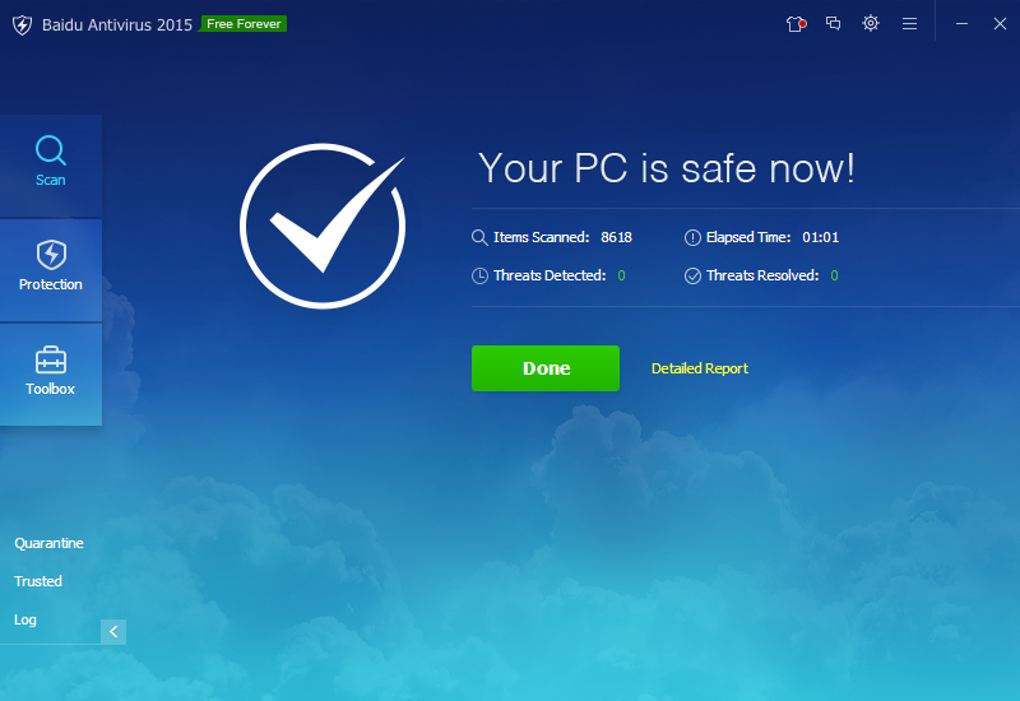
The antivirus engine itself utilizes the Avira engine, a reputable and widely respected engine known for its effective threat detection. The default scan settings include executable files, archives, and documents, but users can expand the scope to include virtually any file type by adjusting the file extension filters and archive size parameters. This flexibility enables users to finely tune the scan to address specific security concerns.
The program automatically handles many detected threats, moving them to a quarantine zone for safekeeping. However, users retain complete control and can manually choose the action to be taken against each identified threat, be it deletion or marking as trusted. This level of user oversight is crucial for preventing false positives, which can occur in antivirus software, leading to the accidental deletion or disabling of legitimate files. The user’s intervention helps ensure the accuracy of the program’s actions.
Real-Time Protection and Advanced Features
Beyond its robust scanning capabilities, Baidu Antivirus includes comprehensive real-time protection. This crucial feature constantly monitors system activity, preventing malware from infecting the system. The real-time protection includes safeguards for the file system, hard disk storage, web access, and even USB drives. The level of real-time protection can be adjusted, allowing users to balance comprehensive scanning with resource consumption. This option allows for a tailored approach to protection depending on the user’s computing needs and system performance.
Further enhancing its security profile, Baidu Antivirus incorporates additional features such as:
- USB Protection: This prevents the spread of malware from external storage devices like USB drives. Users can configure the level of scanning (automatic or normal mode) and even disable autoplay for added precaution.
- Download Protection: The software automatically scans downloaded files, including zipped and executable files, for malicious content, notifying the user immediately of any detected threats.
- Browser Protection: Baidu Antivirus aids in safeguarding web browsing by incorporating an ad blocker, reducing the risk of exposure to malicious websites and potentially harmful advertisements.
- Malicious Plugin Detection: This feature proactively identifies and removes malicious browser plugins that could compromise security or system performance.
- Permanent File Removal: The ability to securely delete files, preventing data recovery, is a valuable feature for handling sensitive information.
- Customizable Skins: While functional, Baidu Antivirus also allows users to personalize the visual appearance of the application.
Performance and System Impact
A common concern with antivirus software is its potential impact on system performance. Baidu Antivirus addresses this concern effectively. While full system scans can naturally take time (depending on the size and complexity of the system), they generally do not significantly impede system speed or responsiveness. The program is designed to operate efficiently in the background without consuming excessive resources, ensuring a smooth user experience. This design choice reflects a user-friendly approach to virus scanning.
Baidu Antivirus’s Strengths and Weaknesses
Strengths:
- User-Friendly Interface: The simple and intuitive interface makes the software accessible to users of all technical skill levels.
- Comprehensive Protection: Baidu Antivirus offers a wide array of security features including real-time protection, multiple scan types, USB protection, and more.
- Free and Without Limitations: Unlike some antivirus software that offers limited features in the free version, Baidu Antivirus provides full functionality without any hidden costs or restrictions.
- Lightweight and Efficient: The program has a minimal impact on system performance, making it suitable for both high-end and low-end systems.
- Regular Updates: Baidu regularly releases updates to ensure the software remains effective against the latest threats. This continual updating is critical for maintaining current security protections against ever-evolving threats.
Weaknesses:
- Limited Pop-Up Alerts: The lack of pop-up alerts on scan completion may not appeal to users who prefer immediate visual confirmation of scan results. Some users rely on these confirmations for peace of mind, making this a potential drawback for some.
- Relatively Unknown in Western Markets: Compared to more established brands, Baidu Antivirus may have less widespread recognition and user reviews in Western countries. This does not necessarily denote inferior performance, but it may lead to some hesitation among users who prefer well-known products.
- Advance Feature Complexity: While easily accessible, some of the more advanced features within the settings might require a deeper understanding of computer security for optimal utilization.
Conclusion: A Solid Free Antivirus Option
Baidu Antivirus presents a compelling case as a free antivirus solution. Its user-friendly interface, comprehensive feature set, and minimal impact on system performance make it a viable alternative to many paid and free competitors. While the lack of pop-up alerts and relatively lower Western market visibility might be drawbacks for some, the overall effectiveness and robust security features make it a strong choice for users seeking reliable and free antivirus protection. The software provides a great balance of powerful security and ease of use for every day consumers.
File Information
- License: “Free”
- Latest update: “July 10, 2023”
- Platform: “Windows”
- OS: “Windows 8”
- Language: “English”
- Downloads: “633.9K”
- Size: “2.03 MB”


