
Baidu PC Faster is a free, comprehensive utility suite designed to optimize and protect your Windows PC. Developed by Baidu, a prominent Chinese technology company, this software offers a range of features aimed at enhancing system performance, cleaning up unnecessary files, and bolstering security. While it presents a user-friendly interface, certain aspects warrant closer examination before committing to its installation. This review delves into the strengths and weaknesses of Baidu PC Faster, providing a balanced assessment to assist you in determining its suitability for your needs.
Core Features and Functionality
Baidu PC Faster’s functionality is organized around several key modules, each addressing a specific aspect of PC maintenance and optimization. These core features include:
1. Win Update: This module acts as a smart updater for Windows security patches. It intelligently scans your system for vulnerabilities and recommends applicable patches and fixes. This is crucial for maintaining a secure system, as outdated software can be vulnerable to exploits and malware infections. By automating this process, Baidu PC Faster eliminates the need for manual checks and updates, a significant advantage for users who may not be tech-savvy. However, it’s crucial to note that while the software identifies updates, it doesn’t automatically install them; user confirmation is still required.
2. Cleaner: The Cleaner module serves as a comprehensive cleaning tool that addresses various types of digital clutter. Its capabilities include:
-
One-Click Clean: This provides a quick and easy way to remove temporary files, browsing history, and other unnecessary data that accumulate over time. This functionality is valuable for freeing up disk space and improving system responsiveness.
-
Plugin Cleaner: This feature focuses on identifying and removing unnecessary browser plugins and extensions that may contribute to slower browsing speeds or security vulnerabilities. A cluttered browser can impact performance and pose security risks, so this function provides valuable system maintenance.
-
Privacy Cleaner: This helps to safeguard user privacy by removing browsing history, cookies, and other potentially sensitive data. This aspect is increasingly important in an era of heightened online privacy concerns.
-
Software Cleaner: This allows for the removal of unwanted or unused programs, which can free up considerable disk space and enhance system efficiency. Unnecessary programs can consume system resources and create potential vulnerabilities.
-
Large File Cleaner: This scans the system for large files that may be consuming unnecessary storage space. This is particularly helpful in identifying potential candidates for deletion or archiving, streamlining storage management.
3. Speed Up: This module focuses on improving system performance by addressing factors that impact boot times and overall responsiveness. Its key functions include:
-
Automatic Monitoring: The software monitors system processes to identify those consuming excessive resources. This allows for informed decisions regarding resource allocation and optimization.
-
Management of Unnecessary Startup Items: Baidu PC Faster identifies and allows users to disable programs that automatically start with Windows. These programs can significantly impact boot times and overall system performance.
-
System Optimization: This encompasses a range of optimization techniques aimed at enhancing overall system responsiveness and stability.
-
Network Optimization: This element aims to improve internet connection speed and stability by identifying and addressing potential bottlenecks.
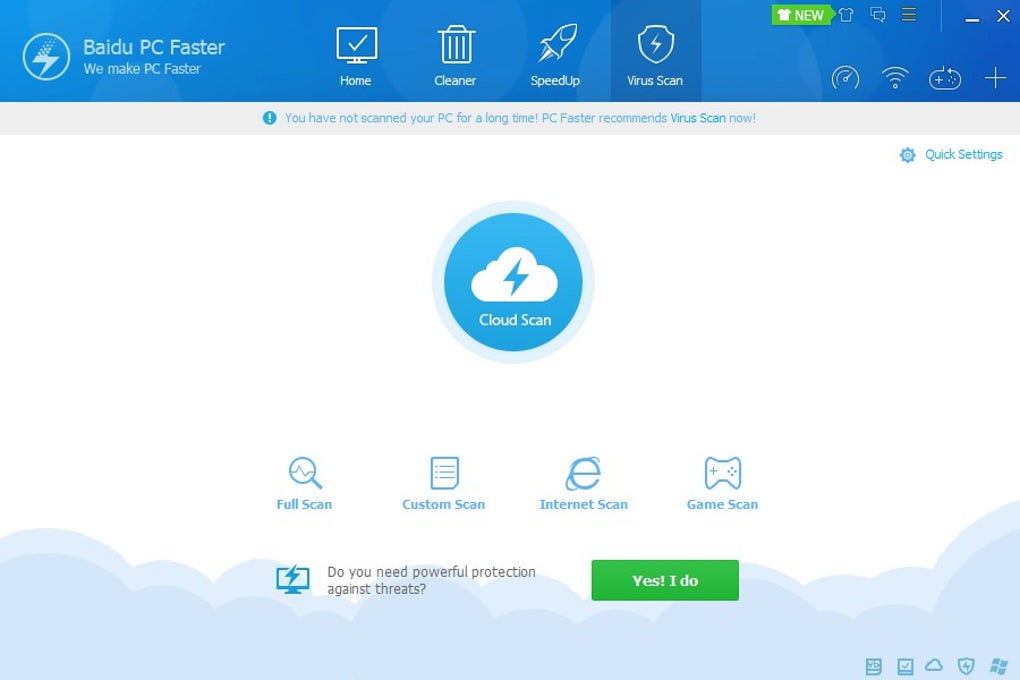
4. Cloud Security: Employing cloud-based scanning technology, this module provides a robust anti-malware solution. Leveraging Baidu’s cloud infrastructure, it detects and removes malware and suspicious processes that could compromise the system’s security. The cloud-based approach offers the advantage of access to updated malware definitions, providing better protection than traditional, locally-based antivirus solutions. However, it requires an active internet connection to function effectively.
5. Toolbox: This module provides a collection of additional tools to further optimize your PC and internet connection. The specific tools included may vary over time with software updates, providing flexibility and adaptability.
User Interface and Usability
Baidu PC Faster boasts a clean and intuitive interface, making it easily navigable for both experienced and novice users. Each function is clearly explained, minimizing the learning curve. The software’s design prioritizes simplicity and ease of use, making it accessible to a broad range of users. This accessibility contributes significantly to its user-friendliness and appeal. The straightforward design makes it easy to understand and operate, which is a significant benefit for those who may not be comfortable with complex technical interfaces.
Performance Considerations
While generally efficient, Baidu PC Faster’s performance can vary depending on system resources and the tasks being performed. Some users have reported that the software consumes more RAM than other comparable optimization utilities. This increase in RAM usage, although not always significant, should be considered when using the software, particularly on systems with limited RAM capacity. Overuse of system resources can impact overall system performance, negating some of the performance benefits the software intends to provide. It is essential to monitor RAM usage while running Baidu PC Faster to gauge its impact on your specific system.
Security Concerns
As with any software downloaded from the internet, security concerns must be addressed. While Baidu PC Faster is generally considered safe, like any third-party software, there’s always a potential risk. The software is widely used, and its reputation is generally positive. However, it’s still recommended to download the software only from official and trusted sources to minimize the risk of downloading malicious files disguised as the legitimate application.
Alternatives to Baidu PC Faster
Several alternative PC optimization and security suites are available. These offer comparable functionalities but with differing strengths and weaknesses. Researching alternative software is essential to find one that perfectly matches your individual needs and preferences.
Some popular alternatives include:
- CCleaner: A well-established and widely-used cleaning utility.
- Advanced SystemCare: A comprehensive suite offering a wider range of tools than Baidu PC Faster.
- IObit Uninstaller: A powerful tool specifically designed for software uninstallation.
- Auslogics BoostSpeed: A more specialized performance optimization tool.
Choosing the right software depends on your individual needs and preferences. Some may prioritize specific features or prefer a lighter program with fewer resource demands.
Conclusion
Baidu PC Faster provides a convenient and user-friendly approach to PC optimization and security. Its comprehensive suite of tools caters to a wide range of maintenance and performance enhancement needs. The software’s intuitive interface and clearly-defined features are highly appealing. However, potential users should consider the resource consumption reported by some users and weigh the program’s performance against available alternatives before deciding on its installation. Ultimately, the effectiveness of Baidu PC Faster will depend on individual system configurations and usage patterns. Regularly reviewing its functionality and resource consumption is advisable to ensure continued optimal performance and to address any potential issues promptly.
File Information
- License: “Free”
- Latest update: “May 24, 2023”
- Platform: “Windows”
- OS: “Windows 8”
- Language: “English”
- Downloads: “1.1M”
- Size: “26.80 MB”


