
This in-depth guide explores the Bass Treble Booster software, examining its features, functionality, user experiences, and alternative options. We will delve into the details of this audio enhancement tool, evaluating its strengths and weaknesses to help you determine if it’s the right choice for your audio editing needs.
Understanding Bass Treble Booster Functionality
Bass Treble Booster is a Windows-based audio editing program designed to allow users to manipulate the bass and treble frequencies of various audio files. It goes beyond simple volume adjustments, offering granular control over specific frequency bands to refine the overall sound profile. This allows for a tailored listening experience, catering to individual preferences and the characteristics of different genres of music.
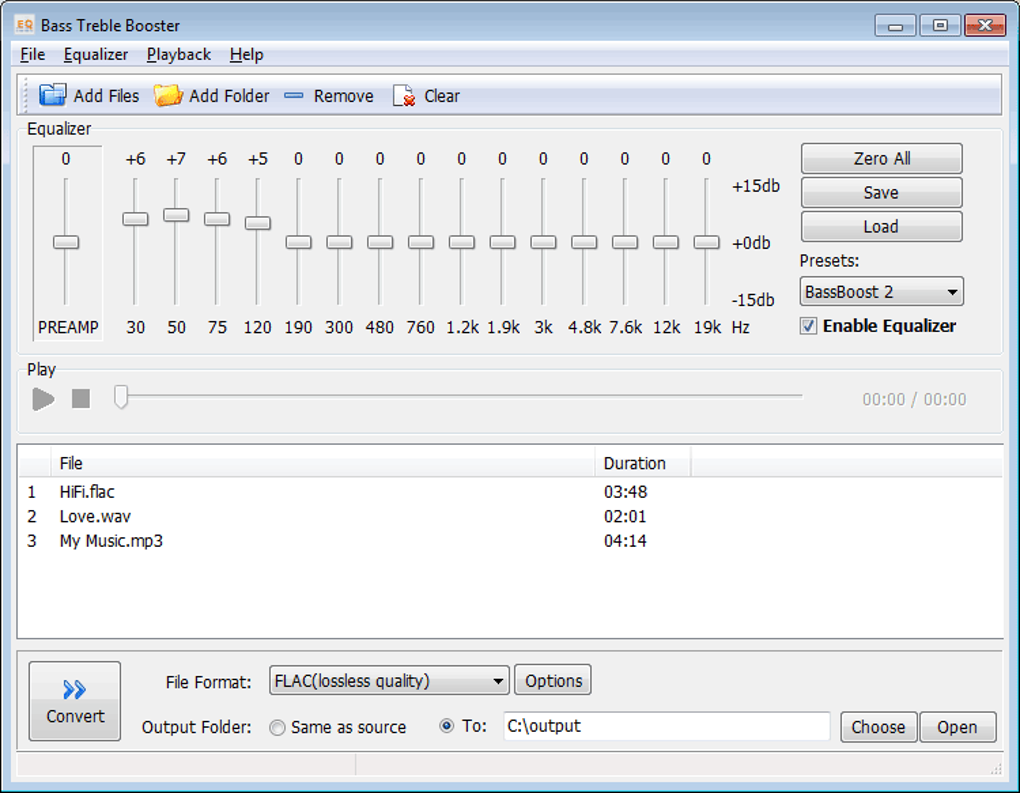
The core functionality revolves around its 15 frequency settings. These settings allow users to precisely boost or cut the energy within specific frequency ranges, extending from 30 Hz to 19 kHz. This wide range accommodates the entire audible spectrum, enabling comprehensive audio manipulation. For less technically inclined users, the software incorporates pre-set equalizers. These presets offer readily available equalization profiles, simplifying the process of achieving a desirable sound without requiring in-depth knowledge of audio engineering principles.
Beyond frequency adjustment, a key feature of Bass Treble Booster is its file conversion capabilities. The software supports a wide array of input file types, including MP3, FLAC, WAV, OGG, WMA, APE, AAC, WV, AIFF, and M4A. This broad compatibility ensures that users can work with most commonly used audio formats. Moreover, it offers lossless conversion to FLAC and WAV formats, preserving the audio quality during conversion. The option to convert to MP3 is also available, offering a smaller file size at the cost of some audio fidelity. This dual approach caters to users who prioritize either audio quality or file size depending on their needs.
Key Features and Advantages
The ease of use is a significant advantage of Bass Treble Booster. Its intuitive interface simplifies the audio editing process, making it accessible to users with varying levels of technical expertise. The ability to easily revert any modifications back to the original settings provides a safety net, allowing for experimentation without fear of permanently altering audio files. This feature is particularly valuable for users unfamiliar with audio editing software. The ability to convert audio files between various formats, including lossless formats, further enhances its usability and appeal.
-
Precise Frequency Control: The 15 frequency bands provide granular control over the entire audible spectrum, allowing for precise adjustments to bass and treble frequencies. This level of detail empowers users to tailor the audio to their liking with accuracy.
-
Pre-set Equalizers: The inclusion of multiple equalizer presets simplifies the editing process, providing convenient starting points for various musical genres or listening preferences. This is extremely helpful for users without a strong understanding of audio equalization.
-
Lossless Conversion: The ability to convert to lossless formats like FLAC and WAV ensures the preservation of audio quality, a crucial feature for audiophiles who value high-fidelity sound.
-
Wide Format Support: The support for a wide array of input file formats enhances the software’s versatility and adaptability to various user needs and audio sources.
-
Batch Processing: The ability to batch convert multiple files simultaneously significantly improves efficiency, saving users time when working with large collections of audio.
-
Drag-and-Drop Functionality: The incorporation of drag-and-drop functionality further enhances the user experience, allowing for a seamless workflow when importing and exporting files.
Limitations and Potential Drawbacks
While Bass Treble Booster offers several advantageous features, it also exhibits certain limitations. One potential drawback is the limited number of equalizer presets. While the existing presets provide a useful starting point, a wider variety of presets could further enhance the software’s usability and cater to a broader range of musical styles and user preferences. A more extensive library of presets could allow for quicker adjustments and a more intuitive user experience.
Another potential limitation is the absence of more advanced audio editing capabilities. Bass Treble Booster focuses primarily on bass and treble adjustments and file conversion. Users seeking more comprehensive audio editing tools, such as those offering effects processing, noise reduction, or more advanced equalization capabilities, may find its features insufficient.
The user reviews highlight some inconsistencies in user experience. While some users praise its effectiveness and ease of use, others report issues with functionality and the cost associated with upgrading to a full version. The lack of transparency regarding the pricing and purchasing process of the full version is a concern raised by several users.
Alternative Audio Enhancement Software
Several alternative audio enhancement applications offer similar or more advanced features. These alternatives provide options for users seeking more comprehensive capabilities or a different user experience.
- Equalizer APO: This free, open-source parametric equalizer offers extensive control over audio frequencies. While it requires more technical knowledge than Bass Treble Booster, its flexibility and customization make it a powerful choice for experienced users.
-
Letasoft Sound Booster: This software focuses on boosting the overall system volume, unlike Bass Treble Booster, which focuses on manipulating frequency bands. It is an option for users primarily looking to increase their system volume beyond its default limits.
-
Volume 2: A free and advanced volume controller for Windows systems, Volume 2 provides a different approach to audio management compared to Bass Treble Booster’s frequency-focused approach.
-
Other Audio Editors: Several other audio editors such as Audacity (free and open-source) provide broader functionality, encompassing features like recording, mixing, effects, and mastering. These software packages, however, often have a steeper learning curve compared to Bass Treble Booster’s user-friendly interface.
Conclusion
Bass Treble Booster presents a straightforward and user-friendly approach to adjusting bass and treble frequencies in audio files. Its intuitive interface and file conversion capabilities make it an appealing choice for users who require simple but effective audio editing. However, users should be aware of its limitations regarding the number of equalizer presets and the lack of advanced audio editing tools. Those seeking more comprehensive features may find alternative audio editing software, such as the ones mentioned above, to be a better fit for their needs. Ultimately, the choice depends on individual requirements, technical expertise, and the specific audio editing tasks at hand. The decision to utilize Bass Treble Booster depends on a careful consideration of its advantages and limitations in relation to the user’s specific needs and expectations.
File Information
- License: “Trial version”
- Version: “1.1”
- Latest update: “August 15, 2018”
- Platform: “Windows”
- OS: “Windows XP”
- Language: “English”
- Downloads: “575.6K”
- Size: “1.54 MB”


