
Batch files, those files with the .BAT or .CMD extensions, are powerful tools for automating tasks in Windows. However, creating and managing them manually can be a tedious and time-consuming process, especially for users who frequently need to generate or modify these scripts. This is where a dedicated batch file maker comes in handy. This comprehensive guide explores the functionalities and advantages of using a batch file maker application, specifically highlighting its capabilities for streamlining the batch file creation and modification process.
Streamlining Batch File Creation
Creating batch files traditionally involves writing and editing text files containing commands. This method is prone to errors, particularly for complex scripts with multiple commands and conditional statements. A batch file maker simplifies this process considerably, providing a user-friendly interface that eliminates the need for direct text editing. Instead of manually typing commands, users can select pre-defined functions or use intuitive drag-and-drop interfaces to build their batch files visually. This visual approach dramatically reduces the risk of syntax errors and speeds up the overall creation process.
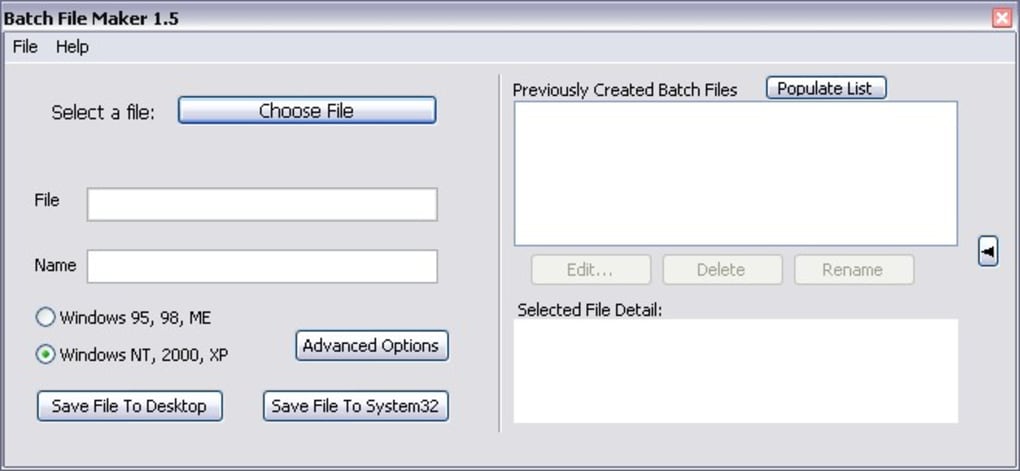
Many batch file makers offer a library of pre-built commands and functions, categorized for easy access. This eliminates the need to memorize intricate command-line syntax, making the tool accessible to both novice and experienced users. Users can simply select the desired function from the library and add it to their batch file, significantly simplifying the development workflow. This library often includes commands for common tasks such as file manipulation, directory navigation, system control, and network operations. The availability of these pre-built commands saves considerable time and effort compared to manually writing each command from scratch.
Efficient Batch File Modification and Management
Beyond creation, batch file makers often include features for efficient modification and management of existing batch files. The ability to easily edit existing scripts, add or remove commands, and modify parameters is crucial for maintaining and updating automated processes. A good batch file maker will allow users to open existing batch files, edit them within a structured interface, and save the modifications without losing formatting or functionality.
The management features often extend to organizing multiple batch files. Some applications allow users to group related batch files into projects or folders, ensuring easy access and organization. This is particularly useful for managing large numbers of batch files related to different tasks or projects. Furthermore, many batch file makers allow for version control of batch files, enabling users to track changes, revert to earlier versions, and compare different revisions. This is an essential feature for maintaining the integrity and reliability of automated processes over time.
Advanced Features and Customization Options
While basic functionality involves creation and modification, sophisticated batch file makers offer advanced features to enhance their versatility. These advanced features often include conditional statements, looping constructs, error handling, and variable substitution. These features allow for the creation of more complex and robust batch files capable of handling a wider range of tasks. Users can implement conditional logic to execute specific commands based on certain conditions, use loops to repeat commands multiple times, implement error handling to gracefully manage unexpected situations, and leverage variable substitution to make batch files more flexible and adaptable to changing conditions.
Customization options extend beyond core functionality. Users might be able to customize the appearance of the interface, create custom command libraries, or integrate the batch file maker with other applications. These customizations allow users to tailor the application to their specific workflows and preferences. For example, a user might customize the interface to match their preferred color scheme or create a custom library of frequently used commands specific to their area of expertise. The integration capabilities can further streamline workflows by allowing the batch file maker to seamlessly interact with other applications, reducing the need for manual data transfer or process switching.
Output Options and Deployment
Once a batch file is created or modified, the batch file maker facilitates seamless output and deployment. Users can typically choose the desired output location, save the batch file to a specific folder, or even directly deploy it to a designated directory. This flexibility in output options allows users to easily integrate their batch files into existing workflows and automate processes across different directories or systems.
Many batch file makers offer the option to save batch files in various formats or to create executable files (.exe) from batch scripts. Creating executable files can improve the user experience by providing a standalone file that doesn’t require direct interaction with the command prompt. Furthermore, they can enhance security by preventing unauthorized modification of the script’s content. The ability to create .exe files is particularly useful when sharing batch files with other users or deploying them to systems without direct command-line access.
Comparison with Manual Batch File Creation
The benefits of using a batch file maker are numerous when compared to manual creation. The primary advantage lies in the significant reduction in time and effort required to create and manage batch files. Manual creation requires a deep understanding of command-line syntax, making it prone to errors and time-consuming, especially for complex scripts. A visual, intuitive interface greatly simplifies the process, allowing users of all skill levels to create sophisticated batch files with ease.
Error reduction is another key advantage. The visual interface and pre-built command libraries minimize the risk of syntax errors, a common problem in manual batch file creation. Furthermore, many batch file makers include built-in error checking and debugging tools, further reducing the likelihood of errors and simplifying the process of identifying and fixing them. This error reduction leads to increased efficiency and reduces the time spent troubleshooting and debugging problems.
Finally, the ease of modification and management provided by a batch file maker contributes significantly to increased productivity. The ability to easily open, edit, and save batch files, combined with features like version control and project organization, simplifies the process of maintaining and updating automated workflows over time. This ease of management reduces the overhead associated with managing large numbers of batch files, allowing users to focus on creating and automating tasks rather than battling with the complexities of manual management.
Conclusion: Embracing Efficiency with Batch File Makers
In summary, a dedicated batch file maker represents a significant improvement over manual batch file creation. It enhances efficiency by streamlining the creation, modification, and management of batch files, reducing errors and increasing productivity. The intuitive interface, pre-built command libraries, and advanced features make batch file creation accessible to a wider range of users, allowing even those without extensive command-line experience to leverage the power of batch scripting to automate tasks and streamline their workflows. The ability to save time, minimize errors, and efficiently manage large numbers of batch files makes a batch file maker an indispensable tool for anyone who frequently works with batch scripts in a Windows environment.
File Information
- License: “Free”
- Version: “1.5”
- Latest update: “September 23, 2021”
- Platform: “Windows”
- OS: “Windows 98 SE”
- Language: “English”
- Downloads: “29.9K”
- Size: “1.10 MB”


