
Batch Video Resizer is a free Windows application designed to resize video files in batches, offering a convenient way to reduce file sizes or prepare videos for specific devices. While its primary function might seem somewhat redundant in the age of readily available high-capacity storage and powerful video editing software, it still holds value for users needing quick and simple resizing without extensive technical knowledge. This review delves into its functionalities, pros, cons, and alternatives, providing a comprehensive overview for potential users.
Functionality and Features
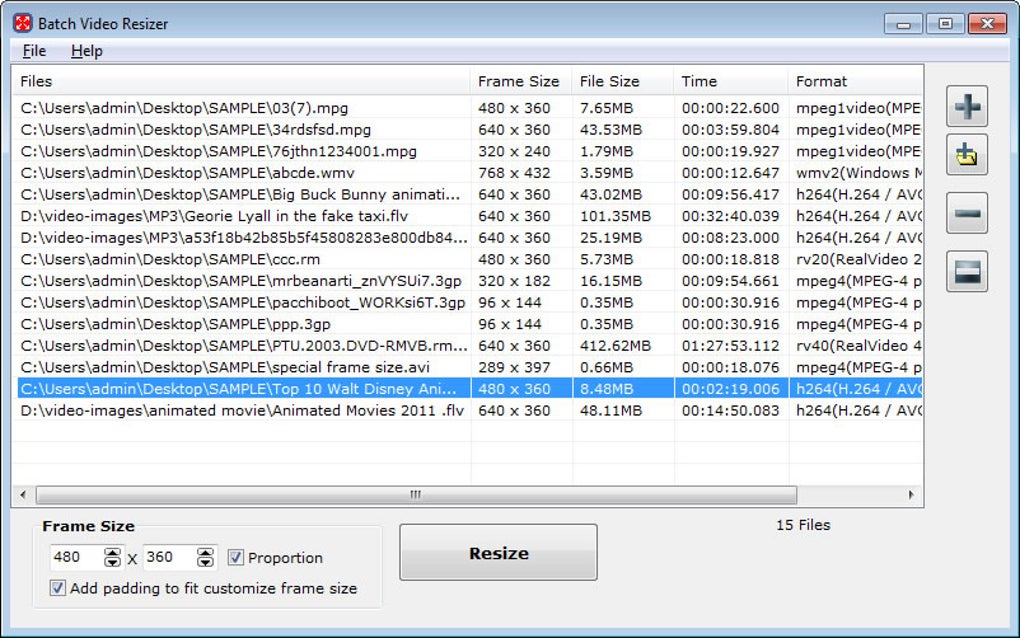
Batch Video Resizer’s core function is straightforward: it resizes videos. Users select a group of video files, specify a target resolution, and the application processes them simultaneously, maintaining the original aspect ratio. This batch processing capability is its key advantage, saving significant time compared to manually resizing each video individually. The application supports various video formats, ensuring compatibility with a wide range of source files. It allows users to dramatically shrink the size of their video files without needing complex video editing skills. This is particularly useful for users wanting to:
-
Reduce file sizes: This is beneficial for users with limited storage space on their computers, external hard drives, or mobile devices. Reducing file sizes allows for more videos to be stored within the available space.
-
Optimize for mobile devices: Videos originally created for larger screens might be too large for smartphones or tablets. Batch Video Resizer enables users to easily adapt video sizes to fit these devices, ensuring smooth playback without excessive buffering.
-
Prepare videos for sharing: Sharing videos online often requires files within specific size and resolution constraints. Batch Video Resizer can facilitate this process by adjusting videos to meet these requirements.
The simplicity of the interface makes it user-friendly, even for those unfamiliar with video editing software. Users simply browse to select their videos, input the desired resolution, and initiate the resizing process. The application handles the technical details, allowing users to focus on the outcome rather than the intricate steps involved.
Pros and Cons
Batch Video Resizer offers several advantages:
-
Batch processing: This is the software’s standout feature. The ability to resize multiple videos simultaneously drastically improves efficiency, particularly when dealing with large numbers of files.
-
Ease of use: The intuitive interface requires minimal technical expertise. Users can easily navigate the software and execute the resizing process with a few simple clicks.
-
Aspect ratio preservation: The application intelligently maintains the original aspect ratio during resizing, preventing distortion of the video’s dimensions.
-
Free software: The application is available at no cost, making it an accessible option for users on a budget. This removes financial barriers and allows wider access to the utility.
However, some limitations exist:
-
Redundancy in modern context: With increasingly larger hard drive capacities and cloud storage solutions, the need for aggressive video resizing is less critical than it once was. Many users might find they have ample storage space to retain high-resolution videos.
-
Quality compromise: Resizing videos, especially to significantly smaller dimensions, inevitably results in some loss of video quality. While the application strives to minimize this loss, users should be aware that a certain degree of quality degradation is unavoidable.
-
Limited presets: The software might lack comprehensive preset resolutions, potentially requiring manual input of desired dimensions. This could prove inconvenient for users seeking specific pre-configured options.
- Single-core processing: The application might not be fully optimized for multi-core processors, limiting its performance on systems with multiple processing units. This could potentially slow down the resizing process for users with powerful computers.
Alternatives to Batch Video Resizer
While Batch Video Resizer provides a convenient solution, several alternatives exist, each offering unique strengths:
Free Options:
-
Free Resize Video: This free software offers video resizing capabilities, similar to Batch Video Resizer. Its ease of use and free licensing make it a comparable alternative for users with basic resizing needs. A comparison of features and performance would be necessary to definitively determine which software is more suitable for a given user.
-
Free Color Video: This software provides broader video editing functionalities beyond just resizing, including color correction and brightness adjustments. Users requiring more comprehensive editing tools might find this a better alternative than the more limited Batch Video Resizer.
-
Video Cutter & Compressor: This tool combines video cutting and compression features. It offers more granular control over the video editing process, which could be advantageous to users who require more than just resizing functionalities.
Commercial Options (Trial versions often available):
-
Video Compressor: This commercial option provides more advanced compression algorithms, potentially achieving better file size reduction with less quality loss compared to Batch Video Resizer.
-
Simple Video Compressor: This tool focuses on efficient compression and provides user-friendly interface. Users may find its compression algorithm to be more efficient than the one used in Batch Video Resizer, but its limitations must be taken into account.
-
Kingshiper Video Compressor: This option focuses on high compression ratios while retaining a reasonable quality. While it is a commercial product, a comparison of features and performance against Batch Video Resizer would be crucial in making an informed decision.
Choosing the best alternative depends on individual needs and technical proficiency. Users requiring only basic resizing functionality might find Batch Video Resizer sufficient. Those needing more advanced features, such as video editing or higher compression ratios, might benefit from exploring commercial alternatives or more feature-rich free options.
Conclusion
Batch Video Resizer serves a specific niche in video processing. Its straightforward interface and batch processing make it a user-friendly option for users needing quick and simple video resizing. However, its limited feature set and potential quality compromises should be considered against the backdrop of readily available storage solutions and other more versatile video editing applications. Ultimately, the decision of whether to use Batch Video Resizer depends on individual needs and priorities. If simple, fast batch resizing is the primary requirement, then it provides a valuable free solution. However, users seeking more advanced features or higher levels of quality control might find more comprehensive software better suited to their needs. A thorough comparison of features and performance against alternatives before making a choice is strongly recommended.
File Information
- License: “Free”
- Version: “1.2.3”
- Latest update: “July 20, 2021”
- Platform: “Windows”
- OS: “Windows 2003”
- Language: “English”
- Downloads: “15.1K”
- Size: “6.66 MB”


