
In an increasingly mobile world, laptops have become indispensable tools for work, education, and entertainment. However, one of the most common frustrations for laptop users is the gradual degradation of battery life. Over time, a once robust battery struggles to hold a charge, leaving users tethered to power outlets or scrambling for a replacement. This seemingly inevitable decline, however, is not entirely unavoidable. With the advent of smart software solutions like the PhanMemFree Battery Limiter, users now have a powerful, free tool at their disposal to actively preserve their laptop’s battery health and significantly extend its operational lifespan.
PhanMemFree Battery Limiter is a lightweight, intuitive utility designed for Windows operating systems. Its sole, yet profoundly impactful, purpose is to safeguard your laptop battery from the detrimental effects of overcharging. By enabling users to set a maximum charge threshold and providing timely alerts, this ingenious application ensures that your battery never lingers at a full 100% charge for extended periods, a common practice that silently erodes its capacity. This article delves deep into the mechanics, benefits, and overall impact of integrating PhanMemFree Battery Limiter into your daily computing routine, offering a comprehensive guide to unlocking longer-lasting power for your portable devices.
The Hidden Cost of Full Charge: Understanding Battery Degradation
To truly appreciate the value of a battery limiting tool, it’s crucial to understand why laptop batteries degrade in the first place. Most modern laptops utilize Lithium-ion (Li-ion) batteries, celebrated for their high energy density and lack of memory effect. However, these batteries are sensitive to certain conditions that accelerate their aging process.
One of the primary culprits in battery degradation is continuous charging to 100% and maintaining that state for prolonged periods. While it might seem counterintuitive, keeping a Li-ion battery at its maximum voltage (which corresponds to 100% charge) puts it under significant stress. This high voltage state, especially when combined with elevated temperatures (often generated during active use or charging), accelerates the chemical reactions within the battery cells that lead to capacity loss. Over time, these reactions cause the internal resistance of the battery to increase, reducing its ability to store and deliver charge efficiently.
Think of it like stretching a rubber band to its absolute limit and keeping it there indefinitely. Eventually, the rubber band loses its elasticity and can no longer return to its original shape or perform its function as effectively. Similarly, a Li-ion battery kept at 100% charge experiences internal wear and tear, leading to a permanent reduction in its overall capacity. This phenomenon is why many manufacturers recommend storing devices with Li-ion batteries at around 50-80% charge if they’re not going to be used for a long time.
Another factor is the number of charge cycles. A charge cycle is counted each time a battery is fully discharged and then recharged to 100%. While the PhanMemFree Battery Limiter doesn’t directly reduce charge cycles in the traditional sense, by preventing constant “top-offs” and encouraging users to disconnect before reaching 100%, it helps maintain the battery in a healthier, less stressed state, indirectly impacting the perceived lifespan relative to its full capacity. The focus of this tool, however, is squarely on mitigating the stress caused by prolonged high-voltage states.
The consequences of battery degradation are evident to any laptop owner: shorter unplugged usage times, slower charging, and eventually, the need for an expensive replacement. This not only incurs a financial cost but also contributes to electronic waste, a growing environmental concern. PhanMemFree Battery Limiter directly addresses this core issue by offering a proactive solution, transforming a passive acceptance of battery decline into an active management strategy.
Introducing PhanMemFree Battery Limiter: Your Simple Solution
PhanMemFree Battery Limiter stands out in the crowded utility market due to its elegant simplicity and unwavering focus on a single, critical task. Unlike complex battery management suites that offer a myriad of features, some of which may be overwhelming or unnecessary for the average user, PhanMemFree Battery Limiter prides itself on doing one job, and doing it exceptionally well. This straightforward approach makes it incredibly accessible to everyone, regardless of their technical proficiency.
At its core, the application is designed to prevent your laptop battery from reaching and staying at a full 100% charge. The developers understand that while disconnecting your charger is beneficial, remembering to do so consistently amidst busy schedules can be a challenge. This is where PhanMemFree Battery Limiter becomes an invaluable digital assistant, taking the guesswork and the burden of memory off your shoulders.
Upon installation, which is remarkably quick and straightforward, the software immediately begins to monitor your laptop’s charging status. Its operation is almost entirely passive until it needs to alert you, ensuring it doesn’t interfere with your daily workflow. The beauty of this tool lies in its ability to empower users to take control of their battery’s destiny without demanding significant time or technical expertise.
Moreover, the fact that PhanMemFree Battery Limiter is completely free for lifetime use makes it an even more compelling option. There are no hidden fees, subscriptions, or premium features locked behind a paywall. This commitment to accessibility underscores the developers’ mission to provide a genuinely useful tool that benefits all Windows laptop users, fostering healthier devices and reducing the need for premature battery replacements. You can download this essential utility from Phanmemfree.org to start protecting your laptop today.
Precision Charging Control
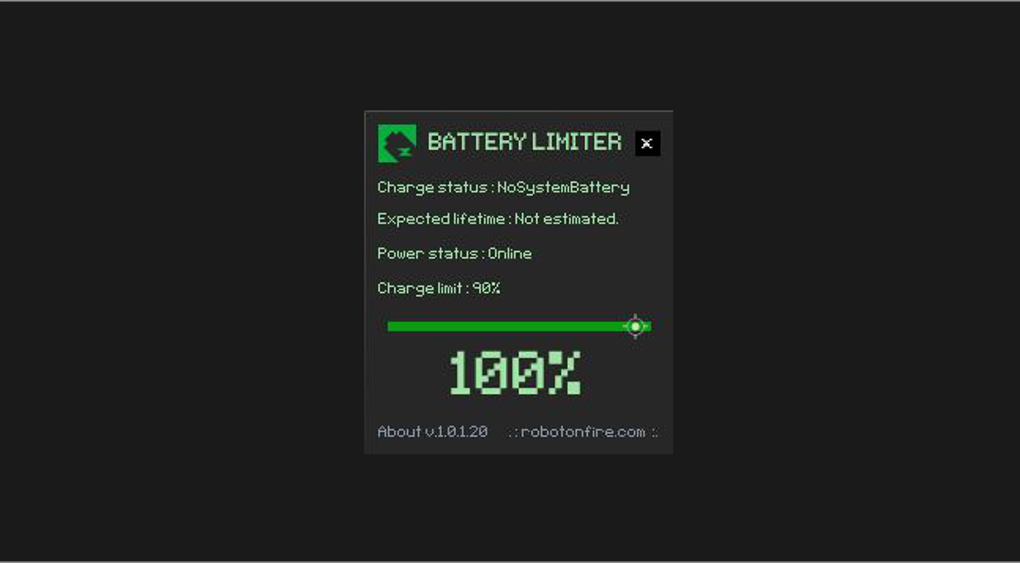
The cornerstone of PhanMemFree Battery Limiter’s functionality is its ability to precisely control the charging process by setting a user-defined limit. The application comes with a sensible default charge limit set at 90%. This threshold is chosen because it strikes an excellent balance: it provides sufficient charge for most tasks while keeping the battery away from the highly stressed 100% state. Experts widely agree that maintaining a Li-ion battery between 20% and 80% or 90% is ideal for maximizing its long-term health.
However, PhanMemFree Battery Limiter understands that user needs vary. Therefore, it offers the flexibility to modify this default limit, allowing users to set a maximum charge value up to 96%. This adjustable range ensures that you can tailor the software’s behavior to your specific usage patterns. For instance, if you anticipate needing slightly more charge for a short period of unplugged use, you can nudge the limit higher, knowing you’re still operating within a range that’s far healthier than a constant 100%. The simple interface makes it easy to adjust this setting, placing control firmly in the user’s hands without complicating the process. This precise control is the first line of defense against battery degradation, actively preventing the very conditions that accelerate aging.
Unmissable Disconnect Alerts
What good is a charge limit if you forget to unplug your laptop? This is where PhanMemFree Battery Limiter’s intelligent alarm system comes into play. Once your battery reaches the user-defined maximum charge percentage (e.g., 90% or 96%), the application activates a clear and audible alert. This alarm serves as an immediate, unmistakable prompt to disconnect your laptop from the charger.
The design of this alert system is intentionally straightforward and effective. It’s not a subtle notification that can be easily overlooked; rather, it’s designed to grab your attention. As soon as the alarm sounds, the solution is simple: unplug your laptop. The alarm will then cease, signaling that the battery is now operating within its optimal, stress-free range. This direct feedback loop ensures that users are actively engaged in the process of battery preservation, fostering good charging habits without requiring constant vigilance. This feature transforms the passive monitoring of charge levels into an active intervention, making battery health management an effortless part of your daily routine.
Keeping Your Laptop Awake for Timely Intervention
One of the more subtle yet incredibly thoughtful features of PhanMemFree Battery Limiter is its ability to prevent your laptop from entering sleep mode while the application is running and monitoring the charge. Imagine setting your charge limit, walking away from your laptop, and then returning to find it asleep, having missed the crucial alarm. This scenario would undermine the entire purpose of the software.
To counteract this, PhanMemFree Battery Limiter incorporates a mechanism that keeps your laptop awake during the critical charging phase, ensuring that you don’t miss the alarm when the charge limit is reached. This attention to user experience highlights the practical design philosophy behind the application. It anticipates potential pitfalls and proactively addresses them, guaranteeing that its core function – alerting you to unplug – remains effective and reliable. This means you can confidently leave your laptop charging, knowing that PhanMemFree Battery Limiter is on guard, ready to notify you at the precise moment required, without the risk of an untimely snooze.
The Enduring Benefits of Smart Battery Management
The collective impact of PhanMemFree Battery Limiter’s features translates into tangible and significant advantages for laptop users. Beyond the immediate convenience of a well-maintained device, the long-term benefits extend to financial savings, environmental responsibility, and an overall enhanced computing experience.
Drastically Extended Battery Life and Value
The most compelling benefit of using PhanMemFree Battery Limiter is the remarkable extension of your laptop battery’s lifespan. By preventing constant saturation at 100% charge, the software significantly mitigates the chemical stress that leads to degradation. The developers proudly state that users “might get 30+ more charges on your battery before next wear steps in.” While exact figures can vary based on individual usage and battery quality, the principle is sound: a less stressed battery will retain its capacity for a much longer period.
This extension of battery life directly translates into a greater return on your initial investment in the laptop. Instead of needing to replace a failing battery after just a couple of years, you could potentially defer that expense for much longer. For many users, a new laptop battery can cost anywhere from $50 to $150 or more, making this free utility a considerable money-saver in the long run. Moreover, a healthier battery means sustained performance and mobility, allowing you to use your laptop unplugged for longer periods throughout its operational life.
Effortless Usability for Everyone
PhanMemFree Battery Limiter embodies simplicity in its design and operation. Its intuitive interface requires virtually no learning curve, making it accessible to users of all technical backgrounds. The installation process is quick, and configuring the charge limit is a matter of a few clicks. Once set, the software operates quietly in the background, only making its presence known when it’s time to unplug.
This ease of use is a significant advantage, especially for those who prefer straightforward solutions over complex software. There are very few user-adjustable settings, meaning less time spent fiddling with configurations and more time spent on productive tasks. This focused approach ensures that the primary goal – protecting your battery – is achieved efficiently and without unnecessary complications. It’s a tool that integrates seamlessly into your digital life, requiring minimal conscious effort for maximum benefit.
A Greener Choice for Your Devices
In an era of increasing environmental awareness, choosing to extend the life of your electronic devices is a responsible and impactful decision. Laptop batteries, like other electronic components, contribute to e-waste when they are discarded. By prolonging the life of your laptop’s battery, PhanMemFree Battery Limiter indirectly helps reduce the demand for new battery manufacturing and minimizes the amount of waste ending up in landfills.
This small, free utility offers a simple way to contribute to environmental sustainability. By making your devices last longer, you’re not only saving money but also participating in a broader effort to reduce consumption and waste. It’s a testament to how intelligent software design can have far-reaching positive implications, extending beyond just individual convenience to embrace ecological responsibility. Using PhanMemFree Battery Limiter is, therefore, a choice that benefits both your wallet and the planet.
Getting Started and Advanced Considerations
Adopting PhanMemFree Battery Limiter into your daily computing regimen is a straightforward process, designed to be as user-friendly as possible. This section will guide you through the initial steps and discuss what makes this utility a standout choice, even with its intentionally “limited” feature set.
Installation and Customization
Getting started with PhanMemFree Battery Limiter begins with a visit to Phanmemfree.org. The download process is quick, and the installer is small, reflecting the lightweight nature of the application itself. Once downloaded, the installation is a typical Windows affair: click through a few prompts, and the software will be ready to go. The developer, robotonfire.com, has ensured that the process is hassle-free.
Upon launching the application, you’ll be presented with a minimalist interface. The default charge limit is set to 90%, a recommended starting point for most users. However, as mentioned, you have the flexibility to adjust this. You can easily modify the maximum charge value up to 96% through the settings. This customization allows you to fine-tune the battery protection to your specific needs, whether you prefer a slightly higher ceiling for occasional bursts of activity or want to stick closer to the more conservative 90% for maximum longevity. Once your preferred limit is set, PhanMemFree Battery Limiter takes over, silently monitoring your battery and preparing to alert you when the time is right.
Beyond Basic Functionality: A Focused Approach
One of the “cons” often listed for PhanMemFree Battery Limiter is its “limited functionality” and “very few user adjustable settings,” leading to “no options for advanced users.” While these points are factually correct, it’s crucial to view them not as drawbacks, but as deliberate design choices that contribute to the software’s effectiveness and accessibility.
In an ecosystem saturated with feature-rich applications that often overwhelm users with complex options and unnecessary telemetry, PhanMemFree Battery Limiter offers a refreshing alternative. Its simplicity is its strength. By focusing solely on intelligent charge control and timely alerts, it avoids feature bloat and ensures a stable, reliable performance without consuming excessive system resources. This makes it an ideal solution for users who want a direct, no-fuss approach to battery management, rather than a comprehensive power management suite.
For the vast majority of laptop owners, the “advanced features” offered by other tools are often unused or misunderstood. PhanMemFree Battery Limiter distills the essence of proactive battery care into its most impactful form. It’s designed to automate a crucial maintenance task that many users overlook, providing a tangible benefit without demanding a deep understanding of power management intricacies. Its lightweight nature (the file size is a mere 4.06 MB) and minimal system footprint mean it won’t slow down your laptop, making it a truly unobtrusive guardian of your battery’s health.
The program’s primary goal is to help your battery last longer, and it achieves this with remarkable efficiency. Its compatibility with Windows (specifically noted for Windows 7 and newer versions) further broadens its appeal, making essential battery protection available to a wide audience.
Conclusion: Safeguarding Your Laptop’s Future
In an era where digital devices are integral to daily life, ensuring their longevity and reliable performance is paramount. The laptop battery, often overlooked until it starts to fail, is a critical component that deserves proactive care. PhanMemFree Battery Limiter emerges as an indispensable tool for any Windows laptop owner committed to maximizing their device’s lifespan and maintaining its mobile capabilities.
By intelligently controlling the charging process, setting a customizable maximum charge limit, and providing clear, timely alerts, this free utility directly addresses the primary cause of Li-ion battery degradation: prolonged periods at 100% charge. Its user-friendly design, combined with its focused functionality, makes it accessible to everyone, from tech novices to seasoned professionals. The benefits are clear and compelling: a significantly extended battery lifespan, potentially saving you the cost and inconvenience of premature replacements, and a contribution to a greener technological footprint.
PhanMemFree Battery Limiter is more than just a piece of software; it’s a smart investment in the future of your laptop. It offers peace of mind, knowing that a vigilant digital assistant is constantly working to preserve one of your device’s most vital components. If you’re looking for a simple, effective, and free solution to protect your laptop battery, look no further. Visit Phanmemfree.org today, download PhanMemFree Battery Limiter, and take the first step towards a healthier, longer-lasting laptop experience. Give your battery the care it deserves, and it will serve you faithfully for years to come.
File Information
- License: “Free”
- Latest update: “November 29, 2023”
- Platform: “Windows”
- OS: “Windows 7”
- Language: “English”
- Downloads: “36.5K”
- Size: “4.06 MB”


