
Battle Encoder Shirase is a free, portable utility designed to help Windows users regain control over their system resources. Developed by Faireal, this lightweight tool offers a straightforward approach to managing CPU and memory usage, particularly useful when dealing with resource-intensive background processes that may be slowing down your computer. Unlike complex system monitoring suites, Battle Encoder Shirase focuses on providing a simplified interface for controlling the resource allocation of individual processes, allowing even novice users to optimize their system performance. This review will delve into its features, functionality, and overall effectiveness in addressing common performance bottlenecks in the Windows operating system.
Understanding the Problem: Resource-Intensive Processes and System Slowdown
Modern Windows systems run numerous processes concurrently, many operating in the background without explicit user interaction. These processes, ranging from system services to applications running silently, consume valuable CPU cycles and RAM. When multiple processes compete for limited resources, it can lead to a noticeable decline in system performance, manifested as slow response times, application freezes, or even system crashes. This is particularly true for older machines or those with relatively low RAM and processing power. Identifying and managing these resource-hungry processes is crucial for maintaining system responsiveness and stability.
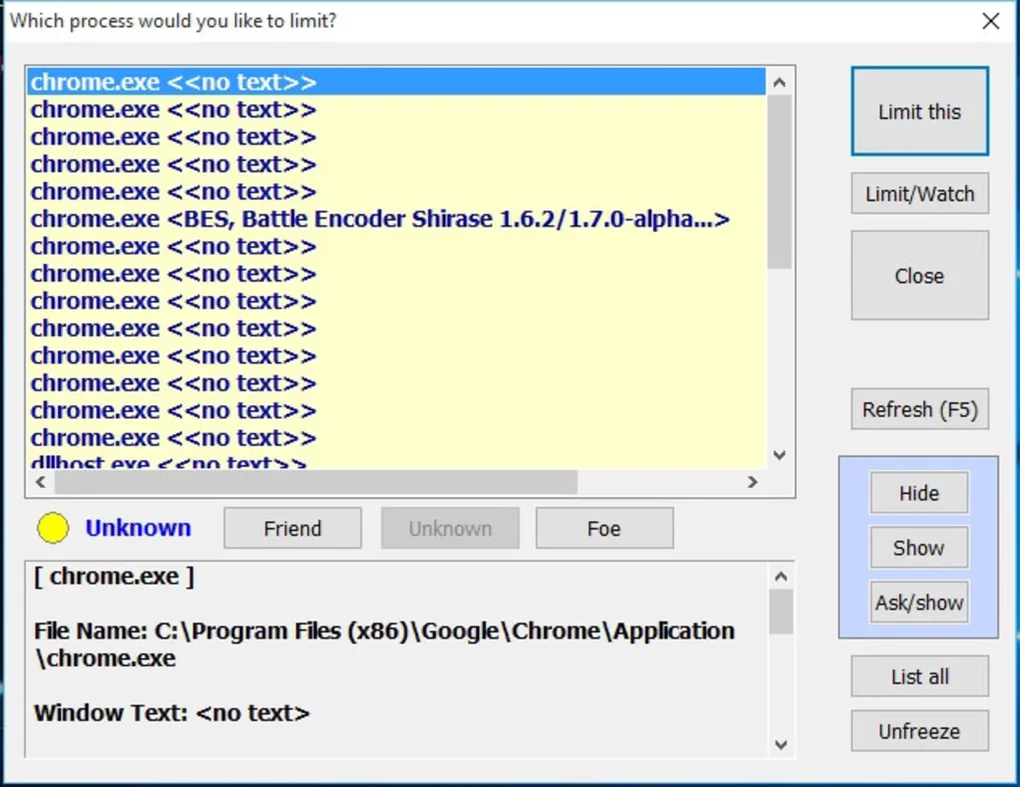
Traditional methods of managing system resources often involve using the built-in Task Manager, which provides information on running processes but lacks the fine-grained control necessary to effectively limit their resource consumption. While Task Manager allows you to end processes, this is often a blunt instrument, potentially disrupting ongoing tasks or leading to application instability. Battle Encoder Shirase offers a more nuanced solution, enabling users to limit the percentage of CPU allocated to specific processes without terminating them entirely. This approach provides a balance between resource management and maintaining application functionality.
Battle Encoder Shirase: A Simple Yet Powerful Solution
Battle Encoder Shirase’s core strength lies in its simplicity. The application is entirely portable, requiring no installation. This makes it incredibly convenient to use, allowing users to run it from any location without needing administrator privileges or making changes to the system registry. Its compact size ensures minimal impact on system resources, further enhancing its overall efficiency.
The user interface is remarkably straightforward, prioritizing ease of use over complex features. Users can easily select up to three processes to manage simultaneously. For each selected process, a slider allows for precise adjustment of the CPU usage percentage. This allows users to prioritize crucial processes by allocating them a higher percentage of CPU resources, while simultaneously restricting the resource consumption of less critical applications or background services. This targeted approach is far more effective than globally reducing CPU clock speeds or employing other system-wide performance adjustments that can impact the overall user experience.
The program’s intuitive design allows users to quickly identify resource-intensive processes and adjust their CPU usage accordingly. The real-time monitoring capabilities help visualize the effect of these adjustments, enabling users to fine-tune their settings for optimal performance.
How Battle Encoder Shirase Works: A Technical Overview
Battle Encoder Shirase operates by modifying the process priority and potentially utilizing other resource management techniques within the Windows operating system. It doesn’t directly interfere with the processes themselves; instead, it works within the established framework of the OS to subtly influence their resource allocation. The precise mechanisms are not publicly documented, but the effect is clear: a reduction in CPU usage for the targeted processes without outright termination. This nuanced approach minimizes the risk of system instability and allows for a more gradual and controlled optimization of system resources.
One key aspect of Battle Encoder Shirase’s functionality is its advisory to revert any modifications before closing the application. This is a crucial precaution to ensure that the processes return to their normal operating states. Without this reversion, processes might retain the altered CPU limits even after Battle Encoder Shirase is closed, potentially leading to unexpected behavior or performance issues.
Practical Applications and Use Cases
Battle Encoder Shirase is beneficial across a wide range of scenarios. Here are some practical use cases:
- Gaming Optimization: While gaming often utilizes dedicated graphics cards, CPU-intensive games can still benefit from optimized resource allocation. Battle Encoder Shirase can help prioritize the game process, giving it more CPU resources while limiting the consumption of less important background tasks. This can result in smoother gameplay and improved frame rates.
-
Multitasking Enhancement: When multitasking with several resource-intensive applications, such as video editing software, 3D modeling tools, or virtual machines, Battle Encoder Shirase can help prevent performance bottlenecks. Users can allocate more CPU to the currently active application while temporarily limiting the resources used by other applications in the background.
-
System Stability Improvement: Unresponsive or sluggish system behavior can often be traced back to rogue processes consuming excessive resources. Battle Encoder Shirase offers a targeted approach to curb the impact of these processes, improving overall system stability and responsiveness.
-
Troubleshooting Performance Issues: It’s a valuable tool for troubleshooting performance problems. By systematically limiting the CPU usage of individual processes, users can pinpoint the source of resource conflicts and address them accordingly.
Limitations and Considerations
While Battle Encoder Shirase offers a valuable solution for many users, it’s important to be aware of its limitations:
- Limited Process Management: The ability to manage only three processes simultaneously may be restrictive for users with more complex resource allocation needs.
-
No Real-time Detailed Statistics: While it displays the CPU usage of the selected processes, it doesn’t provide detailed statistics or comprehensive system resource monitoring.
-
Potential for User Error: Improper configuration or failure to revert changes before closing the application could lead to unexpected system behavior. Careful and informed use is essential.
-
Not a Replacement for Comprehensive System Optimization: Battle Encoder Shirase is not a replacement for comprehensive system optimization techniques, such as disk cleanup, driver updates, or malware removal. It should be viewed as a supplementary tool for fine-tuning resource allocation.
Conclusion: A Valuable Tool in the Resource Management Arsenal
Battle Encoder Shirase offers a simple yet effective solution for managing CPU resource allocation in Windows. Its intuitive interface, portability, and ease of use make it an excellent choice for both novice and experienced users looking to improve system performance. While it has limitations, particularly concerning the number of manageable processes, its targeted approach to resource management provides a valuable tool for addressing common performance bottlenecks caused by resource-intensive applications and background processes. Users should exercise caution and follow the recommended practices, particularly the advice to revert changes before closing the application, to ensure optimal system stability and avoid unexpected behavior. For users needing more comprehensive system monitoring and control, more feature-rich tools may be necessary, but for a quick and easy solution to manage individual process CPU usage, Battle Encoder Shirase is a strong contender.
File Information
- License: “Free”
- Version: “1.7.7”
- Latest update: “July 8, 2024”
- Platform: “Windows”
- OS: “Windows 11”
- Language: “English”
- Downloads: “339”
- Size: “497.66 KB”


