
BB Flashback is an all-in-one screen capture suite designed for users of all skill levels, from beginners to seasoned professionals. It excels not only in capturing screen activity but also in providing robust editing and publishing capabilities, setting it apart from many competing screen recording applications. This detailed review explores the features, strengths, and limitations of BB Flashback, providing a comprehensive understanding of its capabilities.
Core Functionality: Recording Your Screen with Ease
At its heart, BB Flashback is a powerful screen recorder. It offers a straightforward interface for capturing video of your screen activities, making it accessible to users with minimal technical expertise. The software allows you to record the entire screen, a specific window, or even a custom-defined region of the screen. This flexibility is invaluable for creating targeted recordings focused on specific applications or processes, avoiding unnecessary clutter. The ability to record only a portion of the screen is particularly useful when working with multiple applications or needing to focus on a specific element within a larger interface.
The recording process itself is streamlined, allowing users to initiate and stop recordings effortlessly. Keyboard shortcuts are fully customizable, providing a highly efficient workflow that minimizes interruptions and maximizes productivity. This feature is particularly advantageous for users who prefer keyboard-driven interactions, allowing them to initiate, pause, and stop recordings without ever needing to reach for the mouse.
Beyond the ease of use, BB Flashback supports multiple output formats, giving users flexibility in how they share and utilize their recordings. Support for formats such as Flash, AVI, WMV, EXE, and PowerPoint ensures compatibility across a wide array of platforms and applications, allowing users to seamlessly integrate their screen recordings into presentations, training materials, or online content. This versatility ensures that users can optimize their recordings for various purposes and audiences.
Advanced Editing Features: Refining Your Recordings
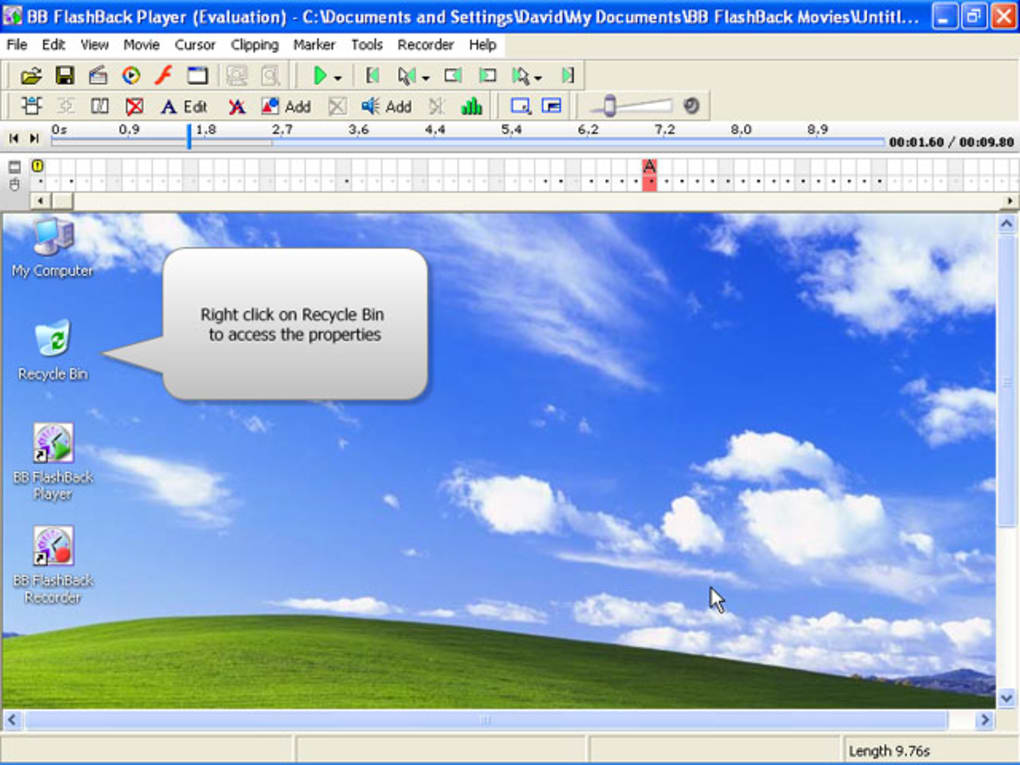
BB Flashback extends beyond simple screen recording; it incorporates a comprehensive suite of editing tools, allowing for the creation of polished and professional-quality screencasts. This aspect differentiates it from many simpler screen recording tools that lack sophisticated post-production capabilities. The editing features allow users to refine their recordings, ensuring that the final product is clear, concise, and impactful.
The software enables users to add various elements to their recordings, including text, images, and audio commentary. This is crucial for creating engaging and informative screencasts. Adding text annotations can highlight key steps or information, enhancing clarity and comprehension for the viewer. Images can be incorporated to visually illustrate concepts or provide additional context. Audio commentary allows for the addition of explanations, insights, or narration, making the recordings more dynamic and informative.
The ability to add audio commentary in MP3 or WAV format is a significant advantage, providing flexibility in audio quality and file size. Users can choose the format that best suits their needs, balancing audio fidelity with file size considerations. Further enhancing the editing capabilities, BB Flashback allows users to add text boxes, tips bubbles, and images directly onto the recordings, allowing for visually rich and engaging final products. These features enable the creation of high-quality, professional-looking screencasts.

However, while the editing features are extensive, some users have reported that the editing process can be relatively slow, particularly when dealing with longer recordings or complex edits. This is a potential drawback that users should be aware of, especially those who require fast turnaround times for their projects. The speed of editing might depend on the system’s processing power and the complexity of the edits being performed.
Publishing and Sharing: Getting Your Recordings Out There
After the recording and editing phases are complete, BB Flashback facilitates easy publishing and sharing of the final product. The variety of supported output formats ensures that the final screencasts can be readily shared through various channels, including online platforms, email, or embedded into presentations. This feature is essential for maximizing the reach and impact of the created screencasts. This makes the process of disseminating the recordings straightforward and adaptable to different needs.
User Interface and Experience
The user interface is designed to be intuitive and easy to navigate, minimizing the learning curve for new users. The software’s straightforward design makes it accessible to individuals with varying levels of technical proficiency. This is crucial for ensuring that a wide range of users can effectively utilize the software’s capabilities without experiencing significant frustration or difficulties.
However, despite the generally intuitive design, some users might find the software’s advanced features somewhat overwhelming initially. While the basic functionalities are easy to grasp, mastering the more complex editing and customization options might require some time and experimentation. This is a common characteristic of feature-rich software applications and should not be considered a major drawback, as most users will only need to learn the features relevant to their specific use cases.
Comparison to Alternative Screen Recording Software
BB Flashback competes with a wide range of screen recording software, each with its own strengths and weaknesses. While some alternatives might offer comparable recording capabilities, BB Flashback distinguishes itself through its robust editing capabilities and ease of publishing. Other software may focus primarily on simple screen capture, while BB Flashback offers a more comprehensive solution. The choice of software depends on individual requirements and priorities. Some users might find simpler alternatives sufficient, while others will benefit from the advanced features offered by BB Flashback.
Conclusion: A Powerful Tool for Various Needs
BB Flashback is a versatile and powerful tool for creating and sharing high-quality screen recordings. Its ease of use, combined with its advanced editing capabilities and flexibility in output formats, makes it a suitable choice for both casual users and professionals. The ability to create engaging and informative screencasts, with the added benefit of easy sharing, makes BB Flashback a strong contender in the screen recording software market. While the editing process might be slow for some users, this is offset by the comprehensive features and the ability to produce high-quality, shareable recordings. The software’s overall effectiveness positions it as a reliable option for a wide range of screen recording tasks.
File Information
- License: “Trial version”
- Latest update: “February 24, 2016”
- Platform: “Windows”
- OS: “Windows 2000”
- Language: “English”
- Downloads: “68.3K”
- Size: “20.67 MB”


