
BD Sizer is a free, lightweight Windows program designed for resizing digital images. While it may not boast the advanced features of professional-grade photo editors like Adobe Photoshop, its simplicity and effectiveness make it a popular choice for users needing a quick and efficient way to adjust image dimensions without sacrificing image quality or EXIF data. This guide provides a detailed overview of BD Sizer’s capabilities, features, and limitations.
BD Sizer’s Core Functionality: Resizing and Beyond
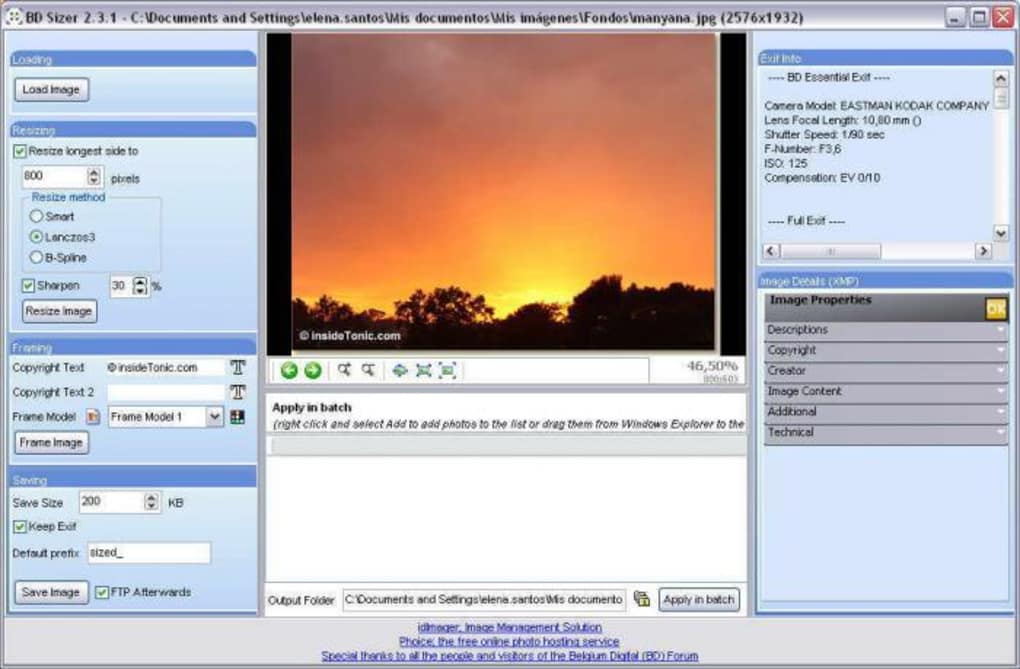
At its heart, BD Sizer is an image resizing tool. This means its primary function is to change the dimensions of your digital photos, reducing or enlarging them as needed. Unlike some simpler resizing tools that only offer basic scaling options, BD Sizer provides users with three distinct resizing algorithms: Smart, Lanczos 3, and B-spline. Each algorithm employs a different mathematical approach to resizing, impacting the final image quality.
-
Smart Resizing: This algorithm likely employs an adaptive approach, analyzing the image content and selecting the optimal resizing technique based on the image’s characteristics. This often results in a balance between speed and image quality. It’s a good all-around choice for most users.
-
Lanczos 3 Resizing: This algorithm is known for its high-quality results, especially when dealing with downscaling. Lanczos 3 uses a more complex mathematical interpolation technique, which leads to sharper images with fewer artifacts, but at the cost of increased processing time. This is an ideal choice for users prioritizing image quality over speed, particularly when reducing image size.
-
B-spline Resizing: B-spline interpolation is another method commonly used in image resizing. It generally provides smoother results than simpler algorithms but may not produce the same level of sharpness as Lanczos 3. It’s a good compromise between speed and quality.
The choice of resizing algorithm depends on individual needs and priorities. For quick resizing with acceptable quality, Smart Resizing is sufficient. For high-quality downscaling, Lanczos 3 is preferred, while B-spline offers a balance.
Beyond basic resizing, BD Sizer offers further enhancements. Users can specify a maximum file size for the resized images, ensuring that the output files stay within desired storage limits. This is particularly helpful when dealing with a large number of images or when uploading images to websites with file size restrictions.
Adding Frames and Watermarks: Enhancing Your Images
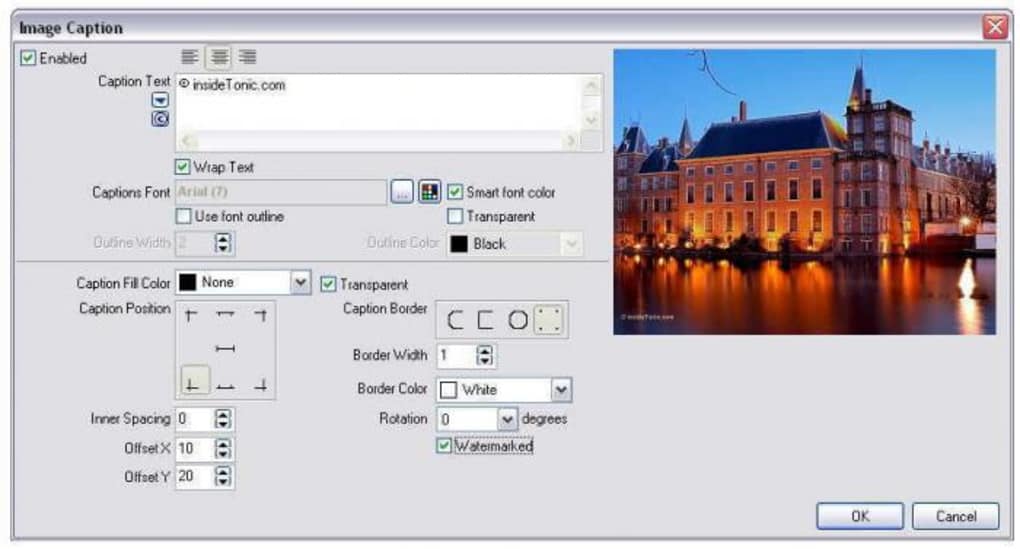
BD Sizer allows users to add visual flair to their images with the inclusion of frames and watermarks. This feature enhances the aesthetic appeal of the photos or adds a layer of copyright protection. The program provides a range of customization options for both frames and watermarks:
-
Frames: Users can choose from a variety of frame styles, adjusting their size, color, and other parameters to suit their preference. This allows for personalized image presentation, adding a decorative touch or a specific theme.
-
Watermarks: The watermark feature allows users to add text or images to their photos, serving as a copyright notice or a personal branding element. Users can customize the watermark’s position, font, size, color, and transparency, ensuring it’s prominently displayed yet doesn’t overwhelm the main image.
Preserving Metadata: Maintaining EXIF and XMP Data
One of BD Sizer’s key strengths is its ability to preserve EXIF data during the resizing process. EXIF (Exchangeable Image File Format) data includes metadata like camera model, date and time of capture, exposure settings, and GPS location. Preserving this information is crucial for photographers who value detailed image history. The program also supports viewing and editing XMP (Extensible Metadata Platform) data, providing comprehensive control over image metadata.
The retention of EXIF and XMP data is a significant advantage over simpler image resizing tools that often discard this crucial information. This feature ensures that important details associated with the image are not lost during the resizing process, maintaining the integrity of the photographic record.
Batch Processing: Efficiency for Large Image Sets
BD Sizer supports batch processing, allowing users to resize multiple images simultaneously. This dramatically increases efficiency when dealing with large numbers of images. Instead of resizing each image individually, users can select an entire folder of images and apply the desired resizing settings to all of them in one go. This batch processing capability significantly saves time and effort, making it highly beneficial for photographers and users handling extensive image collections. The program handles the processing automatically, applying the same settings consistently to every image in the selected batch.
System Requirements and User Interface
BD Sizer is designed for older versions of Windows, specifically Windows 98 and earlier. While it may not be compatible with the latest operating systems, its compatibility with older systems highlights its longevity and adaptability to different hardware configurations. The software’s user interface is likely straightforward and intuitive, although details on the specific interface design are limited in the provided information. Its simplicity is a key factor in its accessibility, making it easy to use for both novice and experienced users.
Comparison with Alternatives: BD Sizer’s Niche
While BD Sizer offers a streamlined approach to image resizing, it lacks the advanced editing capabilities of more comprehensive photo editing software such as Adobe Photoshop or GIMP. These professional-grade tools offer a wide array of features including layers, advanced filters, retouching tools, and much more. However, BD Sizer excels in its simplicity and focus on efficient resizing while preserving metadata. It caters to users who prioritize speed and ease of use over advanced editing functionalities. For users needing only basic resizing with EXIF preservation, BD Sizer provides a lightweight and effective solution, avoiding the complexity and resource demands of larger photo editors.
Conclusion: BD Sizer’s Strengths and Limitations
BD Sizer is a valuable tool for users needing a simple, efficient, and metadata-preserving image resizing solution. Its strengths lie in its ease of use, batch processing capabilities, and the preservation of EXIF and XMP data. However, users seeking advanced editing features should look towards more comprehensive photo editing software. Its limitations mainly stem from its lack of advanced features and its compatibility primarily with older Windows versions. Overall, BD Sizer occupies a niche in the image editing landscape, offering a solid solution for users with specific needs, prioritizing efficiency and metadata retention over extensive editing capabilities. Its continued popularity, even with the emergence of more advanced alternatives, testifies to its enduring usefulness in its designated area of application.
File Information
- License: “Free”
- Version: “2.3.1”
- Latest update: “June 23, 2020”
- Platform: “Windows”
- OS: “Windows 98 SE”
- Language: “English”
- Downloads: “24.2K”
- Size: “2.28 MB”


