
In the ever-evolving landscape of digital music production, tools that empower both seasoned artists and budding enthusiasts to create and experiment with sound are highly valued. Among these, “Beat Master” emerges as a compelling free application, meticulously designed to transform how users approach beat-making across a spectrum of devices. Available for desktop and laptop PCs, as well as an array of mobile platforms, Beat Master offers an intuitive yet powerful gateway into the world of rhythmic composition. It promises a world where crafting custom beats, layering diverse sounds, and even integrating personal audio samples becomes an effortlessly accessible endeavor. This application stands out not just for its cost-free model, but for its ambition to democratize music creation, putting a versatile virtual drum machine directly into the hands of anyone with a compatible device.
The core philosophy behind Beat Master revolves around simplicity and immediate gratification, ensuring that the barrier to entry for aspiring beatmakers is virtually non-existent. Forget cumbersome hardware setups or complex, prohibitively expensive software; Beat Master distills the essence of rhythm creation into an approachable digital format. Users are greeted with an interface that quickly becomes familiar, inviting them to dive headfirst into experimenting with its foundational components: a selection of up to eight distinct drums and cymbals. This initial palette, while seemingly modest, provides a robust foundation for building intricate percussive patterns, allowing for a wide range of rhythmic expressions from simple grooves to more complex polyrhythms. The ability to loop these creations further enhances the creative process, allowing users to build a track piece by piece, refining their ideas before moving on to more advanced customization. This blend of accessibility and foundational depth makes Beat Master an ideal starting point for anyone looking to make original music, whether they’re sketching out ideas on their phone during a commute or meticulously arranging a track on their PC.
Unleashing Your Inner Beatmaker: The Core Experience
The essence of Beat Master lies in its commitment to facilitating custom music creation, providing a flexible toolkit that caters to a diverse array of musical imaginations. At its heart are the eight distinct drums and cymbals that serve as the primary instruments for rhythm construction. These aren’t just generic sounds; they’re carefully selected percussive elements designed to offer a broad sonic spectrum. Imagine a crisp snare, a booming kick drum, shimmering hi-hats, a splashy crash, and various other Toms and auxiliary percussion, all ready to be triggered at your command. The beauty of having this foundational set is the immediate ability to experiment. Users can tap out a simple 4/4 rock beat, explore syncopated funk grooves, lay down a driving electronic rhythm, or even delve into more experimental soundscapes. Each tap, each beat, contributes to a unique sonic tapestry, offering endless permutations.
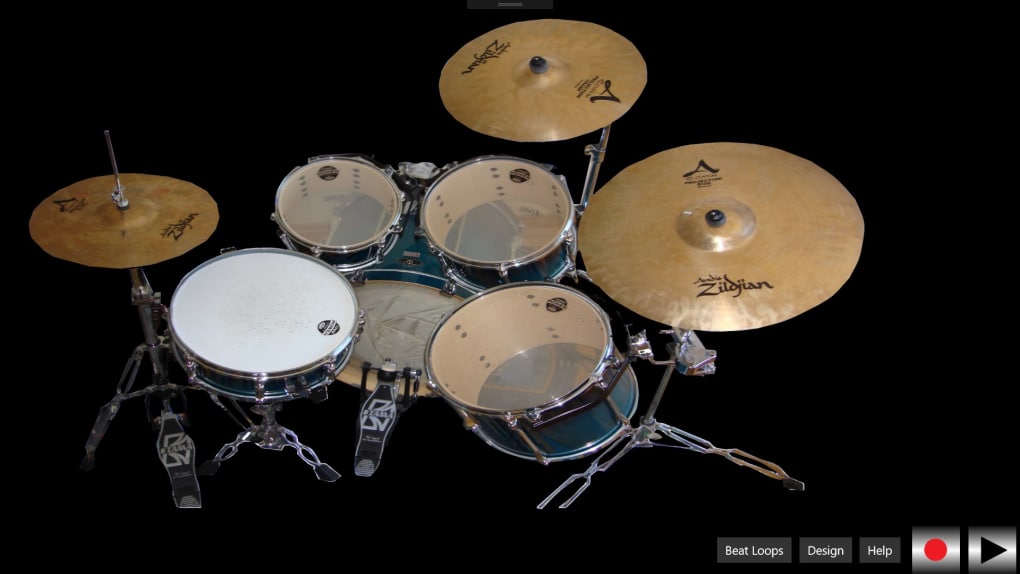
The design philosophy ensures that the learning curve is gentle, allowing users to focus purely on their creative flow rather than getting bogged down by complicated controls. This immediacy is crucial for fostering an environment where ideas can be captured the moment inspiration strikes. Whether you’re a complete novice looking to understand basic rhythm or an experienced musician wanting a quick scratchpad for ideas, the eight drum and cymbal sounds provide a surprisingly rich ground for exploration. You might start with a simple kick-snare pattern, then gradually introduce hi-hats for texture, add a tom fill for variation, and punctuate sections with a crash cymbal. The real magic begins as these individual sounds coalesce into cohesive loops, forming the backbone of potential tracks. The ability to easily loop these beats means that once a satisfying rhythm is established, it can serve as a canvas for further improvisation, layering, and refinement. This iterative process of creation and enhancement is central to Beat Master’s appeal, encouraging users to push the boundaries of what they can achieve with a limited but effective set of tools.
Beyond the initial exploration of the built-in sounds, Beat Master distinguishes itself by fostering a truly personalized approach to beat-making. The application recognizes that while a standard set of drums is excellent for foundational work, true individuality in music often stems from unique sonic textures. This is where its advanced customization features come into play, allowing users to transcend the conventional and infuse their beats with an unparalleled sense of personal identity.
Beyond the Basics: Recording and Customizing Your Sound
What truly sets Beat Master apart in the crowded space of digital audio workstations and beat-making apps is its revolutionary feature allowing users to record their own sounds directly into the program. This functionality elevates the application from a mere virtual drum machine to a highly personalized sound design tool. Imagine the possibilities: capturing the distinct snap of a finger, the percussive clatter of everyday objects, a vocal sample, or even ambient sounds from your environment. Depending on the version you’re utilizing—whether it’s the desktop iteration with an external microphone or the mobile app leveraging your device’s built-in mic—the process is remarkably straightforward.
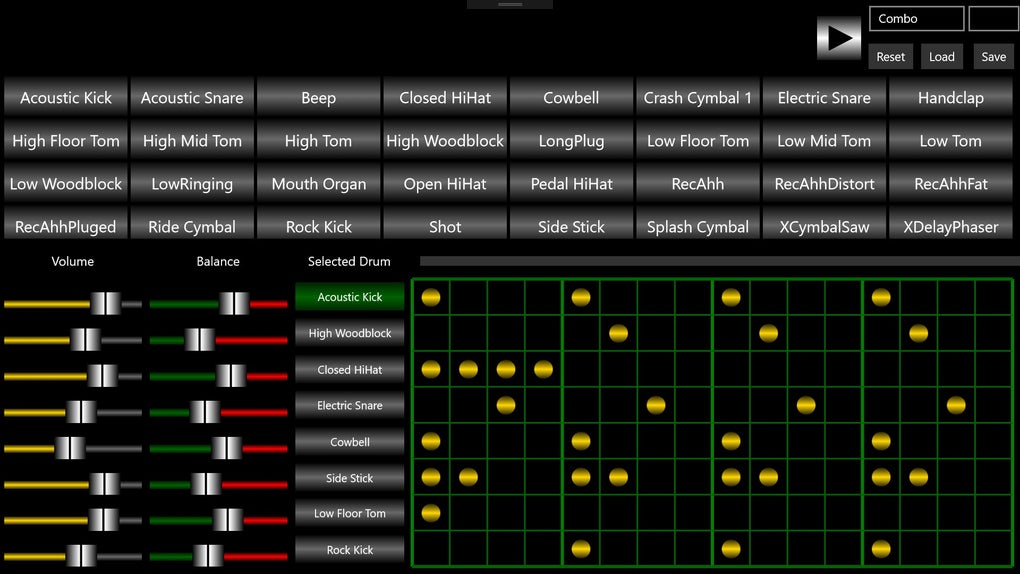
Once recorded, these custom audio snippets are no longer just abstract sound files; Beat Master empowers users to assign them to the individual drum or cymbal pads. This means that instead of a traditional kick drum sound, you could have the deep thud of a closed door; instead of a standard snare, you might trigger the sharp crack of a dropped pencil; your hi-hats could be replaced by the rhythmic clinking of keys. The creative implications are staggering. This feature isn’t just about replacing sounds; it’s about transforming the entire sonic character of your beats, imbuing them with a unique texture that is inherently yours. It encourages experimentation and offers a boundless palette for sonic exploration, allowing users to sample anything from a barking dog to a synthesizer chord and seamlessly integrate it into their rhythmic compositions. This personal touch ensures that every beat created is genuinely original, reflecting the user’s immediate environment and unique artistic vision.
The process of recording and assigning sounds is designed with the user in mind, emphasizing ease and fluidity. There’s no need for complex audio editing software; the integration is direct and intuitive. This accessibility means that even users without extensive audio engineering knowledge can effortlessly manipulate and personalize their sound libraries. Furthermore, this capability fosters a deeper connection between the creator and their music. Every sound captured from the real world, every vocal inflection, every unique clang or whisper, becomes a building block in a rhythm that echoes the creator’s personal journey and surroundings.
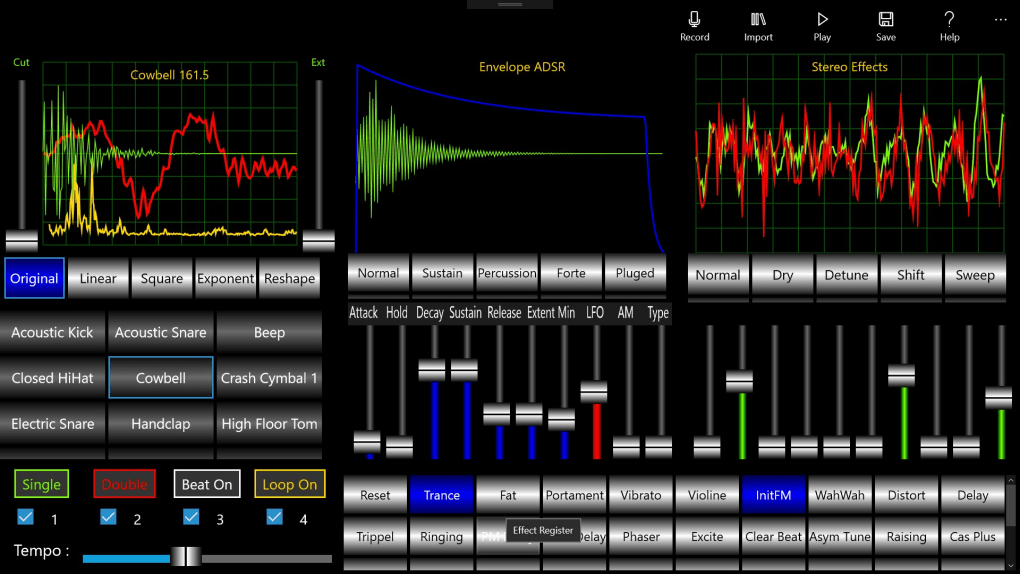
Once your custom sounds are loaded and assigned, Beat Master doesn’t stop there. The application provides a range of additional tools and effects to further sculpt and refine your samples. While the specifics of these effects might vary, typical offerings in such applications include elements like reverb to add spatial depth, delay for echoic trails, pitch shifting to alter the tone of a sound, equalization (EQ) to shape its frequency profile, and even distortion or compression to give it more grit or punch. These effects are crucial for professional-sounding production, allowing users to fine-tune the character of each assigned sound and ensure it sits perfectly within the overall mix of the beat. For instance, a recorded clap might be given a short reverb to make it sound more natural in a mix, or a vocal sample might be pitched down and distorted to create a menacing bassline. The ability to apply these effects directly within the application streamlines the workflow, eliminating the need to export and process sounds in external software. This comprehensive approach to sound customization ensures that Beat Master is not just a beat-making tool, but a complete environment for creative sonic expression.
Seamless Creativity Across Devices: Mobile and PC Integration
In today’s interconnected digital world, the flexibility to create and produce across various devices is no longer a luxury but a necessity. Beat Master embraces this modern paradigm, offering a consistent and user-friendly experience whether you’re composing on a smartphone, tablet, or a full-fledged PC. This cross-platform compatibility ensures that your creative flow remains uninterrupted, allowing you to transition effortlessly between devices without missing a beat.
For mobile users, Beat Master transforms your phone or tablet into an incredibly responsive and portable drum machine. The interface is meticulously optimized for touch input, making the act of playing drums as intuitive as a simple tap. Just select the drum or cymbal you wish to trigger on the screen, and instantly, the sound is produced. This direct tactile interaction is incredibly engaging, making it easy to keep a rhythm going, improvise new patterns, and experiment with different percussive arrangements on the fly. Whether you’re on a bus, waiting in a café, or simply lounging on the couch, your mobile device becomes a powerful instrument for capturing spontaneous musical ideas. The immediacy of touch controls fosters a sense of playfulness and direct engagement with the music, making the beat-making process feel less like work and more like an extension of your natural rhythm. The convenience of having a full-featured beat maker in your pocket means that inspiration can be acted upon the moment it strikes, preventing valuable creative thoughts from slipping away. This mobile versatility is a huge advantage, particularly for those who lead busy lives but still want to carve out moments for musical expression.
PC users, on the other hand, benefit from the precision and expanded input options offered by a keyboard and mouse. While the tactile satisfaction of tapping a screen is unique, the physical buttons of a keyboard offer a different kind of control and speed. Users can assign different drum sounds to specific keys, allowing for rapid-fire beat construction and complex rhythmic layering. The mouse provides seamless navigation through the interface, enabling quick adjustments to loops, effects, and sample assignments. This combination of keyboard and mouse input offers a robust and familiar workflow for desktop users, facilitating more intricate sequencing and detailed sound design. The larger screen real estate on PCs also provides a more expansive view of the project, allowing for easier manipulation of multiple tracks, effects parameters, and recording options. Whether you prefer the immediacy of touch or the precision of traditional desktop controls, Beat Master ensures that the user experience is optimized for the chosen platform, making the creative process both accessible and enjoyable.
Once a beat has been meticulously crafted, whether through mobile taps or PC key presses, Beat Master provides the essential functionality to loop it seamlessly. This looping capability is fundamental to modern music production, enabling users to build a consistent rhythmic foundation upon which melodies, basslines, and other musical elements can be layered. The ability to set the length of the loop and have it play back continuously frees up the user to focus on other aspects of their composition, such as applying the aforementioned range of tools and effects. These post-production capabilities—which can include anything from volume adjustments and panning to adding reverb, delay, or distortion—allow for further customization of the sample, transforming a raw beat into a polished and professional-sounding component of a larger track. This seamless integration of creation, looping, and post-processing tools across both mobile and PC platforms truly underscores Beat Master’s commitment to making original music accessible and enjoyable for everyone, irrespective of their device preference.
Evaluating the Rhythm: Pros, Cons, and Technical Specifications
Like any digital tool, Beat Master presents a mixed bag of advantages and disadvantages that users should consider before integrating it into their workflow. Understanding these aspects is crucial for setting realistic expectations and maximizing the utility of the application.
One of Beat Master’s most significant “Pros” is its easy controls. This is paramount for an application aimed at broad accessibility, from novices to more experienced users seeking a quick solution. The intuitive interface, whether via touch on mobile devices or keyboard/mouse input on PCs, means that users can immediately start experimenting without a steep learning curve. There are no complex menus or arcane commands to memorize; the layout is straightforward, focusing on direct interaction with the drum pads. This simplicity accelerates the creative process, allowing inspiration to translate directly into sound without technical barriers. For beginners, it’s an excellent entry point into understanding rhythm and beat construction, while for experienced producers, it serves as a rapid prototyping tool for sketching out ideas.
Another clear advantage is the availability of up to 8 different drum sounds. While this number might seem modest compared to professional DAWs with vast sound libraries, it provides a well-rounded and versatile foundation for creating a wide array of beats. This focused selection encourages users to maximize the potential of each sound, fostering creativity within constraints. The eight pads typically cover the essential elements of a drum kit—kick, snare, hi-hat (open/closed), clap, various toms, and cymbals—offering enough variety to craft diverse rhythms across multiple genres. This careful selection ensures that users have enough tools to be creative without being overwhelmed by choice, making the learning process more manageable and enjoyable.
However, Beat Master is not without its limitations, which manifest as critical “Cons” that users might encounter. A frequently reported issue is frequent freezing and lag. This can be a significant deterrent for any creative application, as it disrupts the flow of inspiration and can lead to frustration. Imagine trying to lay down a complex rhythm only for the application to stutter, freeze, or introduce latency between your input and the sound output. Such performance issues can make precise timing difficult, hinder real-time improvisation, and even lead to lost progress, undermining the user’s confidence in the software. For a tool designed to capture immediate musical ideas, stability and responsiveness are paramount, and any compromise in these areas can severely impact the user experience.
Another potential drawback, especially for those considering long-term use, is a limited trial version. While Beat Master is marketed as a free application, the presence of a “limited trial version” implies that certain features or functionalities might be locked behind a paywall, or that the free version itself might have time-based restrictions or feature limitations. This can be confusing if the expectation is a fully functional, perpetually free application. Users might find themselves unable to access advanced tools, save their projects beyond a certain point, or utilize the full range of customization options without upgrading or purchasing a full license. This limitation could stifle creativity for serious users who want to build a substantial body of work within the application, pushing them towards alternatives that offer more comprehensive free tiers or one-time purchase models.
Technical Specifications and Platform Availability
Delving into the technical aspects of Beat Master provides further context regarding its standing and development.
- License: Free. This remains a core attraction, providing cost-free access to beat-making tools. However, as noted with the “limited trial version” concern, users should clarify what precisely is free and what might require an upgrade or in-app purchase.
- Version: Varies-with-device. This indicates that the application is optimized for different operating systems and hardware configurations, suggesting a tailored experience for each platform. It also implies that specific features or performance levels might differ across devices, contributing to the “freezing and lag” issue if not uniformly optimized.
- Latest update: June 10, 2018. This is a critical piece of information. An update date from several years ago suggests that the application might no longer be actively maintained or developed. In the fast-paced world of software, especially for creative tools that often rely on compatibility with newer operating systems and security patches, an outdated last update can be a significant red flag. It could explain performance issues (like freezing on newer OS versions), lack of new features, and potential security vulnerabilities. Users might find that the application struggles with contemporary hardware or software environments.
- Platform: Windows. While the initial description mentions mobile devices, the specific technical listing highlights Windows as a primary platform. This means Windows 10 users are explicitly supported, and performance may vary on older Windows versions or other desktop operating systems not officially listed.
- Other platforms: (2). This confirms its cross-device availability, likely referring to Android and iPhone versions as mentioned elsewhere, reinforcing its mobile accessibility.
- Language: English. The application is primarily available in English, which might limit its global reach for non-English speaking users, though the intuitive nature of beat-making interfaces often transcends language barriers.
- Downloads: 8.4K.
- Last month’s downloads: 29. The download numbers provide insight into the application’s popularity and current user base. While 8.4K total downloads suggests a respectable user base over its lifetime, 29 downloads in the last month is a very low figure. This could indicate a significant drop in new user acquisition, perhaps due to the outdated update status, increasing competition, or issues reported by existing users. This trend might align with the observation of potential performance issues and lack of recent development.
- Developer: SoundDesigner. Identifying the developer helps users understand the source of the software and potentially explore other offerings from the same creator. PhanMemFree may receive referral fees if users click on their products.
- Available in other languages: The list provided (e.g., Arabic, German, Spanish, French, Indonesian, Italian, Japanese, Korean, Dutch, Polish, Portuguese, Russian, Swedish, Thai, Turkish, Vietnamese, Chinese) indicates that while the primary language listed for the Windows version might be English, the program itself or its support pages are translated, broadening its potential international audience.
In conclusion, Beat Master offers a highly accessible and intuitive entry point into the world of digital beat-making, boasting easy controls and the innovative ability to record custom sounds. Its cross-platform availability further enhances its appeal, allowing for creative expression on both mobile and PC. However, prospective users should be mindful of potential performance issues like freezing and lagging, the possible limitations of its “free” model, and the significant concern of its apparently outdated last update, which raises questions about ongoing support and compatibility with modern systems. Despite these drawbacks, for those seeking a free, straightforward, and personalized beat-making experience, Beat Master remains a viable option, particularly for casual users or beginners looking to dip their toes into rhythm creation.
About Us
PhanMemFree Info Help & Support Jobs Editorial Guidelines Advertising Monetization solutions for Publishers Upload and Manage your Software Software Policy Advertising Opportunities Legal DMCA Legal Information Terms of use Privacy Policy Cookie Policy Cookie settings Social media PhanMemFree in: عربي Deutsch English Español Français Bahasa Indonesia Italiano 日本語 한국어 Nederlands Polski Português Русский Svenska ภาษาไทย Türkçe Tiếng Việt 中文 Copyright PHANMEMFREE INTERNATIONAL S.A. © 1997–2025 — All rights reserved
Your review for Beat Master
Thank you for your review! Program review Your program review has been submitted successfully. Submit review
In PhanMemFree, we scan all the files hosted on our platform to assess and avoid any potential harm for your device. Our team performs checks each time a new file is uploaded and periodically reviews files to confirm or update their status. This comprehensive process allows us to set a status for any downloadable file as follows:
Clean It’s extremely likely that this software program is clean. What does this mean? We have scanned the file and URLs associated with this software program in more than 50 of the world’s leading antivirus services; no possible threat has been detected.
Warning This software program is potentially malicious or may contain unwanted bundled software. Why is the software program still available? Based on our scan system, we have determined that these flags are possibly false positives. What is a false positive? It means a benign program is wrongfully flagged as malicious due to an overly broad detection signature or algorithm used in an antivirus program. We’d like to highlight that from time to time, we may miss a potentially malicious software program. To continue promising you a malware-free catalog of programs and apps, our team has integrated a Report Software feature in every catalog page that loops your feedback back to us. Flag any particular issues you may encounter and PhanMemFree will address those concerns as soon as possible.
File Information
- License: “Free”
- Version: “varies-with-device”
- Latest update: “June 10, 2018”
- Platform: “Windows”
- OS: “Windows 10”
- Language: “English”
- Downloads: “8.4K”


