
Beauty Box is a powerful video enhancement plugin designed for effortless skin retouching and digital makeup application. Developed by Digital Anarchy for desktop use, this tool streamlines the post-production process, offering real-time adjustments and a range of creative effects. Whether you’re working on feature films, music videos, commercials, or personal projects, Beauty Box provides the tools to achieve professional-looking results with minimal effort.
Effortless Skin Retouching and Digital Makeup
The core strength of Beauty Box lies in its ability to seamlessly retouch skin in real-time. This is achieved through intelligent algorithms that identify skin tones and automatically mask imperfections like wrinkles and blemishes. The level of retouching is entirely customizable, ranging from subtle enhancements to a more airbrushed look, allowing for complete creative control. This flexibility ensures that the plugin adapts to diverse projects and stylistic preferences. Unlike laborious manual adjustments, Beauty Box’s automated features save significant time and effort, accelerating the video editing workflow.
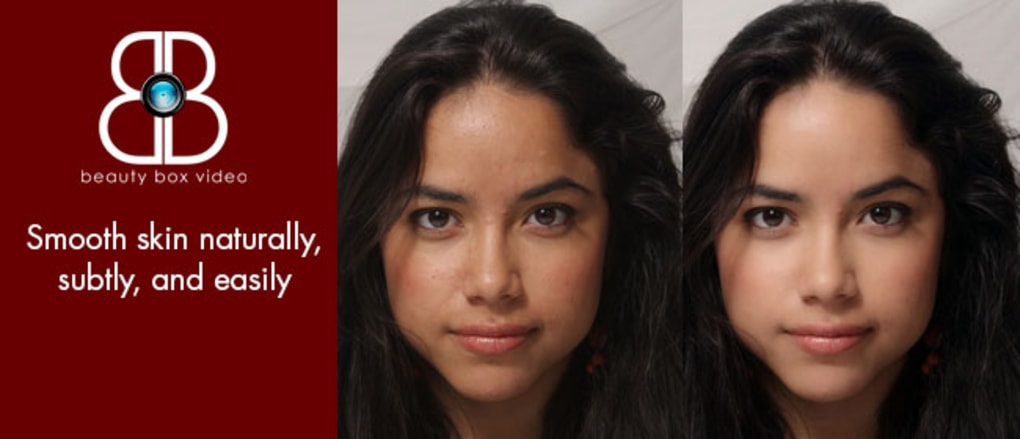
Beyond basic blemish removal, Beauty Box integrates sophisticated digital makeup capabilities. This functionality extends the possibilities beyond simple touch-ups, enabling users to apply a variety of cosmetic enhancements directly within the video editing environment. The application of this digital makeup is as intuitive as the skin retouching features, allowing for quick adjustments and experimentation with different looks.
The application of digital makeup is a key differentiator, as it often requires significant time and expertise using traditional methods. Beauty Box simplifies this complex process, making it accessible to a wider range of users, from professional editors to amateur videographers. The integration of these features within a single plugin creates a cohesive and efficient workflow for comprehensive video enhancement.
Automatic Masking and Real-Time Rendering
A standout feature of Beauty Box is its advanced automatic masking. This intelligent system continuously adapts to the movements and expressions of your subject, ensuring that the retouching effects remain seamlessly integrated, even with dynamic footage. This automatic tracking eliminates the need for manual adjustments, further enhancing the efficiency of the workflow. To initiate the automatic masking process, users simply click the “Analyze Frame” button. Beauty Box then analyzes the clip, identifies skin tones, and establishes tracking parameters that persist throughout the video.
The plugin’s real-time rendering capabilities, powered by CUDA and OpenCL support, contribute significantly to its efficiency. This ensures near real-time playback with compatible Nvidia and AMD graphics cards. This allows editors to see the effects instantaneously, making adjustments and experimenting with different settings without significant delays. This immediate visual feedback accelerates the decision-making process, fostering a more fluid and intuitive editing experience. The fast rendering speeds are crucial for maintaining productivity, especially when working with high-resolution 4K videos which can be computationally demanding.
This real-time processing significantly reduces the rendering time typically associated with such effects, speeding up the entire editing workflow. The ability to see the results instantly enables immediate feedback and iterative refinement of the retouching and digital makeup, ultimately enhancing both the creative process and efficiency.
Style Presets and Color Correction
Beyond its core retouching and makeup functions, Beauty Box offers a comprehensive selection of style presets. These presets provide a diverse range of visual effects and color correction options, allowing users to quickly apply stylistic choices to their footage. These pre-configured settings serve as a valuable starting point for creative exploration, enabling users to achieve specific aesthetic goals, such as adding a vintage Hollywood glow or a dramatic sunburst effect, without extensive manual adjustments.

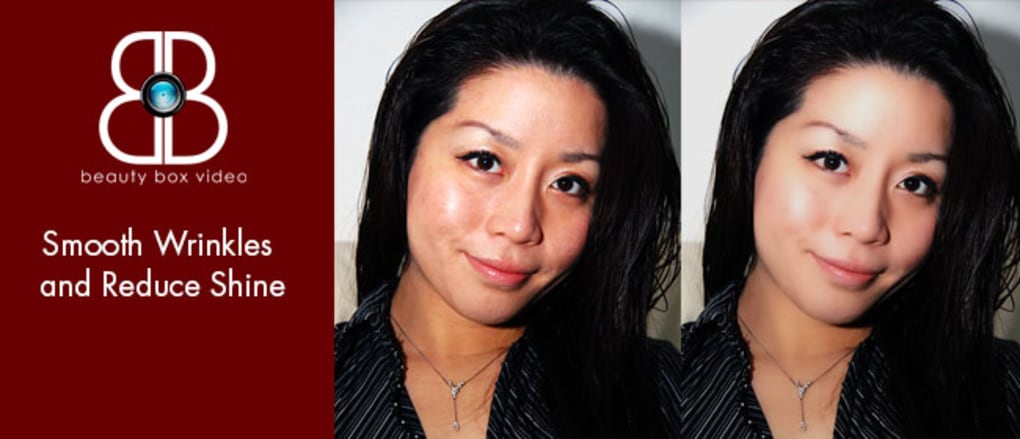
The built-in color correction features are specifically valuable for addressing common video issues. The plugin effectively reduces shine caused by oily skin or bright lighting conditions, ensuring that the final result is polished and professional. These color correction tools are seamlessly integrated into the workflow, allowing for precise control over skin tone and overall video appearance. The combination of style presets and precise color control provides flexibility and caters to a broad spectrum of artistic vision.
A Comprehensive Enhancement Tool for Various Applications
Beauty Box is not limited to a single use case; its versatility makes it adaptable to various video production needs. Whether it’s refining the appearance of actors in a feature film, enhancing the aesthetic of music videos, or adding a touch of polish to corporate commercials, the plugin delivers consistent results. Its intuitive interface and efficient processing make it an invaluable asset for professional and amateur video editors alike. Its speed and ease of use mean that extensive retouching no longer presents a major bottleneck in the post-production workflow.
The ability to apply a variety of effects, from subtle enhancements to dramatic stylistic choices, caters to the broad spectrum of video production styles and genres. The plugin’s robust features combine to significantly reduce the time and effort required for skin retouching and digital makeup application, freeing up time for other crucial aspects of the video editing process. This efficiency translates to cost savings and increased productivity for video professionals.
Pros and Cons of Beauty Box
Pros:
- Effortless Skin Retouching: The plugin simplifies a traditionally time-consuming task.
- Efficient Digital Makeup Application: Adds cosmetic enhancements with intuitive controls.
- Automatic Masking Feature: Maintains retouching even with subject movement.
- Fast and Real-Time Rendering: Provides immediate feedback and rapid processing.
- Style Presets and Color Correction: Offers a diverse range of creative options.
- Wide Application Range: Suitable for various video genres and production scales.
Cons:
- Occasional Slowdowns and Freezing: Users have reported occasional performance issues.
- Challenges with Blonde Hair: Some users have noted difficulties achieving optimal results with subjects with blonde hair. This may require adjustments to settings or manual intervention. The algorithm may be less effective in discriminating between hair and skin in certain lighting conditions.
Alternatives to Beauty Box
While Beauty Box is a robust option, several alternative applications offer similar functionalities:
- CleanSkinFX: A free alternative focusing on skin optimization in digital photos.
- TouchRetouch: A paid application for user-friendly image retouching.
- Various professional video editing suites: Software such as Adobe After Effects and DaVinci Resolve offer built-in tools for similar effects, although they may require more advanced technical skills to achieve comparable results.
Choosing the right software depends on individual needs, budget, and technical proficiency. While Beauty Box excels in its user-friendly interface and real-time performance, alternatives may be more suitable for users with specific requirements or preferences. It’s important to weigh the pros and cons of each option before making a decision.
In conclusion, Beauty Box emerges as a powerful and efficient tool for skin retouching and digital makeup application in video post-production. Its user-friendly interface, combined with its advanced features like automatic masking and real-time rendering, significantly accelerates the workflow and improves overall productivity. While minor performance issues have been reported, the overall benefits largely outweigh these drawbacks, making Beauty Box a worthwhile addition to any video editor’s toolkit.
File Information
- License: “Demo”
- Version: “4.0”
- Latest update: “March 4, 2020”
- Platform: “Windows”
- OS: “Windows 7”
- Language: “English”
- Downloads: “21.1K”
- Size: “22.12 MB”


