
In an increasingly visual world, where personal expression is often conveyed through vibrant images shared across digital platforms, photo editing tools have become indispensable. Among the myriad options available for enhancing and personalizing photographs, Beauty & Filter Camera, Sweet Snap emerges as a specialized application designed for users looking to add a touch of sparkle and creativity to their selfies and snapshots. Developed by Sandpiper Studio, this freemium multimedia tool for Windows focuses primarily on decorative elements, offering a wide array of filters, stickers, and emoticons to infuse life and personality into any picture.
Available for free download on platforms like PhanMemFree, Beauty & Filter Camera, Sweet Snap positions itself as a straightforward solution for aesthetic embellishments. While it excels in its niche of overlaying fun, thematic elements onto photos, a closer examination reveals a particular design philosophy that prioritizes decorative flair over fundamental image manipulation. This distinction is crucial for understanding its place in the competitive landscape of photo-editing software, especially when compared to more robust, all-encompassing editors that offer a full suite of foundational tools. This article delves into the functionalities, advantages, limitations, and overall user experience of Beauty & Filter Camera, Sweet Snap, providing a comprehensive overview for potential users seeking to understand its capabilities and shortcomings.
Dive into Features: Filters, Stickers, and Text Customization
At its core, Beauty & Filter Camera, Sweet Snap is engineered to provide users with an accessible and enjoyable way to transform ordinary photos into visually engaging artworks, primarily through the application of various overlay elements. The application’s main draw lies in its extensive collection of creative assets, which are designed to cater to diverse tastes and occasions.
One of the most prominent features is the Filters section. Filters are perhaps the quickest and most impactful way to alter the mood and aesthetic of a photo. Beauty & Filter Camera, Sweet Snap offers a rich selection that allows users to colorize, stylize, and subtly enhance their images with just a tap. From vintage tones that evoke nostalgia to vibrant hues that make colors pop, and from soft, dreamy effects to sharp, dramatic contrasts, the variety of filters empowers users to experiment and find the perfect visual signature for each photograph. These filters can instantly transform the atmosphere of a selfie, making it suitable for different social media contexts or personal preferences. For instance, a casual photo can be given a professional sheen, or a candid shot can be imbued with an artistic, ethereal quality, all through the intelligent application of a filter.
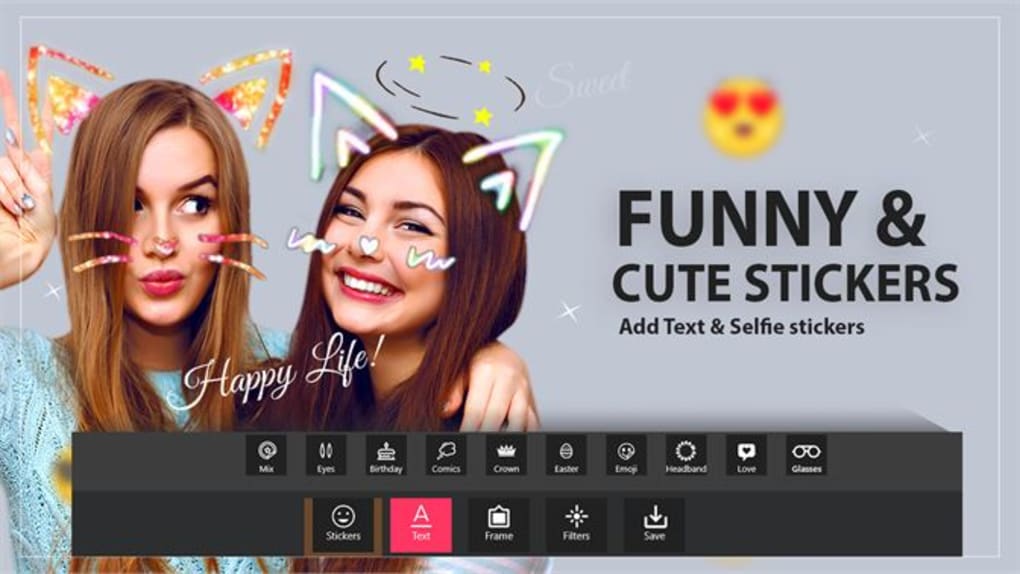
Beyond filters, the application boasts a remarkable library of Stickers and Emojis. This is where Beauty & Filter Camera, Sweet Snap truly shines in offering playful and expressive personalization. The range of stickers is surprisingly broad, spanning from simple geometric shapes and common emoticons that add a touch of emotion, to elaborate, holiday-themed images that are perfect for seasonal greetings or festive posts. Imagine adorning a Christmas selfie with a Santa hat sticker, or adding cute animal ears to a portrait for a whimsical effect. These decorative elements can be resized, rotated, and positioned anywhere on the photo, giving users complete creative control over their placement. This flexibility allows for truly unique compositions, ensuring that each edited photo carries the distinct personality of its creator. The dynamic nature of these stickers ensures that photos are not just static images, but rather canvases for dynamic and engaging storytelling.

Text Customization is another powerful feature within Beauty & Filter Camera, Sweet Snap, enabling users to add narrative or commentary directly onto their images. Whether it’s a witty caption, a heartfelt message, a date, or a location, adding text can significantly enhance the communicative power of a photo. The application provides a dedicated pop-up interface for text editing, granting users extensive control over how their message appears. Users can easily adjust the font size, ensuring readability or making a bold statement. The spacing between characters and lines can also be fine-tuned, contributing to the overall aesthetic appeal. Furthermore, a wide palette of colors is available, allowing text to either blend seamlessly with the image or stand out as a striking focal point. Crucially, the program offers numerous font styles, from elegant scripts to playful handwritten types and modern sans-serifs, empowering users to select a typeface that perfectly complements the mood and theme of their photo. This level of customization ensures that the text isn’t just an afterthought but an integral part of the image’s design.
Finally, the ability to add Frames completes the suite of decorative options. Frames act as digital borders that can give a finished, polished look to any photo. They can range from simple, clean lines that mimic traditional photo borders to more ornate or thematic frames that complement the content of the picture. Adding a frame can help draw the viewer’s eye towards the subject, give the image a classic feel, or even embed it within a whimsical context. Together, these features — filters, stickers, text, and frames — equip users with ample tools to transform their photos into expressive visual narratives, making Beauty & Filter Camera, Sweet Snap a delightful option for those prioritizing creative overlays and decorative enhancements.

Navigating Limitations: The Absence of Core Editing Tools
Despite its rich array of decorative features, Beauty & Filter Camera, Sweet Snap presents a significant caveat that discerning users, or indeed most users expecting a comprehensive photo editor, must consider: a noticeable absence of fundamental image manipulation tools. This omission is not merely a minor inconvenience but a foundational limitation that dictates the application’s role and utility in a user’s digital workflow. While it excels at adding superficial flair, it largely sidesteps the core tasks of photo correction and refinement that are standard in virtually any other photo-editing software.
The lack of basic editing features such as a crop tool is perhaps the most glaring deficiency. Cropping is one of the most elementary and frequently used functions in photo editing, essential for improving composition, removing unwanted elements from the edges, or adjusting the aspect ratio for different platforms. For Beauty & Filter Camera, Sweet Snap to omit this functionality means that users must perform any cropping in a separate program before importing their photo into Sweet Snap for decorative additions. This creates an inefficient, multi-application workflow that can be frustrating and time-consuming, especially for users who prefer an all-in-one solution.
Furthermore, the application conspicuously lacks controls for adjusting crucial image parameters like brightness, saturation, contrast, and hue. These tools are the bedrock of photo enhancement, allowing users to correct exposure issues, fine-tune color vibrancy, balance light and shadow, and shift color tones. Without these adjustments, users are left with their original photo’s inherent characteristics. If a photo is too dark, washed out, or suffers from an undesirable color cast, Beauty & Filter Camera, Sweet Snap offers no internal solution. Filters might superficially alter the image, but they cannot address underlying deficiencies in the same way direct adjustments can. This means that any photo requiring even minor corrective enhancements must again be processed elsewhere before it can receive the “sweet snap” treatment.
The implications of these missing tools extend beyond mere inconvenience. For an application marketed as a “photo-editing tool,” even a specialized one, the exclusion of such fundamental capabilities limits its applicability to photos that are already perfectly composed and exposed. This is rarely the case for casual snapshots, which often benefit immensely from quick crops, brightness boosts, or color corrections. Users are forced to rely on external software for these basic tasks, thereby reducing Beauty & Filter Camera, Sweet Snap to a secondary, embellishment-only utility rather than a primary photo editor.
Adding to these functional gaps, some basic tools that are present, such as the ability to flip an image horizontally or vertically, are surprisingly locked behind subscription packages. This decision is particularly perplexing as image flipping is a very basic transformation, often used for stylistic reasons or to correct accidental orientations. Placing such a fundamental utility behind a paywall further underscores the application’s imbalanced feature set and potentially diminishes its value proposition for free users who might expect these simple functionalities to be freely available.
In summary, while Beauty & Filter Camera, Sweet Snap excels at applying decorative overlays, its inability to handle basic image corrections and manipulations is a significant drawback. This forces users into a fragmented workflow, requiring multiple applications to achieve what many competing editors offer within a single interface. This limitation positions it not as a standalone photo editor, but rather as a specialized tool best used in conjunction with other, more comprehensive software for initial image preparation.
Freemium Model Explained: Unlocking Premium Potential
Beauty & Filter Camera, Sweet Snap operates on a freemium model, a common strategy in the software industry where basic functionalities are offered for free, while more advanced or extensive features are reserved for paying subscribers. This approach allows users to try out the core capabilities of the app without an initial investment, potentially enticing them to unlock the full suite of options. However, as with any freemium product, the balance between what’s free and what’s paid is critical to its perceived value.
In the case of Beauty & Filter Camera, Sweet Snap, while a decent selection of filters, stickers, fonts, and frames are accessible at no cost, a substantial portion of its creative assets and even some basic utilities are locked behind a subscription package. This means that users who wish to fully explore the artistic potential of the application will inevitably encounter paywalls.
What’s freely available? Typically, the free tier offers enough variety to give users a taste of the app’s capabilities. This includes a selection of popular filters, a range of general-purpose stickers and emojis, some basic font styles, and a few simple frames. These free elements are often sufficient for casual users who only occasionally want to add a quick decorative touch to their photos for social media or personal sharing. It allows for immediate gratification and a straightforward application of fun overlays.
What requires a subscription? The premium subscription unlocks the full creative arsenal of Beauty & Filter Camera, Sweet Snap. This includes access to an expanded library of filters, often featuring more nuanced, sophisticated, or trending effects. The sticker collection becomes significantly larger, encompassing more specific themes, intricate designs, and a broader range of expressive elements. Similarly, the premium tier provides a much wider selection of font styles, offering greater typographic diversity and flexibility for text overlays. Beyond decorative assets, as previously mentioned, certain fundamental tools like the ability to flip an image horizontally or vertically are also gated behind the subscription. This particular aspect can be a point of contention for users, as such basic functionalities are often expected to be free in almost any image manipulation tool.
The decision to subscribe will largely depend on an individual user’s needs and their perceived value of the premium offerings. For avid social media users, content creators, or those who frequently enhance photos and desire the maximum possible variety in their decorative elements, a subscription might seem worthwhile. The expanded choices in filters, stickers, and fonts can significantly broaden creative possibilities, allowing for more diverse and personalized photo expressions.
However, the subscription model also prompts a critical evaluation when considering the app’s core limitations. Given the absence of basic image editing tools (like cropping, brightness, saturation, and contrast adjustments), users are essentially paying for an enhanced set of decorative overlays on top of an image that has already been perfected (or at least pre-edited) elsewhere. This raises the question of whether the premium cost justifies access to more embellishments when the underlying foundational editing capabilities are still missing. Users might compare the subscription fee to that of more comprehensive photo editors that offer both extensive decorative features and a full suite of basic to advanced editing tools.
Ultimately, Beauty & Filter Camera, Sweet Snap’s freemium model allows for a compelling trial experience but asks users to weigh the benefits of expanded decorative options against the continued absence of essential editing functionalities when considering a paid upgrade. For those who prioritize a vast library of fun overlays and are content to use other programs for foundational edits, the premium tier might be appealing. For others seeking an all-in-one solution, the value proposition may be less clear.
The Verdict: Is Beauty & Filter Camera, Sweet Snap Right for You?
After a thorough examination of its features, limitations, and pricing structure, Beauty & Filter Camera, Sweet Snap emerges as a distinct tool in the crowded photo-editing landscape. It’s a freemium multimedia application designed for Windows, developed by Sandpiper Studio, which prioritizes ease of use and immediate aesthetic enhancement through a rich collection of decorative elements. Its primary appeal lies in its straightforward approach to adding visual flair to photos, making it particularly attractive for casual users and those who enjoy quick, creative embellishments.
Pros:
- Numerous Stickers with Fun Themes: The application boasts an impressive and diverse collection of stickers and emojis, ranging from simple shapes to holiday-themed graphics. This variety allows users to inject personality, humor, or thematic relevance into their photos effortlessly.
- Customizable Text: The ability to add text with extensive customization options—including font size, spacing, color, and a wide array of font styles—is a significant advantage. This feature empowers users to add captions, messages, or artistic typography, making their photos more communicative and engaging.
- Lets You Add Filters and Frames: A good selection of filters enables quick mood shifts and stylistic enhancements, while various frames provide a polished finish to images. These tools are effective for instantly elevating the visual appeal of a photo.
- User-Friendly Interface for Decorative Tasks: For its intended purpose, applying overlays and text, the interface is intuitive and easy to navigate, allowing users to quickly find and apply their desired elements.
- Free to Start: The freemium model allows users to explore a decent range of features without any upfront cost, offering a low barrier to entry for experimentation.
- Clean and Safe Software: As verified by PhanMemFree.org, the software has a “Clean” security status, indicating it’s free from detected threats, providing peace of mind for users.
Cons:
- Missing a Lot of Basic Functionalities: This is the most significant drawback. The glaring absence of fundamental editing tools such as cropping, brightness adjustment, saturation control, contrast correction, and hue manipulation is a critical limitation. This means any photo requiring basic correction or compositional refinement must be processed in another application first.
- Some Basic Tools are Subscription-Locked: The decision to place even simple functionalities like horizontal or vertical image flipping behind a premium subscription package can be frustrating for users expecting such basic operations to be freely available.
- Not Ideal for Comprehensive Editing: Due to its limited foundational editing capabilities, Beauty & Filter Camera, Sweet Snap cannot serve as a standalone, all-in-one photo editor. It’s best suited as a complementary tool.
- Compared to Competitors: When pitted against feature-rich alternatives like PicsArt, or even more focused apps like Snap Photo Filters & Stickers, which often offer a broader range of basic and advanced tools alongside decorative elements, Beauty & Filter Camera, Sweet Snap falls short in overall utility.
Who is this app for? Beauty & Filter Camera, Sweet Snap is best suited for:
- Casual users who primarily want to add fun, decorative elements to photos that are already well-composed and correctly exposed.
- Social media enthusiasts looking for quick ways to personalize their posts with trending stickers, stylish text, and appealing filters.
- Users who already employ other photo editors for foundational adjustments (cropping, color correction) and are seeking a specialized tool exclusively for creative overlays.
- Individuals who appreciate a simple, focused application that excels at one specific task: embellishment.
It is not recommended for:
- Users seeking a comprehensive photo editor capable of handling all aspects of image manipulation, from basic corrections to advanced effects.
- Professionals or serious hobbyists who require precise control over every aspect of their images.
- Anyone looking for an all-in-one solution to streamline their photo-editing workflow.
Final Thoughts: Beauty & Filter Camera, Sweet Snap, available for Windows, is a decent option if your sole purpose is to add charming stickers, expressive text, and appealing filters to your pictures. Its strength lies in its decorative capabilities and user-friendly approach to these specific tasks. However, its noticeable absence of common editing tools, combined with the fact that some basic functionalities are premium-locked, makes it a less versatile choice compared to many other editors on the market.
Before committing to a subscription, potential users should carefully consider their primary photo-editing needs. If basic image correction and manipulation are paramount, then Beauty & Filter Camera, Sweet Snap will likely disappoint as a standalone solution. However, as a supplementary tool for infusing an extra dose of fun and personality into already prepped photos, it can certainly add a “sweet snap” to your visual content. It serves its specific niche well but requires users to manage their expectations regarding its broader photo-editing prowess. For an app with version 1.0.8.0, last updated on July 11, 2023, and with over 6.2K downloads, its continued presence on platforms like PhanMemFree.org indicates a steady, albeit niche, user base appreciative of its decorative focus.
File Information
- License: “Free”
- Version: “1.0.8.0”
- Latest update: “July 11, 2023”
- Platform: “Windows”
- OS: “Windows 10”
- Language: “English”
- Downloads: “6.3K”


