
Better Canvas is a free Google Chrome extension designed to significantly improve the user experience within the Canvas Learning Management System (LMS). For students and educators alike who spend considerable time navigating the Canvas platform, Better Canvas offers a suite of customization options that boost both functionality and aesthetics, ultimately leading to a more efficient and enjoyable learning environment. This in-depth review explores the features, benefits, and limitations of this powerful tool.
Streamlining Workflow and Enhancing Visual Appeal
Canvas, while a robust platform, can sometimes feel cluttered and lack the personalized touch many users desire. Better Canvas directly addresses these issues by offering a range of visual enhancements and productivity-boosting features. Its primary goal is to transform the often-overwhelming Canvas interface into a more streamlined and visually appealing workspace. This is achieved through a combination of features designed to improve both the aesthetic presentation and the practical usability of the system. The result is an experience tailored to individual preferences, leading to a more focused and productive learning journey.
The extension’s impact goes beyond mere cosmetic changes. By enhancing the organization and accessibility of crucial information, Better Canvas facilitates better time management and reduces the cognitive load associated with navigating a complex LMS. This is particularly valuable for students juggling multiple courses and assignments, allowing them to maintain a clearer overview of their academic workload.
Deep Customization: Themes, Dark Mode, and Beyond
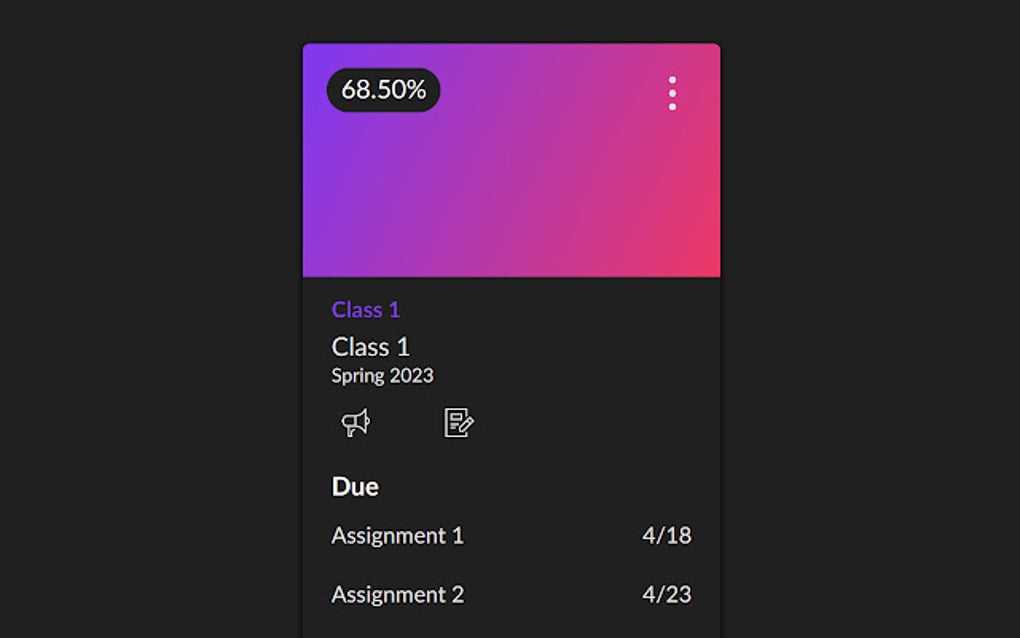
One of Better Canvas’s standout features is its extensive customization capabilities. Users aren’t limited to the standard Canvas interface; instead, they have the power to tailor the platform to their specific needs and preferences. This granular control is a significant advantage, allowing for a truly personalized learning experience.
Dark Mode Mastery: The built-in dark mode isn’t just a simple color inversion. Better Canvas offers a selection of pre-designed dark mode themes, ranging in shades and intensity to suit various tastes and preferences. Users can also manually adjust the dark mode settings to create a custom theme perfectly tailored to their visual comfort and concentration levels. The ability to schedule the automatic switching between light and dark modes, based on time of day or personal preference, further enhances usability. This feature is particularly valuable for mitigating eye strain during prolonged screen time, a crucial aspect for students and educators alike.
Theme Variety: Beyond dark mode, Better Canvas provides access to a library of user-created themes. This ensures a diverse range of aesthetic options, catering to a broad spectrum of visual preferences. Whether you prefer minimalist designs or more vibrant and engaging themes, you’re likely to find something that suits your style within the available options. This continuous expansion of themes, contributed by the user community, ensures that the extension remains fresh and adaptable to evolving tastes.
Enhanced Task Management and Grade Tracking
Beyond aesthetics, Better Canvas focuses on enhancing the practical aspects of using Canvas. Key features in this regard include an improved to-do list and a built-in GPA calculator.
Organized To-Do List: The default Canvas to-do list can often feel overwhelming, especially when managing multiple courses. Better Canvas reimagines this crucial tool, offering a more organized and efficient way to track assignments and deadlines. The extension’s improved to-do list allows users to view all their assignments grouped by class, providing a clear and concise overview of tasks requiring immediate attention. This streamlined view significantly improves time management and reduces the risk of missed deadlines.
GPA Calculator Integration: Maintaining an accurate overview of academic performance is paramount for students. Better Canvas incorporates a built-in GPA calculator, eliminating the need for external tools and manual calculations. This allows students to track their progress throughout the term and even estimate potential grade outcomes based on current performance. This feature provides valuable insights into academic standing, allowing for proactive adjustments to study habits and course strategies.
Advanced Card Customization and Other Notable Features
The customization extends beyond themes and dark mode. Better Canvas allows users to customize the appearance of individual course cards, enhancing both organization and visual appeal. These customizable elements provide a powerful way to personalize the visual presentation of individual courses, allowing for a clearer distinction and easier navigation between different subjects. This visual distinction can significantly improve cognitive organization and facilitate quicker access to specific courses.
The extension also incorporates other helpful features that enhance the overall Canvas experience. These might include options for improved notification management, shortcuts for common actions, or other usability enhancements designed to streamline the user workflow. While the specific features can vary with updates, the overall goal remains consistent: to provide users with a more efficient and enjoyable interaction with the Canvas platform.
Limitations and Considerations
While Better Canvas offers significant advantages, it’s essential to acknowledge some limitations.
Font Compatibility: Although the extension supports custom fonts, not all fonts are universally recognized or render correctly within the Canvas environment. This limitation may restrict the level of complete visual customization some users desire. While the range of compatible fonts is likely to expand over time, it remains a consideration for those seeking extremely granular control over typography.
Learning Curve: The sheer number of customization options, while beneficial, does introduce a learning curve. New users may require some time to familiarize themselves with the various settings and options before achieving the desired level of personalization. However, the detailed documentation and intuitive interface mitigate this issue to a degree. The developers also often provide updates and improvements, further enhancing the user experience.
Potential for Conflicts: As with any browser extension, there is a potential for conflicts with other extensions or updates to the Canvas platform itself. While Better Canvas is actively maintained and generally stable, occasional issues may arise. The developers generally react quickly to user reports and release updates to address these issues, but this remains a potential point of concern.
Conclusion: A Valuable Addition to the Canvas Ecosystem
Better Canvas stands as a compelling tool for anyone seeking to enhance their Canvas experience through extensive personalization and workflow improvements. The combination of visual enhancements, productivity-boosting features, and customizable options transforms the Canvas LMS from a potentially overwhelming platform into a more user-friendly and aesthetically pleasing environment.
While a small learning curve exists and certain font limitations may apply, the overall benefits of increased productivity, personalized aesthetics, and improved organization significantly outweigh these minor drawbacks. For students and educators who regularly interact with Canvas, Better Canvas presents a worthwhile investment of time and effort, ultimately leading to a more efficient and enjoyable learning experience. The ongoing updates and responsive development team ensure the extension remains relevant and adaptive to the evolving needs of Canvas users.
File Information
- License: “Free”
- Version: “6.0.3”
- Latest update: “August 9, 2025”
- Platform: “chrome”
- Language: “English”
- Downloads: “30.1K”


