
Better DS3 was a popular, lightweight application designed to configure and utilize PlayStation DualShock controllers on personal computers. Unlike its predecessor, DS3 Tool, Better DS3 provided a cleaner, ad-free interface and operated offline, offering a more user-friendly experience for connecting and customizing PS3 controllers on Windows PCs. While the application is no longer available for download, its impact on providing a simpler alternative to existing controller configuration tools remains noteworthy. This article explores its features, functionality, and the reasons behind its discontinued status.
Effortless PlayStation Controller Integration on PC
The process of connecting and utilizing a PlayStation controller on a PC has historically been more complex compared to Xbox controllers. This complexity stemmed from the need for specific drivers and configuration software to properly map the controller’s buttons and functionalities to the PC’s operating system. While DS3 Tool was a prevalent solution, its cluttered interface and online-dependent nature often presented challenges to users. Better DS3 emerged as a direct response to these shortcomings, aiming to provide a more streamlined and efficient solution.
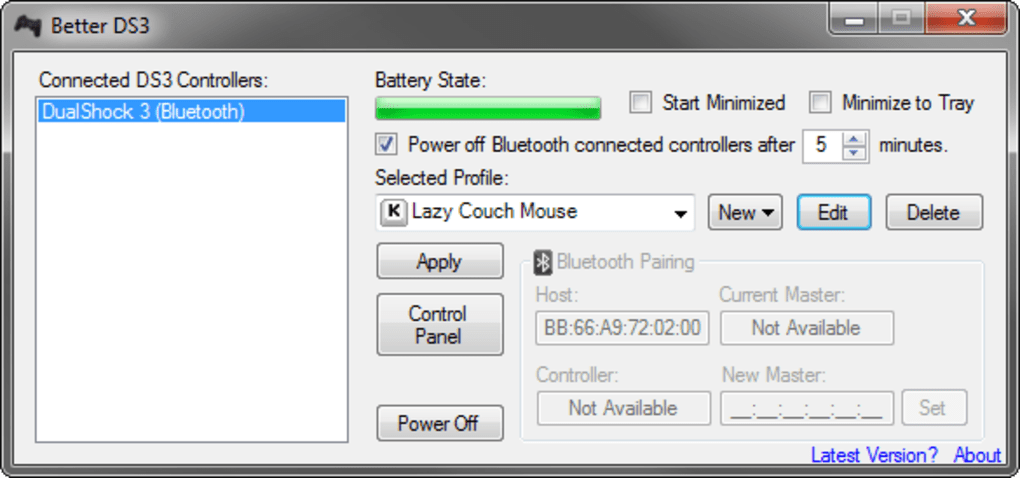
Better DS3 leveraged the MotioninJoy driver (the same driver used by DS3 Tool) to facilitate the connection and configuration of PS3 controllers. This underlying driver handled the low-level communication between the controller and the PC, allowing Better DS3 to focus solely on providing an intuitive user interface for managing controller profiles and settings. The application’s offline functionality eliminated the reliance on internet connectivity for controller operation, a significant advantage over its predecessor.
A Refined Interface for Enhanced User Experience
One of the most significant improvements Better DS3 offered was its remarkably improved user interface. In stark contrast to the often overwhelming and confusing interface of DS3 Tool, Better DS3 presented a clean, intuitive design. The simplified layout made navigating the settings and configuring button mappings significantly easier and faster. Users could quickly and efficiently customize their controller profiles without the need for extensive searching or troubleshooting. This ease of use was a major contributing factor to Better DS3’s popularity among gamers seeking a straightforward solution for using their PlayStation controllers on their PCs.
The application facilitated the creation of custom profiles, allowing users to tailor controller mappings for various games. This feature was particularly beneficial for gamers who preferred different button configurations for different game genres or individual titles. The ability to easily switch between these profiles provided flexibility and convenience, eliminating the need for repeated reconfiguration.
Core Features and Functionality
Better DS3’s functionality went beyond simple button mapping. The application included several additional features that further enhanced its appeal:
-
Battery Status Display: Better DS3 displayed the current battery level of the connected PlayStation controller, allowing users to monitor the controller’s power and avoid unexpected interruptions during gameplay. This simple yet valuable addition improved the overall user experience by proactively preventing gameplay disruptions.
-
Automatic Controller Disconnection: The application allowed users to configure an automatic disconnection feature after a period of inactivity. This feature saved power and prevented the controller from unnecessarily remaining connected to the PC when not in use. This functionality aligned with a modern approach to power management and enhanced the overall convenience of using the controller.
-
Profile Management: Better DS3 allowed for the creation and management of multiple controller profiles. Users could create unique profiles for different games or genres, adjusting button mappings and other settings to optimize the gaming experience for each. This flexibility catered to various gaming preferences and enhanced overall usability.
- Offline Operation: Unlike DS3 Tool, Better DS3 operated entirely offline, eliminating the need for an internet connection to use the controller. This feature improved reliability and accessibility, especially for users with unreliable internet connections.
MotioninJoy Driver Dependency
While Better DS3 offered a substantial improvement over DS3 Tool in terms of user interface and functionality, it did inherit one crucial dependency: the MotioninJoy driver. This meant users still needed to install the MotioninJoy driver separately before they could use Better DS3. While this added an extra step to the setup process, it was a relatively minor inconvenience compared to the overall benefits provided by the simplified interface and additional features of Better DS3. The process of installing the MotioninJoy driver, while a prerequisite, was relatively straightforward and well-documented, minimizing any significant user frustration.
Why Better DS3 is No Longer Available
Unfortunately, Better DS3 is no longer available for download. The reasons behind its discontinuation remain unclear, but it is likely due to a combination of factors. The most probable reason is the ceasing of development and support for the underlying MotioninJoy driver. As the primary component on which Better DS3 relied for its functionality, the discontinuation of the driver inevitably rendered Better DS3 obsolete and unsustainable. The lack of updates and ongoing maintenance likely led to compatibility issues with newer operating systems and devices, ultimately leading to its removal from the software repositories.
Alternatives to Better DS3
While Better DS3 is no longer available, several alternative applications offer similar functionality for connecting and configuring PlayStation controllers on PC. These include DS4Windows, SCP Server, and various other controller mapping tools. These alternatives provide similar features, such as button remapping and profile creation, and often offer additional functionalities not available in Better DS3.
Choosing an alternative will depend on individual needs and preferences. Some alternatives may offer more advanced features, while others focus on simplicity and ease of use. It is recommended to research and compare different options to find the best fit for one’s specific gaming setup and requirements.
Conclusion
Better DS3 represented a significant improvement over existing solutions for connecting PlayStation controllers to PCs. Its clean interface, ease of use, and helpful features provided a more enjoyable experience for users compared to its predecessor. Although no longer available for download, its legacy as a streamlined and effective controller configuration tool remains. The continued existence of alternative applications offering similar functionality ensures that users can continue to seamlessly integrate their PlayStation controllers with their PCs, albeit with different interfaces and features. The overall impact of Better DS3 lies in its demonstration of how a refined interface and focus on usability can significantly improve user experience in even the most technical of applications.
File Information
- License: “Free”
- Latest update: “January 15, 2014”
- Platform: “Windows”
- OS: “Windows XP”
- Language: “English”
- Downloads: “158.3K”
- Size: “797.44 KB”


