
BetterShifts is a free iPhone application designed to revolutionize the way employees manage their work schedules. This comprehensive tool, available for download on PhanMemFree.org, seamlessly integrates scheduling, communication, and personal preference management into a single, user-friendly platform. By enhancing convenience, accessibility, and flexibility, BetterShifts contributes significantly to a better work-life balance and increased overall job satisfaction.
BetterShifts for iPhone: A Deep Dive into the Features
BetterShifts boasts a rich feature set designed to address the common pain points associated with traditional work scheduling methods. Its intuitive interface ensures ease of use, making it accessible to users of all technical skill levels. Key features include:
-
Integrated Calendar: The app’s core functionality centers around a visually appealing and highly functional calendar. This calendar allows employees to view their scheduled shifts at a glance, whether it’s for the current day, week, month, or even an entire year. This comprehensive view allows for effective long-term planning and helps avoid scheduling conflicts. The calendar integrates seamlessly with the other features, providing a central hub for all scheduling-related information.
-
Personalized Shift Options: BetterShifts empowers employees to take control of their schedules. Users can specify their preferred working days and times, allowing the system to prioritize shifts that align with their individual availability. This personalization feature reduces the likelihood of scheduling conflicts and allows for better work-life integration. Employees can set their availability in advance, ensuring that they are only offered shifts that fit their personal commitments and preferences.
-
Flexible Shift Dropping: Life happens. BetterShifts understands this and offers a streamlined process for dropping shifts. The app provides a simple mechanism for requesting shift changes, requiring only the supervisor’s approval. This added flexibility eliminates many of the hassles associated with traditional shift trading or swapping, making the overall scheduling process smoother and less stressful for employees.
-
Instant Priority Shift Alerts: Staying informed about crucial changes to the schedule is essential. BetterShifts facilitates this by providing instant alerts for any priority shifts or last-minute changes. These notifications ensure employees are always up-to-date and can react swiftly to unexpected developments. This feature minimizes the risk of missed shifts and ensures smooth operational continuity for businesses.
-
Availability Setting: This pivotal feature empowers users to set their availability for specific days and times. BetterShifts utilizes this information to intelligently filter and display only the shifts that align with the employee’s preferences. This significantly reduces the time spent searching through irrelevant shift options, saving both time and mental energy. The system learns user preferences over time, optimizing the shift selection process for greater efficiency.
Apps Similar to BetterShifts: A Comparison
While BetterShifts stands out with its comprehensive feature set and user-friendly design, several other applications offer similar functionality within the productivity and scheduling realm. A comparative analysis would reveal that many competitors lack the seamless integration of personalized preferences, flexible shift dropping, and proactive priority shift alerts that BetterShifts provides. This unique combination differentiates BetterShifts from the competition, positioning it as a superior solution for both employees and businesses.
BetterShifts and its Impact on Business Operations
Beyond individual employee benefits, BetterShifts offers substantial advantages to businesses. The app’s streamlined scheduling system reduces administrative overhead, minimizes the time spent on manual scheduling tasks, and facilitates more efficient workforce management. This translates to cost savings and improved operational efficiency. Furthermore, the enhanced communication features foster better collaboration and transparency between employees and supervisors, contributing to a more positive work environment.
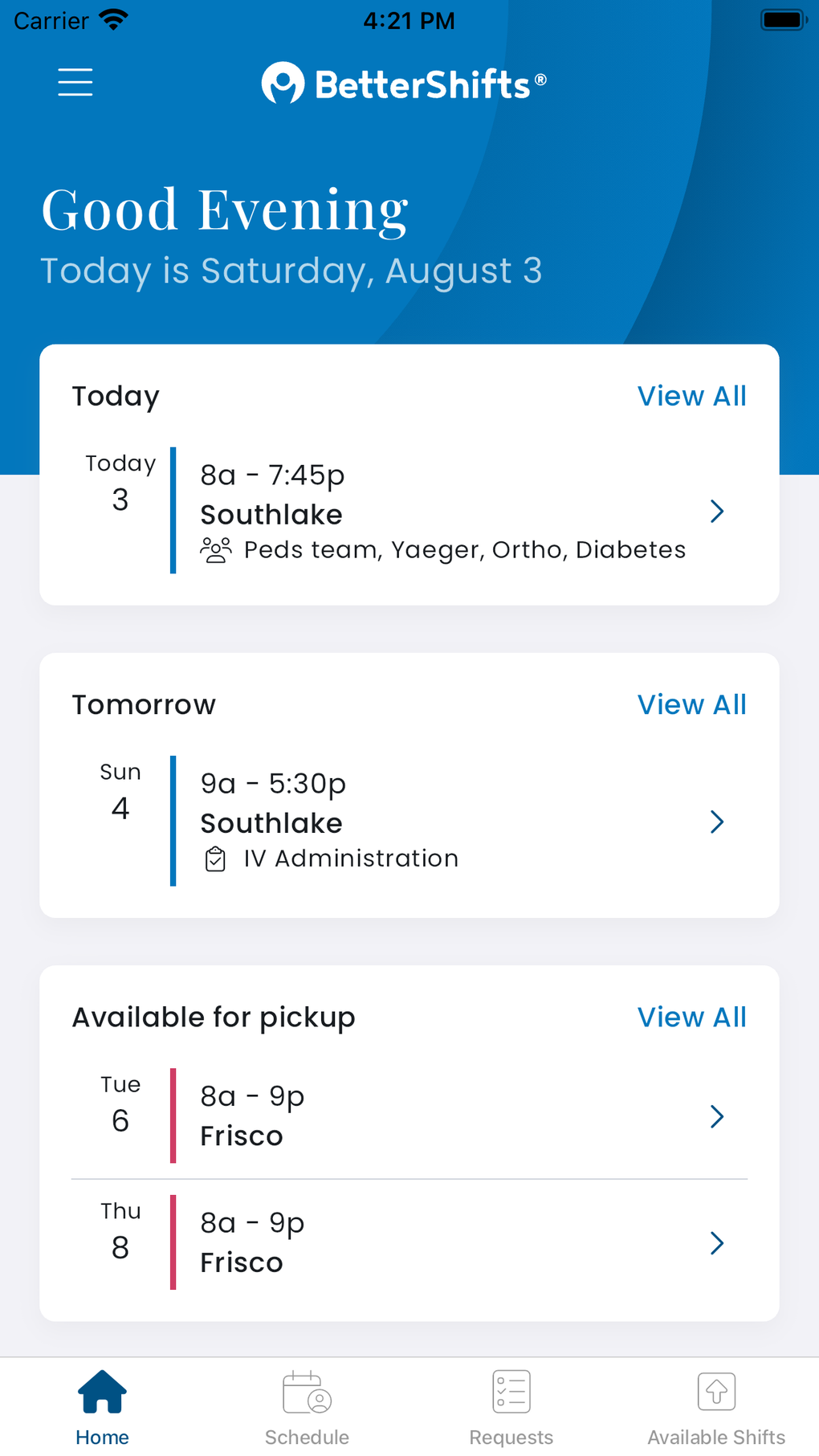
BetterShifts empowers businesses to:
- Reduce Scheduling Errors: The app’s integrated calendar and automated shift allocation minimize human error, reducing the likelihood of double-bookings or missed shifts.
- Improve Employee Satisfaction: The personalized scheduling options and flexible shift dropping features contribute significantly to enhanced employee satisfaction and morale, leading to increased productivity and reduced turnover.
- Enhance Communication: The instant alert system for priority shifts improves communication and ensures that all employees are aware of crucial schedule changes in a timely manner.
- Optimize Workforce Management: BetterShifts provides valuable data on employee availability and workload, allowing businesses to optimize their staffing levels and resource allocation.
BetterShifts for iPhone: A Productivity Powerhouse
The BetterShifts iPhone application stands as a testament to the power of technology to simplify and enhance our daily lives. Its intuitive interface, coupled with its comprehensive feature set, transforms the often-tedious process of work scheduling into a manageable and even enjoyable task. The app’s focus on personalization, flexibility, and efficient communication empowers employees to take control of their schedules, resulting in a better work-life balance and increased job satisfaction. For businesses, BetterShifts streamlines workforce management, leading to improved operational efficiency and cost savings. In conclusion, BetterShifts is more than just a scheduling app; it’s a productivity powerhouse that improves the lives of both employees and employers alike. Its availability on PhanMemFree.org makes it easily accessible to a broad user base.
Frequently Asked Questions (FAQs) about BetterShifts
Q: Is BetterShifts free to download and use?
A: Yes, BetterShifts is completely free to download and use. There are no hidden fees or subscription costs associated with the application.
Q: What iOS version is required to run BetterShifts?
A: BetterShifts requires iOS 16.4 or later. Ensure your iPhone is updated to the latest version of iOS for optimal performance.
Q: How do I report a bug or provide feedback?
A: The app likely provides an in-app mechanism for reporting bugs or providing feedback. Check the app’s settings or contact the developer, Providerscience LLC, directly for specific instructions.
Q: Can I use BetterShifts on multiple devices?
A: This information is not available in the provided text. You should check the app description or contact the developer to confirm whether multi-device usage is supported.
Q: Is my data secure within BetterShifts?
A: The app’s privacy policy would outline the security measures implemented to protect user data. Review this policy carefully before using the app if you have privacy concerns.
Q: What languages does BetterShifts support?
A: The provided text mentions that the app is available in multiple languages but doesn’t list them specifically. Check the app listing on PhanMemFree.org for a complete list of supported languages.
Q: How can I contact customer support if I have issues?
A: Contact information for customer support should be available within the app’s settings or on the app’s listing on PhanMemFree.org.
This expanded response provides a more comprehensive overview of BetterShifts, addressing its key features, benefits, and addressing potential user questions. Remember to always refer to the official app description and developer’s website for the most up-to-date information.
File Information
- License: “Free”
- Version: “1.2.14”
- Latest update: “June 30, 2025”
- Platform: “iPhone”
- OS: “iOS 16.4”
- Language: “English”
- Downloads: “1”


