
BetterTouchTool is a powerful and highly customizable application for macOS that allows users to significantly enhance their interaction with their trackpads, mice, keyboards, and other input devices. Developed by Andreas Hegenberg, this freeware application offers a wide array of features, enabling users to create personalized gestures and shortcuts to streamline their workflow and boost productivity. However, its extensive functionality and lack of explicit instructions can present a steep learning curve for newcomers. This comprehensive review will explore BetterTouchTool’s capabilities, its advantages and disadvantages, and provide insights into its overall usability.
Extensive Customization and Control
For many Mac users, the default trackpad and mouse functionalities can feel limiting. BetterTouchTool steps in to address these limitations, providing unparalleled control over how you interact with your Mac. It goes far beyond simply assigning new functions to existing gestures; it empowers users to create entirely new ones. The app’s central focus is on input methods, enabling the customization of triggers for a broad range of devices.
This includes:
- Trackpads: Customize existing multi-finger gestures or create entirely new ones for actions like application switching, window management, media control, and much more.
- Mice (Magic Mouse, regular mice): Assign custom actions to clicks, scrolls, and other mouse movements. This allows for precise control over various applications and system functions.
- Keyboards: Create complex keyboard shortcuts beyond the standard macOS options. This is particularly useful for power users who need rapid access to specific commands or applications.
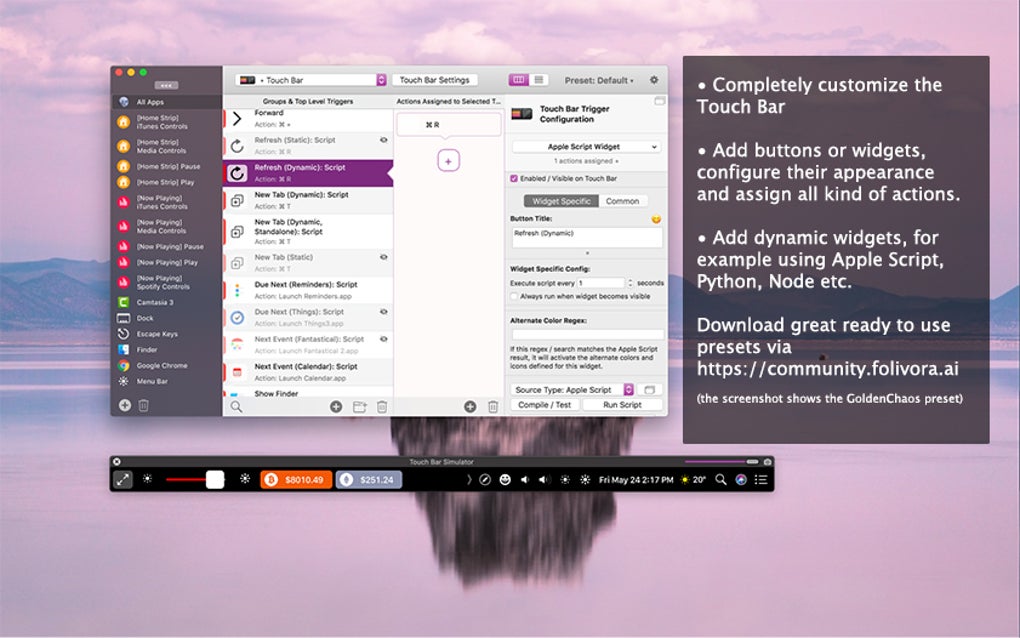
- Touch Bar (if equipped): Customize the functionality of the Touch Bar, assigning custom actions to its various controls.
- Siri Remote: If you use a Siri Remote with your Mac, BetterTouchTool allows you to program custom actions to its buttons.
- MIDI Triggers: For advanced users, BetterTouchTool even supports MIDI triggers, opening up possibilities for creative control through external MIDI devices.
- Key Sequences: Create and assign custom actions based on specific key combinations. This allows for highly specialized shortcuts tailored to specific workflows.
- BTT Remote: A companion iOS app (available for free) lets you control your Mac remotely using your iPhone or iPad, adding another layer of versatility and convenience.
The app’s flexibility extends to the creation of highly specialized shortcuts. You can record complex actions, combine key sequences, define intricate mouse movements, and even design custom gesture patterns to trigger specific functions. This granular control allows users to tailor their interactions with the system precisely to their needs, streamlining even the most complex tasks. The possibilities are limited only by the user’s imagination and willingness to experiment. Furthermore, you can define which applications these shortcuts apply to, allowing for context-sensitive customizations. A shortcut could work in one application, but be disabled in another, ensuring smooth and efficient operation across diverse software.
Integrated Tools for Enhanced Productivity
BetterTouchTool isn’t just about gestures and shortcuts. It also incorporates several integrated tools designed to boost productivity:
- Clipboard Manager: This feature allows users to manage multiple copied items, making it easy to paste previously copied text or images without repeatedly copying them.
- Screenshot Tool: BetterTouchTool includes a built-in screenshot tool with options for adjusting images on the fly, eliminating the need to switch to a separate application for basic image editing.
These additions highlight the app’s commitment to providing a comprehensive suite of tools for streamlining workflows. By combining gesture customization with essential utility features, BetterTouchTool aims to provide a single, powerful application to manage various aspects of the Mac user experience.
Navigating the Learning Curve: Challenges and Considerations
While BetterTouchTool offers immense power and flexibility, its complexity can be a significant hurdle for inexperienced users. The app’s initial setup and configuration can be daunting. The lack of comprehensive, built-in instructions or tutorials can make understanding the various features and options challenging for those unfamiliar with such sophisticated customization tools. The interface, while generally well-designed, can feel overwhelming to newcomers, leading to a steep learning curve.
Several specific challenges users might face include:
- Initial Setup: The app’s initial setup attempts to access computers on the network, which can be concerning for users unfamiliar with this behavior. Clearer communication about this function would improve user confidence.
- Understanding Functionality: The sheer number of options and features can be overwhelming, making it difficult for users to understand the intended function of various settings without substantial experimentation.
- Debugging Custom Shortcuts: Creating complex custom shortcuts can lead to unexpected behavior, and troubleshooting these issues can require significant time and effort.
- System Preferences Interaction: Some BetterTouchTool modifications require changes to system preferences, which might not be immediately apparent or intuitive to all users.
- Occasional Glitches: Users have reported occasional instances where custom shortcuts stop working unexpectedly. While restarting the app usually resolves the issue, it’s a minor inconvenience that points to the potential for infrequent stability problems.
Despite these challenges, many users find that the power and customization BetterTouchTool offers are well worth the effort of mastering its interface and navigating its learning curve. The ability to create highly personalized and efficient workflows can significantly increase productivity for those willing to invest the time to learn the system.
Performance and Resource Usage
BetterTouchTool is a lightweight application, designed to operate efficiently without significantly impacting system performance. It runs quietly in the background, requiring minimal system resources and generally maintaining a low profile. This light footprint is a significant advantage, ensuring that the app’s extensive features don’t compromise the overall performance of the Mac. The infrequent need for updates further underscores its efficiency and stability.
Overall Assessment: A Powerful Tool for Advanced Users
BetterTouchTool is a remarkably powerful application for customizing and enhancing the interaction with a Mac. Its wide range of features, deep customization options, and lightweight design make it an attractive option for power users seeking to optimize their workflow. However, the significant learning curve and the lack of readily available instructions and tutorials might deter less technically inclined individuals. The occasional need to restart the app due to malfunctioning shortcuts is also a minor drawback.
Ultimately, the decision of whether or not to use BetterTouchTool hinges on the user’s technical proficiency and their willingness to invest the time required to master its complexity. For those willing to embrace the challenge, it offers a powerful and highly rewarding way to transform the user experience on a Mac.
Pros:
- Extensive Customization: Unparalleled control over trackpad, mouse, keyboard, and other input devices.
- Wide Range of Features: Includes a clipboard manager and screenshot tool in addition to gesture customization.
- Lightweight and Efficient: Minimal impact on system performance and infrequent update requirements.
- Powerful Shortcut Creation: Supports complex key sequences, mouse movements, and custom gesture patterns.
- Cross-Application Control: Allows tailoring shortcuts to specific applications.
- BTT Remote App: Offers remote control functionality via a companion iOS app.
Cons:
- Steep Learning Curve: The complexity of the app can be overwhelming for inexperienced users.
- Lack of Comprehensive Instructions: Insufficient built-in help and tutorials.
- Occasional Shortcut Malfunctions: Custom shortcuts might occasionally stop working, requiring a restart.
- System Preferences Interaction: Requires some modifications to system preferences.
- Initial Network Access: The initial setup might be concerning to users unfamiliar with its network access behavior.
In conclusion, BetterTouchTool is a sophisticated and versatile application that empowers users to redefine their interaction with their Mac. While its complexity might pose a challenge to beginners, the level of customization and control it offers makes it a worthwhile tool for those seeking to maximize their productivity and personalize their computing experience.
File Information
- License: “Free”
- Latest update: “March 3, 2025”
- Platform: “Mac”
- OS: “Mac OS X”
- Language: “English”
- Downloads: “237K”
- Size: “36.98 MB”


