
BeWidgets is a free personalization application for Windows PCs, developed by BeXCool. This desktop customization tool empowers users to create and manage widgets displaying diverse information, enhancing the visual appeal and functionality of their desktop environment. Offering a selection of themes and icons, BeWidgets allows for significant customization to match individual preferences and system aesthetics. Similar to other widget applications like Power Widgets or XWidgets, BeWidgets provides users with a readily accessible overview of important information at a glance, directly on their desktop. Designed with the modern look of Windows 11 in mind, it maintains excellent compatibility with Windows 10 as well, providing a consistent user experience across different operating system versions.
Enhancing Desktop Personalization with BeWidgets
The concept of desktop widgets has evolved significantly since the early days of Windows Vista’s resource-intensive Desktop Gadgets. Those gadgets, often displayed on an expanded taskbar, provided limited information, primarily focusing on time and weather updates. BeWidgets presents a contemporary and optimized approach to this concept. Its compatibility with both Windows 10 and 11 allows users to seamlessly integrate customizable floating widgets into their desktop workspace. These widgets can be positioned freely, offering unmatched flexibility in arranging the desktop environment to suit individual workflow preferences.
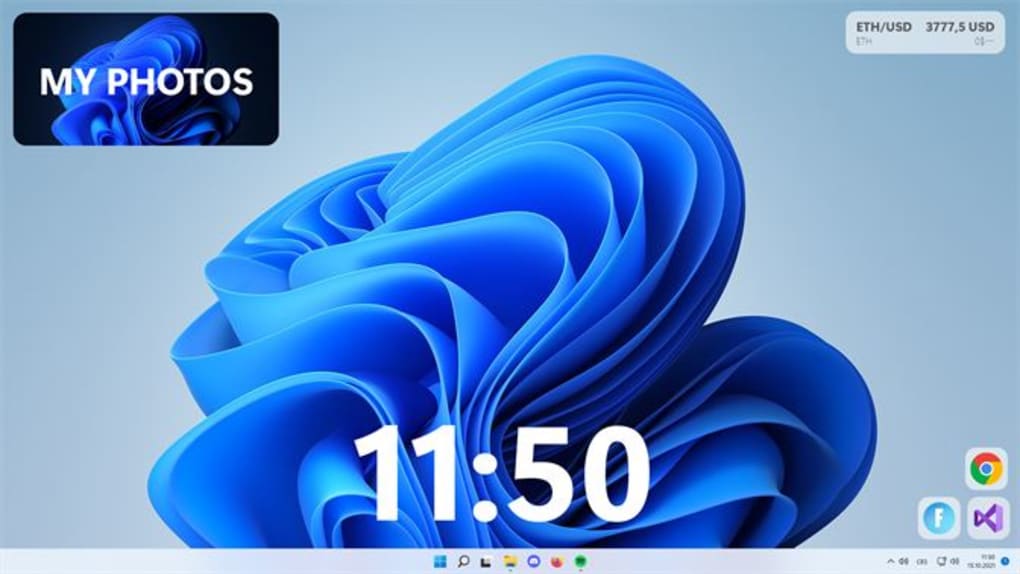
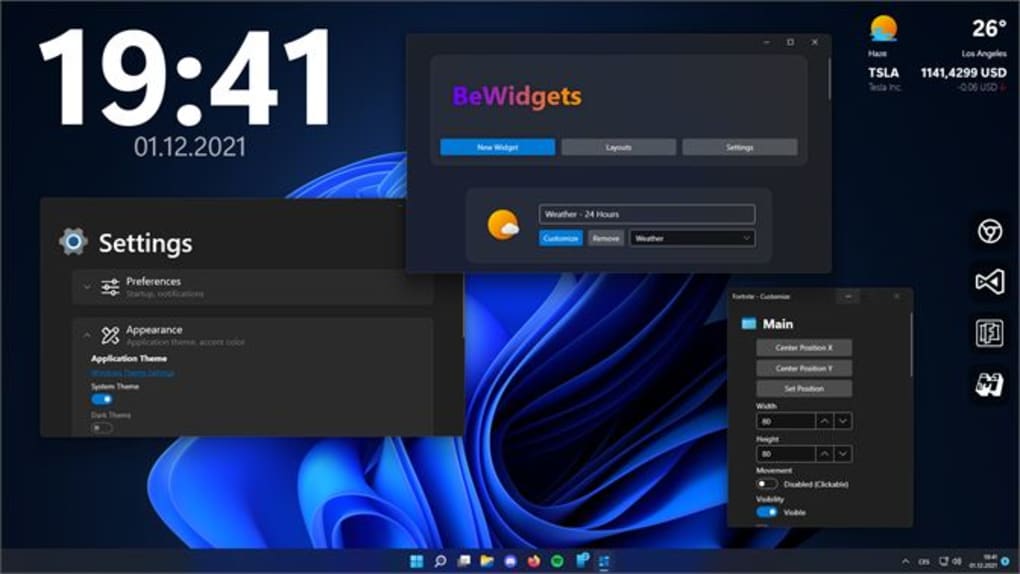
BeWidgets provides a range of readily available widgets, offering functionality beyond simple time and weather displays. Users can incorporate widgets showcasing financial information, personal photo galleries, and even quick-access app shortcuts. This diverse selection caters to a broad range of user needs and preferences, providing valuable information and streamlined access to frequently used applications.
The flexibility extends beyond the selection of available widgets. BeWidgets offers comprehensive customization options for each widget. Users can freely adjust widget size and position, ensuring optimal visual integration with the overall desktop layout. Fine-tuning options also include the ability to modify corner radius, providing further control over the widget’s visual appearance. This level of customization allows for a highly personalized desktop environment, reflecting the user’s aesthetic preferences and functional requirements.
Thematic Options and User Interface Design
BeWidgets offers two distinct themes: a light theme and a dark theme. This caters to users with varying aesthetic preferences and those who wish to match their widget appearance with their overall system theme and desktop background. The seamless integration of these themes ensures a cohesive and visually pleasing desktop experience. Switching between themes is straightforward, allowing users to quickly adapt the visual style to match their mood or current working environment. This design choice enhances user experience by promoting seamless integration with the broader Windows aesthetic and user preference.
Features and Functionality: A Closer Look
BeWidgets provides a compelling suite of features designed to enhance desktop organization and productivity. Key features include:
-
Customizable Widgets: A range of widgets offering diverse information displays, including time, weather, finance, and photo galleries. Each widget can be customized extensively in terms of size, position, and corner radius.
-
App Shortcuts: Create and arrange shortcuts to frequently used applications, facilitating quick and easy access to essential tools and software. This feature streamlines workflow by minimizing the need to navigate through lengthy menus or file structures.
-
Theming Options: Choose between light and dark themes to match personal preferences or system aesthetics. Seamlessly integrate the widgets into the overall visual scheme of the desktop environment.
- Intuitive Interface: A user-friendly interface simplifies the creation, customization, and management of widgets, ensuring a smooth and enjoyable user experience, even for users unfamiliar with similar applications.
Limitations and Potential Improvements
While BeWidgets provides a strong set of features and a polished user experience, some areas could benefit from further development. Notably, the absence of system performance metrics widgets is a significant omission. Adding widgets that display CPU usage, RAM utilization, and disk I/O would greatly enhance the application’s utility and appeal to users interested in system monitoring. Including such metrics would broaden the application’s appeal and make it a more comprehensive desktop management tool.
Another potential area for improvement lies in expanding the range of available widgets. The current selection, though useful, could be further expanded to cater to more niche requirements and user preferences. Adding widgets focusing on specific areas like calendar integration, note-taking, or task management could substantially increase the application’s value proposition.
Despite these minor limitations, BeWidgets remains a robust and user-friendly application, offering a valuable and visually appealing enhancement to the Windows desktop experience. The developers’ commitment to regular updates suggests a potential for addressing these limitations in future releases, further solidifying BeWidgets’ position as a leading desktop personalization tool.
BeWidgets: A Comparative Analysis
BeWidgets stands alongside other desktop widget applications, each offering unique features and functionalities. While similar applications such as Power Widgets and XWidgets provide comparable functionality, BeWidgets distinguishes itself through its user-friendly interface, sleek design, and seamless integration with the modern Windows aesthetic. Other applications might offer more extensive widget selections or system monitoring capabilities, but BeWidgets provides a balance between functionality and ease of use.
This balance makes BeWidgets particularly accessible to users who may not be comfortable navigating complex interfaces or dealing with extensive customization settings. The application’s emphasis on user-friendliness ensures that even less technically inclined users can quickly and efficiently enhance their desktop workspace.
Conclusion: A Valuable Addition to the Windows Desktop
BeWidgets offers a refreshing approach to desktop personalization, providing a visually appealing and functional way to enhance the Windows experience. Its intuitive interface, customizable widgets, and theming options cater to a wide range of users, regardless of their technical expertise. While the absence of system monitoring capabilities is a notable omission, the application’s overall strengths, including its ease of use and aesthetically pleasing design, make it a compelling choice for users seeking a simple yet effective way to personalize their desktop. The prospect of future updates addressing the identified limitations further strengthens its potential for becoming an indispensable tool for Windows users. For those seeking a straightforward and visually appealing way to manage information and access frequently used applications, BeWidgets is definitely worth considering. The balance between functionality and simplicity makes it a strong contender in the ever-evolving landscape of Windows desktop personalization tools.
File Information
- License: “Free”
- Version: “0.12.0.0”
- Latest update: “May 11, 2023”
- Platform: “Windows”
- OS: “Windows 11”
- Language: “English”
- Downloads: “15.8K”


