
The Big Fish Games App serves as a central hub for accessing, managing, and playing the extensive library of games developed by Big Fish Games. While individual games can be downloaded separately, the app streamlines the process, offering a convenient interface for browsing, installing, updating, and removing titles from your Windows PC. This eliminates the need for manual online searches and provides a centralized location for your entire Big Fish Games collection. Its user-friendly design and robust functionality make it a compelling choice for casual PC gamers who enjoy the diverse range of titles offered by Big Fish.
Streamlined Game Management: A User-Friendly Interface
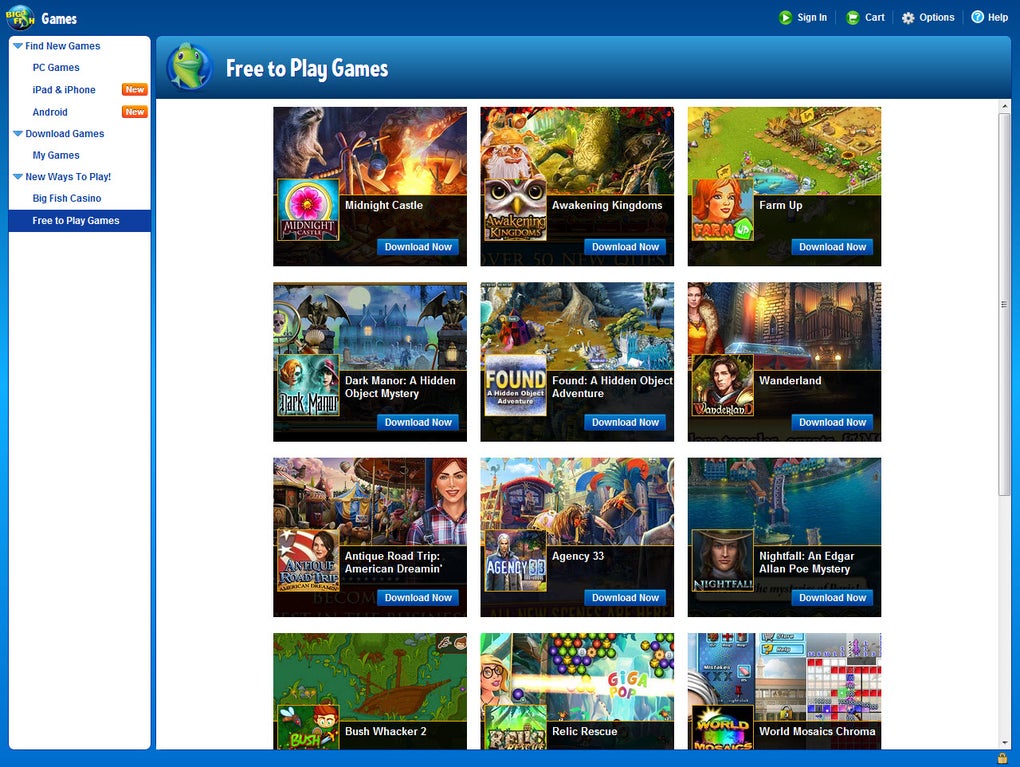
Unlike platforms like Steam or emulators such as GameLoop, which cater to a broader range of game genres and complexities, the Big Fish Games App focuses on providing a simple and intuitive experience specifically tailored for Big Fish Games’ catalog. Its interface prioritizes ease of use, making it straightforward for users to navigate and discover new games.
The app’s layout is clean and organized. A tabbed navigation system on the left-hand side allows quick access to different sections, while a large central area displays available games as easily browsable thumbnails. A prominent search bar at the top facilitates efficient searching for specific titles, whether you’re looking for a particular game you’ve played before or want to explore something new.
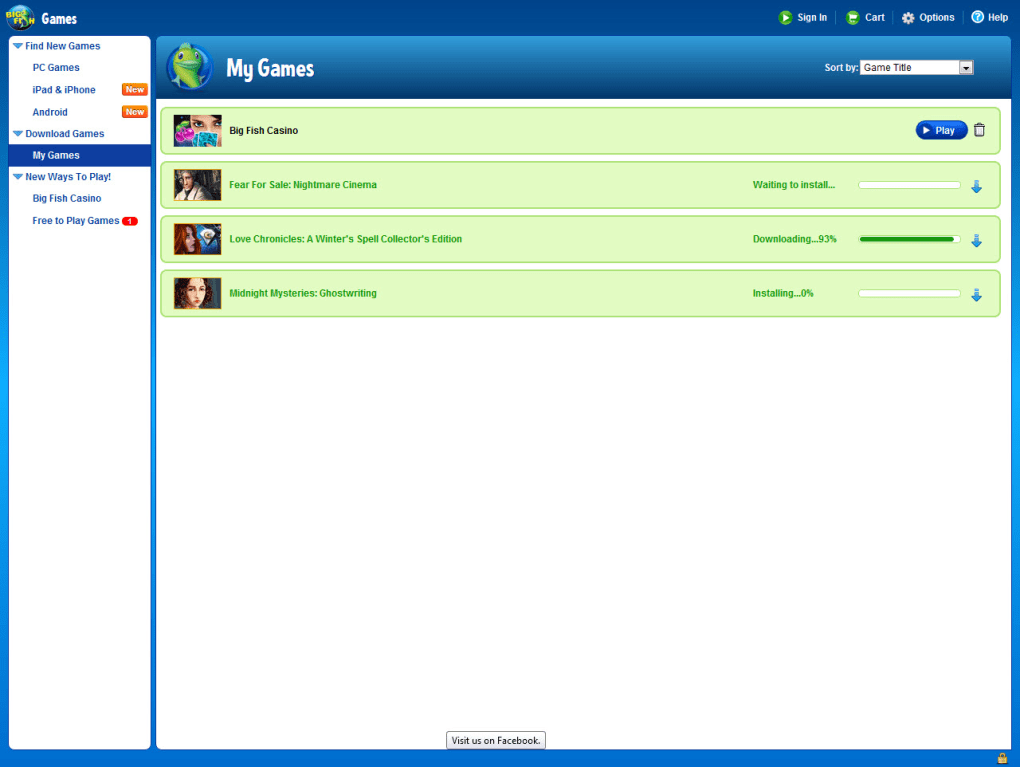
The use of large icons and responsive design ensures smooth navigation regardless of screen size. Downloading or purchasing games is a straightforward process, and all downloaded titles are automatically added to the “My Games” tab for easy access and management. The overall speed and responsiveness of the application contribute to a positive user experience, minimizing wait times and ensuring a seamless gaming flow.
Core Functionality: Three Pillars of the Big Fish Games App
The Big Fish Games App revolves around three core functionalities, each clearly presented on the home screen: “New Ways of Playing,” “Downloaded Games,” and “Find New Games.” These features work in concert to offer a comprehensive gaming experience.
The “New Ways of Playing” section serves as a gateway to discover new games, with a focus on showcasing both free-to-play titles and online casino options. This section often highlights promotional offers, rewards, and incentives designed to encourage continued engagement with the app. It acts as a dynamic showcase for the latest releases and ongoing events within the Big Fish Games ecosystem.
The “Find New Games” button is your direct access to the vast catalog of games offered by Big Fish. Using the built-in search functionality, you can quickly find specific games based on title, genre, or other keywords. This feature extends beyond PC games, allowing exploration of titles available on Android and iOS platforms, thereby providing a unified view of the entire Big Fish Games library. Once a game is selected, downloading it to your device is just a single click away.
The “Downloaded Games” section serves as your personal game library within the app. Here, you’ll find a list of all games previously downloaded and installed on your PC. This functionality extends beyond simple listing; it allows you to efficiently manage your installed games. Users can readily update games to the latest versions and uninstall those they no longer wish to keep, keeping their PC organized and their game library streamlined.
Privacy, Security, and Target Audience
A key aspect of the Big Fish Games App is its focus on family-friendly content and a commitment to user privacy and security. Unlike many other gaming platforms that incorporate social features and extensive online interactions, Big Fish prioritizes a safer environment, avoiding features that might expose younger users to potentially inappropriate content or online risks.
The application deliberately omits social interaction platforms and integrations, concentrating instead on providing a straightforward experience centered around game access, download, and management. This approach aligns with the company’s emphasis on delivering casual games suitable for a broad audience, including children and families.
Advantages and Disadvantages of the Big Fish Games App
The Big Fish Games App presents a compelling proposition for many casual gamers. Its strengths are numerous:
Pros:
- Simple and Intuitive Interface: The app’s clean design and straightforward navigation make it easy for users of all technical skill levels to use effectively.
- Extensive Game Library: The app provides access to Big Fish Games’ vast catalog, offering a diverse range of genres and styles to explore.
- Efficient Search Functionality: The built-in search function simplifies the process of finding specific games, reducing the time spent searching manually.
- Centralized Game Management: The app allows for efficient downloading, updating, and deleting of games, streamlining game management on your PC.
- Cross-Platform Compatibility: While primarily focused on Windows, the app also allows exploration of games available on Android and iOS, providing a unified access point to the entire Big Fish Games ecosystem.
- Free to Use: The app itself is free to download and use, offering access to a substantial library of free games and paid titles.
- Lightweight and Optimized: The app is designed to be lightweight, minimizing resource consumption and reducing the likelihood of crashes or lag.
Cons:
- Lack of Social Interaction: The absence of social features might be a drawback for gamers who enjoy connecting with friends and other players online.
- Exclusively Big Fish Games: The app is limited to games developed by Big Fish Games, restricting access to titles from other publishers.
Conclusion: A Powerful Tool for Casual Gaming Enthusiasts
The Big Fish Games App effectively bridges the gap between casual gaming and convenient game management. Its intuitive interface, robust functionality, and vast game library make it a valuable tool for anyone who enjoys the casual games offered by Big Fish. While lacking social features, its focus on ease of use, privacy, and a family-friendly environment makes it an appealing choice for a broad range of users. The streamlined download, update, and management capabilities provide a significantly improved experience compared to manually managing individual game installations, solidifying its position as a convenient and effective solution for casual PC gamers. For those who appreciate the wide selection and family-friendly nature of Big Fish Games, the app is a must-have addition to their gaming arsenal.
File Information
- License: “Free”
- Version: “3.3.0.2”
- Latest update: “January 31, 2023”
- Platform: “Windows”
- OS: “Windows Vista”
- Language: “English”
- Downloads: “108.9K”
- Size: “34.48 MB”


