
Binary Viewer is a free and versatile Windows utility designed to open and display the contents of any file on your computer, regardless of its format. Unlike typical file viewers that render files in their intended format, Binary Viewer provides a low-level, binary representation of the file’s data, making it an invaluable tool for software developers, reverse engineers, computer forensic investigators, and anyone needing to inspect the raw data within a file. This detailed analysis will explore its features, functionalities, and overall effectiveness.
Exploring Binary Viewer’s Core Functionalities
The core strength of Binary Viewer lies in its ability to present file data in various formats. Users can seamlessly switch between decimal, octal, hexadecimal, and text representations (ASCII and Unicode). This flexibility is crucial for understanding different aspects of a file’s structure. Hexadecimal representation, in particular, is essential for examining the raw byte data that forms the foundation of any digital file. The ability to view data in ASCII and Unicode is equally important for understanding text-based portions of files, even when those portions are embedded within larger binary structures.
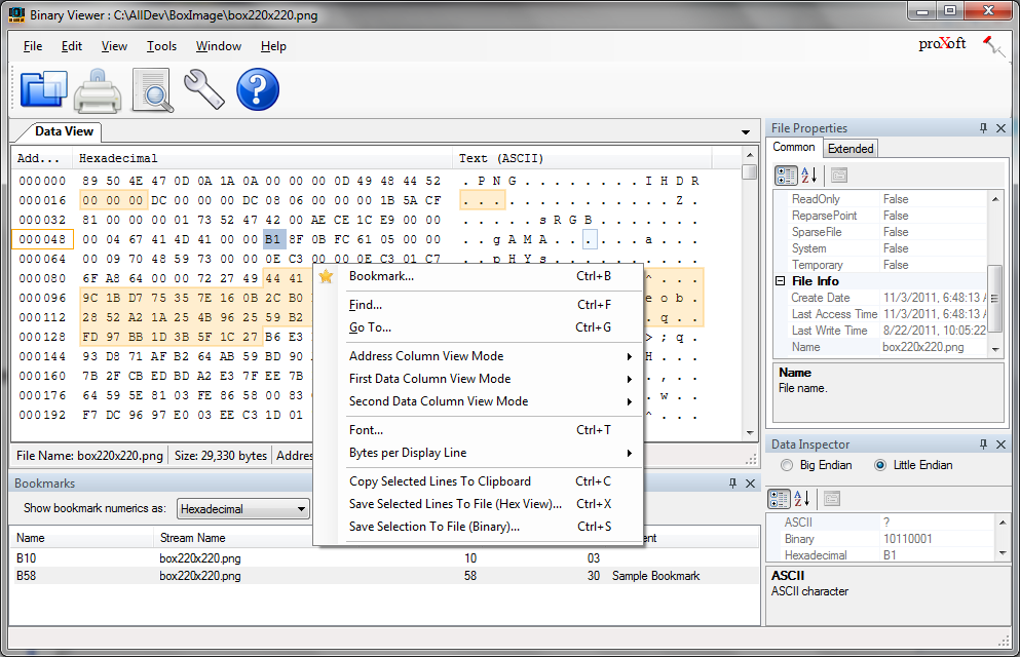
Beyond the basic display of data, Binary Viewer offers advanced features not commonly found in similar utilities. For instance, it supports the viewing of files with alternate data streams (ADS), a feature often overlooked in standard file viewers. ADS are hidden streams of data associated with a file, commonly used by the operating system or applications for storing metadata or additional information. Binary Viewer’s ability to handle these adds another layer of investigative power.
The application’s compatibility extends to large files, handling files up to 4GB in size without significant performance degradation. This is a notable advantage, as many files, especially those used in software development, data analysis, or forensic investigations, can be quite large. The small memory footprint ensures that Binary Viewer’s performance doesn’t compromise system resources, a key concern for users working with extensive data sets.
User Interface and Ease of Use
Binary Viewer boasts a simple and intuitive user interface, prioritizing ease of navigation and access to key functionalities. Files can be added either by dragging and dropping them directly into the main window or through the traditional file browser. This dual approach caters to different user preferences and workflows, ensuring a streamlined experience.
Once a file is loaded, the main interface displays the file’s data in a clear and organized manner. The user can seamlessly navigate through the data using various controls, allowing for granular inspection of the file’s contents. Furthermore, the application provides details such as file creation date, last modification date, last access date, file size, and other metadata, enabling users to gain comprehensive insights into the file’s history and properties.
While the interface is designed for user-friendliness, it’s worth noting that Binary Viewer is primarily geared towards technically proficient users. Individuals without prior experience working with hexadecimal or binary data might find the interface slightly challenging to navigate. However, the intuitive layout and clearly labeled options mitigate this somewhat, making it more accessible than many other binary viewers.
Advanced Features and Unique Capabilities
Binary Viewer differentiates itself from competitors through its advanced features. These capabilities significantly enhance its usefulness for specific tasks:
-
Physical Drive Access: A unique feature of Binary Viewer is its ability to open and examine physical drives. This functionality is particularly valuable for computer forensic analysis or low-level system investigations, offering a direct glimpse into the raw data on a storage device.
-
Binary Pattern Searching: The application allows users to search for specific binary patterns within files. This sophisticated search functionality is indispensable for locating specific code sequences, identifying file signatures, or uncovering hidden information within a file. This feature greatly speeds up the process of analyzing large files and focusing on specific regions of interest.
-
Bookmarking: Binary Viewer provides the ability to set bookmarks at various locations within the file. This is critical for revisiting specific areas of interest during an investigation, enabling efficient and organized analysis of complex files.
-
Printing and Exporting: The software allows users to print the displayed data, providing a physical copy of the binary information for reference or documentation. While the specific export capabilities may not be explicitly detailed, the potential to save data in various text-based formats is implied, given the ability to represent data as text (ASCII or Unicode).
-
Offset Jumping: This feature enables users to quickly jump to a specific byte offset within the file, accelerating the investigation of large files and streamlining the analysis process.
These advanced features, combined with the core functionalities discussed earlier, cement Binary Viewer’s position as a powerful and versatile tool for a range of users.
Limitations and Areas for Improvement
Despite its many strengths, Binary Viewer does have some limitations. One notable absence is the capability to edit binary code. While it provides extensive viewing functionalities, it lacks the ability to modify the raw data within the file, restricting its use for certain tasks requiring direct file manipulation. This limitation is understandable, as direct binary editing can be inherently risky and should be handled with extreme care. Incorrect modification can easily render a file unusable or corrupt.
The software might also present a steeper learning curve for novice users. While the interface is relatively intuitive, understanding the nuances of binary data and utilizing the advanced search features might require some technical proficiency. Improved tutorials or a more comprehensive help section could alleviate this limitation and broaden its appeal.
Comparison with Alternative Apps
Several alternative binary viewers exist, each with its own strengths and weaknesses. The choice of application often depends on specific needs and preferences. While direct comparison requires testing against specific alternatives, the common functionality among most binary viewers is the ability to display files in binary or hexadecimal formats. However, the advanced capabilities of Binary Viewer—such as physical drive access and advanced search features—set it apart.
Some competitors may focus more on user-friendliness, with simplified interfaces, while others might offer features such as enhanced data analysis or file comparison tools. This emphasizes the importance of considering the specific tasks at hand when choosing the optimal binary viewer.
Conclusion: A Powerful Tool for Technical Users
Binary Viewer presents a strong case as a free, powerful, and versatile binary viewing utility for Windows. Its ability to handle large files, display data in multiple formats, access physical drives, and offer advanced search functionalities makes it an indispensable asset for various technical users. While lacking an editing capability and potentially presenting a steeper learning curve for novice users, its significant advantages outweigh these limitations, particularly for software developers, reverse engineers, and computer forensic specialists. The application’s simple yet effective interface ensures a straightforward and efficient user experience, further enhancing its overall appeal and usefulness within its intended niche.
File Information
- License: “Free”
- Latest update: “May 2, 2025”
- Platform: “Windows”
- OS: “Windows 8”
- Language: “English”
- Downloads: “96.1K”
- Size: “1.98 MB”


