
Bing, the search engine developed by Microsoft, has established itself as a significant player in the online search market. While not as dominant as its main competitor, Google, Bing offers a unique set of features and functionalities that cater to diverse user needs and preferences. This article explores various aspects of Bing, from its core search functionality and its comparison with Google to its various applications and integrations across different platforms and devices.
Bing’s Search Capabilities and Comparison with Google
At its core, Bing is a search engine designed to provide users with relevant information based on their queries. Like Google, it employs sophisticated algorithms to analyze search terms, crawl the web, and index billions of web pages. The ranking methodology considers various factors, including backlinks, SEO content, technical aspects of websites, and metadata. However, the weighting of these factors and the overall approach differ significantly from Google’s.
One key distinction lies in Bing’s emphasis on metadata. While Google’s algorithm considers a broader range of factors including contextual understanding of content (beyond keyword density), Bing places more weight on keywords and structured data found within website metadata. This means that websites optimized specifically for Bing’s algorithm, focusing on keyword optimization within metadata, may perform better on Bing than on Google. Conversely, websites primarily optimized for Google’s algorithm, which prioritizes high-quality, relevant content even without excessive keyword stuffing, may rank lower on Bing.
The difference in results is further amplified by the disparity in the volume of data and user base each search engine possesses. Google’s massive dataset and vast user base provide it with a substantial advantage in understanding user intent and providing highly refined search results. Most websites are optimized to suit Google’s algorithm, utilizing Google Analytics and other Google tools, leading to a natural bias towards Google in search results. Switching to Bing can therefore feel jarring, as the results may differ considerably from what users are accustomed to with Google.
The user interface also contributes to this perception. While functional, Bing’s design has often been criticized for lacking the simplicity and modern aesthetic of Google’s search page. Many users find Bing’s interface less intuitive and visually appealing compared to Google’s streamlined design, potentially contributing to user preference for Google.
Despite these differences, Bing excels in specific areas. Its video search capabilities, for example, are often praised for accurately capturing meta descriptions and providing highly relevant video results. For users who prioritize video search, Bing might present a compelling alternative to Google.
Bing for Firefox: A Browser Extension
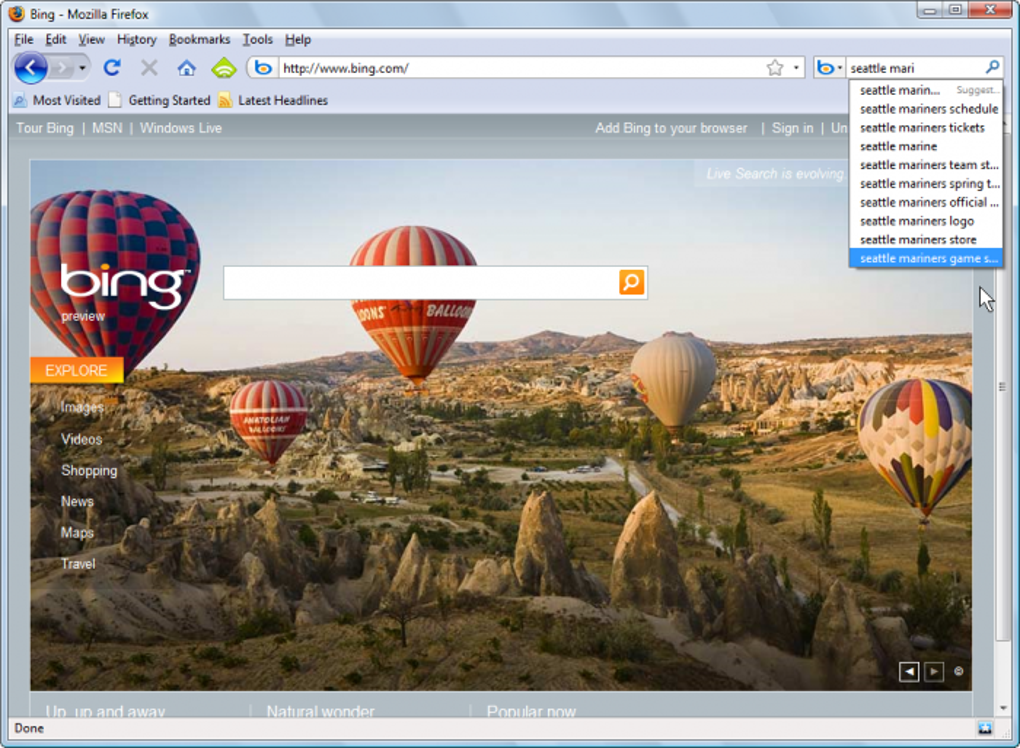
One significant aspect of Bing’s presence online is its integration with web browsers, particularly its add-on for Firefox. Bing for Firefox is a browser extension that integrates Bing’s search functionality directly into the Mozilla Firefox browser. As a default search option for many Firefox installations, it provides easy access to Bing’s search engine without requiring users to navigate to Bing’s website directly.
This convenience is a major advantage for users who are either indifferent to search engines or prefer a readily available, integrated search solution. The extension’s ease of use allows users to seamlessly transition between browsing and searching without changing browser contexts. However, the ease of changing the default search engine in Firefox often leads users to switch from Bing to Google, reflecting the preference many have for the latter.
Bing’s Applications Beyond Search: A Diverse Ecosystem
Bing’s reach extends far beyond its core search function. Microsoft integrates Bing into various applications and services, leveraging its search capabilities to enhance user experiences in diverse contexts. These include:
-
Bing for Business: Offers tailored search solutions for businesses, enabling enhanced internal search functionalities within corporate networks and facilitating improved information retrieval for employees. This may include customizable search results, integration with corporate databases, and advanced security features to protect sensitive business information.
-
Bing Apps: While not a dedicated app store in the same way as Google Play or the App Store, Bing offers various applications and services accessible through its website or through integrated functionalities within other Microsoft products. These may range from productivity tools and games to educational resources and lifestyle applications.
-
Bing AI: This represents Microsoft’s foray into the rapidly expanding field of artificial intelligence. Bing AI offers various AI-powered features, including AI-driven audio processing, chatbot functionality, AI-assisted coding, educational resources using AI, AI-powered image generation and editing tools, productivity enhancements through AI, and AI-based video generation and editing. Furthermore, an AI-powered writing assistant is offered to improve writing efficiency and quality.
-
Bing across Microsoft Products: Bing is deeply integrated into various Microsoft products, subtly influencing user experience. For instance, Bing’s search engine powers the search functionality within Windows operating systems, Microsoft Edge browser, and other Microsoft applications. This integration provides a seamless user experience for individuals heavily invested in the Microsoft ecosystem.
Bing’s Strengths and Weaknesses: A Balanced Perspective
Bing’s strengths are primarily found in its integration within the Microsoft ecosystem and its specific capabilities in certain areas, such as video search. Its default status in Firefox and its integration with various Microsoft products make it a convenient option for users who are already immersed in that environment. The AI functionalities offered by Bing AI provide valuable tools for various tasks, ranging from creating images and videos to writing assistance and code generation.
However, Bing’s weaknesses stem from its lack of dominance in the broader search engine market. Google’s superior market share, vast data resources, and refined user interface design have made it the preferred search engine for most internet users. Bing’s user interface often feels outdated compared to Google’s modern and minimalist approach, potentially deterring users accustomed to the latter. The difference in search results, often stemming from the algorithms’ emphasis on different factors, can also be a significant point of friction for users accustomed to Google’s search results.
The Future of Bing: Navigating the Competitive Landscape
Despite the challenges, Bing continues to evolve and adapt to the competitive landscape. Microsoft’s ongoing investments in AI and its integration of Bing AI into its product offerings suggest a strategic focus on differentiating Bing through innovative AI-driven functionalities. The future of Bing hinges on its ability to refine its user interface, improve the relevance of its search results, and further leverage the capabilities of AI to offer a compelling alternative to the established dominance of Google. The success of Bing will likely depend on its capacity to attract a larger user base beyond those already entrenched in the Microsoft ecosystem, perhaps by highlighting its strengths in specific areas, such as video search or AI-powered tools, and addressing criticisms regarding its interface and search results consistency.
File Information
- License: “Free”
- Version: “20090601”
- Latest update: “July 8, 2024”
- Platform: “Windows”
- OS: “Windows 2003”
- Language: “English”
- Downloads: “174K”


