
Bing’s daily background images are renowned for their captivating visuals, offering a constantly refreshed selection of stunning photography and artwork. While browsing Bing’s search results, these images often catch the eye, tempting users to pause and appreciate their beauty. However, manually downloading each image can be a tedious process. This is where Bing Downloader steps in, providing a simple and efficient solution for acquiring these captivating backgrounds.
This lightweight application offers a straightforward method to download Bing’s daily wallpapers without the need for extensive navigation or manual downloads from the Bing website. This article will delve into the features, benefits, and limitations of Bing Downloader, along with a look at alternative options and user experiences.
A Streamlined Download Experience
Bing Downloader is designed with simplicity in mind. Its core function is to quickly and efficiently download the current Bing background image. This eliminates the steps involved in navigating to the Bing homepage, locating the image, and initiating a manual download—a process that, while simple, can be repetitive if done daily.
The application’s size is minimal, minimizing the storage space it occupies on your system. Furthermore, it’s a portable application, meaning it doesn’t require installation. This portability is a significant advantage, allowing users to run the application from any location without needing administrator privileges or system modifications. You simply download the executable file, and you are ready to go. This also makes it ideal for users who prefer to avoid installing software on their computers, or for those using shared or public computers.
Once downloaded, the program requires a small amount of initial setup. You need to create a dedicated folder (named “BingImages”) in the same directory where you’ve placed the Bing Downloader executable file. This folder will serve as the repository for all downloaded images. The application then automatically saves the downloaded images directly into this folder. Although it might seem slightly unconventional that users must manually create the folder, this minor setup step is easily completed and does not detract from the overall ease of use.
Functionality and Interface
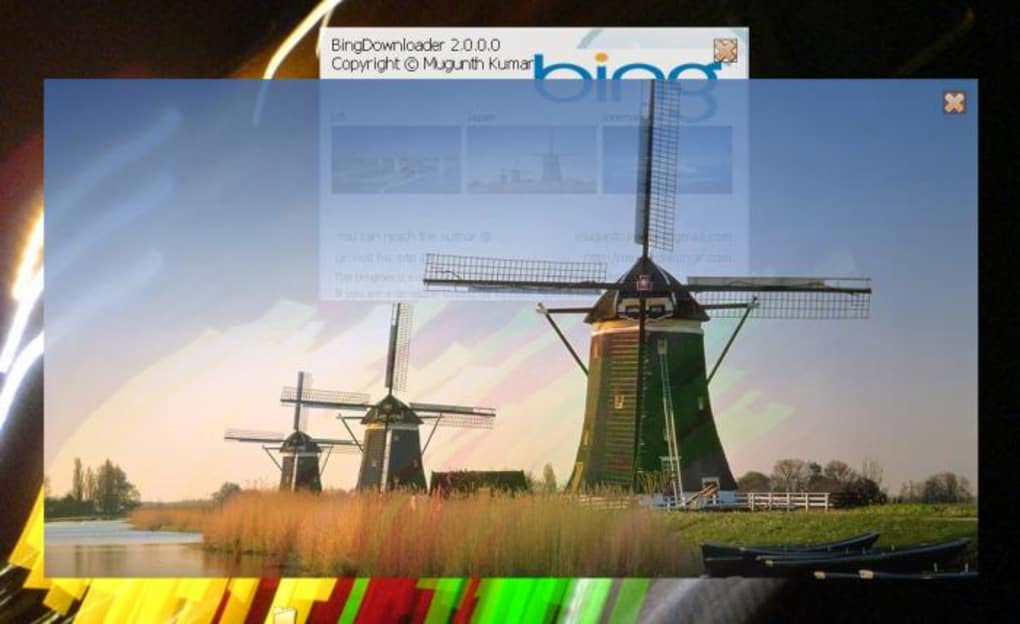
The user interface is incredibly intuitive. Upon launching the Bing Downloader executable, the current Bing background image is displayed almost instantaneously. This speed is a key selling point, ensuring a quick and efficient download process. The image is presented in a slightly transparent window, adding a modern aesthetic touch. While the transparency might not be a defining feature, it does contribute to a cleaner visual experience.
Clicking on the displayed image enlarges it for closer inspection, providing a preview before it’s saved. This allows users to verify the image’s quality and composition before adding it to their collection. After the image is displayed, it is automatically downloaded and saved to the pre-designated “BingImages” folder. There are no complex settings or options to configure; the app focuses solely on its core function—efficiently downloading Bing’s daily background.
Advantages and Disadvantages
Bing Downloader’s key advantage lies in its speed and simplicity. It’s a highly efficient tool for downloading Bing’s daily images, requiring minimal effort and time. The portable nature and lack of installation further enhance its convenience. For users seeking a quick and uncomplicated method to obtain these images, this application excels. However, there are a few drawbacks to consider.
The necessity to create the “BingImages” folder before using the app can be seen as a minor inconvenience. A more user-friendly approach would be for the application to automatically create this folder if it doesn’t exist. While this is a small issue, it’s an aspect that could be improved in future iterations. Additionally, the application’s functionality is limited solely to downloading the current Bing background. There’s no option to download past images or choose specific images from Bing’s extensive archive.
Alternatives and User Feedback
While Bing Downloader offers a simple solution, several alternatives exist for downloading Bing backgrounds. Many websites and browser extensions offer functionality to automate the download of these images, often providing additional features like scheduling or selecting specific image preferences. However, these alternatives might involve more complex setups or integration with browsers. It’s crucial to weigh the simplicity of Bing Downloader against the added functionality offered by other methods. Choosing the best approach depends on individual preferences and technical capabilities.

User reviews on Bing Downloader are mixed. While many praise its speed and ease of use, some have reported compatibility issues, particularly on older operating systems. Negative reviews primarily centered around the requirement to manually create the “BingImages” folder and the lack of additional features. It’s evident that user experience varies depending on individual technical expertise and expectations. The simplicity of the tool might be seen as a limitation by some users who seek more advanced features, but it’s precisely this simplicity that appeals to others who prefer a hassle-free approach.
Conclusion
Bing Downloader provides a quick and efficient method to download Bing’s daily stunning background images. Its portability, minimal size, and straightforward interface make it a valuable tool for users who prioritize speed and ease of use. The minor drawback of needing to create a dedicated folder is easily overcome. Users seeking more advanced features, such as scheduling or selecting past images, might find other alternatives more suitable. Ultimately, Bing Downloader’s effectiveness is determined by individual preferences and needs. Its strength lies in its simplicity, catering specifically to users who value a no-frills, efficient approach to downloading their favorite Bing backgrounds. Weighing the pros and cons alongside available alternatives will help determine if Bing Downloader aligns with your specific requirements for downloading Bing’s captivating imagery.
File Information
- License: “Free”
- Version: “2.0.0.0”
- Latest update: “July 15, 2022”
- Platform: “Windows”
- OS: “Windows XP”
- Language: “English”
- Downloads: “76.6K”
- Size: “185.86 KB”


