
Bingo at Home is a free Android application designed to bring the fun and excitement of bingo directly to your home. Whether you’re hosting a family game night or gathering with friends, this app serves as a convenient and versatile virtual bingo caller, enhancing your game nights with ease and precision. The app’s intuitive interface and customizable features make it ideal for players of all ages and experience levels, transforming your living room into a lively bingo hall.
Game Mechanics and Features: A Seamless Bingo Experience
Once you initiate a bingo game within the Bingo at Home app, the automated caller begins announcing numbers with accuracy and clarity. This eliminates the need for a human caller, allowing for a smoother and more efficient game flow. The app provides complete control over the game’s pacing, allowing you to pause and restart at any point. This pause functionality proves invaluable for verifying winning lines or bingos, ensuring fair play and eliminating any potential disputes. It also allows for a quick review of the numbers called, particularly helpful if players missed an announcement.
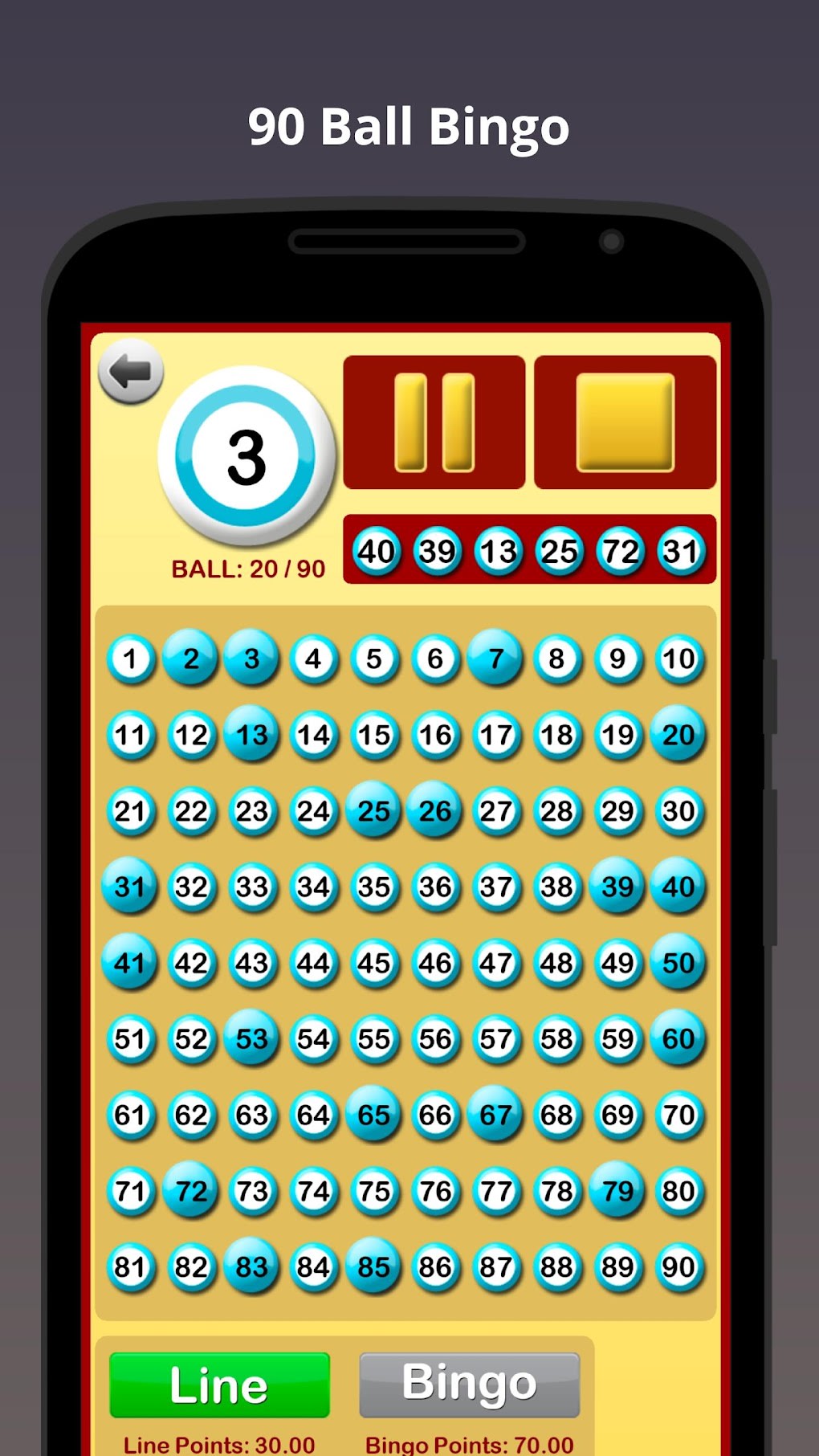
The app’s flexibility extends beyond simple pause functionality. It offers two distinct game modes catering to different preferences and play styles:
-
Automatic Mode: This mode provides a hands-off experience. The app autonomously calls out numbers at a pre-selected speed until the game is paused or all numbers have been called. You can adjust the speed of the ball calls to match your group’s pace and comfort level, providing an adaptable experience for both fast-paced and relaxed games.
-
Manual Mode: For those who prefer a more controlled game flow, the Manual mode allows you to call each number by tapping a button. This offers a more interactive experience, allowing for strategic pauses and engaging your players more actively in the game progression. This mode is particularly suitable for players who enjoy a slower, more deliberate game, or for groups where players might want to discuss potential winning combinations before the next number is called.
The application also supports two prevalent bingo variations:
- 90-Ball Bingo: This classic British variant follows the standard rules. The first player to complete a horizontal, vertical, or diagonal line wins the “line” prize, while the first to complete the entire card wins the “bingo” prize. The strategic element in this variant lies in recognizing patterns early and hoping for favorable number distributions.
- 75-Ball (American) Bingo: This variation offers a different strategic dimension. Instead of simply marking off numbers until a line or full house is completed, players race to complete specific pre-determined shapes on their card, such as a line, an ‘X’, or a corner square. This adds an extra layer of excitement and anticipation, as players may find themselves chasing multiple potential winning configurations simultaneously.
One limitation to consider is that Bingo at Home currently only uses pre-set virtual bingo cards. While this simplifies the setup and ensures a standardized game experience, it does not allow for the creation of custom cards with player-selected numbers. However, a simple workaround involves generating cards using a separate app or website before using Bingo at Home to call the numbers.
Ideal for Enhancing Your At-Home Bingo Nights
Whether you’re a seasoned bingo enthusiast or a newcomer looking for some fun, Bingo at Home provides a versatile and enjoyable experience. Its simplicity, coupled with its customization options and authentic gameplay, makes it an excellent choice for adding a touch of exciting unpredictability to your family game nights or gatherings with friends. The app’s capacity to handle both 90-ball and 75-ball bingo caters to diverse preferences, ensuring that the game caters to your chosen style.
The convenience factor of Bingo at Home cannot be overstated. It eliminates the need for physical bingo cards, dabbers, and a human caller, streamlining the setup and gameplay. This frees up time and energy that would otherwise be dedicated to these logistical aspects, allowing for more focus on social interaction and the enjoyment of the game itself.
Furthermore, the app’s ability to pause and restart at any point enhances its user-friendliness. This feature proves especially beneficial when dealing with interruptions or when players need time to carefully review their cards and confirm potential wins.
Advantages and Disadvantages: A Balanced Perspective
While Bingo at Home offers a compelling and enjoyable bingo experience, it’s important to consider both its advantages and disadvantages to ensure it aligns with your specific needs and expectations:
Advantages:
-
Two Engaging Game Modes: The availability of both Automatic and Manual modes caters to diverse play styles and preferences. Players can choose the mode that best suits their group’s dynamics and desired level of interaction.
-
Support for Two Popular Bingo Variants: The inclusion of both 90-ball and 75-ball bingo expands the app’s appeal, catering to a broader range of bingo players and traditions. This ensures that the app is versatile and capable of accommodating different preferences.
-
Pause and Restart Functionality: The ability to pause and restart the game offers unparalleled control and flexibility, enabling players to verify wins, review numbers, or accommodate interruptions without disrupting the flow of the game.
-
Ease of Use and Accessibility: The application boasts a simple and user-friendly interface, making it accessible to players of all ages and technical skill levels. The intuitive design ensures that players can focus on the game itself without needing extensive technical knowledge.
-
Free and readily available: The app is free to download and use, making it an accessible option for anyone who wants to enjoy the game of bingo at home.
Disadvantages:
- Lack of Custom Bingo Card Creation: The inability to create custom bingo cards is a notable limitation. While pre-set cards suffice for many, the lack of customization might disappoint players who prefer using personalized or themed cards. This limitation could impact the long-term enjoyment for some users who seek creative control over their gaming experience.
Alternative Bingo Apps: Exploring the Market
While Bingo at Home provides a solid foundation for at-home bingo games, several other apps offer alternative features and functionalities. Some might prioritize multiplayer options, allowing for online competition against other players, while others might focus on enhanced graphics or special events. Exploring other bingo apps can broaden your options and perhaps uncover features that better meet your needs. The choice of which app to use depends on individual preferences and the features considered most valuable.
In conclusion, Bingo at Home offers a straightforward and enjoyable way to bring the classic game of bingo into your home. While the lack of custom card creation might be a drawback for some, its user-friendly interface, flexible game modes, and support for popular bingo variations make it a strong contender for those seeking a convenient and engaging bingo experience. The app excels in its simplicity and efficiency, making it an excellent choice for casual players and families seeking a fun and easy game night activity. Its accessibility and ease of use make it a valuable addition to any home entertainment collection.
File Information
- License: “Free”
- Latest update: “December 26, 2024”
- Platform: “Android”
- OS: “Android 13.0”
- Language: “English”
- Downloads: “2.7K”
- Download Options: “Google Play”


