
Bingo, a game of chance and strategy, has captivated audiences for generations. Its simple premise—matching numbers on a card to those called—belies a surprising depth of social interaction and excitement. While traditional bingo halls offer a vibrant social atmosphere, the digital age has brought forth innovative ways to enjoy the game, one of which is the Bingo Caller software. This in-depth analysis explores the features, functionality, and user experience of Bingo Caller, examining its strengths and weaknesses alongside comparisons to other digital and traditional bingo experiences.
Features and Functionality of Bingo Caller
Bingo Caller, as the name suggests, is a software application designed to automate the calling of numbers in a bingo game. Its primary function is to eliminate the need for a human caller, providing a convenient and consistent experience for both players and game organizers. The software boasts a clean and intuitive interface, making it accessible to users of all technical skill levels. Key features include:
-
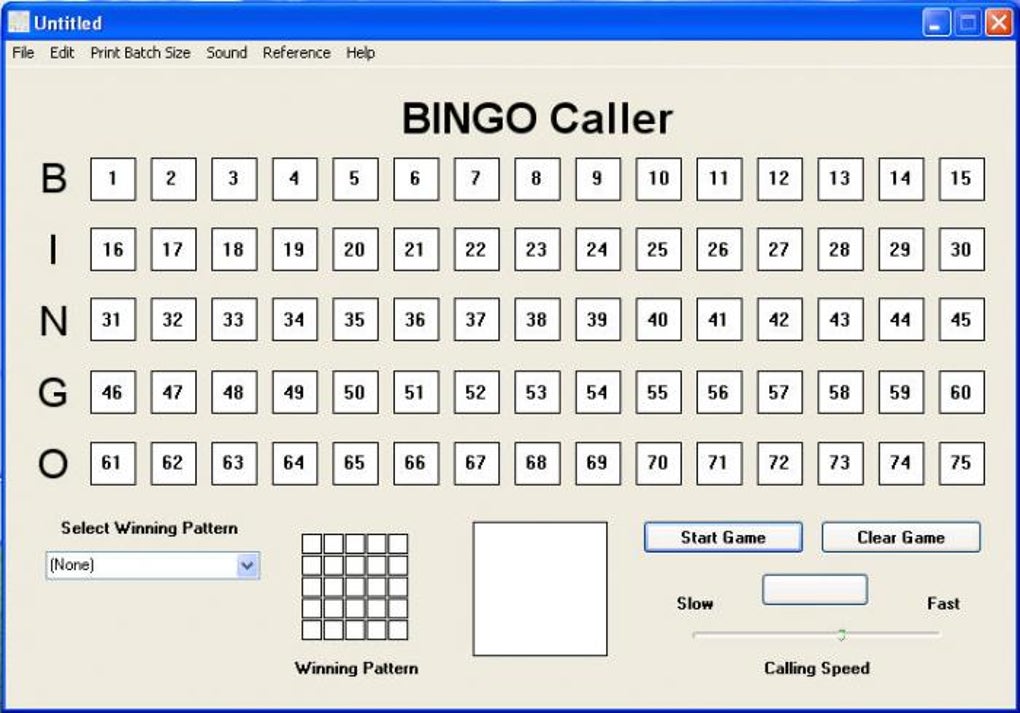
Number Generation and Tracking: The core function of Bingo Caller is its ability to randomly generate and display bingo numbers. These numbers are typically drawn from the standard 75-number bingo grid (B-I-N-G-O), with each letter corresponding to a specific range of numbers. The software meticulously tracks which numbers have been called, presenting a clear visual record for players to reference against their cards. This eliminates any ambiguity or potential for human error often associated with manual calling.
-
Winning Pattern Selection and Customization: Bingo Caller allows users to pre-select or customize winning patterns. These patterns, ranging from simple straight lines to more complex shapes (e.g., “X,” “Railroad Tracks,” “Four Corners”), dictate the arrangement of called numbers required for a bingo. This feature caters to diverse gameplay preferences and allows for varied game experiences. Users can either choose from a pre-defined list of patterns or manually create their own by selecting cells on the on-screen grid.
-
Adjustable Calling Speed: The software offers adjustable calling speed, a crucial element for controlling the pace of the game. This allows organizers to tailor the game’s rhythm to the players’ preferences and the overall atmosphere. A faster speed might suit experienced players or those seeking a more rapid-fire game, while a slower speed could benefit novices or those enjoying a more relaxed pace.
-
Game Control Features: Bingo Caller includes comprehensive game control buttons, providing the ability to start, pause, and clear the game. The “Pause” function is especially useful for verifying bingo claims, ensuring fair play and preventing disputes. The “Clear Game” function resets the game, allowing for immediate commencement of a new round.
-
Sound Integration: The software incorporates sound effects, enhancing the immersive experience. The sounds typically accompany each number called, providing auditory feedback that complements the visual display. Users have the option to turn the sound on or off, accommodating individual preferences and potentially quieter environments.
User Interface and Experience
The success of any software hinges on its user interface (UI). Bingo Caller’s UI is designed for simplicity and ease of use. The main screen clearly displays the called numbers, the selected winning pattern, the current number being called, and the controls for game speed, starting, pausing, and clearing the game. This streamlined design avoids overwhelming users with unnecessary information or complex menus. The use of clear visual cues and intuitive button placement further enhances the user experience, making the software accessible to users with varying levels of computer literacy.
The software’s design prioritizes usability, ensuring that even first-time users can readily grasp the controls and begin calling numbers without any significant learning curve. This straightforward approach avoids technical jargon and complex configurations, maintaining focus on the core function of calling bingo numbers.
Comparison to Other Bingo Software and Traditional Bingo
Bingo Caller holds its own against other digital bingo software and even stands up favorably against the traditional bingo hall experience. Compared to other software, Bingo Caller offers a balance of features and simplicity. Some alternatives may provide more advanced features, such as integrated player tracking, scoring, or networking capabilities, but they often come with increased complexity and a steeper learning curve. Bingo Caller’s focus on core functionality makes it an ideal choice for users who prefer a straightforward, uncomplicated approach.
Against the backdrop of traditional bingo halls, Bingo Caller offers distinct advantages. It eliminates the reliance on a human caller, thus ensuring consistency and eliminating potential human error or bias. The adjustable calling speed offers a level of control not possible in a traditional setting. However, the social aspect of traditional bingo is lacking in the digital version. The communal atmosphere and personal interactions are key components of the traditional experience, which are inherently absent from a software application.
Strengths and Weaknesses
Bingo Caller’s strengths lie in its simplicity, ease of use, and reliability. Its streamlined design allows users to quickly grasp its functionality and begin using the software without extensive training. The software’s consistent number generation and accurate tracking eliminate any human error, resulting in a more fair and predictable gaming experience. The adjustable calling speed caters to diverse player preferences and allows for flexible gameplay.
Despite its strengths, the software has certain weaknesses. The lack of integrated player tracking and scoring limits its scalability for larger games or tournaments. The absence of a chat feature or other interactive elements diminishes the social aspect of the game, a significant element of the traditional bingo experience. Additionally, the software’s basic features might be insufficient for those seeking more advanced functionalities such as prize management or automatic payout calculations.
Conclusion
Bingo Caller provides a viable and efficient solution for automating bingo number calls, offering a streamlined and user-friendly experience for organizers and players alike. Its strengths lie in its simplicity, ease of use, and reliable functionality. However, the lack of advanced features and social interaction may limit its appeal to users seeking more comprehensive or interactive digital bingo experiences. For those seeking a straightforward, reliable, and easy-to-use tool for managing their bingo games, Bingo Caller remains a practical and effective option. The software excels as a tool for casual or smaller-scale bingo events, providing a convenient and efficient way to manage the game’s mechanics. However, for large-scale events or those prioritizing social interaction, more sophisticated bingo platforms might be more suitable. Ultimately, Bingo Caller’s value lies in its ability to provide a consistent and efficient number calling system, filling a specific niche within the digital bingo landscape.
File Information
- License: “Free”
- Latest update: “December 9, 2011”
- Platform: “Windows”
- OS: “Windows XP”
- Language: “English”
- Downloads: “70K”
- Size: “1.21 MB”


