
Bingo Caller Pro is a feature-rich application designed to elevate the bingo experience, whether you’re hosting a small gathering or a large-scale event. This software provides a robust and user-friendly platform for managing all aspects of a bingo game, from number calling to pattern tracking and result generation. Its versatility makes it suitable for both casual players and serious bingo enthusiasts.
Key Features and Functionality of Bingo Caller Pro
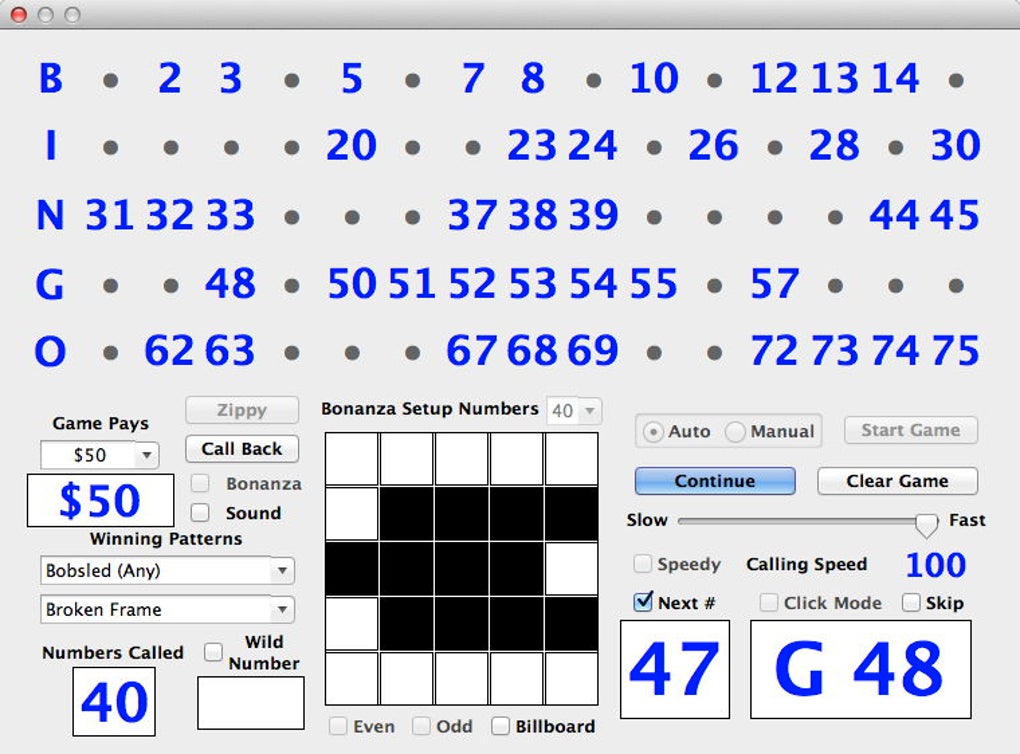
Bingo Caller Pro stands out from simpler bingo applications due to its comprehensive range of features. The software’s core functionality revolves around automating the number-calling process, simplifying game management, and enhancing the overall player experience. Let’s delve into the key features that contribute to its effectiveness:
-
Multiple Calling Modes: The software offers a diverse range of calling modes to cater to different preferences and game styles. These include:
- Automatic Mode: This mode automatically calls numbers at a set interval, ensuring a smooth and consistent game flow. Users can customize the speed at which numbers are called, allowing for adjustments based on the number of players and the complexity of the game.
- Manual Mode: This mode provides complete control to the caller, enabling them to call numbers at their own pace. This is particularly useful for experienced callers who want to add a personal touch or adjust the pace based on the player’s reactions.
- Click Mode: In this mode, numbers are called by simply clicking on them on the screen. This streamlined approach simplifies the calling process and is ideal for situations where a rapid game pace is preferred.
- Skip Mode: This feature allows the caller to skip numbers that have already been called or numbers that are not needed in the current round. This feature adds flexibility and control over the game’s progression.
-
Customizable Winning Patterns: Bingo Caller Pro allows for the creation and use of various winning patterns, adding a significant layer of customization to the game. The application preloads over 100 default patterns, covering a broad spectrum of bingo variations. This impressive library ensures that users can easily find a pattern that suits their specific needs. Furthermore, the software empowers users to design and add their own custom patterns, ensuring a high degree of flexibility and personalization. This allows for the creation of unique and challenging bingo games, thereby enhancing the overall engagement and enjoyment of the players. The support for up to two winning patterns simultaneously further increases the complexity and strategic depth of the game.
-
Advanced Features for Enhanced Gameplay: Bingo Caller Pro is not limited to basic bingo functionality. It incorporates a range of advanced features designed to enhance the overall gaming experience:
- Wild Number: This exciting feature allows for the designation of a specific number as a “wild card,” adding an element of unpredictability and strategy to the game.
- Speedy Mode: This mode accelerates the calling process, making it ideal for shorter, fast-paced games.
- Bonanza Mode: This mode may involve a special bonus or prize, adding an extra layer of excitement and incentive for players.
- Zippy Mode: Similar to Speedy Mode, this accelerates the pace of the game.
- Even/Odd Mode: This allows for selecting even or odd numbers, adding another layer of strategy and unpredictability to the game.
- Computer Call Back: This feature enables the computer to automatically recall either called or uncalled numbers, providing additional flexibility in managing the game.
- Billboard Feature: This feature dynamically displays important information on the screen, such as the called numbers or remaining numbers.
- Last Number & Next Number Display: This provides immediate visual feedback on the most recent and upcoming numbers.
-
Bingo Sheet Generation: The software facilitates the creation of personalized bingo sheets. Users can print their own bingo sheets, each containing four unique and numbered patterns. This customization ensures that each player receives a unique sheet, minimizing the chance of identical patterns and promoting fair play. The ability to generate multiple sheets with diverse patterns efficiently handles larger groups of players, significantly improving the logistical aspects of running a bingo game.
-
User-Friendly Interface and Settings Management: Bingo Caller Pro prioritizes user experience with its intuitive interface. The large, clear display ensures easy readability, even for those with visual impairments. All settings are easily accessible and saved between sessions, eliminating the need for repetitive configurations. This consistent setup reduces setup time and ensures smooth transitions between games.
-
Demo Mode and Free Upgrades: The software offers a demo mode, allowing potential users to test the application’s features before committing to a purchase. This enables users to evaluate whether the application meets their specific requirements. Registered users also benefit from free upgrades as they become available, ensuring that they always have access to the latest features and bug fixes. This continuous improvement guarantees that the application remains current and relevant.
Bingo Caller Pro: System Requirements and Installation
Bingo Caller Pro is designed to be compatible with a broad range of systems, ensuring accessibility for most users. The application’s specific system requirements are:
- Operating System: Windows 7 or later.
- Processor: A standard processor is sufficient for smooth operation.
- Memory: A standard amount of RAM is sufficient.
- Storage: The installation file size is relatively small, requiring minimal storage space.
The installation process is straightforward. After downloading the installer, users can simply follow the on-screen instructions to complete the installation. The application is designed to automatically expand to fill the display upon launch, optimizing screen usage for ease of view.
Comparisons with Alternative Bingo Applications
While several other bingo applications exist, Bingo Caller Pro distinguishes itself through its combination of features, functionality, and user-friendliness. Many alternatives may lack the breadth of options in calling modes, pattern customization, or advanced features like the wild number and computer call back functions. Some might offer a simpler interface but at the cost of flexibility and control. Others may focus primarily on online play, whereas Bingo Caller Pro caters specifically to in-person or small-group bingo games. The balance of comprehensive features, intuitive interface, and offline functionality positions Bingo Caller Pro as a strong contender in the bingo software market.
Conclusion: Is Bingo Caller Pro Right for You?
Bingo Caller Pro presents a compelling solution for anyone seeking a robust and versatile bingo application. Its diverse range of calling modes, extensive pattern customization, and user-friendly interface cater to a broad spectrum of users. The addition of advanced features enhances the overall gaming experience, making it ideal for both casual and competitive play. The availability of a demo mode allows potential users to experience the application firsthand before purchasing, mitigating the risk of investing in unsuitable software. If you’re seeking a comprehensive and user-friendly solution for managing and enhancing your bingo games, Bingo Caller Pro deserves serious consideration. Its combination of features and ease of use makes it a valuable tool for enhancing the fun and enjoyment of bingo for players of all skill levels.
File Information
- License: “Full”
- Version: “3.1.1”
- Latest update: “December 10, 2015”
- Platform: “Windows”
- OS: “Windows 7”
- Language: “English”
- Downloads: “7K”
- Size: “2.48 MB”


