
Biscuit is a minimalist web browser designed to simplify your online experience and boost productivity by addressing the common frustration of navigating a cluttered browser window filled with numerous open tabs. Instead of endlessly scrolling through a chaotic landscape of open pages, Biscuit offers a more organized and accessible approach to managing your web applications. This review will delve into the features, pros, cons, and overall usability of this unique browser.
A Fresh Approach to Tab Management
Unlike traditional browsers that prioritize feature-rich interfaces, Biscuit focuses on functionality and streamlined organization. Its core principle is to categorize and readily present your frequently used web applications, eliminating the need to constantly search for specific tabs. The browser’s interface is purposefully simple and intuitive, avoiding the complexity often associated with feature-laden browsers. This minimalist design is intentional, aiming to reduce cognitive overload and improve user experience.
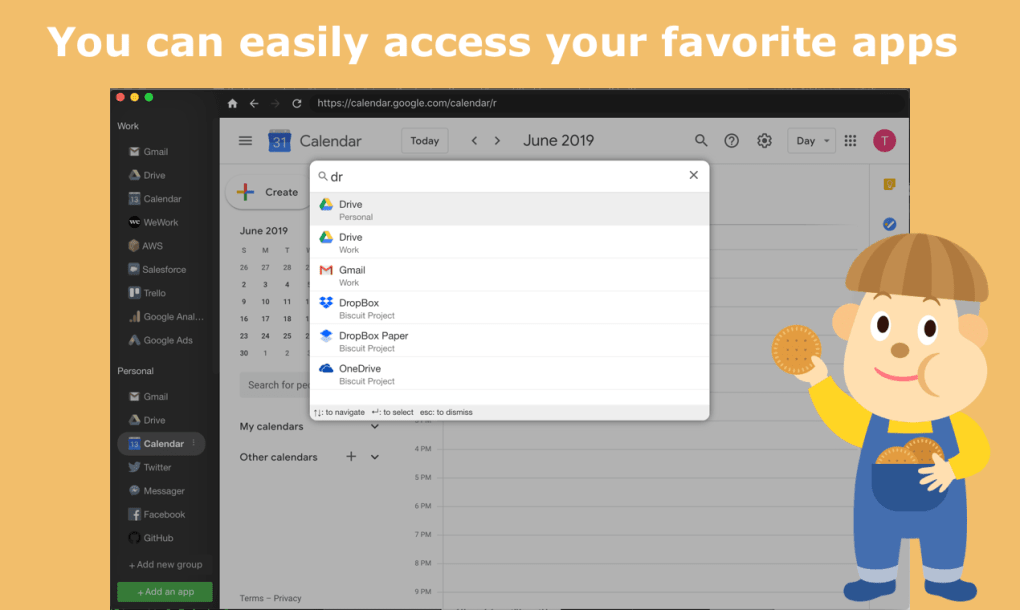
Instead of the typical tab-based interface where multiple pages are opened concurrently, Biscuit uses a system of categorized sessions. Users can create separate sessions for various purposes. For example, you might have a session dedicated to work-related applications such as email, calendar, and project management tools, while another session focuses on personal tasks, including social media and online shopping. This separation helps users maintain a clearer distinction between work and personal activities, promoting better focus and potentially reducing distractions. The organization within these sessions is further enhanced by clear labeling and intuitive arrangement. Productivity and business applications might fall under a single, easily accessible tab, while entertainment or social applications reside under a separate tab. This system contributes to a more controlled and manageable online workspace.
Key Features and Functionality
Biscuit’s core strength lies in its ability to simplify the management of online applications. While it lacks some of the advanced features found in more established browsers, its simplicity makes it an efficient tool for users who prioritize organization and ease of access. The browser’s functionality is focused on its core objective: providing a straightforward method to access frequently used web applications. This approach minimizes distractions and allows users to focus on their tasks. Here are some of the key features:
-
Organized Session Management: Biscuit allows users to create and manage multiple sessions, categorizing web applications based on their function or purpose. This feature promotes efficient workflow by grouping related apps together. This segregation minimizes distractions and improves focus.
-
Intuitive Interface: The browser interface is designed for simplicity and ease of navigation. Users can quickly access their frequently used web applications without navigating through numerous open tabs. The clear visual hierarchy and minimal clutter make it user-friendly even for those less comfortable with technology.
-
App Notifications: Biscuit allows users to set notifications for specific applications, ensuring they remain aware of important updates or messages without the constant need to check individual tabs. This feature enhances productivity by alerting users only when necessary.
-
Cross-Platform Compatibility: While the primary focus might be on Windows users, the availability on other platforms (Android and Mac) suggests a broader user base and indicates the potential for continued development and platform compatibility.
-
Regular Updates: The mention of regular updates signifies ongoing development and the potential for improvements in functionality and stability. This demonstrates a commitment to maintaining and refining the software over time, addressing potential bugs and incorporating user feedback.
Advantages and Disadvantages
Like any software, Biscuit offers both advantages and disadvantages. While its streamlined approach is a significant strength for some users, others might find its lack of advanced features limiting.
Pros:
- Increased Productivity and Efficiency: The clear organization and easy accessibility of applications contribute to a more streamlined workflow, leading to increased productivity.
-
Reduced Cognitive Overload: The minimalist design and clear categorization reduce mental clutter, allowing users to focus on their tasks rather than navigating through a complex browser interface.
-
Improved Focus: By separating personal and professional applications into distinct sessions, Biscuit helps users maintain better focus and minimize distractions.
-
Simplified User Experience: The intuitive interface is designed for ease of use, making it an accessible option for users of all technical skill levels.
-
Regular Updates: Ongoing development suggests continued support and improvements to the software.
Cons:
-
Limited Advanced Features: Biscuit lacks some of the advanced features found in more established browsers, such as extensive extension support, advanced privacy settings, or sophisticated customization options.
-
Potential Learning Curve: Although the interface is designed for simplicity, users accustomed to more complex browsers might need some time to adjust to Biscuit’s workflow.
- Relatively Small User Base: Compared to popular browsers, Biscuit has a smaller user base, which means fewer user-generated resources and potentially less community support.
Comparison with Other Browsers
Biscuit differentiates itself from established browsers like Chrome, Firefox, and Edge by prioritizing simplicity and organization over an extensive array of features. While these popular browsers offer a wide range of extensions, customization options, and advanced features, they can also become overwhelming with countless open tabs and settings. Biscuit offers a counterpoint, targeting users who value a clean, organized workspace above all else. The trade-off is a reduced feature set, but for users who prioritize efficiency and a clutter-free experience, this may be a worthwhile compromise.
Conclusion
Biscuit provides a unique solution for users frustrated by the complexity of conventional web browsers. Its strength lies in its simplified approach to web application management, prioritizing organization and ease of access. The absence of advanced features may be a drawback for some, but for users who value a clean, efficient, and focused online experience, Biscuit offers a compelling alternative. The browser’s focus on streamlined workflow and user experience makes it a worthwhile option for those seeking a more productive browsing environment. The clear categorization of applications and intuitive interface ultimately make Biscuit a practical choice for enhancing productivity and reducing the mental clutter often associated with traditional browsers.

File Information
- License: “Free”
- Latest update: “May 24, 2023”
- Platform: “Windows”
- OS: “Windows 10”
- Language: “English”
- Downloads: “8.4K”
- Size: “155.60 MB”


