
BitLocker, a robust security feature built into Windows, provides powerful encryption for your computer’s hard drive. This encryption safeguards your data from unauthorized access, ensuring privacy even if your device is lost or stolen. However, this strong security comes with a potential downside: recovering data from a BitLocker-encrypted drive can be significantly more challenging than recovering data from an unencrypted drive. Standard data recovery tools often fail when encountering BitLocker encryption. This is where specialized software like M3 BitLocker Recovery Free steps in, offering a potential solution for retrieving lost or inaccessible files.
Understanding BitLocker Encryption and Data Recovery Challenges
BitLocker encryption works by encrypting the entire hard drive or a specific partition. This means that even if you lose access to your system, the data remains inaccessible without the correct decryption key, typically a password or a 48-digit recovery key. Unlike simple file deletion, where data recovery is often possible by recovering file fragments, BitLocker encryption renders the data unreadable without the proper credentials. This makes data recovery a significantly more complex undertaking.
The encryption process utilizes the Trusted Platform Module (TPM), a secure chip on many modern computers, to help protect the encryption key. The TPM works in conjunction with the BitLocker recovery key and/or password to authenticate the user and decrypt the drive. If any of these components—the TPM, the recovery key, or the password—are compromised or unavailable, recovery becomes incredibly difficult.
How M3 BitLocker Recovery Free Works: A Step-by-Step Guide
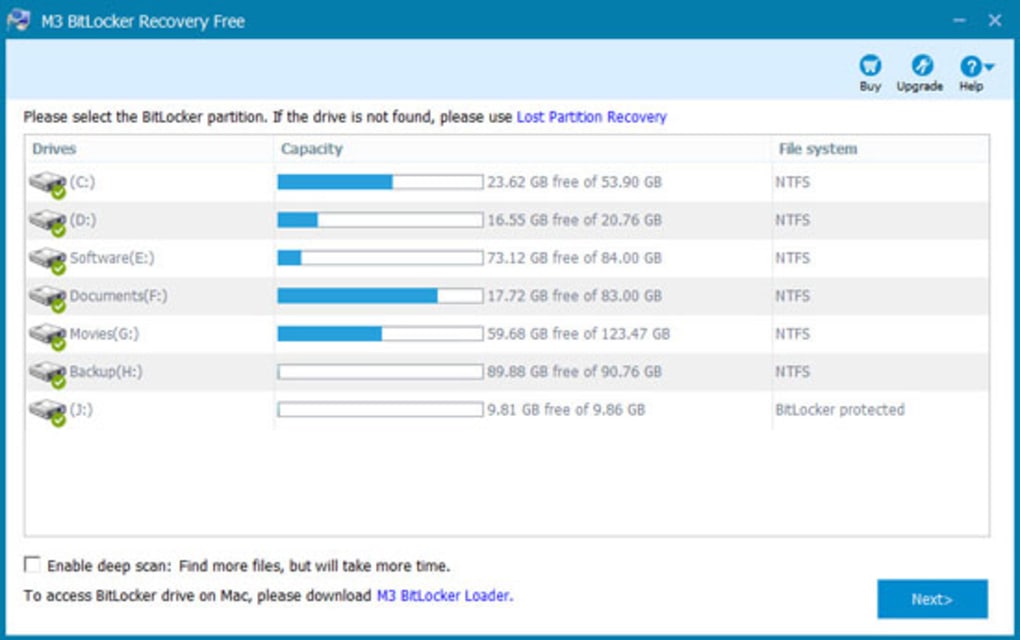
M3 BitLocker Recovery Free is designed specifically to address the challenges of recovering data from BitLocker-encrypted drives. It simplifies the recovery process, presenting it as a three-step procedure:
-
Launch the Application: After successfully installing the software, launch the M3 BitLocker Recovery Free application on your computer. The interface should be user-friendly and intuitive, guiding you through the process.
-
Drive Selection and Authentication: Select the BitLocker-encrypted drive from which you want to recover data. Crucially, the software will require you to provide either the BitLocker password or the 48-digit recovery key. Without this authentication, the application cannot proceed with the decryption and recovery process. This is a critical requirement stemming from the security measures implemented by BitLocker.
- Scanning, Preview, and Recovery: Once the correct authentication credentials are provided, the software will begin scanning the selected drive. This process might take considerable time depending on the size of the drive and the extent of data corruption. After the scan completes, you will be presented with a preview of the recoverable files. Select the files you wish to recover and specify the destination for the recovered data. Ensure you have sufficient free space on the target drive or external storage device.
Factors Affecting Successful Recovery with M3 BitLocker Recovery Free
The success of data recovery using M3 BitLocker Recovery Free hinges on several critical factors:
-
Intact BitLocker Metadata: The software relies heavily on the integrity of the BitLocker metadata. This metadata contains essential information about the encryption, including the key and other critical parameters. If the metadata is corrupted or damaged, the software may be unable to decrypt the drive. This damage could be a result of physical drive failure, severe corruption, or even malicious activity.
-
Valid Recovery Key or Password: The recovery key or password is paramount. Without the correct credentials, the software cannot proceed with the decryption. Losing this key renders the data effectively unrecoverable without specialized, and often expensive, professional data recovery services.
-
Drive Condition: Physical damage to the hard drive itself presents a significant obstacle. Scratches, broken sectors, or head crashes can compromise the drive’s integrity, making data recovery far more complex or impossible. If the problem stems from physical damage, professional data recovery services are generally required.
-
Corruption Extent: The level of data corruption can impact recovery success. Minor corruption might be recoverable, while extensive corruption might make recovery challenging or impossible.
Advantages and Limitations of M3 BitLocker Recovery Free
M3 BitLocker Recovery Free presents a balance of benefits and drawbacks:
Advantages:
-
Free to Use: The software is freely available, making it an attractive option for those facing unexpected data loss. This affordability is a significant advantage, particularly when dealing with the costs associated with professional data recovery.
-
Simple Interface: The software boasts a user-friendly interface, making it relatively easy to use even for those unfamiliar with data recovery tools. This simplicity reduces the technical barrier to recovery.
-
Recovery from Failed BitLocker Disks: The software aims to recover data even from BitLocker-encrypted drives that are inaccessible or showing errors. This makes it potentially useful in situations where the drive is malfunctioning.
-
Recovery After BitLocker Encryption Failure: In cases where the BitLocker encryption process fails, M3 BitLocker Recovery Free attempts to retrieve data, offering a chance to recover information lost due to incomplete encryption.
Limitations:
- Dependency on Recovery Key: The software’s primary limitation is its reliance on the BitLocker recovery key or password. Without these credentials, data recovery is essentially impossible.
-
Incomplete Data Recovery: In some cases, the software might not recover all files from the drive. The success rate can vary widely depending on the factors mentioned earlier, such as metadata integrity and drive condition.
-
Limited Support for Severe Corruption: The software is not a panacea for all data loss scenarios. Severe data corruption, particularly if caused by physical drive damage, might render the software ineffective.
Alternatives to M3 BitLocker Recovery Free
While M3 BitLocker Recovery Free offers a free solution, several commercial alternatives exist, providing potentially higher recovery success rates and broader functionality. These commercial options often incorporate advanced algorithms and offer better support in case of complex data loss scenarios. The choice between a free tool and a commercial one depends on factors like budget, the urgency of data recovery, and the complexity of the data loss situation. Before investing in a commercial solution, it is always worth trying a free option like M3 BitLocker Recovery Free to see if it can successfully retrieve your data.
Conclusion
M3 BitLocker Recovery Free provides a valuable, free tool for attempting to recover data from BitLocker-encrypted drives. While its success depends heavily on factors like the availability of the recovery key and the integrity of the drive and metadata, it represents a significant advantage for users who have lost access to their encrypted data. However, users should be realistic about its limitations and consider professional data recovery services if the free software proves ineffective, particularly in cases involving extensive data corruption or physical drive damage. Remember, preventative measures such as regularly backing up your data remain the most effective way to protect yourself from data loss.
File Information
- License: “Free”
- Latest update: “May 24, 2023”
- Platform: “Windows”
- OS: “Windows 8.1”
- Language: “English”
- Downloads: “69.8K”
- Size: “3.75 MB”


