
BitLocker, Microsoft’s full disk encryption technology, offers robust security for Windows devices. However, losing your BitLocker password can lead to data inaccessibility, a frustrating and potentially critical situation. This article explores BitLocker password recovery methods, focusing on software solutions and best practices to regain access to your encrypted data. We’ll examine both the capabilities and limitations of different approaches to help you choose the right path for your specific circumstances.
Understanding BitLocker Encryption and Password Loss
BitLocker encryption protects your entire hard drive or a specific partition, making it inaccessible without the correct password. This encryption is powerful and designed to safeguard your sensitive data from unauthorized access. The encryption process employs sophisticated algorithms to scramble your data, rendering it unreadable without the decryption key derived from your password. Losing this password effectively locks you out of your encrypted drive, preventing you from accessing your files and applications.
There are several scenarios that can lead to BitLocker password loss:
-
Forgotten Password: The most common cause is simply forgetting the password after setting it up. This can happen due to infrequent use of the encrypted drive or if the password was complex and not well-documented.
-
Incorrect Password Entry: Repeatedly entering the wrong password can lead to a temporary or permanent lockout, depending on BitLocker’s security settings.
-
Compromised System: If your system is compromised by malware or a hacker, your BitLocker password might be stolen or overwritten, resulting in data loss.
-
Hardware Failure: A malfunctioning hard drive or other hardware component can also lead to BitLocker password issues. The encryption key itself might be corrupted, making recovery more difficult.
BitLocker Password Recovery Software: Capabilities and Limitations
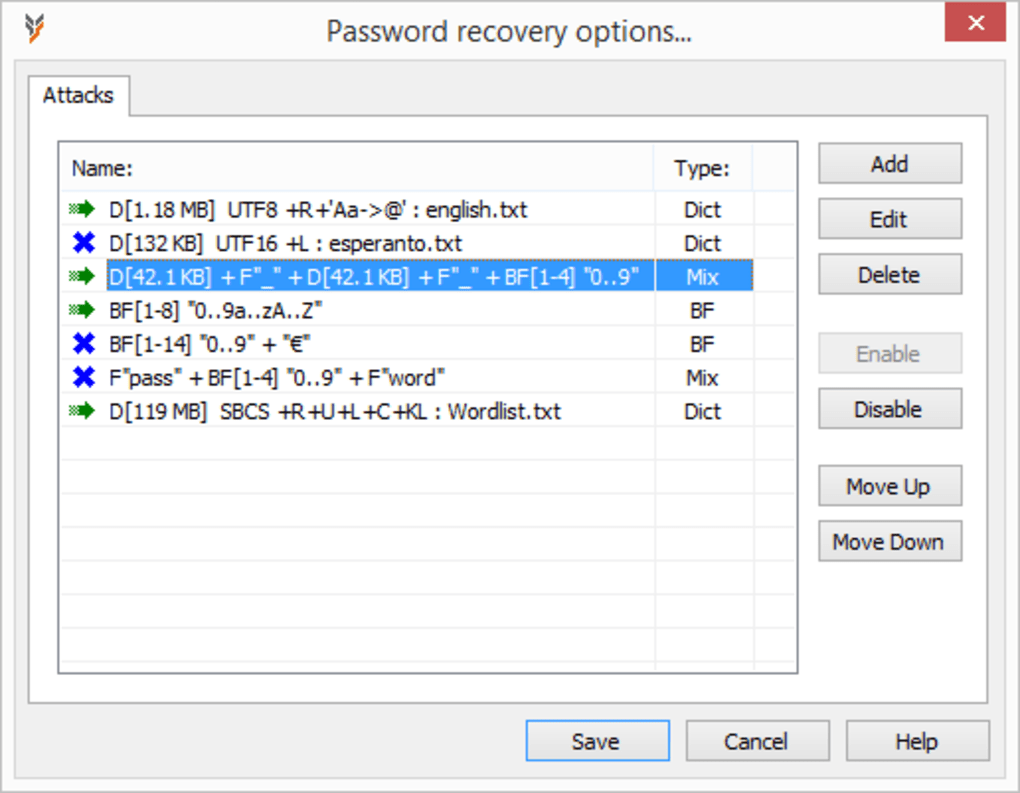
Several software applications claim to recover lost or forgotten BitLocker passwords. These tools generally employ various techniques, including brute-force attacks, dictionary attacks, and hybrid approaches combining both methods. However, it’s crucial to understand their limitations:
-
Trial Versions and Limitations: Many BitLocker password recovery tools offer trial versions with restricted functionality. These trials often limit the number of passwords attempted, the types of attacks allowed, or the size of the encrypted drive they can handle. Before investing in a full version, carefully assess the trial’s limitations to ensure it meets your needs.
-
Complexity of Passwords: The success rate of password recovery software depends significantly on the complexity of your BitLocker password. Simple passwords are more susceptible to brute-force attacks, while complex passwords with a mix of uppercase and lowercase letters, numbers, and symbols require substantially more time and processing power to crack.
-
Time and Resource Requirements: Recovering a complex password can consume significant time and computing resources. Brute-force attacks, in particular, can take hours, days, or even weeks depending on the password’s length and complexity, and the processing power of your computer or GPU.
-
Legal and Ethical Considerations: Using password recovery software on drives you don’t own is illegal and unethical. Always ensure you have the legal right to access the encrypted data before attempting recovery.
Choosing a BitLocker Password Recovery Tool: Key Considerations
When selecting BitLocker password recovery software, consider these factors:
-
Compatibility: Ensure the software is compatible with your operating system and the specific version of BitLocker used on your encrypted drive.
-
Attack Methods: Evaluate the range of attack methods supported by the software, including dictionary attacks, brute-force attacks, and hybrid approaches. The choice will depend on your password’s complexity.
-
GPU Acceleration: Many modern recovery tools utilize GPU acceleration to significantly speed up password cracking. Check if the software supports your graphics card for faster processing.
-
Support for Different Key Types: Different BitLocker configurations might utilize different types of encryption keys. Verify that the software supports the key type relevant to your encrypted drive.
- User Reviews and Ratings: Read user reviews and ratings before purchasing or downloading any software to get a sense of its effectiveness, reliability, and user experience.
Alternative Methods for BitLocker Password Recovery
While software tools can be effective, other options exist for BitLocker password recovery, although they often involve more technical expertise:
-
Recovery Key: If you created a recovery key during BitLocker setup, this is the simplest and most reliable method for regaining access. The recovery key bypasses the password entirely, allowing direct decryption. Store your recovery key securely and separately from your encrypted drive.
-
System Restore: If you have a system restore point from before the password was changed or lost, you can potentially revert your system to that point. This is not guaranteed to work but can be effective if you have recent backups.
-
Third-Party Data Recovery Services: For critical data recovery scenarios or complex password recovery situations, professional data recovery services can be a cost-effective option. They possess specialized tools and expertise to tackle difficult password recovery tasks.
-
BitLocker Management Tools: If you are managing BitLocker in an enterprise environment, utilize administrative tools to recover passwords, including tools within the Windows operating system.
-
Data Loss - Last Resort: In severe situations where the password is irretrievably lost and all other methods fail, you might have to accept data loss. Consider this possibility in your risk assessment, and emphasize the importance of regular backups as a preventive measure.
Best Practices for BitLocker Password Management
Preventing BitLocker password loss is far easier than recovering it. Here are several best practices for managing your BitLocker passwords:
-
Strong Password: Create a strong, complex password that is difficult to guess or crack. Use a password manager to generate and securely store complex passwords.
-
Recovery Key Management: Always create and securely store a BitLocker recovery key. Keep it in a safe place, such as a password manager, or offline storage.
-
Regular Backups: Implement a regular backup strategy to protect your data against loss due to password loss or other issues. Consider using multiple backup methods, such as cloud storage, external drives, and network storage.
-
Password Manager: Use a reputable password manager to securely generate and store your BitLocker password, along with other important passwords.
-
Documentation: Document your BitLocker password and recovery key in a safe and accessible location. Consider using a password manager or a physical, encrypted storage device.
Conclusion
Losing your BitLocker password can be a significant setback, but effective recovery methods exist. Software tools offer automated password cracking, but their effectiveness varies depending on password complexity and other factors. Always consider alternative methods, including recovery keys and professional data recovery services. Proactive measures, such as strong passwords, secure recovery key management, and regular backups, are the best defense against data loss due to password loss. Understanding the strengths and limitations of different recovery approaches will better prepare you for this situation, enabling you to choose the optimal method tailored to your specific circumstances. Remember to always act within the bounds of the law and ethics when accessing encrypted data.
File Information
- License: “Trial version”
- Latest update: “March 6, 2025”
- Platform: “Windows”
- OS: “Windows Vista”
- Language: “English”
- Downloads: “116.3K”
- Size: “4.06 MB”


